
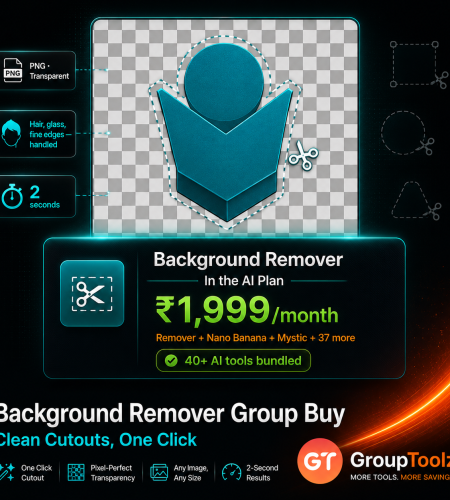
Removing a background used to mean twenty minutes with a pen tool and a lot of swearing. Now it’s one click, and the tools that do it charge accordingly. remove.bg works out around ₹34 an image, PhotoRoom runs about ₹1,700 a month, and most of them do nothing except cut things out. A Background Remover group buy gets one inside the GroupToolz AI Plan for ₹1,999, next to 40+ tools that let you actually use the cutout. Here’s how it works and how to use it.
By GroupToolz Team Updated: July 2026
| ~₹34 Per image, remove.bg | ₹1,700 PhotoRoom, per month | 3 Formats supported | ₹1,999 In the AI Plan |
Let me start with why this tool became a daily necessity rather than a novelty. If you sell anything online, marketplaces want your product on a plain white background. If you make thumbnails, you need your face cut out and dropped onto a design. If you build presentations, a logo with a white box behind it looks amateur. Every one of those jobs is the same job: separate the subject from its background, cleanly, including the fiddly bits like hair and glass.
AI does this in about two seconds now, and it does it well. What hasn’t kept pace is the pricing. The best-known tool charges per image, others want a monthly fee, and almost all of them do this one thing and nothing else. Cut your product out, and you still need somewhere to put it. That’s the gap a Background Remover group buy closes, because GroupToolz includes one in the AI Plan alongside the tools that finish the job. Let me walk through what it does, what the alternatives charge, and how to use it.
What Does a Background Remover Do?
A background remover separates the main subject of a photo from everything behind it, then gives you back the subject on a transparent background, usually as a PNG. That transparency is the whole point. Because there’s nothing behind your subject, you can drop it onto any colour, any scene, any design, and it sits there properly instead of carrying a white rectangle around with it.
The AI part matters more than it sounds. Cutting around a solid object is easy. Cutting around flyaway hair, a fur collar, a glass bottle or the gaps in a wicker chair is where cheap tools fall apart and leave you with a grey halo or a solid blob where the transparency should be. A good model handles those edges properly. That’s what a Background Remover group buy gives you, without paying per image for the privilege.
What It’s Best At
| Job | What it does for you |
|---|---|
| Product photos | Plain white or transparent backgrounds for marketplace listings |
| Thumbnails | Cut yourself out and drop onto any designed background |
| Logos and graphics | Strip the white box so a logo sits on any colour |
| Profile pictures | Swap a messy room for a clean, professional backdrop |
| Presentations | Clean cutouts that sit properly on slide layouts |
| Composites | Place a subject into an entirely different scene |
| Why the transparent PNG is the thing you actually want Most people think they want the background gone. What they really want is a file they can reuse anywhere. A transparent PNG is exactly that, your subject with nothing at all behind it, so it drops onto a red banner, a photo, a slide or a website header and looks like it belongs there. Compare that to a JPEG with a white background, which looks fine on white and instantly wrong on everything else. Once you have proper transparent cutouts of your products, your logo and yourself, you stop redoing the same work every time you design something. That reuse is the quiet value of a Background Remover group buy, and it compounds every month. |
What Background Removers Actually Cost
Here’s the 2026 landscape, converted to rupees so it lands properly.
| Tool | Price | In Rupees | The catch |
|---|---|---|---|
| remove.bg | €9 for 25 credits | ~₹34/image | Per-image pricing, and it does only this |
| PhotoRoom | $20/month | ~₹1,700/mo | Custom backgrounds cost 5x more |
| Clipdrop | $9/month | ~₹765/mo | 50 calls, owner changed twice since 2022 |
| Canva | Pro plan only | Pro pricing | Not available on the free plan |
| Free tiers | ₹0 | ₹0 | Several add a watermark to your output |
| GroupToolz AI Plan | ₹1,999/month | ₹1,999/mo | Remover plus 40+ other AI tools |
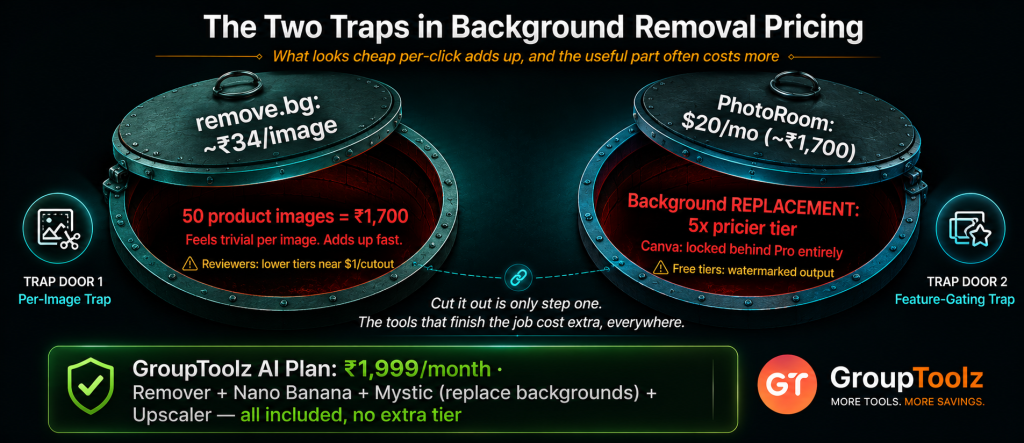
| The two traps in background removal pricing First, the per-image model. remove.bg’s entry plan works out around ₹34 a cutout, which feels trivial until you’re doing a product catalogue and realise fifty images just cost you ₹1,700. Reviewers put its lower tiers close to a dollar a cutout. Second, and this catches more people out, the feature you actually need often sits on a higher tier. PhotoRoom’s cheap plan removes the background, but replacing it with a white fill for Amazon or a colour for social needs the plan that costs five times more. Canva locks removal behind Pro entirely. And several free options stamp a watermark on the result, which makes them useless for anything commercial. A Background Remover group buy avoids every one of those traps. |
How to Use the Background Remover, Step by Step
After all that pricing talk, here’s the relief: actually using it takes about ten seconds and there’s nothing to learn. Here’s the whole flow.
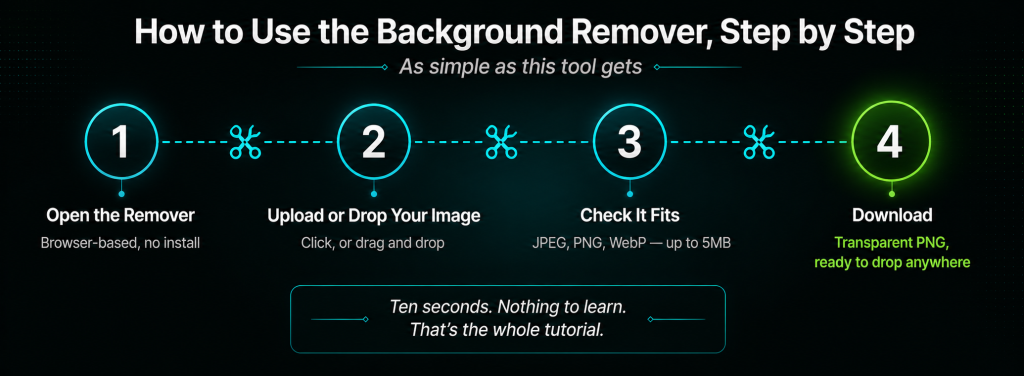
1. Open the Background Remover
Log into your GroupToolz dashboard and open the Background Remover from your AI Plan tools. It runs in the browser, so there’s no app to install and no graphics card needed. It works the same on a laptop or a phone, which matters if you’re photographing products and editing on the move.
2. Upload or drop your image
Click the Upload Image button, or drag your file straight onto the upload area and drop it. Both work the same. If the file is already open in a folder, dragging it across is usually faster than clicking through a file picker.
3. Check your file fits
It takes JPEG, PNG and WebP files up to 5MB. That covers phone photos, product shots, screenshots and web images, which is nearly everything you’d want to cut out. If a file is bigger than 5MB, resize it slightly first and you’ll be fine.
4. Let it process, then download
The AI finds your subject, works out the edges and strips everything behind it. Download the result and you’ve got a transparent cutout ready to drop into any design. Zoom in on the edges to check hair and fine detail came out cleanly before you use it.
| Save your cutouts as PNG, always One thing worth getting right. When you download and later re-save your cutout, keep it as PNG. JPEG cannot store transparency at all, so saving a cutout as a JPEG silently fills the empty space with white and you’ve undone the entire job. PNG keeps the transparency intact. WebP does too and makes smaller files, which is handy for websites, though PNG is the safer default when you’re handing files to someone else. Get this one habit right and your cutouts stay reusable forever, which is the real payoff of a Background Remover group buy. |
What Is a Background Remover Group Buy?
A Background Remover group buy is where access to an AI background removal tool is shared through a provider, so you don’t buy a standalone subscription or pay per image in dollars. Through GroupToolz, a Background Remover group buy gets you one inside the AI Plan for ₹1,999 a month, paid in rupees, alongside 40-plus other AI tools.
The point of a Background Remover group buy is that it isn’t sold as a lonely single subscription. It comes as part of the AI Plan, so the same ₹1,999 that covers background removal also covers Nano Banana for editing, Mystic for photorealistic scenes, Recraft V4 for design, Qwen Image for text layouts, the Image Upscaler, and video tools like Kling 2.5. A Background Remover group buy this way isn’t just cheaper cutouts, it’s the remover plus everything you’d want to do with a cutout afterwards.
| The Background Remover comes inside the AI Plan Here’s how the access works, plainly. The Background Remover is one of the tools included in the GroupToolz AI Plan at ₹1,999 a month. You don’t buy it as a separate subscription, you don’t pay per cutout, and you don’t install anything. You get into the AI Plan, open the Background Remover in your dashboard, upload an image and download a clean transparent version. That’s the whole appeal of a Background Remover group buy through GroupToolz, one rupee plan, cutouts included, plus everything else. |
Group Buy vs Paying for a Remover Directly
| What matters | Standalone Remover | Background Remover Group Buy |
|---|---|---|
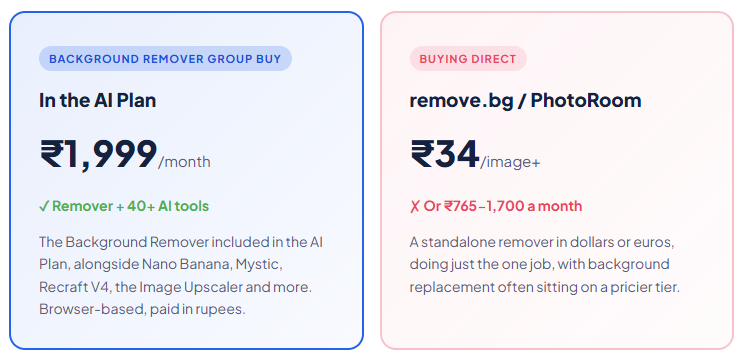
| Price | ~₹34/image or ₹765-1,700/mo | In AI Plan, ₹1,999 |
| Billing | USD or EUR, card | Rupees, UPI |
| Watermarks | On several free tiers | Clean output |
| Replace the background | Often a higher tier | Nano Banana, Mystic in the plan |
| Other AI tools | Cutouts only | 40+ tools included |
| Support | Email or docs | WhatsApp, Indian hours |
| Bottom line | One utility, in dollars | Remover + 40 tools, in rupees |
Why Getting It in the AI Plan Makes Sense
You could buy a standalone remover, but here’s the argument for the AI Plan route. First, it’s in rupees, ₹1,999 through a UPI app rather than a euro or dollar charge with forex on top. Second, there’s nothing to install and no per-image counter running in the back of your mind while you work.
Third, and this is the real one, cutting something out is almost never the finished job. It’s step one. You cut the product out because you want it on a white background for Amazon, or on a lifestyle scene for Instagram, or in a poster. Standalone removers hand you a transparent PNG and stop there, so you export and open something else. In the AI Plan, the tools that finish the job are already sitting next to the remover. That’s what makes a Background Remover group buy through the plan more useful than a cheaper subscription that only does the first step.
| Remove, replace, then upscale, all in one place Here’s the workflow the bundle unlocks. Cut your product out with the Background Remover, which is the first thing a Background Remover group buy gets you. Drop it onto a new setting with Nano Banana, which is built for exactly this kind of natural-language editing. Or generate a whole photorealistic scene in Mystic and place the product there. Then run the finished image through the Image Upscaler so it meets whatever resolution the marketplace or printer demands. Three or four tools, one plan, no exporting between subscriptions. On standalone products that’s three bills and a lot of downloading and re-uploading. That’s the practical case for a Background Remover group buy that lives inside a wider toolkit. |
How It Compares to the Big Removers
Let me be straight about where each option stands, because they really do differ.
| Tool | Best at | The trade-off |
|---|---|---|
| AI Plan remover | Fast browser cutouts, bundled with 40+ tools | Fewer e-commerce staging extras than PhotoRoom |
| remove.bg | Best raw edge accuracy on hair and glass | ~₹34/image, and it does only this one thing |
| PhotoRoom | E-commerce staging, shadows, mockups | ~₹1,700/mo, best features on the pricier tier |
| Canva | Handy if you already pay for Canva Pro | Not on the free plan, weaker on tricky edges |
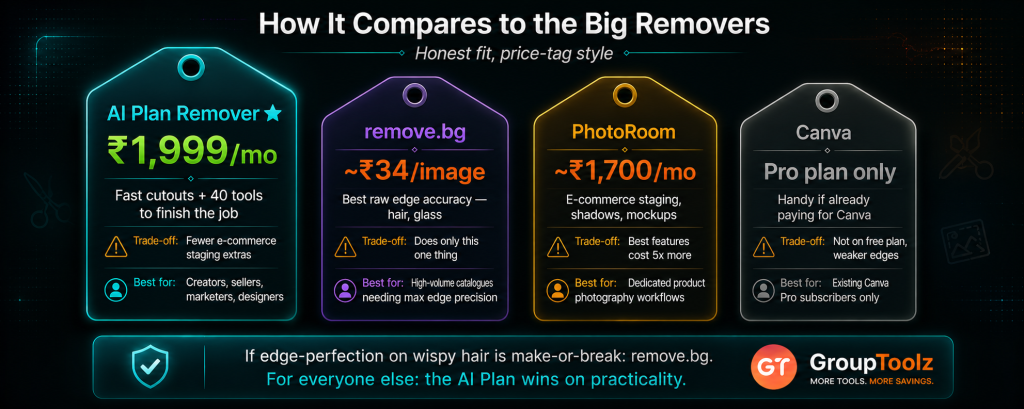
The honest read: if your entire business is cutting out thousands of product images and edge perfection on wispy hair is make-or-break, remove.bg is still the accuracy benchmark and worth its per-image cost. For everyone else, creators, sellers, marketers, designers, a solid browser remover bundled with the tools that let you use the cutout wins on practicality. A Background Remover group buy through the AI Plan is aimed at that second group, which is most people.
What You Can Use It For
| Use case | Why the remover helps |
|---|---|
| Marketplace listings | Meet white-background rules on Amazon, Flipkart and Meesho |
| YouTube thumbnails | Cut yourself out and place onto any designed background |
| Ads and banners | Products that sit properly on brand colours |
| Logo cleanup | Strip the white box from a logo file nobody has the original of |
| Catalogues | A consistent look across every product photo |
| Profile and team photos | Clean, uniform headshots from mismatched originals |
| Background Remover, in the AI Plan ₹1,999 Remover + Nano Banana + Mystic + Image Upscaler + Recraft V4 + 35 more AI tools · one plan · billed in INR · no auto-renewal |
A Real Workflow
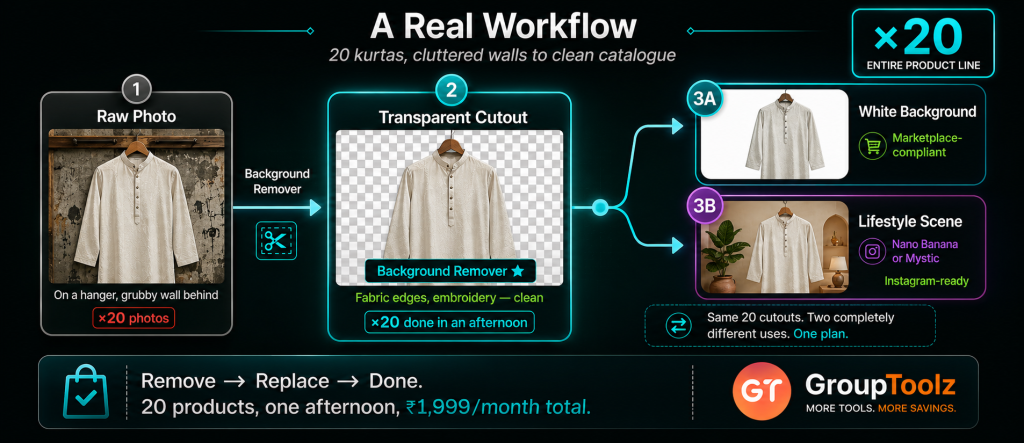
Let me make it concrete. Say you sell kurtas online and you’ve photographed twenty of them at home, on a hanger, against a slightly grubby wall. The marketplace wants clean white backgrounds and your photos plainly aren’t that.
You’d run each photo through the Background Remover, which strips the wall and gives you the kurta on transparency. Fabric edges and any lace or embroidery come out cleanly, which is where cheap tools usually fail. Now you have twenty cutouts. Drop them onto white and your listings are compliant, done in an afternoon rather than a week of hand-editing. That alone justifies a Background Remover group buy.
Then the fun part. For your Instagram set, take the same cutouts into Nano Banana and place them onto a nicer setting, or generate a lifestyle backdrop in Mystic and put the kurta in it. If a marketplace demands a bigger file than your phone produced, run it through the Image Upscaler. Same twenty photos, three completely different uses, one plan. A Background Remover group buy that includes the rest of the stack is what makes that afternoon possible.
| What makes a cutout come out clean Worth knowing, because it’s mostly down to your source photo rather than the AI. Contrast is everything: a dark subject against a light background cuts perfectly, a white shirt against a white wall confuses any model. Even, diffused light helps, harsh shadows get read as part of the subject. Sharp focus matters too, since a blurry edge gives the AI nothing to lock onto. And be realistic about the hard cases, wispy flyaway hair, glass, smoke and fine mesh are hard work for every tool on the market. Photograph with a bit of separation between subject and background and you’ll get near-perfect results every time. |
Who a Background Remover Group Buy Is For
| You are a… | And it gives you… |
|---|---|
| E-commerce seller | Listing-ready product photos without a studio or an editor |
| YouTuber | Clean cutouts of yourself for every thumbnail |
| Designer | A fast way to free any asset a client sends from its background |
| Social media manager | Products and people that drop onto any branded layout |
| Small business owner | Professional-looking visuals from ordinary phone photos |
| Reseller | Consistent catalogue images across dozens of products |
Tips for Getting Great Results
Since a Background Remover group buy gives you the tool, here’s how to get the most out of it once you’re in.
Shoot with contrast in mind
If you control the photo, put your subject against a background that differs from it in colour and brightness. Two minutes of thought while shooting saves every bit of fiddling afterwards.
Always keep the PNG
Save and archive the transparent PNG, not just the finished composite. That cutout is reusable forever across every future design, and redoing it later is wasted effort.
Zoom in before you publish
Check the edges at full size, especially around hair, fingers and anything semi-transparent. A halo that’s invisible in a thumbnail becomes obvious on a product page.
Cut out first, edit after
Remove the background before you start compositing or upscaling, so every later step works on a clean subject rather than one still carrying bits of the old scene.
The Bottom Line
Here’s where I land. Background removal is one of those small tools that quietly touches everything. Product listings, thumbnails, logos, ads, presentations, they all need a clean cutout at some point, and doing it by hand wastes an afternoon you don’t have. A Background Remover group buy turns that into a two-second job.
What never made sense was paying separately for it. remove.bg wants around ₹34 an image, PhotoRoom about ₹1,700 a month with the useful features on a pricier tier, Canva keeps it behind Pro, and free options often stamp a watermark on your work. Worse, they hand you a transparent PNG and stop, when cutting out is only ever step one.
A Background Remover group buy through GroupToolz fixes both problems: the tool sits inside the AI Plan at ₹1,999 a month, in rupees, in your browser, next to Nano Banana, Mystic, the Image Upscaler and 35-plus other tools that let you finish the job. For any Indian seller, creator or small business, that’s the smart way to get cutouts in 2026.
Questions People Actually Ask
What’s a Background Remover group buy, in plain terms?
It’s shared access to an AI background removal tool through a provider, so you don’t buy a standalone subscription or pay per image in dollars. Through GroupToolz, a Background Remover group buy gets you one inside the AI Plan for ₹1,999 a month, paid in rupees, alongside 40+ other AI tools. So you get cutouts plus everything you’d want to do with them.
How much do background removers cost normally?
remove.bg’s entry plan is €9 for 25 credits, roughly ₹34 an image, with reviewers putting lower tiers near a dollar a cutout. PhotoRoom is around $20/month (~₹1,700), though background replacement sits on a tier costing five times more. Clipdrop is about $9/month for 50 calls. Canva includes removal only on Pro. A Background Remover group buy gets it inside the ₹1,999 AI Plan.
How do I use the Background Remover?
Open it from your AI Plan dashboard, then click Upload Image or drag and drop your file onto the upload area. It accepts JPEG, PNG and WebP files up to 5MB. The AI separates your subject from the background, then you download a transparent cutout. It runs in your browser, so there’s nothing to install.
What file formats does it support?
JPEG, PNG and WebP, up to 5MB per file. That covers phone photos, product shots and web images. When you save your finished cutout, use PNG or WebP rather than JPEG, because JPEG cannot store transparency and will fill the empty area with white, undoing the whole point of the cutout.
Can I put the cutout on a new background?
Yes, and that’s where the AI Plan helps. The remover gives you a transparent cutout, then Nano Banana can place it into a new setting with a plain-language instruction, or Mystic can generate a photorealistic scene to drop it into. On standalone removers, background replacement often needs a higher-priced tier or a second tool entirely.
Can I pay in Indian Rupees?
Yes. The Background Remover group buy through GroupToolz is part of the AI Plan at ₹1,999, billed in INR via Razorpay and UPI apps like PhonePe, GPay and Paytm. There’s no dollar or euro billing and no international card, unlike remove.bg or PhotoRoom. The AI Plan also doesn’t auto-renew, so you choose when to pay again.
Comments