
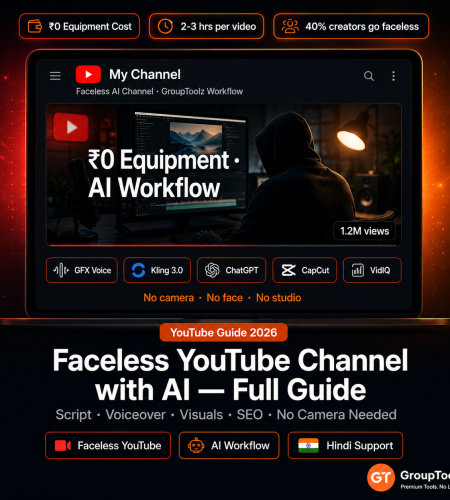
No camera. No face. No studio. In 2026, a complete YouTube video — script, voiceover, visuals, editing, captions, thumbnail, SEO — can be done entirely with faceless youtube channel ai tools on one GroupToolz subscription. Here’s the exact workflow from choosing a niche to publishing your first video.
By GroupToolz Team Updated: June 13, 2026
Why faceless channels work in 2026
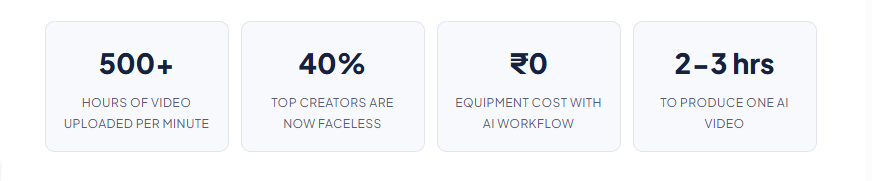
Faceless channels aren’t a workaround. They’re a legitimate format that’s been building serious audiences for years. Kurzgesagt, Cold Fusion, Bright Side, WatchMojo — tens of millions of subscribers, no face required. The format works because YouTube viewers watch for value: information and stories. Your face isn’t the value. Your content is.
What AI tools change in 2026 is the economics. Previously, a faceless ai youtube channel required a professional voiceover artist (₹2,000-₹8,000 per video), a stock video subscription (₹5,000-₹15,000/month), graphic design for thumbnails, and real video editing skills. GroupToolz replaces every one of those with AI tools on a single subscription. GFX Voiceover for narration. Kling 3.0 and Veo 3.1 for video visuals. Canva Pro for thumbnails. CapCut for editing. VidIQ for YouTube SEO. One subscription. The whole pipeline.
Step 1: choose the right niche
| Before you create anything Pick a niche that works for AI production VidIQ Semrush ChatGPT Plus |
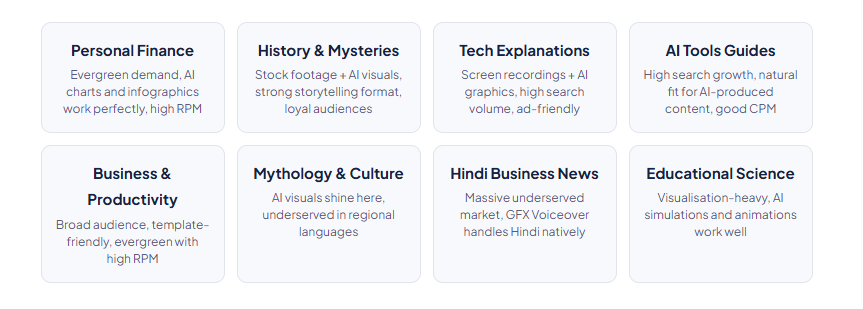
Not all niches suit AI production equally. The ones that work well share a few traits: the content is informational rather than personality-driven, there’s consistent search demand for new videos, and the topic can be illustrated with AI-generated visuals without looking jarring. Channels that depend on personality, physical presence, or real-world footage (travel, cooking, fitness) have a harder time. That’s not the start youtube without camera use case this guide is for. Stick to informational content where the audio carries the show.
Research in VidIQ: Keyword Research → enter your niche → check search volume, average views per video, competition score. Look for high search volume with moderate competition and average views-to-subscriber ratios that suggest the algorithm actually promotes this content. The weekly trend matters too — pick niches with stable or growing search interest, not declining ones.
Validate in Semrush: Search your niche keywords, check monthly volume, look at related questions. Those questions become your video titles. Export the top 20 keyword opportunities and build your first content calendar from there.
Step 2: write the script
| Production step 1 Write a script that sounds human when spoken aloud ChatGPT Plus Claude AI Perplexity AI |
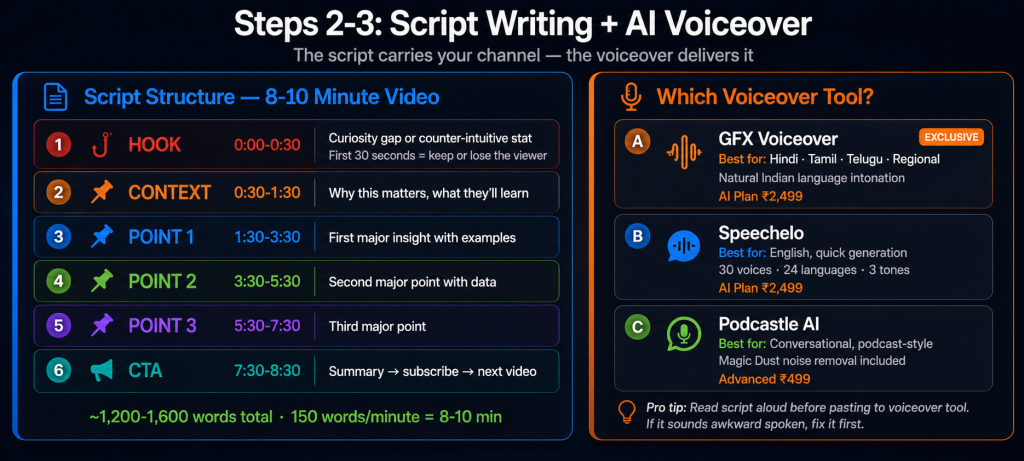
The script is everything on a faceless channel. There’s no presenter to carry the personality, so the writing has to do that work. The technique is the same as good podcasts and audiobooks: strong hooks, conversational tone, storytelling, natural pacing. If it reads awkwardly in your head, it’ll sound awkward when the AI reads it aloud. That’s the test.
Perplexity AI first, for research: Perplexity’s real-time web access means your script has current data, not whatever was in ChatGPT’s training set six months ago. Gather the key facts, statistics, and sources. Put them in a research doc before you write a word of script.
ChatGPT Plus for structure: “Write a YouTube script outline for a [length]-minute video about [topic]. Audience: [audience]. Format: hook → context → main point 1 → main point 2 → main point 3 → call to action. Conversational, not academic. Include timestamps.” This gives you the skeleton.
Claude AI for the actual writing: Claude produces tighter, more natural-sounding prose for long-form audio content than ChatGPT, in my experience. The rhythm of the sentences matters when someone’s listening. Use Claude to write the actual script from the ChatGPT outline, enriched with the Perplexity research. Target 150-160 words per minute for natural speech pacing. A 10-minute video is roughly 1,500-1,600 words of script.
The hook matters most for an ai youtube channel: Your first 30 seconds decides whether viewers stay. Faceless channels can’t rely on a likeable presenter to carry weak opening material. The strongest hooks for this ai youtube channel format use a curiosity gap (“What 90% of people get wrong about [topic]”), a counter-intuitive stat (“In 2026, [surprising fact] — and here’s why it matters”), or a relatable problem (“If you’ve ever tried to [struggle your viewer has], this explains why”).
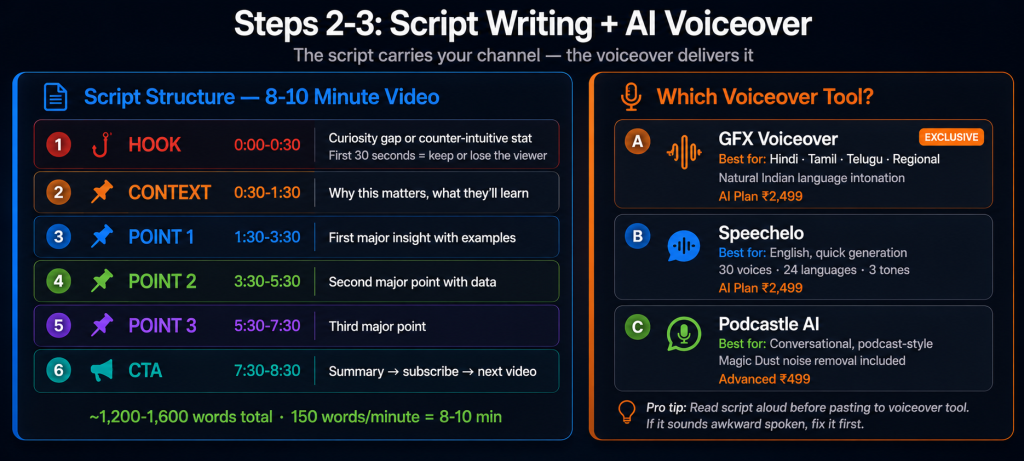
| Script structure for an 8-10 minute video Hook (0:00-0:30): The single most compelling reason to keep watching. Context (0:30-1:30): Why this topic matters and what they’ll learn. Section 1 (1:30-3:30): First major point with examples and data. Section 2 (3:30-5:30): Second major point. Section 3 (5:30-7:30): Third major point. Conclusion + CTA (7:30-8:30): Summary, subscribe request, next video teaser. Total: roughly 1,200-1,400 words at 150 words per minute. |
Step 3: generate the voiceover
| Production step 2 AI narration that doesn’t sound robotic GFX Voiceover Speechelo Podcastle AI |
Voiceover quality is what separates watchable faceless channels from the ones people click away from in 10 seconds. A robotic, monotone AI voice will lose viewers regardless of how good the content is. The good news: the tools on GroupToolz have gotten genuinely good. Not perfect, but good enough that viewers stop noticing the AI and start listening to the content.
GFX Voiceover (GroupToolz exclusive): This is the one I’d recommend for anyone targeting Hindi or regional Indian language audiences. It was built with Indian language tonal patterns as a primary design target, not an afterthought. Most English-first AI voiceover tools sound noticeably off when asked to do Hindi. GFX Voiceover doesn’t. Paste your script, select voice, adjust speed and tone, export. Included in the AI Plan at ₹2,499/month.
Speechelo for English: Quick, reliable, 30 voices across 24 languages. Three tone options (normal, joyful, serious) and breathing pauses for natural delivery. Best for shorter content under 10 minutes where generation speed matters. Also on the AI Plan.
Podcastle AI for conversational content: If your channel’s style is more podcast-feel than formal explainer, Podcastle’s voice generation sounds more natural for longer formats. Its Magic Dust audio cleaning feature removes artifacts before you mix. Available on Advanced at ₹499/month.
Practical tips: Add comma pauses where you want a breath. Use ellipsis (…) at section breaks. Write numbers as words (“ten thousand,” not “10,000”). Read your script aloud before pasting it into the voiceover tool. If it sounds awkward when you say it, it’ll sound awkward when the AI says it. Fix it first.
Step 4: generate the video visuals
| Production step 3 AI visuals that match the narration Kling 3.0 Veo 3.1 Hailou 2.3 Leonardo AI Storyblocks |
Faceless channels need visuals. The options in 2026 are: AI-generated video clips, AI-generated images, stock video from Storyblocks or Envato, screen recordings, or a mix. Most successful faceless creators use a combination. Don’t feel like you have to pick one approach.
For video B-roll: Kling 3.0 for 15-second cinematic clips with strong character consistency — people, animals, environments. Veo 3.1 when you need readable text in the scene or tight audio synchronisation. Hailou 2.3 when you’re sketching ideas and testing 10 visual concepts before committing to renders. The start youtube without camera ai workflow works best when you use each tool for what it actually does well.
Visual planning workflow: Break your script into sections. For each section, identify the primary visual concept. Write specific prompts: “Wide cinematic shot of money stacks growing on a table, warm lighting, financial documentary style, 15 seconds.” Generate 3-5 options at low resolution to evaluate, then render finals at 1080p. This is where Hailou 2.3’s speed advantage matters most — concept testing is cheap.
For static visuals: Use Leonardo AI Maestro to generate custom charts, infographics, and conceptual visuals. For finance channels, generate data visualisations. For history channels, generate period-appropriate scenes. For tech channels, generate product or interface mockups. Pair with Canva Pro to add text overlays, data labels, and brand colours. The combination is faster than doing either alone.
Stock video for supplementary shots: Storyblocks (GroupToolz Advanced ₹499, 30 downloads/day) has 40 million+ professional stock clips. For establishing shots, generic city environments, office settings, and anything where AI-generated video would look uncanny or wrong, professional stock is the better call. Mix AI and stock within videos. The combination looks better than either alone.
Step 5: edit the video
| Production step 4 Assemble, sync, polish CapCut Pro Descript |
You’ve got: voiceover audio, AI-generated video clips, stock B-roll, AI-generated images. Now assemble them.
CapCut Pro workflow: Import voiceover audio as the main timeline track. Cut to match script sections. Drop video clips and images onto the timeline, timed to the corresponding narration. Beat sync for any music. Text overlays for key statistics and chapter titles. Export at 1080p minimum, 4K if your clips support it. CapCut is the most efficient editor I’ve seen for this kind of faceless youtube channel ai tools production workflow — it’s built for creators, not film editors.
Pacing rule: Change the visual every 3-5 seconds for fast-paced content (finance, tech, news). Every 5-8 seconds for educational content (history, science). Sitting on one image for more than 8 seconds without a cut kills retention. YouTube shows you the audience retention graph for every video — edit tighter in the sections where people drop off. That graph is your most useful feedback.
Descript for cleanup: If your AI voiceover has imperfections, Descript’s transcript-based editing removes them without re-recording. Delete a word from the transcript; the audio cut follows automatically. Studio Sound cleans up any artifacts before you mix. It’s the faster fix for small voiceover issues rather than regenerating the whole file.
Step 6: captions and music
| Production step 5 Captions aren’t optional anymore Submagic Epidemic Sound Artlist IO |
Captions are a retention tool in 2026, not an accessibility add-on. A significant portion of YouTube viewers watch with sound off at least some of the time, particularly on mobile. Animated word-by-word captions (the style from short-form content) have leaked into longer-form and they work. They improve watch time in the first 60 seconds where viewers are deciding whether to stay.
Submagic (AI Plan ₹2,499 or single ₹349): Animated, word-by-word captions in the style that works for youtube automation ai content. Choose caption style, positioning, animation. Submagic auto-detects filler words and can omit them from captions. This matters more than it sounds for a youtube automation ai channel — “um” appearing in a caption every 30 seconds erodes perceived quality.
Epidemic Sound (Advanced ₹499 or single ₹199): Background music at 15-20% volume under the narration. Match mood to content: corporate/inspirational for finance and business, mysterious/ambient for history and mystery, energetic for tech and productivity. All Epidemic Sound tracks are pre-cleared for YouTube — no copyright claims, no Content ID strikes. This is one detail that matters a lot for a youtube automation ai channel running at scale.
Step 7: design the thumbnail
| Production step 6 The click-through rate is everything Canva Pro Leonardo AI Ideogram AI |
The thumbnail is the most important thing you make. Not the video — the thumbnail. That’s not an exaggeration. YouTube CTR (click-through rate) is the primary signal the algorithm uses to decide whether to show your video to more people. A better thumbnail equals more clicks equals more views, regardless of video quality. I’ve watched faceless content creator channels with mediocre content get 500k views on thumbnail strength alone.
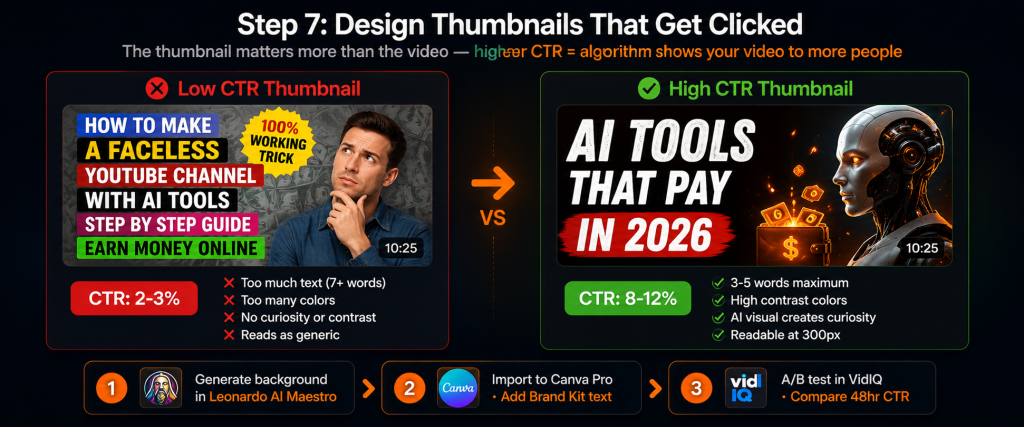
Thumbnail anatomy for faceless channels: No face means no emotional hook from a human expression. You substitute with: bold, high-contrast text (3-5 words maximum), a striking AI-generated visual that creates curiosity, and a colour palette that stands out against YouTube’s white background. Contrasting colours. Never more than two colours plus white or black. Clean, readable, surprising.
Workflow: Generate the background image in Leonardo AI Maestro (consistent style across your channel’s thumbnails) or Ideogram AI (for thumbnails with readable text inside the image). Import into Canva Pro. Add text overlay. Use Canva’s Brand Kit for consistent fonts and colours across all thumbnails. Visual consistency across a faceless content creator channel tells new visitors the channel is serious and worth subscribing to.
A/B test thumbnails in VidIQ: Upload two designs, compare CTR over 48-72 hours. Do this for every video. After 10-15 videos, you’ll have real data on which visual styles and text formats drive the most clicks for your specific audience. It’s the fastest way to learn what works.
Step 8: YouTube SEO
| Production step 7 Get found in search and suggested VidIQ Semrush ChatGPT Plus |
Title: Contains the exact phrase people search for, plus a curiosity or benefit element. Formula: [Keyword] — [Curiosity/Benefit]. “Personal Finance for Beginners — 5 Rules That Change Everything.” Under 60 characters so it displays fully on all devices.
Description: First 2-3 sentences expand on your title naturally — these show in search results. Primary keyword in the first sentence. Timestamps for each section (helps searchability and navigation). 2-3 links to related videos on your channel. Subscribe CTA at the end.
Tags in VidIQ: Enter your video’s main topic. VidIQ suggests tags from actual YouTube search data. Include the exact keyword, 2-3 variations, the niche category, and relevant trending terms. The faceless youtube channel ai tools niche has specific terms worth tracking. The category is growing fast and search volume is rising.
Semrush cross-check: YouTube search and Google search are different ecosystems with different keyword volumes. Use both Semrush (Google demand) and VidIQ (YouTube demand) to validate before investing production time. If a topic shows strong Google volume but no YouTube search data, it might do better as a blog post. If it shows strong YouTube data, it’s a video.
End screens and cards: Every video needs an end screen promoting 2 other videos and a subscribe button. Cards every 2-3 minutes for related content. These drive watch time from returning viewers, and watch time is the metric YouTube uses to decide whether to recommend your channel to new people.
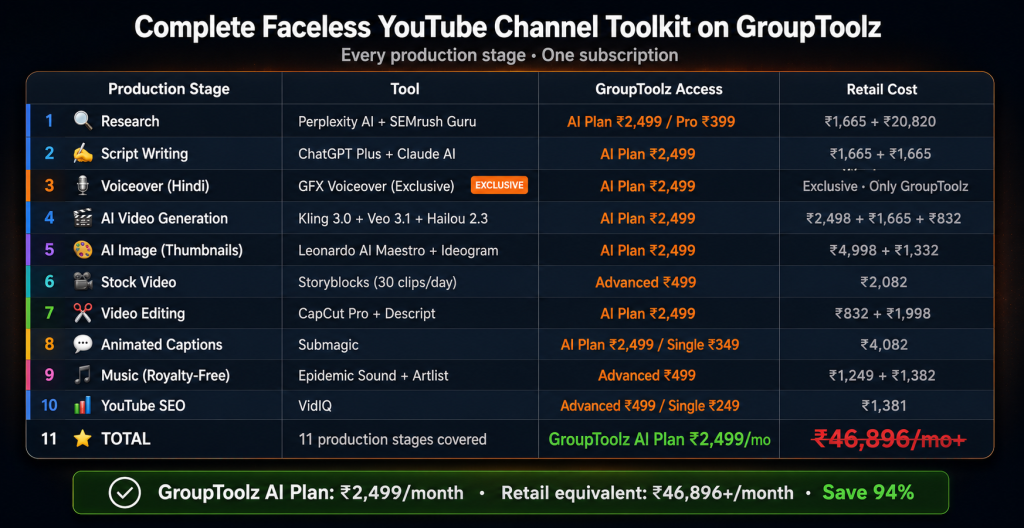
The complete faceless channel toolkit on GroupToolz
| Stage | Tool | GroupToolz plan | Retail/month |
|---|---|---|---|
| Research | Perplexity AI + Semrush Guru | AI Plan ₹2,499 / Pro ₹399 | ₹1,665 + ₹20,820 |
| Script writing | ChatGPT Plus + Claude AI | AI Plan ₹2,499 | ₹1,665 + ₹1,665 |
| Voiceover | GFX Voiceover (Hindi) / Speechelo (English) | AI Plan ₹2,499 | Exclusive / $97 lifetime |
| AI video generation | Kling 3.0 + Hailou 2.3 + Veo 3.1 | AI Plan ₹2,499 | ₹2,498 + ₹832 + ₹1,665 |
| AI image generation | Leonardo AI Maestro | AI Plan ₹2,499 / Single ₹399 | ₹4,998 |
| Stock video | Storyblocks (30/day) | Advanced ₹499 | ₹2,082 |
| Video editing | CapCut Pro + Descript | AI Plan ₹2,499 | ₹832 + ₹1,998 |
| Captions | Submagic (animated) | AI Plan ₹2,499 / Single ₹349 | ₹4,082 |
| Music | Epidemic Sound + Artlist IO | Advanced ₹499 | ₹1,249 + ₹1,382 |
| Thumbnail design | Canva Pro + Ideogram AI | AI Plan ₹2,499 / Lite ₹199 | ₹1,249 + ₹1,332 |
| YouTube SEO | VidIQ | Advanced ₹499 / Single ₹249 | ₹1,381 |
| Retail total | ₹46,896/mo+ | ||
| GroupToolz AI Plan | All tools + 29 more | ₹2,499/mo |
Realistic timeline: first 90 days
| Week | Activity | Output |
|---|---|---|
| Week 1 | Niche selection, keyword research, channel setup, first video research | Channel created, content calendar of 12 video ideas, first script draft |
| Week 2 | First video: script → voiceover → visuals → edit → captions → thumbnail | First video published. Takes 3-5 hours for the first one. Faster with practice. |
| Weeks 3-4 | 2nd and 3rd videos. Refine workflow. Study analytics from Video 1. | 3 videos published. Early data on what’s working. |
| Weeks 5-8 | 1 video per week. Optimise based on analytics. Test thumbnail styles and hooks. | 7 videos published. Consistent publishing rhythm established. |
| Weeks 9-12 | Increase to 1-2 videos per week as workflow gets faster. Watch time data starts showing. | 12-15 videos. Analytics showing which topics perform best. |
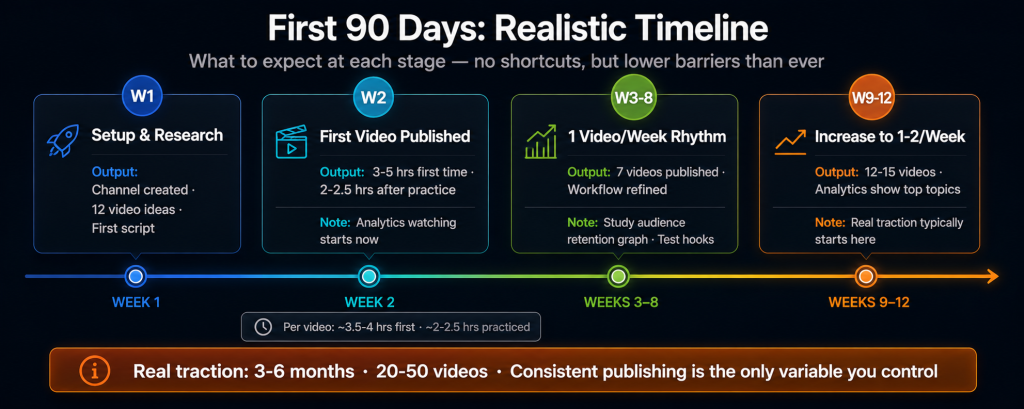
| The realistic expectation Faceless channels with consistent weekly publishing typically see real traction after 3-6 months and 20-50 videos. That’s the honest answer. This isn’t quick — it’s a content business that compounds. The GroupToolz AI Plan at ₹2,499/month covers the whole production pipeline. That’s ₹83/day into a channel that, once monetised, can generate ₹50,000-₹5,00,000+ per month depending on niche, views, and RPM. The start youtube without camera approach isn’t a shortcut. Most people who look at start youtube without camera guides expect it to be easier than it is. It’s a legitimate content business with lower barriers to entry than it’s ever had. Whether that turns into a real income depends on consistent publishing and improving your craft. An ai youtube channel is a channel. The algorithm treats it the same. That part doesn’t have an AI tool. |
Frequently asked questions
Can you really start a YouTube channel without showing your face?
Yes. Kurzgesagt, Cold Fusion, WatchMojo, and dozens of Indian educational channels are massively successful faceless content creator operations. Viewers watch for information, not faces. In 2026, faceless youtube channel ai tools fill the remaining production gaps (voiceover cost, visual production) that previously required real budget to do well. The format isn’t a hack. It’s just a different kind of channel.
Which GroupToolz plan do I need for a faceless YouTube channel?
The AI Plan at ₹2,499/month is the full stack: GFX Voiceover (Hindi/regional), Kling 3.0 and Veo 3.1 for AI video, ChatGPT Plus and Claude AI for scripting, Leonardo AI Maestro for thumbnails and images, CapCut Pro for editing, Submagic for captions, and Epidemic Sound for music. Alternatively, start with Advanced at ₹499/month for research (Semrush, VidIQ), stock video (Storyblocks), music (Epidemic Sound), and design (Canva Pro). Add AI video and voiceover as single tools as the channel grows. The cheaper entry point is valid if you’re testing the format.
How long does it take to produce one AI faceless video?
For an 8-10 minute video: research (30 min) + script (45 min) + voiceover (20 min) + visual generation and selection (45 min) + editing and assembly (30 min) + captions and music (20 min) + thumbnail (15 min) + upload and metadata (15 min). Total: about 3.5-4 hours for your first video. With a practiced youtube automation ai workflow, this drops to 2-2.5 hours. Compare that to traditional video production which runs 8-20+ hours for the same length.
Which niches work best for faceless AI channels?
Personal finance, history and mysteries, tech explanations, AI tool guides, business and productivity, mythology and culture, Hindi business news, and educational science all work well. The common thread: informational content, consistent search demand, and topics that AI visuals can actually illustrate without looking wrong. Avoid niches where authentic personal presence matters (travel vlogs, cooking, fitness demonstrations) — those are harder to fake and the audience tends to notice.
Is AI-generated content allowed on YouTube?
Yes, with some disclosure requirements. YouTube requires disclosure when content is “realistic-looking” AI-generated material depicting people doing or saying things they didn’t actually do or say. For most ai youtube channel formats (animations, B-roll, visualisations), disclosure isn’t required. Disclosing AI voiceover use in the video description is best practice regardless. AI-generated content is explicitly allowed for monetisation on YouTube as long as it follows community guidelines.
Can I make a Hindi faceless YouTube channel with GroupToolz?
Yes. GFX Voiceover — a GroupToolz exclusive — handles Hindi, Tamil, Telugu, Bengali, and Marathi with natural Indian language intonation. Kling 3.0 supports multilingual dialogue with lip sync for any talking character elements. The GroupToolz AI Plan at ₹2,499/month includes both tools alongside the full production workflow. Hindi faceless channels in financial education, mythology, business news, and tech have significant growth potential. The Hindi-language YouTube audience is expanding fast and it’s still relatively underserved for high-quality produced content.
Comments