
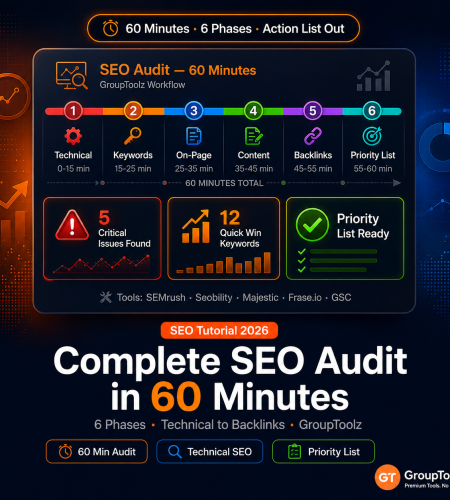
Most SEO audits fail not because data is missing, but because they take too long and get abandoned halfway through. This seo audit checklist 2026 covers every critical area in 60 minutes: technical health, keyword performance, on-page issues, content gaps, and backlinks. Six timed phases. Exact GroupToolz tool workflows. Output is a sorted priority list, not a pile of unsorted problems.
By GroupToolz Team Updated: June 10, 2026
Before you start: the 5-minute setup
Run this before the 60-minute clock starts. You need: GSC open at gsc.google.com, a Semrush project created for your domain, Seobility crawl started (takes 5-15 minutes for most small sites), and a blank doc or spreadsheet to record findings.
Start the Seobility crawl first. It takes the longest. Go to Seobility → Projects → Create New Project → enter your domain → full crawl → start. While it runs, do the Semrush and GSC phases in parallel. By the time you finish those, Seobility’s ready. This is the setup step people skip and then wonder why the audit takes two hours.
This seo audit checklist 2026 runs in 6 timed phases across 60 minutes — technical health, keywords, on-page, content, backlinks, and a sorted priority list at the end.
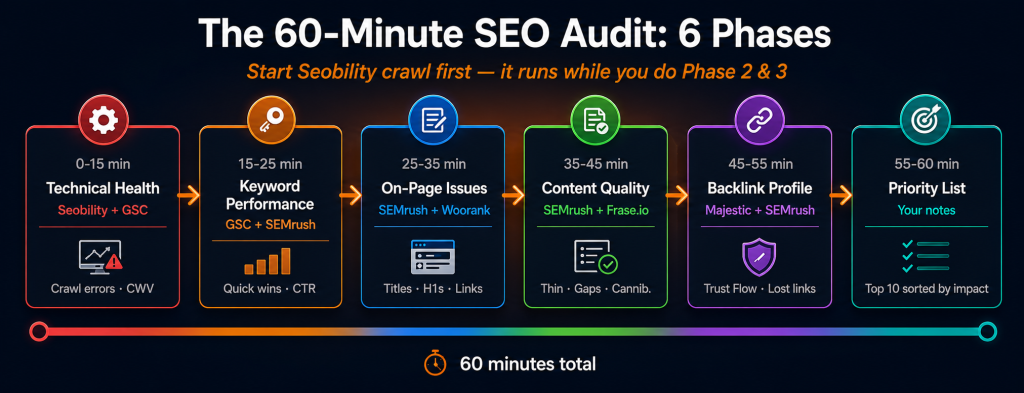
| Phase | Minutes | Tools | What you’re finding |
|---|---|---|---|
| Phase 1: Technical health | 0-15 min | Seobility + GSC | Crawl errors, indexing issues, Core Web Vitals |
| Phase 2: Keyword performance | 15-25 min | GSC + Semrush Guru | Rankings, CTR problems, quick wins, keyword gaps |
| Phase 3: On-page optimisation | 25-35 min | Semrush + Woorank | Title tags, meta descriptions, headings, internal links |
| Phase 4: Content quality | 35-45 min | Semrush + Frase.io + NeuronWriter | Thin pages, content gaps, cannibalization |
| Phase 5: Backlink profile | 45-55 min | Majestic + Semrush | Trust Flow, lost links, toxic links, competitor gaps |
| Phase 6: Priority list | 55-60 min | Your notes | Top 10 issues ranked by impact and effort |
Phase 1: technical health (minutes 0-15)
| ⏱ 0-15 minutes Technical crawl + Core Web Vitals Seobility Google Search Console Woorank |
Seobility: work the report in priority order
Your Seobility crawl should be running or done by now. Open the report.
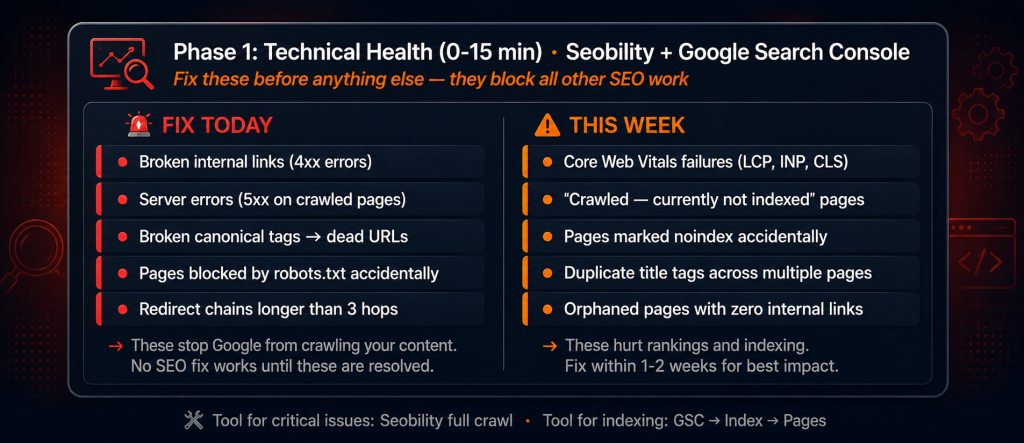
Fix these immediately if found: Broken internal links (4xx errors on internally-linked pages), server errors (5xx responses on any crawled page), broken canonical tags pointing to dead URLs, pages blocked by robots.txt that should be indexed, redirect chains longer than 3 hops. These stop Google from crawling and indexing your content. No amount of keyword optimisation fixes a crawling problem.
Indexing check: Look at the Noindex report. Any pages marked noindex that shouldn’t be? Pages without canonical tags that need them? Duplicate title tags across multiple pages? (Google may choose the wrong one to show.) Record counts and specific URLs. This is the part of the technical seo checklist where I’ve seen sites lose 30% of their indexed pages to a single misconfigured plugin setting — so don’t skim it.
Speed issues: Seobility flags large images (over 200KB), render-blocking resources, and missing compression. These translate to LCP failures in Google’s Core Web Vitals. Cross-reference with Google Search Console → Experience → Core Web Vitals to see which pages are currently failing. The Seobility view is site-wide; the GSC view tells you what’s actually hurting rankings.
Google Search Console: the Coverage report
GSC → Index → Pages. Every URL Google has tried to index, sorted by status. Focus on the problem categories:
- “Crawled — currently not indexed”: Google found these pages but decided they weren’t worth indexing. Usually thin or duplicate content.
- “Discovered — currently not indexed”: Google knows they exist but hasn’t crawled them. Often an internal link depth or crawl budget issue.
- “Duplicate without user-selected canonical”: two pages competing for the same content. Google picked which to show. You didn’t.
- “Blocked by robots.txt”: check these are intentional. A single line misconfiguration here blocks your whole site.
- “Not found (404)”: check if these have incoming backlinks (lost link equity) or internal links pointing to them.
If any problem category has more than 5% of your total page count, that’s a priority fix. Not next month. This week.
Quick Woorank check on your 3 most important pages
Run your homepage, top-traffic page, and main landing page through Woorank. It produces a page-level technical report fast. Flag anything rated “high priority.” Issues on low-traffic pages can wait. Issues on your homepage cannot.
Phase 2: keyword performance (minutes 15-25)
| ⏱ 15-25 minutes Rankings, CTR problems, quick win keywords Google Search Console Semrush Guru |
GSC Performance: find the easy wins first
GSC → Performance → Search Results. Last 28 days. Enable all four metrics: Clicks, Impressions, Average CTR, Average Position.
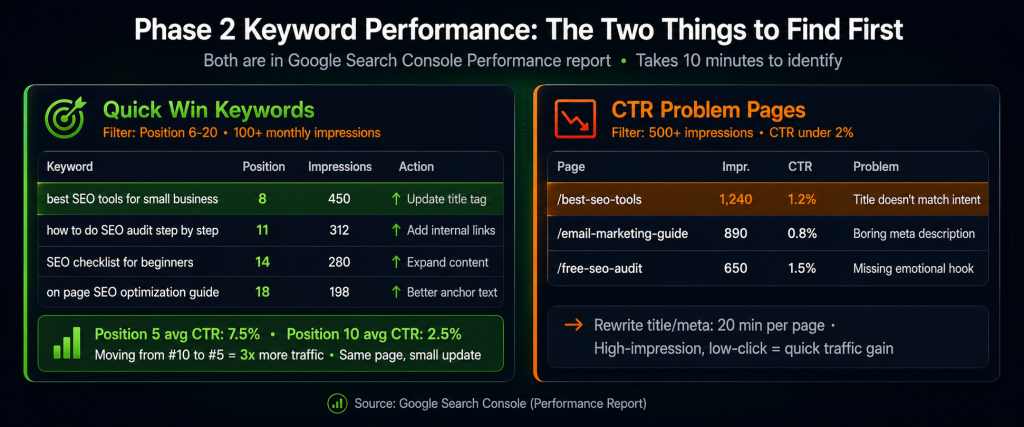
Quick wins (positions 6-20): Sort by Average Position. Filter for positions 6-20 with Impressions over 100. These are keywords where you almost rank on page 1. A content update, better title tag, or a few more internal links can push them into the top 5. Position 1 averages 28-31% CTR. Position 10 averages 2-3%. The traffic difference between position 5 and position 9 is enormous. These are your fastest wins in this complete seo audit.
CTR problems: Reset the filter. Sort by Impressions descending. Look for pages with 500+ impressions but CTR under 2%. These pages rank but nobody clicks. Usually the title tag or meta description doesn’t match what searchers actually want, or it’s just not compelling compared to the competition. Rewriting them is high-impact work that takes maybe 20 minutes per page.
Top traffic pages: Click the Pages tab. Sort by Clicks descending. Your top 5 traffic pages are your most valuable SEO assets. Any problems on these are highest priority. Everything else can wait.
Semrush Guru: keyword gap and recent changes
Semrush → Keyword Gap. Enter your domain plus 2-3 competitors. Filter for keywords where competitors rank in the top 10 but you’re outside position 20. These are validated search terms with proven traffic potential. Export the top 20 for your content backlog.
Then Semrush → Organic Research → your domain → Changes tab. Keywords you’ve lost ranking on in the past 30 days. Any drops need investigation. Content change? Technical issue? Competitor update? Lost keywords from the past month can usually still be recovered if you catch them quickly. That’s one reason a regular site audit tutorial workflow pays off.
Phase 3: on-page optimisation (minutes 25-35)
| ⏱ 25-35 minutes Title tags, meta descriptions, headings, internal links Semrush Guru Seobility |
Semrush Site Audit: on-page issues across the whole site
Semrush → Site Audit → your project → On Page tab. Works through the severity levels.
Errors first: Missing title tags (any page without one is invisible to Google), duplicate title tags (two pages fighting each other for the same keyword), title tags over 60 characters (truncated in SERPs), missing meta descriptions (Google auto-generates one, often badly). These are quick fixes with real impact. I’ve seen sites recover 15-20% CTR just from fixing truncated titles and writing proper meta descriptions.
Warnings next: Missing H1 tags, pages with multiple H1 tags, H1 tags that don’t include the page’s target keyword, internal links pointing to redirected pages. Each of these erodes on-page relevance signals that Google uses to understand what your page is about.
Manual check for your top 10 traffic pages: Does the H1 contain the primary keyword? Does at least one H2 contain the keyword or a close variant? Is the keyword in the first paragraph? Missing any of these on high-traffic pages is a quick fix worth doing. Don’t leave this to automated tools alone for your most important pages.
Internal link audit
Semrush Site Audit → Internal Linking report. This is the check most people rush through and then wonder why their content isn’t ranking.
- Orphaned pages: zero internal links pointing to them. Google can’t find them regardless of how good the content is.
- Pages with only 1-2 internal links: underlinked, losing authority from the cluster structure.
- Broken internal links: pointing to 404 pages. Wasted crawl budget, bad user experience.
- Pages with 100+ internal links: potential crawl budget sink or over-linked navigation.
Every orphaned page in important content categories needs at least 3 internal links. Every high-value page (pillar content, main product pages) should have 10+ internal links coming from across the site. The internal link audit is also part of a thorough seobility audit guide workflow because Seobility catches orphans that Semrush sometimes misses on dynamic sites.
Phase 4: content quality (minutes 35-45)
| ⏱ 35-45 minutes Thin content, content gaps, keyword cannibalization Semrush Guru Frase.io NeuronWriter |
Semrush Content Audit (Guru exclusive)
Semrush → Content Audit → connect GSC → crawl your site. Semrush scores every page using organic traffic, backlinks, social shares, word count, and time on page together. Look for two things.
Thin pages to fix or remove: Low traffic, under 500 words, few backlinks, low time on page. These pages may actually be hurting your site’s perceived authority. Options: expand to a proper cluster article (1,200+ words), merge with a related page, or noindex and stop Google from evaluating them. The “merge or noindex” call is sometimes uncomfortable but it’s worth making. Keeping 15 thin pages on your site to avoid deleting content is a mistake I see a lot.
Declining pages to update: Good topical coverage but traffic has dropped. Update the content with recent data, improve the NeuronWriter score, re-submit to Google. Updated content often recovers 30-60% of lost traffic within 6-12 weeks. Faster than writing something new.
Keyword cannibalization
Semrush → Site Audit → Cannibalization report. Identifies page pairs targeting the same or overlapping keywords. Cannibalization splits your authority between two pages that are essentially competing against each other. The fix: merge the pages (redirect one to the other), differentiate the target keywords (update one page to go after a distinct related keyword), or designate one as canonical and noindex the other. Which fix you choose depends on the pages. Check the traffic data for both before deciding.
Content gap check with Frase.io
Pick your top 3 most important pages. Open each in Frase.io. Compare against the current top 10 ranking competitors. Frase shows every subtopic, entity, and question that top-ranking pages cover but yours doesn’t. Each gap is a content improvement. Note the 3 biggest gaps per page. These go on the action list. This is one of the faster steps in the seo audit checklist 2026 process and one of the highest-yield ones.
Phase 5: backlink profile (minutes 45-55)
| ⏱ 45-55 minutes Trust Flow, lost links, toxic links, competitor gaps Majestic Semrush Guru |
Majestic: Trust Flow analysis
Majestic → enter your domain → Summary view. Two numbers matter here.
Trust Flow (TF): 0-100, measuring backlink quality based on proximity to trusted seed sites. New or small site: TF 10-20 is fine. TF 20-40 is solid. TF 40+ is strong. Low TF relative to Citation Flow means many low-quality links diluting your profile.
Citation Flow (CF): Link quantity metric. A healthy site has TF/CF ratio of at least 0.5. If your TF is less than half your CF, that’s a signal of a spammy backlink profile. Directory submissions and link farms show up here. Check Referring Domains for red flags: domains with TF under 5, exact-match anchor text, domains from completely irrelevant niches. These are potential disavow candidates if there are enough of them.
The Trust Flow / Citation Flow ratio check takes 5 minutes in Majestic and is one of the clearest signals of backlink profile health available from any third-party tool. Worth including in every site audit tutorial you run.
Semrush: lost backlinks and competitor gap
Semrush → Backlink Analytics → Lost tab. Last 3 months. Find high-authority backlinks you’ve lost (sites with TF 20+ that used to link to you). Contact those referring sites and request re-linking if the link was removed rather than naturally dropped. Recovering a lost high-authority link is faster than building a new one. It’s one of those backlink strategies that feels boring but works.
Semrush → Backlink Gap tool → your domain and 2-3 competitors. Filter for domains that link to all three competitors but not to you. These sites have already shown willingness to link within your niche. Export the top 20 for outreach. These are your highest-priority targets because you have social proof that they link to similar sites.
Phase 6: build your priority list (minutes 55-60)
| ⏱ 55-60 minutes Score every issue by impact × effort Your notes |
You’ve got a list of problems from five phases. Most sites find 20-50 issues in this process. You can’t fix everything at once, and trying to prioritise everything as “urgent” is how audits become useless documents nobody reads. Use Impact × Effort scoring.
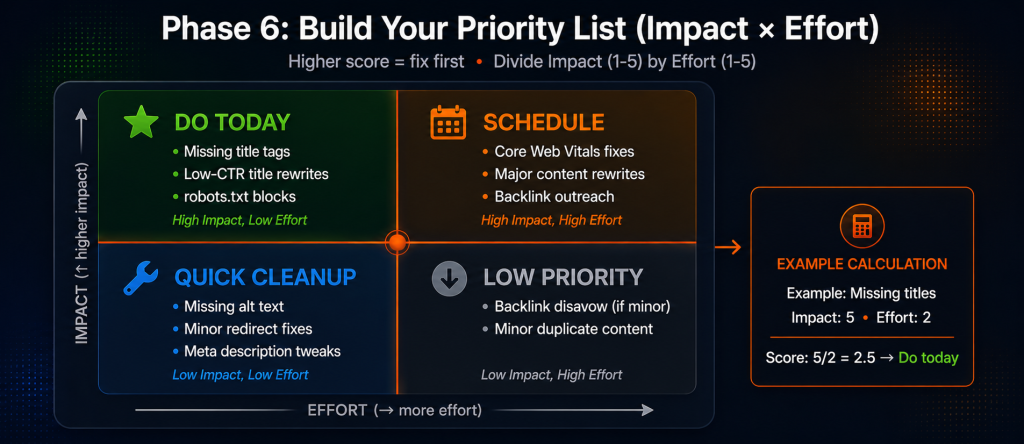
| Issue | Impact (1-5) | Effort (1-5, lower = easier) | Priority score | Fix when |
|---|---|---|---|---|
| Pages blocked by robots.txt accidentally | 5 | 1 | 25 / 5 = 5.0 | Today |
| Missing title tags on 10+ pages | 5 | 2 | 25 / 2 = 12.5 | Today |
| Core Web Vitals failing (5+ pages) | 4 | 3 | 20 / 3 = 6.7 | This week |
| Low CTR title tags on top 5 pages | 4 | 1 | 20 / 1 = 20 | Today |
| 15+ orphaned pages in main cluster | 4 | 2 | 20 / 2 = 10 | This week |
| 3 thin pages under 300 words to expand | 3 | 3 | 15 / 3 = 5 | This month |
| Backlink gap — 20 competitor domains not linking | 3 | 5 | 15 / 5 = 3 | Next quarter |
Divide Impact by Effort. Higher score = fix first. High impact, low effort issues (missing title tags, robots.txt errors, low-CTR rewrites) go today. High impact, high effort (backlink campaigns, major content rewrites) get scheduled.
Your final output from this complete seo audit: a sorted top 10 list, each issue with a specific fix, which tool found it, and who’s responsible. Share this with your team or client. Next month’s audit shows how many have been resolved. The audit only creates value if things actually get fixed. That’s the whole point of running a complete seo audit on a schedule.
The full 60-minute SEO audit checklist
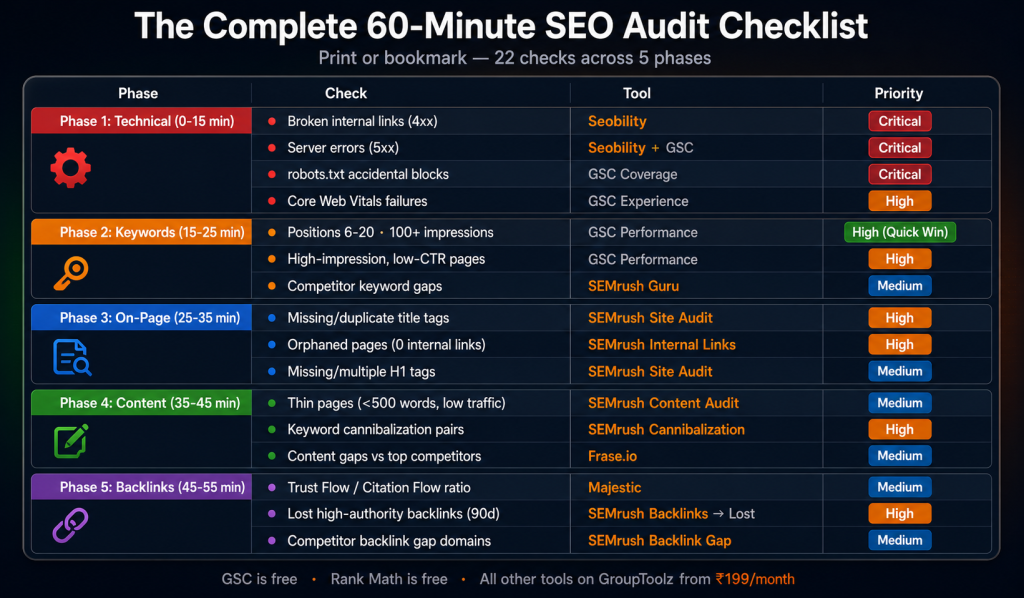
| Phase | Check | Tool | Priority if found |
|---|---|---|---|
| Technical (0-15 min) | Broken internal links (4xx) | Seobility | High |
| Server errors (5xx) | Seobility + GSC | Critical | |
| Pages accidentally blocked (robots.txt) | GSC → Coverage | Critical | |
| Core Web Vitals failures (LCP, INP, CLS) | GSC → Experience | High | |
| “Crawled — not indexed” pages | GSC → Pages | High | |
| Keywords (15-25 min) | Positions 6-20 with 100+ impressions | GSC Performance | High (quick win) |
| High-impression, low-CTR pages (<2%) | GSC Performance | High | |
| Competitor keyword gaps | Semrush Keyword Gap | Medium | |
| Lost keywords in the past 30 days | Semrush Organic → Changes | High | |
| On-Page (25-35 min) | Missing or duplicate title tags | Semrush Site Audit | High |
| Missing meta descriptions | Semrush Site Audit | Medium | |
| Missing or multiple H1 tags | Semrush Site Audit | Medium | |
| Orphaned pages (0 internal links) | Semrush Internal Linking | High | |
| Broken internal links | Seobility | High | |
| Content (35-45 min) | Thin pages (<500 words, low traffic) | Semrush Content Audit | Medium |
| Keyword cannibalization pairs | Semrush Cannibalization | High | |
| Top page content gaps vs competitors | Frase.io | Medium | |
| Declining traffic pages to update | Semrush Content Audit | Medium | |
| Backlinks (45-55 min) | Trust Flow / Citation Flow ratio | Majestic | Medium |
| Potential toxic backlinks (TF <5) | Majestic + Semrush | Low-Medium | |
| Lost high-authority backlinks (90 days) | Semrush Backlinks → Lost | High | |
| Competitor backlink gap domains | Semrush Backlink Gap | Medium |
The GroupToolz SEO audit toolkit
| Tool | Audit phase | GroupToolz access |
|---|---|---|
| Semrush (Guru) | Keywords, on-page, content audit, backlink gap, competitor analysis | Pro ₹399 / Advanced ₹499 / Single ₹199 |
| Seobility | Technical crawl, broken links, speed issues, schema validation | Pro ₹399 / Single ₹199 |
| Woorank | Quick page-level technical check for key pages | Single ₹199 |
| Majestic | Trust Flow, Citation Flow, backlink quality | Single ₹349 |
| Frase.io | Content gap analysis vs current top-ranking competitors | Single ₹199 |
| NeuronWriter | Content scoring for pages flagged in the content audit | Single ₹299 |
| Serpstat | Additional rank tracking and SERP feature monitoring | Advanced ₹499 / Single ₹199 |
| Google Search Console | Indexing, coverage, Core Web Vitals, performance | Free (Google) |
| The actual cost vs the actual value GroupToolz Pro at ₹399/month includes Semrush Guru and Seobility, which cover phases 1-4 of this seo audit checklist 2026 process. Add Majestic (₹349 single), Frase.io (₹199 single), and Woorank (₹199 single) for the complete 8-tool stack. Total: ₹1,146/month. Retail for the same tools: ₹11,000-₹45,000/month depending on which Semrush and Majestic plans you’d need. The robots.txt error that’s been blocking your most important landing page for three weeks? That’s the kind of issue this complete seo audit finds in minute 8. Whatever you’re paying for the audit tools, it’s less than what that costs you in traffic. |
Frequently asked questions
Can a complete SEO audit really be done in 60 minutes?
Yes, with the right structure. This seo audit checklist 2026 covers every critical area and produces a prioritised action list in 60 minutes. It’s not a comprehensive deep-dive (those take days and usually sit unread). It’s a systematic monthly scan that catches the high-impact issues. The goal is a regular audit you actually complete, not an exhaustive one-time exercise you abandon at hour three.
Which is more important: technical SEO or content SEO?
Technical first. Always. A robots.txt error blocks Google from indexing your content regardless of how good it is. Fix crawling and indexing issues before touching content. The exception: if your site has no technical issues at all, content quality and keyword work drive the most traffic. But in practice, nearly every site has at least some technical problems, and this technical seo checklist usually surfaces them quickly.
What are the most common SEO audit findings?
Missing or duplicate title tags, orphaned pages with zero internal links, and “crawled — not indexed” pages. All three show up on most WordPress sites. Title tags take about 5 minutes per page to fix. Orphaned pages need internal links added from existing content. “Crawled not indexed” usually requires improving content depth on the affected pages. Easy finds, real impact.
Which GroupToolz plan is best for monthly SEO audits?
Pro at ₹399/month includes Semrush Guru and Seobility, which covers phases 1-4 of this site audit tutorial. Add Majestic (₹349 single) for Phase 5 backlink work and Frase.io (₹199 single) for content gap analysis. The Advanced plan at ₹499/month adds Serpstat for additional rank tracking alongside everything in Pro.
How often should I run an SEO audit?
Monthly for the 60-minute version. Quarterly for a deeper 3-4 hour audit covering everything in detail. Immediately after: any major site changes, a Google algorithm update, or a sudden traffic drop. Monthly cadence catches problems before they have months to compound. That’s the whole point of a regular seo audit checklist 2026 workflow.
What is Trust Flow and why does it matter for audits?
Majestic’s Trust Flow (0-100) measures backlink quality based on how close your links are to trusted seed sites. High Trust Flow means your links come from reputable, well-established domains. Low TF relative to Citation Flow (your link quantity score) suggests a lot of low-quality links diluting your profile. The TF/CF ratio check takes 5 minutes in this seobility audit guide workflow (Seobility covers technical, Majestic covers link quality) and is one of the clearest quick signals of backlink health available.
Comments