
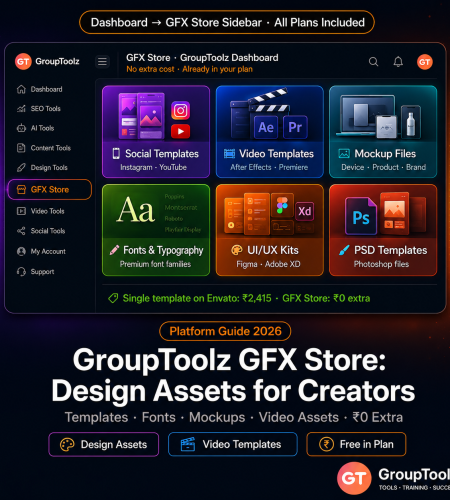
The grouptoolz gfx store design assets section is a curated marketplace inside the member dashboard — no extra cost, already included in your plan. Social media templates, video templates, mockups, fonts, UI kits, Photoshop files, and more. Here’s what it contains and how to actually use it.
By GroupToolz Team Updated: June 18, 2026
What is the GroupToolz GFX Store?
The GFX Store is a design asset section built directly into the GroupToolz member dashboard. Log in, click “GFX Store” in the left sidebar navigation, and you get a catalog of downloadable graphic design files — included in your existing subscription at no additional charge.
It’s worth being clear about what this is and what it isn’t, because it’s easy to confuse with other things in the dashboard. Your GroupToolz tool subscriptions (Canva Pro, Envato Elements, Adobe tools) give you access to live software platforms. The GPL Store gives you WordPress themes and plugins. The GFX Store is different from both. It provides downloadable asset files — Photoshop templates, After Effects projects, vector packs, font families, social media template sets — that you download and work with in your own design software. No login required after download. Files work offline.
To access it: log into app.grouptoolz.com → click “GFX Store” in the left sidebar. It updates regularly — new grouptoolz gfx store design assets get added periodically, so checking it monthly is worth doing rather than just once.
What’s actually in the GFX Store
GFX assets are what the creative professional community calls premium downloadable design files — the kind sold for ₹500-₹5,000 per template on Creative Market or Envato Elements individually. A single After Effects intro template costs $29 (~₹2,415) on Envato. A font family from a typography foundry runs $49 (~₹4,082). In the gfx store group buy model, you get these kinds of assets included in the subscription. Here are the main categories.
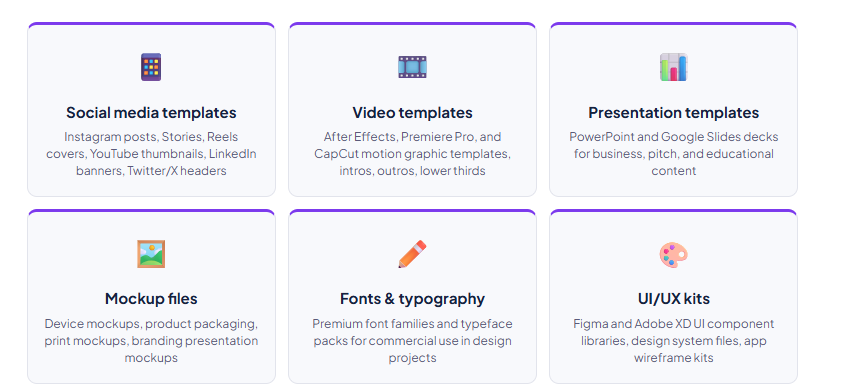
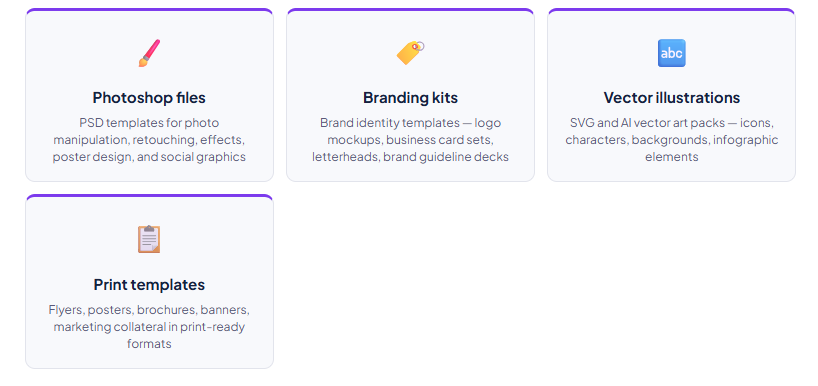
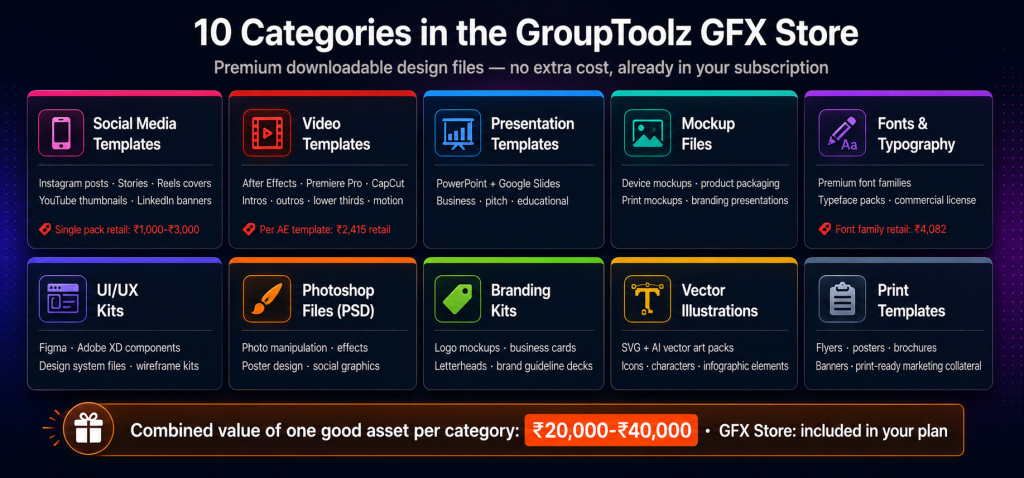
| What “GFX” means in the design world GFX (graphics) resources in the creative professional community are premium downloadable design files — the kind you’d normally pay for individually. An After Effects intro template on Envato: $29 (~₹2,415). A font family from a typography foundry: $49 (~₹4,082). These show up in the free templates group buy approach of the GFX Store at no extra cost. The combined value of a well-stocked GFX asset library easily exceeds a full year of GroupToolz subscription fees. Most subscribers don’t realise this until they start actually browsing. |
GFX Store vs GroupToolz design tool subscriptions: not the same thing
The GFX Store gets confused with the design tool subscriptions available in GroupToolz plans. They serve different purposes and are genuinely different — not overlapping.
| Comparison | GFX Store | Design tool subscriptions (Canva, Envato, etc.) |
|---|---|---|
| What you get | Downloadable asset files (PSD, AI, AE, PPT, fonts, vectors) | Access to live SaaS platforms and their libraries |
| How you use it | Download → open in your design software (Photoshop, After Effects, Figma) | Log in to the platform, use its browser-based or desktop tools |
| Internet required | Only for downloading — files work offline after | Yes — active subscription and internet required |
| What it replaces | Individual template marketplace purchases (Creative Market, Envato per-item) | The software subscriptions themselves (Adobe CC, Canva Pro, etc.) |
| Volume | Curated — GroupToolz selects specific premium assets | Millions of templates (Envato: 16 million+ items) |
| Best for | Specific project needs, premium standalone files, unique assets | High-volume production, browsing large libraries |
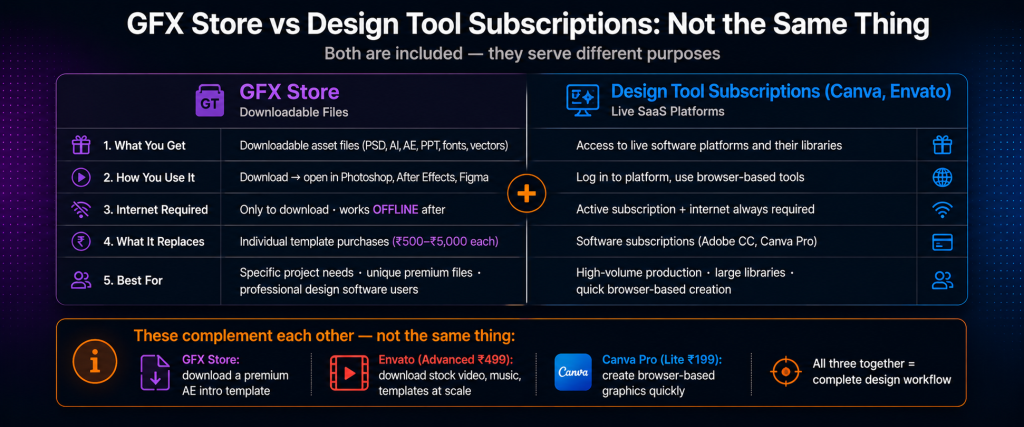
Practically: you use Envato Elements (GroupToolz Advanced, ₹499/month) to download stock video, audio, and templates at scale. You use Canva Pro (GroupToolz Lite, ₹199/month) for quick browser-based graphic creation. You use the grouptoolz gfx store design assets when you need specific high-quality files — a particular font family for a client project, a premium After Effects template for a video intro, a professional mockup set for portfolio work — that you’ll open in professional design software. Different jobs.
How to access and use the GFX Store
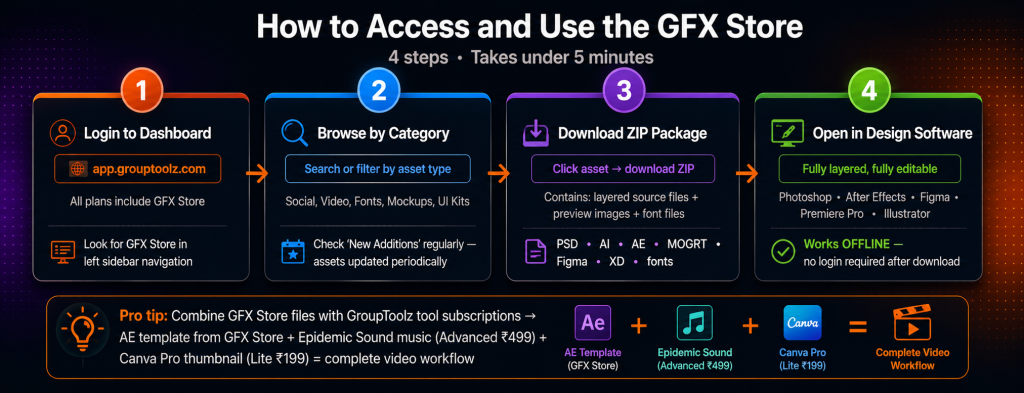
| Step 1 Log in and navigate to the GFX Store Go to app.grouptoolz.com and log in. In the left sidebar, look for “GFX Store” alongside Dashboard, GPL Store, Tutorials, and Helpdesk. Click it to open the store. The GFX Store is in all GroupToolz plans — Lite (₹199), Pro (₹399), Advanced (₹499), and all specialty and custom plans. No plan-specific gating. |
| Step 2 Browse by category or search Assets are organised by category — social media, video, fonts, mockups, UI kits, and so on — with a search function for specific types. Check the “New Additions” section regularly; GroupToolz adds creative resources periodically. Unlike Envato where you’re sorting through millions of items, the GFX Store’s curated approach means fewer options per category but less time spent filtering out mediocre results. I find the smaller catalog easier to navigate for specific project needs. |
| Step 3 Download and open in your design software Click an asset and download. Most come as ZIP packages containing layered source files — PSD for Photoshop, AI for Illustrator, AE for After Effects, MOGRT for Premiere Pro, Figma or XD for UI kits — alongside preview images and any required font files. Extract the ZIP, open the source file in the relevant software, customise with your content and brand colours. Every element is independently editable because the files are fully layered. This is different from using a Canva template where some elements are locked — with design assets cheap professional files, you have full control. |
| Step 4 Combine GFX Store assets with GroupToolz tool subscriptions The most effective approach combines both. Download a video intro template from the GFX Store, open it in After Effects, then add licensed music from Epidemic Sound (GroupToolz Advanced, ₹499). Download a social media template pack from the GFX Store, customise the layouts in Canva Pro (GroupToolz Lite, ₹199), applying the brand colours and fonts from the template pack. Download a mockup set from the GFX Store, drop AI-generated product images from Leonardo AI (GroupToolz AI Plan, ₹2,499) into the mockup frames. The free templates group buy asset library and the live tool subscriptions are designed to work together. |
Who gets the most value from the GFX Store
| User type | GFX Store use case | What it replaces |
|---|---|---|
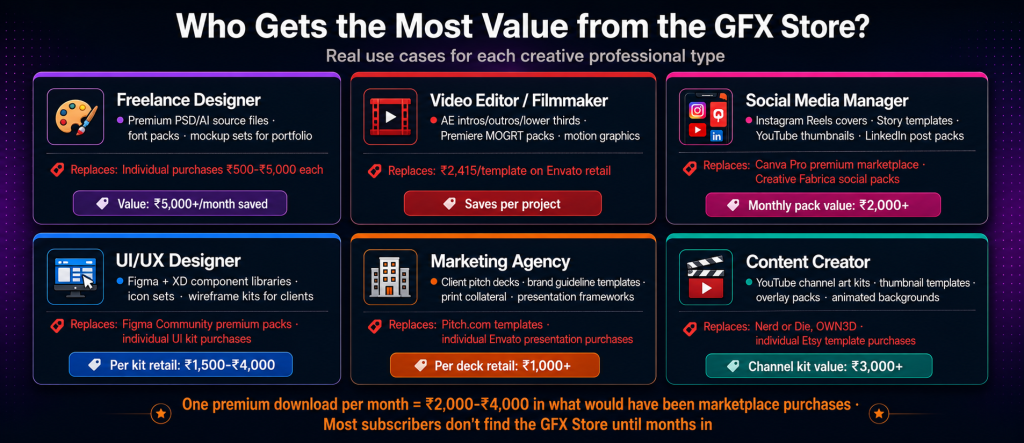
| Freelance graphic designer | Premium PSD and AI source files for client projects; font packs; mockup sets for portfolio and client presentations | Individual template purchases (₹500-₹5,000 each) on Creative Market or Envato |
| Video editor / filmmaker | After Effects templates for intros, outros, lower thirds, titles; Premiere Pro MOGRT packs; motion graphics assets | Motion Array (₹199/mo single) or individual template marketplace purchases |
| Social media manager | Instagram Reels covers, Story templates, YouTube thumbnail packs, LinkedIn post templates | Canva Pro premium template marketplace; Creative Fabrica social packs |
| UI/UX designer | Figma and Adobe XD component libraries, icon sets, wireframe kits for client projects | Figma Community premium packs; individual UI kit purchases |
| Marketing agency | Client pitch deck templates, brand guideline decks, print collateral, presentation frameworks | Pitch.com templates; individual Envato presentation purchases |
| Content creator | YouTube channel art kits, thumbnail templates, overlay packs, animated backgrounds for stream or video | Nerd or Die, OWN3D; individual Etsy template purchases |
GFX Store vs Envato Elements: if you already have Envato
GroupToolz subscribers on the Advanced plan (₹499/month) or Designer’s Pack (₹349/month) already have Envato Elements — 16 million+ creative assets with 20 downloads per day. If that’s already in your plan, does the GFX Store add anything real?
Honestly, it depends on how you work. Envato’s massive catalog requires real time to navigate. Finding a high-quality, unique asset among 16 million items means scrolling through hundreds of similar-looking results. The GFX Store’s smaller selection is faster to browse for specific project needs. Less friction for “I just need a good mockup pack right now” moments.
Envato also has gaps in specific categories — particular software UI kits, niche print formats, or certain design aesthetics that just aren’t well-represented in its catalog. The grouptoolz gfx store design assets can fill those gaps with specific files Envato doesn’t carry well. Both are worth checking for any given project before you buy something elsewhere.
| The honest GFX Store assessment The GFX Store isn’t why most people subscribe to GroupToolz. That’s Semrush Guru at ₹199, or Leonardo AI at ₹399, or Epidemic Sound at ₹199. But it’s real value that most subscribers underuse. A designer who downloads one premium After Effects intro template per month from the GFX Store gets ₹2,000-₹3,000 in what would have been marketplace purchases. That’s not a small number relative to the subscription cost. The creative resources section is genuinely useful once you know it’s there — the problem is most people don’t find it until they’ve been subscribing for months. It’s in the sidebar next to the GPL Store. Check the creative resources there before buying any design asset elsewhere. |
Frequently asked questions
What is the GroupToolz GFX Store?
The GFX Store is a curated design asset section in the GroupToolz member dashboard. It gives subscribers downloadable graphic design files — social media templates, video templates, fonts, mockups, UI kits, PSD files, vector illustrations — at no additional cost. It’s different from the tool subscriptions (Canva, Envato) because you download the actual files and use them in your own software. Access it at app.grouptoolz.com via the left sidebar navigation. The grouptoolz gfx store design assets catalog updates periodically — worth checking regularly.
Which GroupToolz plans include the GFX Store?
All of them. Lite (₹199/mo), Pro (₹399/mo), Advanced (₹499/mo), Designer’s Pack (₹349/mo), Writer’s Pack (₹799/mo), AI Plan (₹2,499/mo), and all custom tiers (₹899-₹1,299/mo). The GFX Store is in the sidebar for every subscriber regardless of plan level. Same for the GPL Store — both are accessible on all plans.
What is the difference between the GFX Store and the GPL Store?
The GPL Store has WordPress themes and plugins for WordPress websites. The GFX Store has graphic design files — templates, fonts, mockups, PSD files, video templates — for use in design software like Photoshop, After Effects, Figma, and Premiere Pro. Both are separate stores in the sidebar, both included at no extra cost in all plans. Different tools for different jobs.
Can I use GFX Store assets for client work commercially?
Most curated design asset libraries in a gfx store group buy setup include commercial use rights for subscribers. That said, check the specific usage rights for each asset before using it in client work that’ll be sold or published commercially. If you’re not sure about a specific asset’s licence, contact GroupToolz WhatsApp support before committing it to a client deliverable. Better to ask than find out later.
How does the GFX Store compare to Envato Elements on GroupToolz?
Envato Elements (Advanced ₹499 or single ₹199) is 16 million+ assets with 20 downloads per day — massive volume, great for high-frequency production. The GFX Store is a smaller, curated selection — better when you want a specific premium file quickly without sorting through a huge library. They’re different rather than one being better. Advanced plan subscribers have both at ₹499/month, which is the best situation. The free templates group buy GFX Store fills specific gaps that Envato’s sheer volume makes harder to navigate to.
Does the GFX Store require additional software to use the assets?
Depends on the asset format. PSD templates need Photoshop. AE templates need After Effects. Figma kits need a Figma account (free tier works). Font files install into any design software. Some templates may be in formats that work with Canva Pro (available on GroupToolz), so if you don’t have Adobe CC, check which formats are available for each asset before downloading. For anyone already running a full design stack, these creative resources open right up in whatever software you’re already using. No learning curve.
Comments