

Here’s a number that reframes the whole thing. One 8-second Veo 3.1 clip on Google’s API costs about ₹510. A Veo 3.1 group buy through GroupToolz is ₹499 a month for unlimited generation on Ultra Low Priority. So a full month costs less than a single video does direct. There’s a trade-off, and I’ll explain it honestly, but for most creators it’s a straightforward win.
By GroupToolz Team Updated : September 2026
| ₹510 One clip, Google API | ₹21,250 Google AI Ultra | ₹499 Group buy, monthly | ∞ Videos included |
Veo 3.1 is Google DeepMind’s video model, and it’s the one most people mean when they say AI video looks real now. Native audio, proper physics, camera moves that behave like a camera rather than a hallucination. It’s the model that made a lot of people stop dismissing this stuff.
It’s also priced like enterprise software. Google sells it through credit pools that vanish faster than you’d expect, an API charging by the second, and a top tier that costs more per month than most people spend on their phone. A Veo 3.1 group buy exists because that pricing puts a brilliant tool well out of reach for the people who’d use it most. Let me walk through the real numbers.
What Veo 3.1 Actually Costs
This is where it gets uncomfortable, and it’s the whole reason a Veo 3.1 group buy exists. Google gives you several routes and every one of them is expensive in a different way.
| Route | Price | In Rupees | What you get |
|---|---|---|---|
| Gemini API / Vertex | $0.75/second | ~₹510 per 8s clip | Pay per second, needs code |
| Google AI Plus | $7.99/mo | ~₹680 | Veo 3.1 Fast, 2 videos a day |
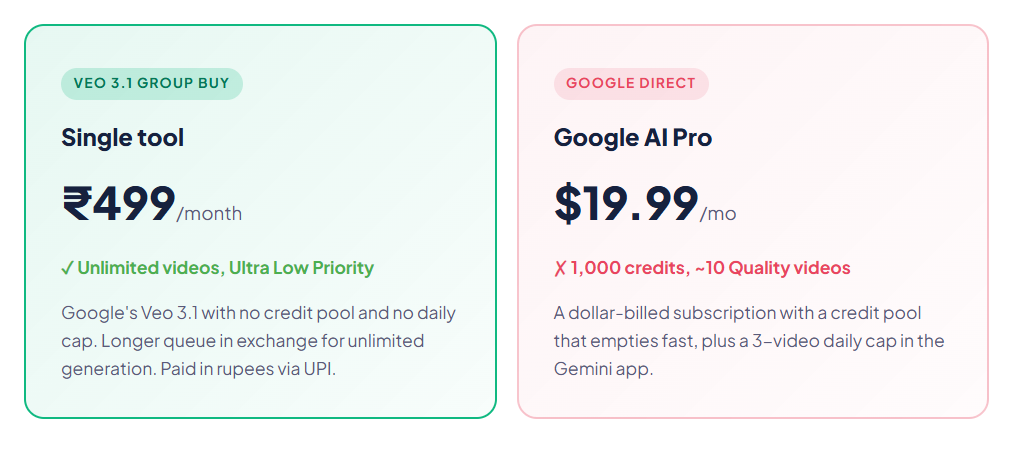
| Google AI Pro | $19.99/mo | ~₹1,700 | 1,000 credits, ~50 Fast or 10 Quality |
| Google AI Ultra | $249.99/mo | ~₹21,250 | 12,500 credits, full Veo 3.1 |
| Replicate | $0.50/second | ~₹340 per clip | Third-party markup |
| Veo 3.1 group buy | ₹499/mo | ₹499 | Unlimited, Ultra Low Priority |
Read the top row and the bottom row together, because that’s the entire argument. Google’s own API charges roughly ₹510 for one eight-second clip. A Veo 3.1 group buy is ₹499 for a month of unlimited generation. You could make one video with Google, or a month’s worth with this.
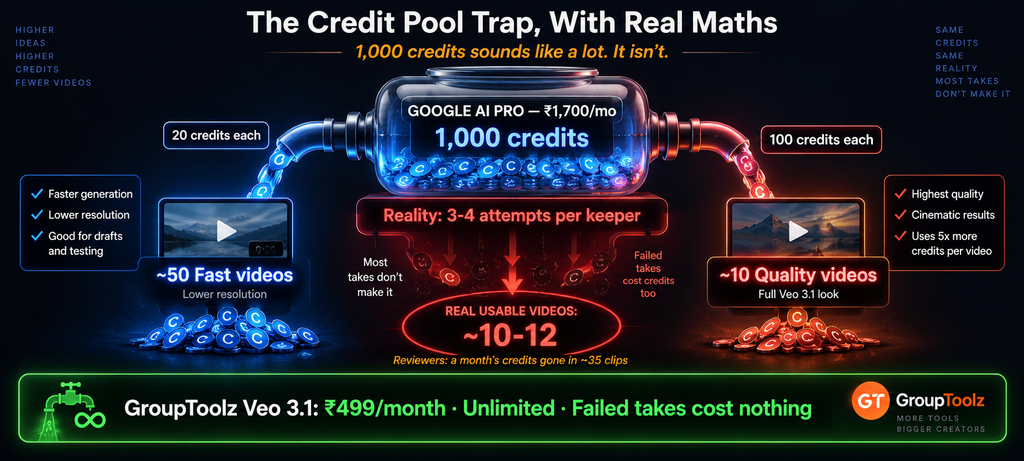
| The credit pool trap, with real maths The subscription tiers look reasonable until you understand credits. On Google AI Pro at about ₹1,700 a month you get 1,000 credits. In Flow, a Veo 3 Fast video costs roughly 20 credits and a Quality video around 100. So that’s about 50 Fast videos, or only 10 Quality ones. Ten. For a whole month. And that assumes every single generation works first time, which it never does, because AI video needs three or four takes before you get one you’d actually publish. Reviewers have found a Pro month’s credits can disappear in around 35 clips at the higher quality tier. The Gemini app caps you separately at 3 Veo videos a day regardless. A Veo 3.1 group buy removes the counting entirely, which changes how you work more than the price does. |
Being Straight About Ultra Low Priority
Now the part of this Veo 3.1 group buy I want to be completely honest about, because you’ll notice it the first day and I’d rather you knew going in.
This Veo 3.1 group buy runs on Ultra Low Priority. That means your generation joins the queue behind higher-priority jobs. You submit a prompt and wait longer than you would on a paid Google tier. Not minutes-versus-seconds, but it isn’t instant either, and at busy times it’s slower still.
That queue position is exactly why unlimited is possible. Priority access costs real compute money, which is what Google’s credits are actually buying you. Trade the speed and the volume cap disappears. It’s a genuine trade rather than a free lunch, and whether it suits you depends entirely on how you work.
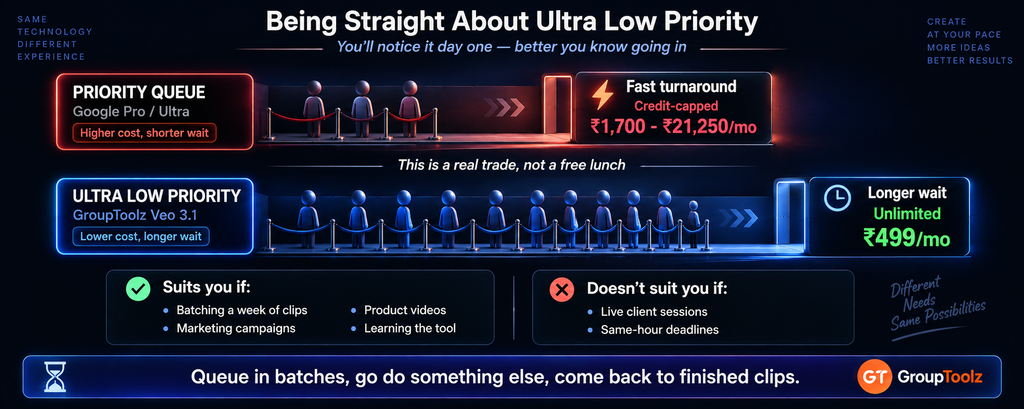
| Who low priority suits, and who it doesn’t Straightforwardly: it suits you if your work is planned rather than reactive. Content creators batching a week of clips, marketers building a campaign, sellers making product videos, students learning the tool. You queue several generations, go do something else, come back to finished videos. That’s most people. It doesn’t suit you if you need a specific clip finished in the next ten minutes for a live deadline, or you’re sitting with a client watching the screen. If that’s your regular situation, be honest with yourself and pay Google for priority. A Veo 3.1 group buy is built for volume and patience, not urgency. |
What Is a Veo 3.1 Group Buy?
A Veo 3.1 group buy is where access to Google’s Veo video model is shared through a provider, so you don’t buy a Google AI subscription in dollars or wire up a per-second API. Through GroupToolz it’s sold as a single tool at ₹499 a month, paid in rupees, with unlimited generation on Ultra Low Priority.
Unlimited is the word that matters. No credit pool draining while you experiment, no daily cap in the Gemini app, no per-second meter running. You generate as much as you need, accept a longer queue, and pay one flat rupee price. For anyone who has watched a credit balance disappear during a single afternoon of iterating, that’s the whole appeal of this Veo 3.1 group buy.
Group Buy vs Buying From Google
| What matters | Google Direct | Veo 3.1 Group Buy |
|---|---|---|
| Price | ₹680 to ₹21,250/mo | ₹499/mo |
| Video volume | Credit-capped | Unlimited |
| Speed | Priority queue | Ultra Low Priority |
| Setup | Subscription or API code | Log in and generate |
| Billing | USD, card | Rupees, UPI |
| Failed takes | Still cost credits | Cost nothing |
| Support | Help centre | WhatsApp, Indian hours |
| Bottom line | Fast but metered, in dollars | Unlimited but patient, in rupees |
Why Failed Takes Are the Hidden Cost
Something worth dwelling on, because it’s the part credit pricing hides and the part a Veo 3.1 group buy fixes. AI video is not a first-attempt medium. You write a prompt, the model gives you something almost right, the hands are wrong or the camera drifts or the timing is off, and you go again.
On a metered plan every one of those attempts costs you. A rejected clip charges exactly the same as a keeper. So when a review says a Pro plan gives you 50 Fast videos, what it really gives you is maybe a dozen usable ones after the misses. That maths is why people run out mid-project and feel cheated.
With a Veo 3.1 group buy, failures cost you nothing but queue time. You can regenerate the same shot six times to nail the motion, and the only thing you spend is patience. For learning the tool properly, that difference is enormous, because experimentation is how you get good and metered plans punish exactly that.
What Veo 3.1 Is Good At
| Strength | What it means for you |
|---|---|
| Native audio | Sound generated with the video, not stitched on afterwards |
| Physics and motion | Things fall, splash and move the way they should |
| Camera control | Pans, pushes and tracking shots that behave cinematically |
| Prompt adherence | Follows detailed scene descriptions closely |
| Realism | Lighting and materials that hold up at a glance |
| Scene consistency | Characters and settings stay coherent across a clip |
The native audio is the thing people underestimate. Most video models hand you a silent clip and you go find music and effects. Veo generates sound as part of the same pass, which means ambient noise, footsteps and dialogue that actually match what’s on screen. That alone saves a step in every single video, and it’s a real reason to want a Veo 3.1 group buy rather than a cheaper silent model.
| One Google API clip vs a month of unlimited ₹510 → ₹499 Unlimited Veo 3.1 on Ultra Low Priority · no credits, no daily caps · billed in INR via UPI · no auto-renewal |
How to Get Good Results
Since a Veo 3.1 group buy gives you unlimited attempts, here’s how to use them well rather than just generating more of the same.
Write like a shot list
Describe the subject, then the camera, then the lighting, then the mood. “Slow push in on a chai stall at dawn, steam rising, warm morning light, shallow depth of field, ambient street sound” gives Veo far more to work with than a sentence about a chai stall.
Name the sound you want
Because audio is generated natively, describing it changes the output. Mention the ambient noise, whether there’s dialogue, what the room sounds like. Skip it and you get whatever Veo assumes.
Change one thing per attempt
When a clip is nearly right, adjust a single element rather than rewriting the prompt. That way you learn what actually moved the result, which is knowledge that compounds across every future video.
Queue in batches
This is the low-priority-specific tip. Don’t sit watching one generation. Submit four or five variations, go work on something else, and come back to a set of finished clips to choose from. Handled that way the queue stops mattering.
| Build your start frames elsewhere A workflow trick worth knowing. Video generation, even unlimited, is slower than image generation by a wide margin. So if you have access to image models, design your opening frame there first, where results come back in seconds, and only move to video once the look is right. Getting the composition and colour settled in an image tool means your Veo prompts start from a much clearer idea, and you spend fewer queue cycles discovering what you wanted. A Veo 3.1 group buy pairs naturally with an image toolkit for exactly this reason. |
What About Google’s Free Tier?
Fair question, and worth answering properly before you spend anything on a Veo 3.1 group buy.
Google does offer limited free access through the Gemini app, but the ceiling is low. Free generations are rate-limited, capped at 720p, and carry a watermark. For getting a feel for what AI video can do, that’s fine and I’d encourage anyone curious to try it. For anything you’d publish, a watermark makes it unusable, and 720p looks soft the moment it hits a full screen.
There’s also the credits angle. Some non-subscribers get a small monthly credit allowance, in the region of a hundred credits. Since a single Quality video runs around a hundred credits in Flow, that’s roughly one video a month. It’s a taste, not a workflow.
The trial routes
Google has run promotional access at various points, first-month offers on Pro, student plans, cloud credits for developers. Those are worth checking if you only need Veo for one project and can finish inside the window. Just diary the end date, because these convert to full price automatically and ₹1,700 landing on your card unexpectedly is a bad surprise.
Where a Veo 3.1 group buy differs is that it’s built for continuing use rather than a trial period. Nothing auto-renews, so there’s no forgotten charge, and there’s no cliff edge where your access ends and your project is half finished. If your video work is ongoing rather than a one-off, that stability is worth more than a free month that ends abruptly.
Who This Suits
| You are a… | And it gives you… |
|---|---|
| Content creator | A week of clips batched in one sitting, no credit anxiety |
| Social media manager | Video for multiple client accounts without per-clip costs |
| E-commerce seller | Product videos and ad creative at any volume |
| Marketer | Campaign concepts tested properly before committing budget |
| Student / learner | Unlimited practice, which is how you actually get good |
| Small agency | Client video work without a ₹21,250 subscription |
| The honest verdict Take this Veo 3.1 group buy if you value volume over speed. Most creative video work is planned days ahead, not needed in the next five minutes, and for that pattern unlimited generation at ₹499 beats a metered subscription at ₹1,700 or ₹21,250 comfortably. You’ll wait longer per clip and you’ll stop caring by day two, because you’re queuing batches rather than watching a spinner. Don’t take it if your work is truly time-critical, live client sessions, same-hour turnarounds. In that case pay Google for priority and treat it as a business cost. Being clear about which of those you are will save you a frustrating month. |
A Realistic Week
Let me put actual numbers on a Veo 3.1 group buy, because that’s more useful than adjectives.
Say you run a small brand account and need twelve short clips a week. On Google AI Pro at ₹1,700 a month you have 1,000 credits. Twelve clips at Quality is 1,200 credits, so you’re already over budget in week one, and that’s before the failed takes. Realistically you’d shoot for Fast quality and still spend most of the month’s credits, with nothing left for experimenting.
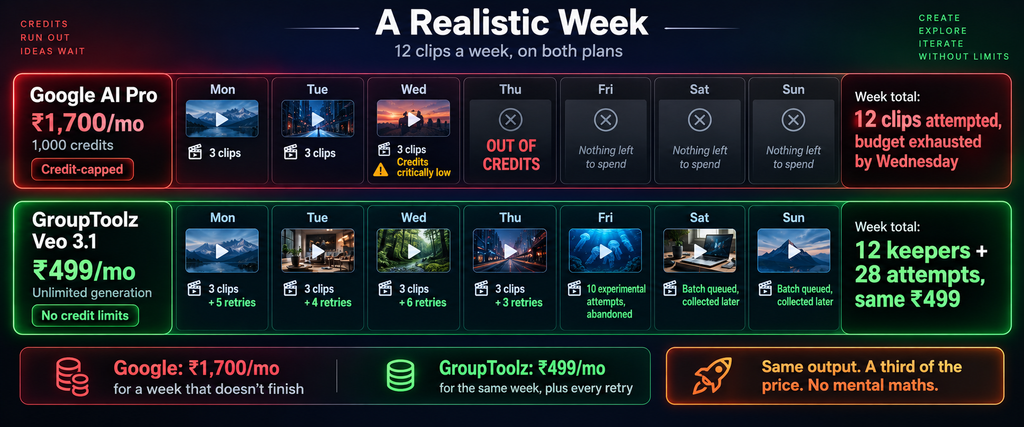
On a Veo 3.1 group buy at ₹499 you’d generate those twelve, plus the twenty-odd attempts it took to get them, plus another ten you tried and abandoned, and the bill is identical. You’d queue Monday’s batch while doing something else and collect them later. Same output, a third of the price, and no arithmetic in your head while you work. That’s the practical difference.
Veo 3.1 vs the Other Video Models
An honest comparison, since Veo isn’t automatically the right pick for every job.
| Model | Best at | Where it trails |
|---|---|---|
| Veo 3.1 | Native audio, realism, cinematic camera work | Expensive direct, slower on low priority |
| Kling | Character motion and consistency | Credit system, no native audio |
| Hailuo | Camera motion controls, budget-friendly | Shorter clips, lower resolution |
The short version: Veo 3.1 wins when you need the video to sound right as well as look right, which covers most storytelling and ad work. Kling is strong on character animation. Hailuo gives you explicit camera controls at a lower cost. A Veo 3.1 group buy gets you the audio-capable option, which is the one most people are actually after.
The Bottom Line
Here’s where I land. Veo 3.1 is the best AI video model most people can name, and the native audio really does separate it from everything else. The problem was never the model, it was the bill. Google’s API wants about ₹510 for a single eight-second clip. AI Pro at ₹1,700 gives you roughly ten Quality videos a month before the credits run dry. Ultra is ₹21,250, which is not a real option for an individual creator in India.
A Veo 3.1 group buy at ₹499 flips that. Unlimited generation, no credits to count, failed takes that cost nothing, billed in rupees through UPI with no auto-renewal. The honest trade is Ultra Low Priority, meaning you wait longer in the queue, and if your work is planned rather than urgent you’ll adapt to that within a day. For creators, sellers, marketers and anyone learning AI video properly, paying less for a month than one clip costs direct is a straightforward decision.
Questions People Actually Ask
What’s a Veo 3.1 group buy, in plain terms?
It’s shared access to Google’s Veo 3.1 video model through a provider, so you don’t buy a Google AI subscription in dollars or set up a per-second API. Through GroupToolz it’s a single tool at ₹499 a month with unlimited generation on Ultra Low Priority, billed in rupees with no auto-renewal.
How much does Veo 3.1 cost from Google?
The API charges about $0.75 a second, which is roughly ₹510 for one 8-second clip. Subscriptions run from Google AI Plus at $7.99 (~₹680, two videos a day) to AI Pro at $19.99 (~₹1,700, 1,000 credits) to AI Ultra at $249.99 (~₹21,250). Third parties like Replicate charge around $0.50 a second.
What does Ultra Low Priority mean?
Your generation joins the queue behind higher-priority jobs, so it takes longer to come back, especially at busy times. That queue position is exactly what makes unlimited generation possible, since priority access is what Google’s credits really pay for. Queue clips in batches and go do something else, and it stops being an issue.
Is it really unlimited?
Yes, that’s the trade for accepting low priority. No credit pool draining as you work, no daily video cap, and failed takes cost you nothing. Given AI video usually needs three or four attempts per usable clip, that last point matters more than the headline price for anyone actually producing work.
How many videos does Google AI Pro actually give you?
About 1,000 credits a month. In Flow, a Fast video costs roughly 20 credits and a Quality video around 100, so that’s approximately 50 Fast or just 10 Quality videos, before any failed attempts. The Gemini app separately caps you at 3 Veo videos a day. Reviewers have found a month’s credits can go in around 35 clips at higher quality.
Can I pay in Indian Rupees?
Yes. The Veo 3.1 group buy is billed in INR at ₹499 via Razorpay and UPI apps like PhonePe, GPay and Paytm, or by card. No dollar billing and no international card needed. Nothing auto-renews, so you decide each month, and support runs on WhatsApp during Indian hours.
Comments