
Kling makes some of the smoothest AI video anywhere. The problem is the credits. Every plan hands you a pot that drains fast, failed generations still cost you, and unused credits vanish at month’s end. A Kling AI group buy gets rid of all that: unlimited image and video generation for ₹499 a month. Here’s how Kling’s pricing really works, why the credit system frustrates people, and the cheaper road in.
By GroupToolz Team Updated: July 2026
| 100 AI prompts/mo on free | $30 Pro monthly, direct | ~₹2,500 That price in rupees | ₹99 Same thing, group buy |
Let me start with what Kling gets right, because it’s real. Kling AI, built by Kuaishou in China, produces some of the smoothest motion in the whole AI video space. People who’ve tried every generator keep coming back to Kling for how natural its movement looks, how it handles physics, faces, camera pans. It does text-to-video, image-to-video, native 4K since April 2026, and native audio. By early 2026 it claimed 60 million creators. The quality is not in question.
What sends people looking for a Kling AI group buy is what happens at the checkout. Kling runs on a credit system, and it’s a rough one. Credits burn faster than you’d expect, failed generations still cost you, and whatever you don’t use each month just disappears. The tier that gives you serious volume runs up to $180 a month. Let me break down how it actually works, then show you the way around it.
What Is Kling AI, Quickly
Kling AI is a text-to-video and image-to-video generator from Kuaishou, the Chinese company behind one of the world’s biggest short-video platforms. You give it a prompt or an image, and it produces a short video clip with realistic motion. Its current models range from the older, cheaper Kling 1.6 up to Kling 3.0, which added better physics, connected multi-shot scenes, and native audio. It’s widely rated as the best in class for smooth, believable movement, and it competes directly with Google’s Veo and the now-discontinued Sora consumer app.
It also does images, not just video, and image-to-video is one of its most popular features, animate a still photo into a moving clip. All of which is great, until you realise every single one of those generations costs credits, and that’s where a Kling AI group buy starts to make sense.
How Kling AI Pricing Actually Works
Kling doesn’t sell you unlimited access. It sells you a monthly pot of credits, and every generation spends from that pot based on length, resolution, model, and whether you use audio. Here are the real 2026 tiers.
| Plan | Price | In Rupees | What you get |
|---|---|---|---|
| Free | $0 | ₹0 | 66 daily credits (expire in 24h), 360-540p, watermarked, no commercial use. |
| Standard | ~$10/mo | ~₹830 | 660 credits, ~33 videos, 720p, watermark removal, commercial use. |
| Pro | ~$37/mo | ~₹3,100 | 3,000 credits, ~150 videos, 720p/1080p. |
| Premier | ~$65/mo | ~₹5,400 | More credits, queue priority. |
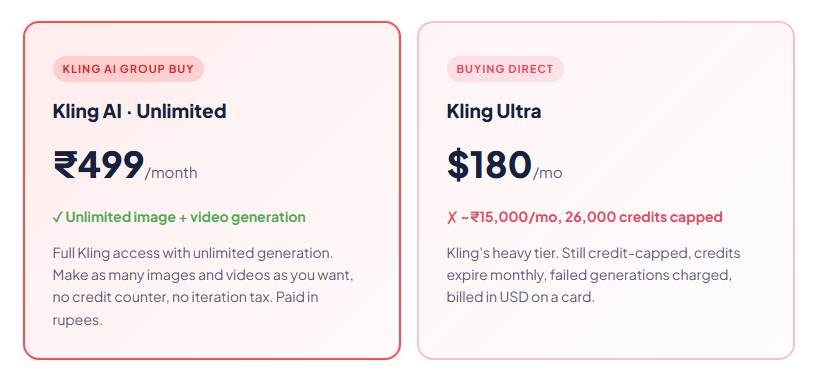
| Ultra | ~$180/mo | ~₹15,000 | 26,000 credits, ~130-200 finished clips. For heavy production. |
| The credit system is the real cost, and it’s brutal Those credit numbers look generous until you understand how they burn. A basic 5-second clip costs around 10 credits, but switch to the good Kling 3.0 model and that same clip jumps to 45 credits, more than triple. Turn on native audio and the rate doubles again. So your “3,000 credits” that sounded like 150 videos is really more like 30-40 once you use the quality settings you actually want. And here’s the part people hate most: failed generations still cost credits. A wonky face, a six-fingered hand, a bad camera move, you pay for it anyway, and you need three to five tries for one usable clip. Kling sits at 1.3 out of 5 on Trustpilot, and it’s almost entirely billing complaints, not video quality. |
The Two Things That Really Sting
Beyond the burn rate, two specific policies push people toward a Kling AI group buy.
Credits don’t roll over
Whatever you don’t spend by the end of your billing month vanishes. Gone. This applies even on annual plans, where you’re paying up front for the year but still lose unused credits every single month. Reviewers are furious about this, and fairly so. You paid for them, but if you have a quiet month, that money evaporates.
Failed generations still charge you
This is the iteration tax, and it’s the one that hurts daily. AI video rarely nails it first try. Motion glitches, faces distort, hands go weird, the camera does something strange. Each retry costs credits. So a single finished clip you’re happy with might have cost you five attempts, five times the credits, and Kling charged you for all five. On a capped plan, that eats your month alarmingly fast.
What Is a Kling AI Group Buy?
A Kling AI group buy is where access to Kling is shared across users so nobody pays Kling’s full solo price. Instead of buying a credit-capped plan from $10 to $180 a month, a Kling AI group buy through GroupToolz gets you unlimited image and video generation for ₹499 a month. No credit counter draining, no iteration tax, no watching your allowance disappear at month’s end. You generate as much as you want.
That unlimited part is the entire point, because it kills Kling’s single biggest frustration stone dead. Every complaint about Kling’s pricing, the burn rate, the failed-generation charges, the vanishing credits, exists because the tool is credit-metered. A Kling AI group buy with unlimited generation removes the meter completely. You stop counting and start creating.
| Why unlimited changes everything with Kling Kling’s iteration tax is the worst on a metered plan, because AI video needs so many retries. When every failed attempt costs credits, you hesitate, you settle for “good enough,” you make fewer videos than you wanted. Unlimited flips that completely. You retry a glitchy clip ten times without a thought. You generate five versions of a scene and keep the best. You animate every image you feel like animating. For a creator producing at volume, or just learning the tool, that freedom is worth more than the raw saving. And a Kling AI group buy at ₹499 gives you both the freedom and the saving. |
Group Buy vs Buying Direct
| What matters | Kling Standard | Kling Ultra | Kling AI Group Buy |
|---|---|---|---|
| Price | ~₹830/mo | ~₹15,000/mo | ₹499/mo |
| Credits | 660 (capped) | 26,000 (capped) | Unlimited |
| Video generation | ~33 videos | ~130-200 clips | Unlimited |
| Image generation | Capped | Capped | Unlimited |
| Iteration tax | ❌ Burns credits | ❌ Burns credits | ✅ No worry |
| Credits expire monthly | ❌ Yes | ❌ Yes | ✅ N/A, unlimited |
| Pay in INR | ❌ USD | ❌ USD | ✅ Rupees |
| Bottom line | Capped, ~33 videos | Capped, ₹15,000 | Unlimited, ₹499 |
| The number to hold onto Kling’s heavy-production Ultra tier is about $180 a month, roughly ₹15,000, and even that is credit-capped at around 130-200 finished clips. A Kling AI group buy gives you unlimited image and video generation for ₹499 a month. That’s not a discount, it’s a different model entirely. You lose the credit anxiety, the iteration tax, and the monthly forfeiture, all at once, for a fraction of even Kling’s cheapest serious plan. |
Why This Beats Kling’s Free Tier Too
You might wonder why not just use Kling’s free plan. It exists, but it’s barely usable for real work. You get 66 credits a day that expire in 24 hours, so you can’t bank them. Videos come out at 360p to 540p, low resolution. Everything’s watermarked with Kling’s branding. And crucially, free-tier output cannot be used commercially without written permission, so it’s useless for any client work, any monetised content, anything real.
At Kling 3.0 rates, those 66 free credits buy you maybe one decent clip a day, watermarked and low-res. It’s fine for a quick test to see if Kling handles your scene. For actual production, it falls apart instantly. A Kling AI group buy at ₹499 gives you the full commercial-grade tool, unlimited, without any of those handcuffs.
How Kling Compares to Other AI Video Tools
Kling isn’t alone, so here’s an honest look at where it sits, because it wins some battles and loses others.
| Tool | Best at | Watch out for |
|---|---|---|
| Kling AI | Smoothest motion, image-to-video, cinematic camera moves | Credit burn, no rollover, iteration tax, billing complaints |
| Google Veo 3 | Realism and native audio, strong lip-sync | Also credit-capped, Ultra tier is pricey |
| Runway | Editing tools, motion control | Quality a step behind Kling’s motion |
| Pika / Luma | Fast, fun, cheaper entry | Less cinematic than Kling |
The honest read: for pure motion quality and image-to-video, Kling is the one a lot of creators reach for first, and it usually wins on smoothness. Veo 3 edges it on native audio. Runway is better if you want editing built in. But if it’s specifically Kling’s motion you want, and you don’t want to bleed credits getting it, a Kling AI group buy is the affordable way to actually use it properly.
What You Can Make With Unlimited Kling
| Use case | Why unlimited Kling fits |
|---|---|
| Social reels & shorts | Generate as many takes as you need for Instagram, TikTok and YouTube Shorts |
| Image-to-video | Animate every product photo or still you have, no per-clip cost |
| Video ads | Cinematic product and lifestyle clips, iterate freely until they land |
| AI images | Unlimited image generation alongside video, all in one place |
| Content at volume | Produce daily content without a credit meter capping your output |
| Learning the tool | Experiment endlessly, which you can’t do when every try costs credits |
| Unlimited Kling AI, one month ₹499 Unlimited image + video generation · vs Kling Ultra at ~₹15,000/month with 26,000 credits that still expire monthly |
Getting the Most From Unlimited Generation
Since you’re not counting credits anymore, you can work the way the tool is actually meant to be used. A few tips:
Iterate without holding back
This is the whole point of unlimited. If a clip isn’t right, run it again. Try five versions of a prompt and pick the best. On a metered plan you’d ration this. Here you don’t, so use it to actually get great results instead of settling.
Use image-to-video freely
Kling’s image-to-video is one of its best features, animating a still into motion. With unlimited generation you can run every image you’ve got through it, test different motion styles, and keep what works.
Use the higher-quality models
On a credit plan you’d avoid Kling 3.0 because it triples the cost. Unlimited means you can use the best model every time without watching the meter, so your output quality goes up.
Plan longer sequences
Kling clips are short, but you can chain generations for longer videos. With unlimited credits, building a multi-shot sequence is painless, where it would be expensive on a metered plan.
Doing the Real Cost Math
Let me put honest numbers next to each other, because the gap is wider than the headline prices suggest once you factor in how credits actually behave.
Take Kling’s Pro plan at roughly $37 a month, about ₹3,100. It gives you 3,000 credits, which sounds like 150 videos on Kling’s own marketing math. But that math assumes basic clips on the cheap model with no audio. Use Kling 3.0 with audio, the settings you’d actually want for good output, and each clip can cost 45 to 100 credits. Suddenly your 3,000 credits is more like 30 to 60 clips. Then subtract the failed attempts, three to five per keeper, and you’re down to maybe 10 to 20 finished videos a month for ₹3,100. That’s the real cost per usable clip, and it’s nothing like the headline.
Now Ultra, at around $180 a month, roughly ₹15,000. Even that heavy tier caps you at 26,000 credits, which at realistic quality settings is 130 to 200 finished clips, and the unused ones vanish at month’s end. A Kling AI group buy at ₹499 gives you unlimited generation at full quality with no forfeiture. Even against Kling’s cheapest paid plan, you come out ahead, and against Ultra it isn’t remotely close. This is the maths that makes a Kling AI group buy the obvious move for anyone producing video seriously.
Who Should Grab This
Let me be honest about who this fits, because that’s more useful than pretending it’s for everyone.
| You are a… | And a Kling AI group buy gives you… |
|---|---|
| Social media creator | Unlimited reels and shorts with Kling’s smooth motion, no credit rationing |
| Video marketer | As many ad and promo takes as a campaign needs, at ₹499 not ₹15,000 |
| Freelancer / agency | Client video work without per-clip cost anxiety or credit math |
| Product seller | Animate every product photo with image-to-video, unlimited |
| Student / learner | Freedom to experiment and learn Kling without burning paid credits |
| Content creator at volume | Daily output without a credit meter capping how much you make |
Who might skip it? If you only need one or two clips a year, Kling’s free tier or a single cheap Standard month might cover you, watermark and all. But if you’re generating video with any regularity, and dealing with the retries that AI video always demands, the unlimited Kling AI group buy at ₹499 is the sane choice. For most creators, marketers and sellers, the credit anxiety alone is worth removing.
How Access Works
There’s nothing complicated about getting started. You pick up the Kling AI group buy on GroupToolz, pay ₹499 in rupees through a UPI app, and you get access to Kling with unlimited generation. From there you use Kling normally, write your prompt, upload an image for image-to-video, choose your settings, generate. The difference is there’s no credit meter ticking down and no dollar bill on a card.
Because generation is unlimited, the smart move is to actually use that freedom. Batch your production, run multiple takes, use the higher-quality models you’d normally avoid on a metered plan, and animate every image you want to. You’re paying one flat rupee price, so the more you create, the more value you pull from it. And with GroupToolz there’s no auto-renewal, so you’re never charged again without deciding to renew yourself, plus WhatsApp support on Indian hours if you need help.
The Bottom Line
Here’s where I land after weighing it honestly. Kling AI makes genuinely brilliant video, the smoothest motion in the business, and its image-to-video is a joy to use. The tool itself isn’t the problem. The pricing is. The credit system burns fast, punishes you for the retries that AI video always needs, and quietly forfeits whatever you don’t spend each month. Even the heavy Ultra tier at ₹15,000 caps you.
That’s exactly the frustration a Kling AI group buy removes. Unlimited image and video generation for ₹499 a month means no credit counter, no iteration tax, no vanishing balance, and no dollar bill on a card. You get Kling’s best quality and the freedom to actually use it the way it’s meant to be used, generating freely until your work is right. For any Indian creator, marketer or seller producing video with regularity, that’s the smarter buy by a distance, and it’s why the group buy route has become the default way to get Kling without the credit headache.
Questions People Actually Ask
What’s a Kling AI group buy, in plain terms?
It’s shared access to Kling AI, so you don’t pay Kling’s full solo price. Through GroupToolz, a Kling AI group buy gets you unlimited image and video generation for ₹499 a month, instead of Kling’s credit-capped plans that run from $10 to $180. You generate as much as you want, with no credit counter, billed in rupees.
How much does Kling AI cost directly?
Kling’s paid plans run roughly $10/month for Standard (660 credits), $37 for Pro (3,000 credits), $65 for Premier, and up to $180 for Ultra (26,000 credits). There’s a limited free tier with 66 daily credits, watermarked and non-commercial. All paid tiers are credit-capped and credits expire monthly. A Kling AI group buy gets you unlimited generation for ₹499.
Why do Kling credits run out so fast?
Because every generation costs credits based on length, resolution and model, and the good Kling 3.0 model triples the cost of a basic clip, with native audio doubling it again. Worse, failed generations still charge you, and you often need three to five tries for one usable clip. That iteration tax is exactly why a Kling AI group buy with unlimited credits is so appealing.
Do Kling AI credits roll over?
No. Unused Kling credits expire at the end of each billing month, even on annual plans where you’ve paid up front. This is one of the most common complaints from Kling users. A Kling AI group buy sidesteps the whole issue by giving you unlimited generation, so there are no credits to lose.
Is Kling AI better than Veo 3 or Runway?
For pure motion smoothness and image-to-video, many creators rate Kling the best. Google’s Veo 3 edges it on native audio and lip-sync, and Runway wins if you want editing tools built in. If Kling’s motion quality is what you’re after, a Kling AI group buy is the affordable way to use it without burning through credits.
Can I pay in Indian Rupees?
Yes. The Kling AI group buy through GroupToolz is ₹499, billed in INR via Razorpay and UPI apps like PhonePe, GPay and Paytm. There’s no USD billing, no international card, and no forex, unlike buying a Kling plan directly, which charges in dollars on a card.
Comments