
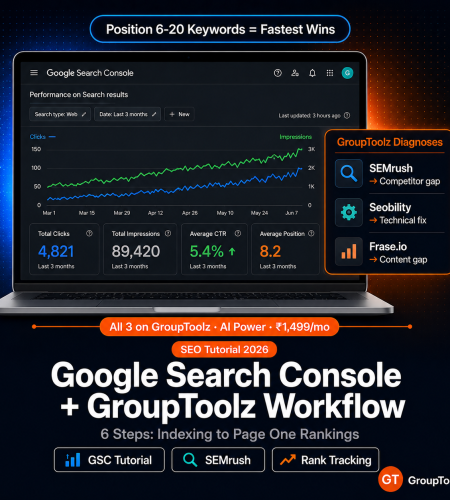
This google search console tutorial 2026 walks through the exact 6-step workflow I use to go from indexing problems to page-one rankings using GSC and GroupToolz together.
GSC tells you what Google sees. But it won’t tell you why your rankings dropped, or what to fix. That’s where GroupToolz comes in. Semrush, Seobility, Frase.io, Serpstat. Here’s the full gsc seo workflow I use, from getting pages indexed to hitting page one.
By GroupToolz Team Updated: May 27, 2026
Why GSC alone isn’t enough
I’ll say this upfront: Google Search Console is the best source of SEO data you can get. It’s ground truth. Actual impressions. Actual clicks. Actual positions. Actual indexing status. No third-party tool matches it because the data comes directly from Google.
But GSC only shows you what’s happening. It won’t explain why. You can see that a page dropped from position 5 to 12 last week. Okay, great, but was that a technical issue? A content gap? A lost backlink? A competitor who published a better page? GSC doesn’t say. You’re left guessing unless you bring in other tools.
That’s the google search console grouptoolz workflow in a nutshell. GSC shows the problem. Semrush tells you how tough the keyword is and who you’re competing against. Seobility and Woorank find the technical stuff that’s broken. Frase.io and NeuronWriter show you where your content falls short. Serpstat watches your positions day by day. You spot something in GSC, figure out what went wrong with GroupToolz, fix it, then check GSC again to confirm it worked.
GSC metrics decoded: what each one means and where it falls short
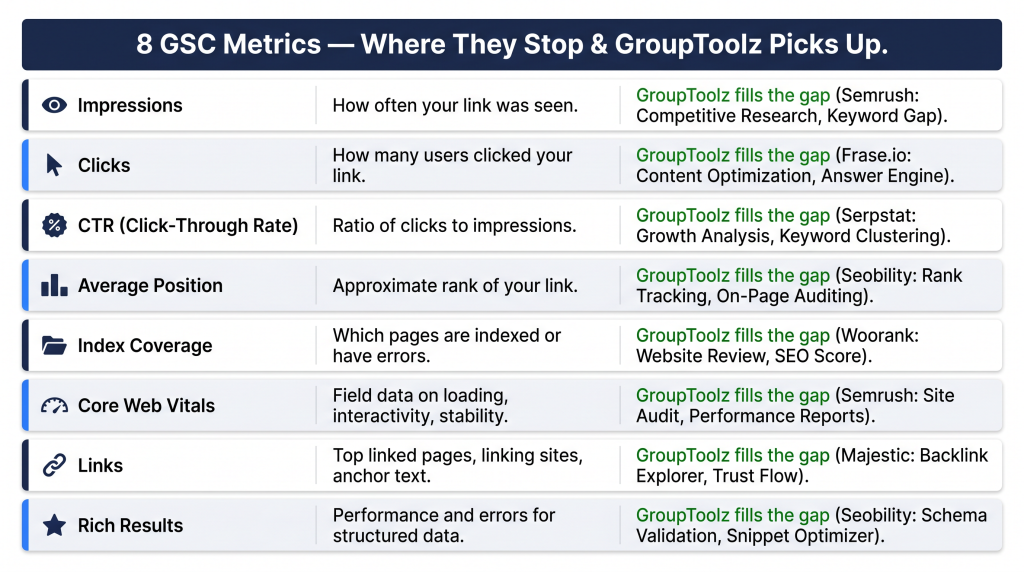
| GSC metric | What it tells you | What it won’t tell you | GroupToolz tool that fills the gap |
|---|---|---|---|
| Impressions | How often your page showed up in search | Why some pages get way more impressions than others | Semrush shows keyword volume and difficulty so you know which queries are worth chasing |
| Clicks | How many people actually clicked through | Why nobody’s clicking even though you’re ranking | Frase.io helps you study competitor titles and meta descriptions so you can write better ones |
| Average CTR | Percentage of impressions that became clicks | Whether your CTR is normal or terrible for your position | Semrush SERP feature data shows if featured snippets or AI Overviews are stealing the clicks |
| Average position | Where you rank on average across queries | What your competitors are doing that you aren’t | Serpstat does search console rank tracking with daily updates and competitor side-by-side |
| Index coverage | Which pages Google indexed and which it skipped | The exact technical reason for each exclusion | Seobility crawls your whole site and tells you exactly what’s wrong per page |
| Core Web Vitals | Real user LCP, CLS, INP scores from Chrome | How to actually fix failing scores (like, at the code level) | Woorank gives you a page-level audit with specific fix suggestions |
| Links report | Who links to you, which pages get the most links | Whether those links are actually good or spammy | Majestic scores link quality with Trust Flow and Citation Flow |
| Search appearance | Which rich results you qualify for | How to add or fix your structured data | Seobility validates schema across your whole site, not just one page at a time |
| How I think about it GSC is like the check engine light. It tells you something’s off. But it won’t tell you which part to replace. Semrush, Seobility, Frase, Serpstat? Those are the mechanic. I’ve tried running SEO with just GSC and honestly, you end up guessing at root causes way too often. You need both halves. |
The 6-step GSC + GroupToolz workflow
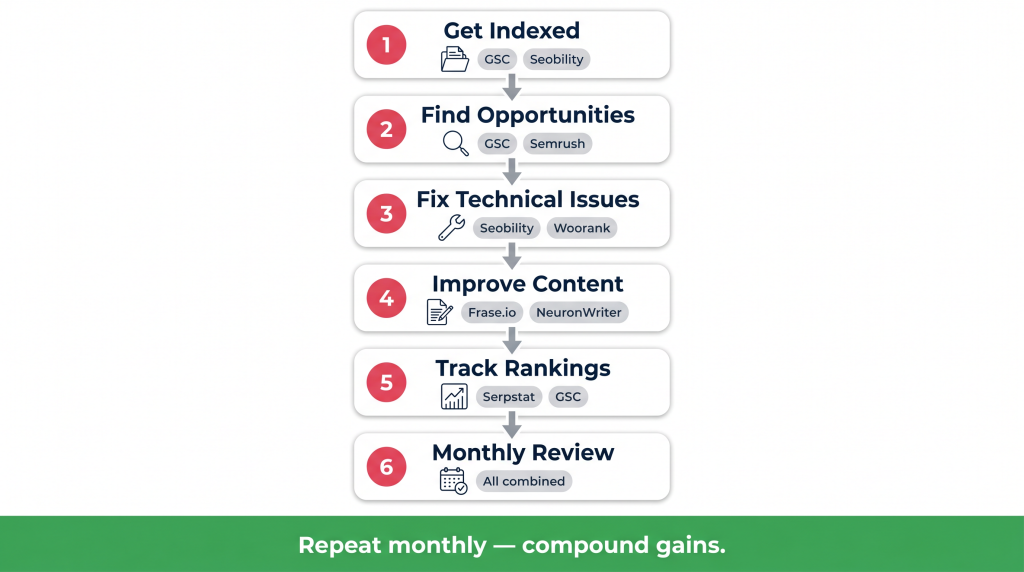
| Step 1 of 6 Get your pages indexed properly GSC Rank Math Seobility Before you think about rankings, make sure Google can actually find your pages. Sounds basic, but I’ve seen sites with 30% of their content sitting in the “crawled, not indexed” bucket and nobody noticed for months. Go to GSC > Pages (under Indexing). You’ll see every URL Google discovered and what happened to it: indexed, crawled but not indexed, excluded by noindex, duplicate, or blocked by robots.txt. This is where your indexing strategy gsc work starts. The three problems I run into most often: “Crawled, currently not indexed” means Google found the page but decided it wasn’t worth keeping (usually thin content or something too similar to another page). “Duplicate without user-selected canonical” means Google picked a different canonical than what you set. And “Blocked by robots.txt” is exactly what it sounds like: your robots file is preventing Google from crawling pages you actually want indexed. Rank Math’s Instant Indexing pushes pages to Google through the IndexNow API. It cuts the wait from days to hours. I’ve had pages show up within 2-3 hours using this on a site with decent authority. For the bigger picture, run a full crawl in Seobility (on GroupToolz Pro at ₹399/month). Seobility checks every single page for indexing issues, canonical conflicts, noindex tags, and robots.txt problems. GSC only shows a sample. Seobility shows everything. Fix what it flags, wait 7 days, then re-check GSC. This alone is worth the subscription if you’re running this workflow seriously. |
| Step 2 of 6 Find the opportunities hiding in your performance data GSC Semrush GSC > Performance > Search Results. This is probably the tab I spend the most time in. It shows clicks, impressions, CTR, and average position for every query and page. Filter by the last 28 days to see what’s current, or compare two periods to spot trends. Here’s where it gets interesting. Filter by position 6-20 and impressions above 100. These are your low-hanging fruit. You’re already on page 1 or the top of page 2, but you’re not getting clicks because you’re below position 5. That’s where CTR really drops off. A content update, a better title tag, or adding a few internal links from other pages on your site can push these up. I’ve done this on dozens of posts and it works within 30-60 days almost every time. This is the part of the gsc seo workflow that pays off fastest. Also filter by CTR below 2% with impressions above 500. These pages are showing up in search constantly but people keep scrolling past them. Nine times out of ten, the title tag or meta description is the problem. Either it doesn’t match what the searcher wants, or it’s just boring. Rewrite it. Test something more specific. Now take those keywords over to Semrush. Put them in the Keyword Magic Tool. GSC tells you what’s real, but Semrush adds the stuff GSC can’t: how hard the keyword actually is to rank for, what the real monthly search volume looks like, whether featured snippets or AI Overviews are sitting above the organic results, and who’s currently in the top 3 spots. That combo of GSC reality plus Semrush context is what turns a list of keywords into a plan you can actually execute. |
| Step 3 of 6 Fix what’s technically broken GSC Seobility Woorank GSC flags technical stuff in three places: Pages report (indexing errors), Core Web Vitals (page speed and experience), and the Experience tab (mobile usability). But here’s the annoying part. GSC tells you something’s broken. It doesn’t tell you how to fix it. And it only shows a sample, not every affected page. I run Seobility for the full picture. It crawls every page and checks for broken links, redirect chains, missing meta tags, duplicate content, canonical conflicts, slow pages, missing alt text, schema errors, mobile issues. The severity ranking is helpful. I fix the critical stuff first, then work through warnings when I have time. When GSC flags one specific page, I drop the URL into Woorank. It’s faster than running a full Seobility crawl when you just need to know what’s wrong with one URL. Woorank gives you the exact problems on that page with actual fix suggestions. I use Seobility for the bird’s-eye view, Woorank when I’m troubleshooting a single page. For Core Web Vitals specifically: GSC tells you which pages fail LCP, CLS, or INP. Seobility’s speed analysis tells you why. Usually it’s unoptimised images, render-blocking JavaScript, or slow server response. Find the root cause, fix that. Don’t just chase the score. |
| Step 4 of 6 Make the content actually competitive Frase.io NeuronWriter ChatGPT Plus So you’ve found underperforming pages in Steps 2 and 3. Now what? “Write better content” is advice I see everywhere, and it’s useless without a definition of “better.” Frase.io and NeuronWriter give you that definition with numbers. Frase.io does something specific that I find really useful. You enter your target keyword and it analyses the pages currently ranking in the top 10-20. It builds a map of what they all talk about. Questions they answer. Topics they cover. Entities they mention. Then you compare that map against your page. The gaps? That’s your update list. Topics the ranking pages all cover that yours doesn’t. NeuronWriter takes a different angle. Paste your content in with the keyword and it scores 0-100 based on how well you cover the same ground as the current top results. I shoot for 80+ before I publish anything. Below 60 and I know I’m missing something obvious. The google search console tutorial 2026 approach here is to use GSC to find the underperformers, then Frase and NeuronWriter to figure out what to add. ChatGPT Plus handles the actual writing when I need to expand thin sections. Feed it the gaps Frase found, tell it your audience and tone, and let it draft new paragraphs. Then score the result in NeuronWriter. If the score went up, publish it. If not, keep iterating. After updating, hit the URL Inspection tool in GSC and request re-indexing. Google usually picks up the changes within a few days. |
| Step 5 of 6 Watch your rankings day by day Serpstat GSC GSC shows “average position” but it’s an average across every query and every date in your selected range. It doesn’t show you that keyword X dropped from position 4 to position 9 on Tuesday. For that, you need dedicated search console rank tracking. Serpstat handles this. Set up tracking for your top 50-100 keywords (₹199/month as a single tool or included in the Advanced plan at ₹499/month on GroupToolz). It tracks position daily across organic results, local pack, and SERP features. I have alerts set for any drop of 5+ positions. When those fire, I investigate immediately. One thing I’ve learned the hard way: when Serpstat shows a drop, verify it in GSC before panicking. Check the Performance data for that specific query. If both tools confirm the drop, it’s real and needs attention. If Serpstat shows a drop but GSC impressions haven’t changed, the drop might be location-specific or just sampling variation. Give it another week. Monthly patterns are what really matter in this google search console grouptoolz workflow. Position 6-10 keywords creeping toward the top 5? Your content work is paying off. Position 1-3 keywords sliding to 4-8? Something changed. Maybe a competitor updated their page, maybe you have a new technical issue. New keywords appearing in GSC that you didn’t even target? That’s your topical authority growing. Good sign. |
| Step 6 of 6 The monthly review that keeps everything from falling apart GSC Semrush Seobility Serpstat Before you think about rankings, make sure Google can actually find your pages. Sounds basic, but I’ve seen sites with 30% of their content sitting in the “crawled, not indexed” bucket and nobody noticed for months. Go to GSC > Pages (under Indexing). You’ll see every URL Google discovered and what happened to it: indexed, crawled but not indexed, excluded by noindex, duplicate, or blocked by robots.txt. This is where your indexing strategy gsc work starts. The three problems I run into most often: “Crawled, currently not indexed” means Google found the page but decided it wasn’t worth keeping (usually thin content or something too similar to another page). “Duplicate without user-selected canonical” means Google picked a different canonical than what you set. And “Blocked by robots.txt” is exactly what it sounds like: your robots file is preventing Google from crawling pages you actually want indexed. Rank Math’s Instant Indexing pushes pages to Google through the IndexNow API. It cuts the wait from days to hours. I’ve had pages show up within 2-3 hours using this on a site with decent authority. For the bigger picture, run a full crawl in Seobility (on GroupToolz Pro at ₹399/month). Seobility checks every single page for indexing issues, canonical conflicts, noindex tags, and robots.txt problems. GSC only shows a sample. Seobility shows everything. Fix what it flags, wait 7 days, then re-check GSC. This alone is worth the subscription if you’re running this workflow seriously. |
The monthly SEO review checklist
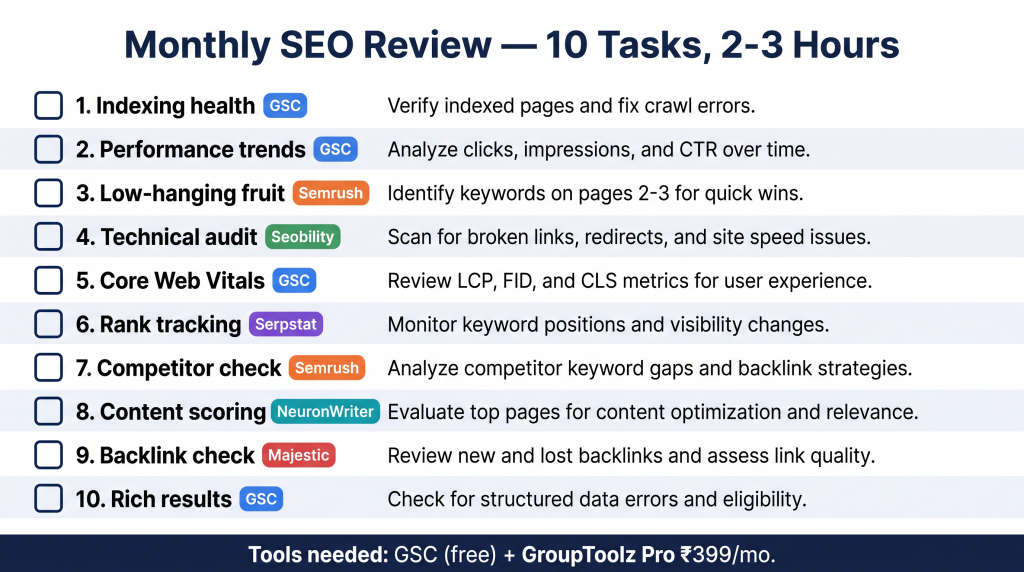
| Task | Tool | What to check | What to do about it |
|---|---|---|---|
| 1. Indexing health | GSC > Pages | New errors, “crawled not indexed” pages, canonical issues | Fix errors, request re-indexing |
| 2. Performance trends | GSC > Performance (28 day compare) | Clicks, impressions, CTR, position changes | Declining pages go through the content update process in Step 4 |
| 3. Low-hanging fruit | GSC > Performance (position 6-20, 100+ impressions) | Keywords almost on page 1 | Content updates, internal links, better title tags |
| 4. Technical audit | Seobility | Broken links, redirects, speed, schema errors | Critical errors first, then warnings when you have time |
| 5. Core Web Vitals | GSC > Experience | Pages failing LCP, CLS, or INP | Seobility speed analysis to find root cause, then fix it |
| 6. Rank tracking | Serpstat | Daily positions for top 50-100 keywords | 5+ position drops get investigated same week |
| 7. Competitor check | Semrush | Keywords competitors rank for that you don’t | New content or updates using Frase.io for gap analysis |
| 8. Content scoring | NeuronWriter | Updated content should hit 80+ | Below 60 means you’re missing semantic terms |
| 9. Backlink check | GSC Links + Majestic | New links gained, good links lost | Outreach to replace lost high-quality links |
| 10. Rich results | GSC > Enhancements | Schema errors, new eligibility | Fix errors, test with Rich Results Test, re-check in 7 days |
| Real talk on time investment This takes me 2-3 hours per month on a site with 50-200 pages. That’s maybe 40 minutes a week. Not nothing, but also not a big commitment. What I get for it: ranking drops caught before they turn into traffic losses, a steady pipeline of keywords that are almost on page 1, and technical stuff that doesn’t silently rot. Most problems I catch in this review get fixed before they hit revenue. The google search console tutorial 2026 approach works because you’re running it as a system, not treating SEO as a one-and-done project. |
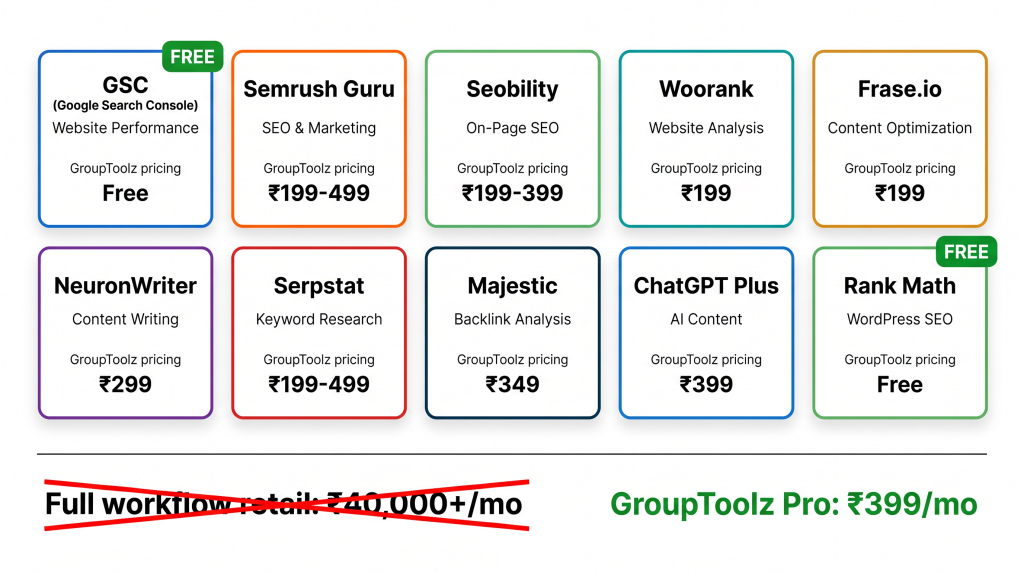
The GSC + GroupToolz toolkit
| Tool | What it does in this workflow | GroupToolz access |
|---|---|---|
| Google Search Console | Ground truth: clicks, impressions, CTR, position, indexing, Core Web Vitals, links | Free (Google) |
| Semrush (Guru) | Keyword difficulty, volume, competitor analysis, SERP features | Pro ₹399 / Advanced ₹499 / Single ₹199 |
| Seobility | Full-site crawl, speed analysis, schema checks | Pro ₹399 / Single ₹199 |
| Woorank | Quick page-level technical reports with fix suggestions | Single ₹199 |
| Frase.io | Content gap analysis, competitor topic mapping | Single ₹199 |
| NeuronWriter | Content scoring 0-100 against top rankers | Single ₹299 |
| Serpstat | Daily search console rank tracking, SERP monitoring | Advanced ₹499 / Single ₹199 |
| Majestic | Backlink quality, Trust Flow, Citation Flow | Single ₹349 |
| ChatGPT Plus | Drafting content updates, rewriting titles | Pro ₹399 / Single ₹399 |
| Rank Math | On-page SEO, schema, IndexNow API | Free WordPress plugin |
GSC is free. Rank Math is free. Every other tool in this google search console grouptoolz workflow is on GroupToolz starting at the Pro plan for ₹399/month or as single tools from ₹199. The Advanced plan at ₹499/month adds Serpstat, SpyFu, VidIQ, and about 40 more. Here’s the thing that still surprises me: the full workflow costs less per month than one Semrush Guru subscription at retail ($249.95/month). That’s kind of wild when you think about it.
Build the full GSC workflow
Semrush Guru + Seobility + Serpstat + Frase.io + NeuronWriter + ChatGPT Plus. Cover every gap GSC leaves open. From ₹399/month.
Frequently asked questions
Why do I need GroupToolz if Google Search Console is free?
Because GSC shows what’s happening but not why. You see a ranking drop. Okay, but was it technical? Content? A competitor? GSC won’t say. The google search console grouptoolz workflow adds the diagnostic layer: Semrush for keyword difficulty and competitors, Seobility for technical issues, Frase.io for content gaps, NeuronWriter for content scoring, Serpstat for daily rank tracking. GSC is the check engine light. GroupToolz tells you which part to replace.
How often should I check Google Search Console?
I do a quick weekly scan, maybe 5 minutes. Just checking for new indexing errors or big position swings. Then once a month, the full 10-step checklist (that takes 2-3 hours). And immediately after publishing new content or making big site changes, I request indexing through URL Inspection. The rhythm is weekly glance, monthly deep review.
What’s the best GroupToolz plan for this GSC workflow?
Pro at ₹399/month gets you the core gsc seo workflow: Semrush Guru, Seobility, ChatGPT Plus, Grammarly. That covers keyword research, technical auditing, and content writing. If you want Serpstat for search console rank tracking and SpyFu for competitor ads, upgrade to Advanced at ₹499/month. Or buy tools individually: Semrush ₹199, Seobility ₹199, Serpstat ₹199, Frase.io ₹199.
What are low-hanging fruit keywords in GSC?
Keywords where you rank positions 6-20 with at least 100 impressions per month. You’re already visible, but you’re not getting clicks because you’re below position 5 where CTR really drops off. A content update, stronger title tag, or some internal links can often push these up within 30-60 days. I’ve used this indexing strategy gsc approach on dozens of client sites and it’s consistently the fastest way to get traffic gains.
Can GSC data and Semrush data disagree?
Absolutely. And when they do, trust GSC for your own site’s data. GSC comes straight from Google. Semrush estimates based on sampling and algorithms. I use GSC for ground truth (what’s actually happening on my site) and Semrush for everything GSC can’t do (competitor intel, keyword difficulty, volume estimates). They’re different tools for different questions. Not competitors.
How long until I see results from this workflow?
Depends on what you’re fixing. Technical issues like indexing errors or canonical problems: Google re-processes those in 1-2 weeks. Content updates on pages that already rank: I usually see movement within 30-60 days on low-hanging fruit keywords. Brand new content going after competitive terms: 3-6 months, sometimes longer. The monthly review is what makes it compound. Each month builds on what you fixed the month before.
Related GroupToolz SEO guides
Want more SEO workflow guides? Find more at GroupToolz
Comments