
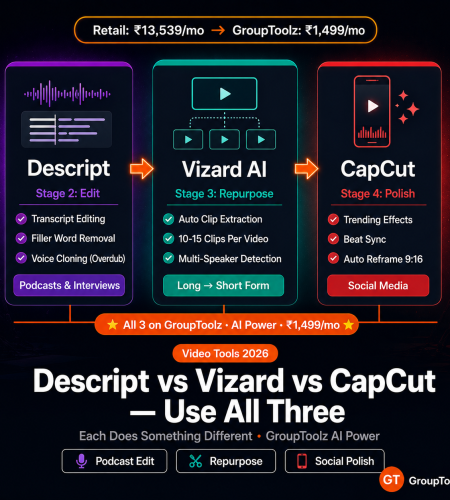
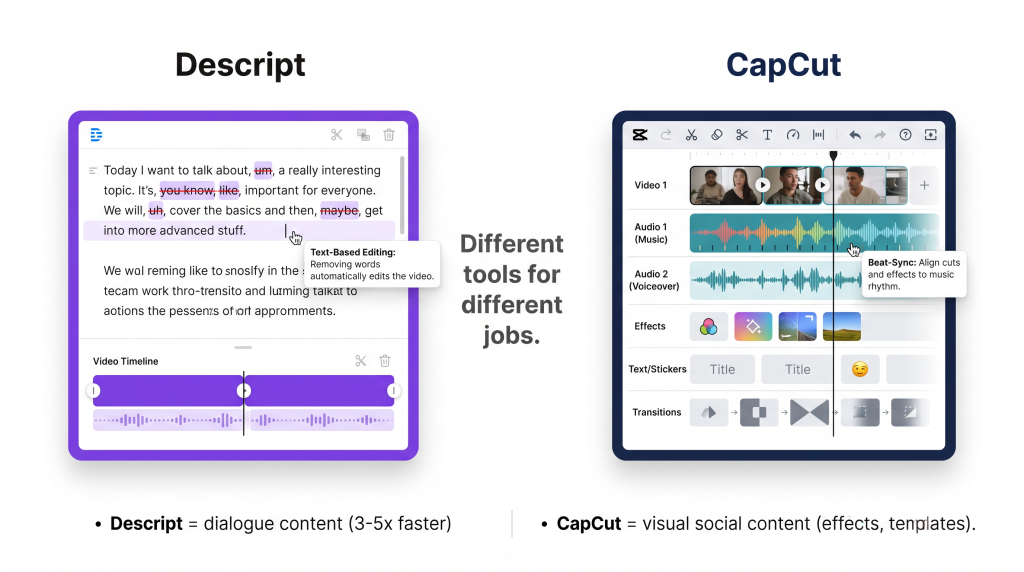
These are not competing tools. They do completely different things. Descript edits video by editing text. Vizard AI turns one long video into 15 short clips automatically. CapCut gives you timeline control with social media effects. I use all three on GroupToolz, and each one has a job the others cannot do. This is when to use which.
By GroupToolz Team Updated: May 25, 2026
The core difference in 30 seconds
Choosing between descript vs vizard ai vs capcut is the wrong question — you need all three, and here is why.
Descript = edit video by editing a text transcript. Delete a word in the text, and the video cut follows. Built for podcasters, educators, and interview-heavy content. The killer features are filler word removal, voice cloning (Overdub), and Studio Sound audio cleanup.
Vizard AI = upload a long video, and AI extracts the best short clips automatically. Built for repurposing. One 30-minute podcast becomes 10-15 platform-ready Shorts/Reels without you making a single manual cut. This vizard ai review section covers the details, but the headline: multi-speaker detection, team collaboration, batch output.
CapCut = traditional timeline editor with AI baked in. Built for social media creators. Trending effects, auto-captions, beat-sync, background removal, templates. The capcut vs descript debate misses the point because they solve different problems, which I will explain below.
They are not fighting over the same job. They handle different stages of the video production process. And on GroupToolz, you use all three together for ₹1,499/month instead of choosing one.
Feature-by-feature comparison
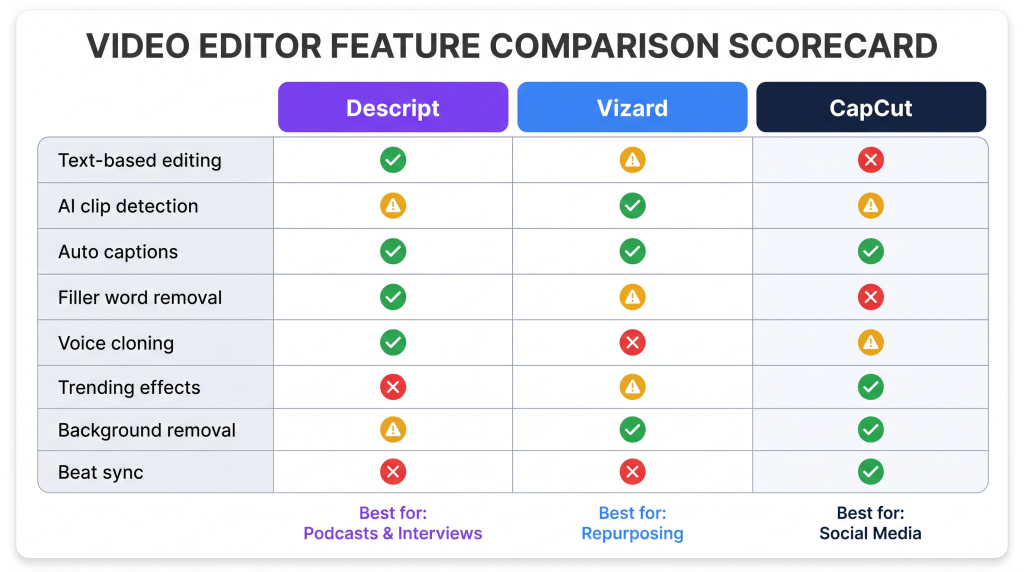
| Feature | Descript | Vizard AI | CapCut |
|---|---|---|---|
| Core workflow | Transcript-based editing | AI clip extraction from long video | Timeline editing with AI effects |
| Best content type | Podcasts, interviews, screencasts | Webinar/podcast repurposing | Social media (Reels, TikTok, Shorts) |
| Text-based editing | ✅ Best in class | ⚠️ Basic transcript editing | ❌ Timeline only |
| AI clip detection | ⚠️ Basic | ✅ Best in class | ❌ Manual selection |
| Auto captions | ✅ Accurate | ✅ Built-in | ✅ Best animated styles |
| Filler word removal | ✅ Auto (uhms, ahs, you knows) | ❌ | ❌ |
| Voice cloning | ✅ Overdub: correct audio by typing | ❌ | ❌ |
| Audio cleanup | ✅ Studio Sound (noise removal) | ❌ | ⚠️ Basic noise reduction |
| Trending effects | ❌ Minimal | ❌ Not focused | ✅ Massive library, TikTok trends |
| Background removal | ⚠️ Basic | ❌ | ✅ Excellent, no green screen |
| Beat sync | ❌ | ❌ | ✅ Auto-sync cuts to beats |
| Templates | ⚠️ Limited | ⚠️ Limited | ✅ Thousands, trend-updated |
| Multi-speaker detection | ✅ Speaker labels | ✅ Speaker-based clip selection | ❌ |
| Batch processing | ❌ Single project | ✅ Multiple clips per upload | ❌ Single project |
| Auto reframe (9:16) | ⚠️ Basic | ✅ Smart vertical framing | ✅ Excellent |
| Team collaboration | ✅ Shared projects | ✅ Approval workflows | ⚠️ Basic sharing |
| Mobile app | ❌ Desktop only | ❌ Web-based | ✅ Powerful mobile app |
| Retail price | $16-$24/mo | $20-$48/mo | Free / $9.99/mo Pro |
| GroupToolz plan | AI Power ₹1,499 | AI Power ₹1,499 | AI Power ₹1,499 |
When to use which
Descript: the podcast and interview editor
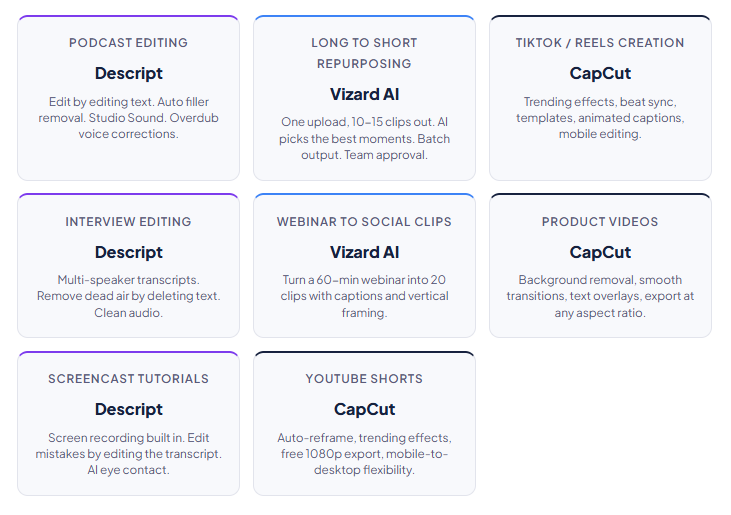
Descript’s core idea is simple: it turns video editing into word processing. Record or upload video. Descript transcribes it. You edit the transcript, delete words, rearrange paragraphs, remove filler, and the video automatically updates to match. If you have ever found timeline editing frustrating (scrubbing through waveforms, trying to find the exact frame), this is a completely different way to work. And once you get used to it, going back to timeline editing for dialogue content feels painfully slow.
Overdub is the feature that made me a Descript convert. Train it on your voice (takes a few minutes of sample audio), and Overdub generates new speech in your cloned voice from typed text. Say you made a factual error in your recording. Type the correction. Overdub replaces the audio with your AI voice saying the right thing. No re-recording. No scheduling another session. I use this at least once per episode now.
Studio Sound removes background noise, room echo, and audio imperfections in one click. If you record in a home office (no acoustic treatment, no isolation), Studio Sound is the difference between sounding amateur and sounding professional. It processes the entire track automatically. No fiddling with noise gates or EQ.
Filler word removal scans the transcript for “um,” “uh,” “you know,” “like,” “basically,” and removes them from both text and video in one click. A typical 30-minute podcast has 2-4 minutes of filler. Removing it tightens the pacing and the content feels more polished without anyone needing to re-record.
Retail pricing: Hobbyist at $16/month (1 hour transcription), Creator at $24/month (10 hours), Business at $50/month (unlimited). On GroupToolz AI Power at ₹1,499/month, Descript is included alongside CapCut, Vizard AI, and 147 other tools. That is where the descript vs vizard ai vs capcut debate stops being about “which one” and becomes “use all three.”
Vizard AI: the repurposing tool
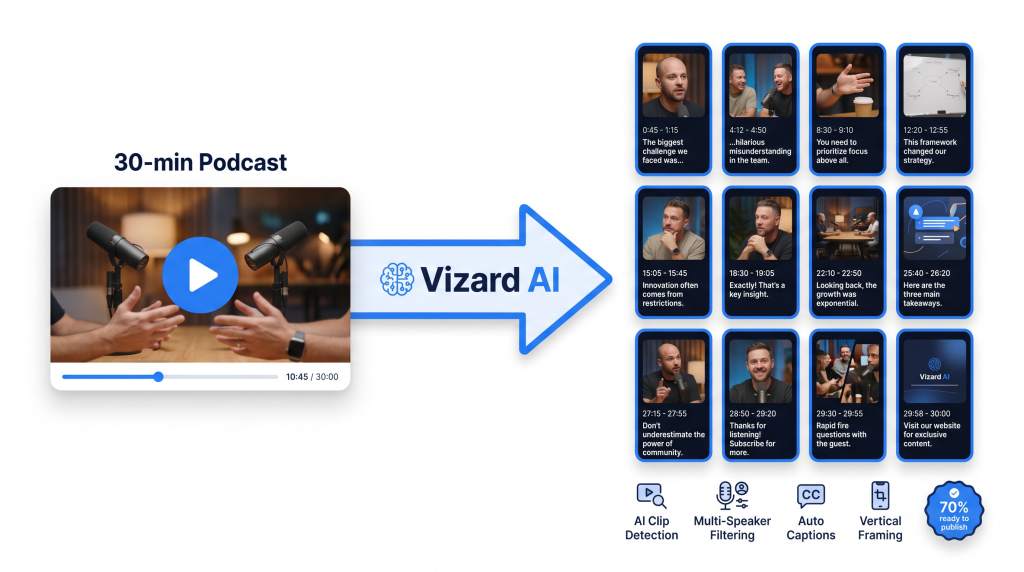
Vizard AI solves a problem that Descript and CapCut do not touch: taking one long video and automatically producing multiple short clips from it. Upload a 30-minute podcast episode, and Vizard analyses the content, finds the most engaging moments, and spits out 10-15 clips. Each one comes with captions, vertical framing, and platform-appropriate formatting. Based on my vizard ai review testing, it does this well enough that about 70% of the clips need only minor tweaks before publishing.
AI clip detection is what makes Vizard worth using. It identifies segments with strong hooks, complete ideas, emotional peaks, and quotable moments. It avoids clipping mid-sentence or mid-thought. The detection quality has gotten noticeably better in 2026. Most clips feel like intentional segments rather than random cuts, which was not always the case a year ago.
Multi-speaker detection identifies different speakers in interviews and podcast conversations. You can filter clips by speaker, which is useful for creating speaker-specific highlight reels from multi-host shows. “Show me every clip where the guest is talking” saves a lot of scrubbing.
Team collaboration with approval workflows makes this practical for agencies and content teams. An editor generates clips. A reviewer approves or rejects each one. Only approved clips get exported for publishing. When you are producing 50+ clips per week across multiple clients, that review step matters.
Retail pricing: Free (60 minutes/month), Creator at $20/month (120 minutes), Team at $48/month (600 minutes). On GroupToolz AI Power at ₹1,499/month, Vizard AI is included with no per-minute limits.
CapCut: the social media editor
CapCut is owned by ByteDance (TikTok’s parent company), and that lineage shows. Features are built for the platform where most short-form content lives. Trending effects, a TikTok-native audio library, format templates that match current platform aesthetics. CapCut stays current because the same company that sets the trends also builds this editor.
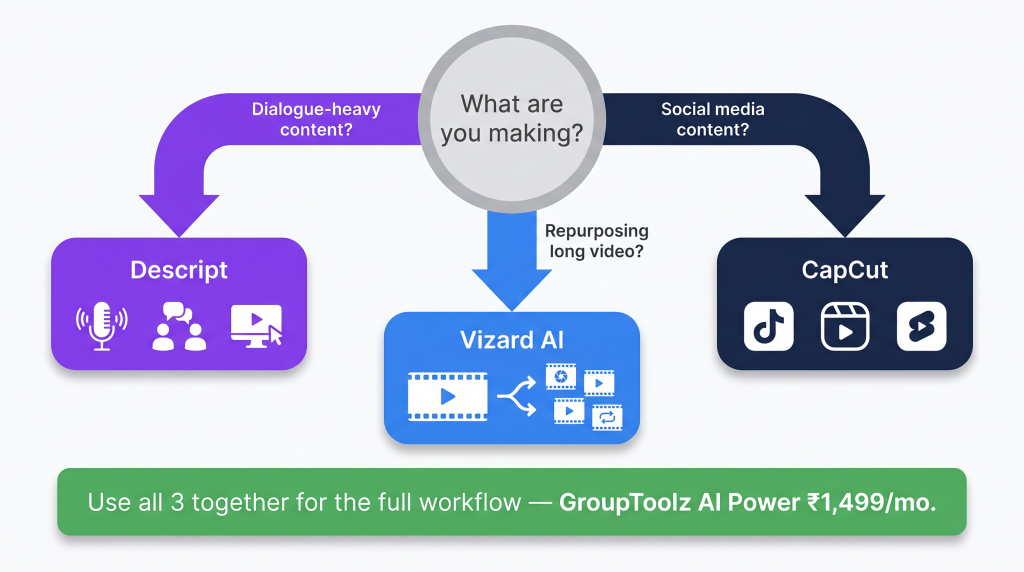
The free tier is remarkably full-featured. Auto-captions, background removal, AI effects, transitions, beat sync, text-to-speech, templates, 1080p export. All free. CapCut Pro at $9.99/month adds premium templates, removes watermarks, and unlocks some advanced features, but many creators never need to upgrade. The capcut vs descript question is not about which is “better.” It is about what you are making. CapCut wins at visual social content. Descript wins at dialogue-heavy content.
Beat sync automatically aligns your video cuts to the rhythm of background music. Select a track, apply beat sync, and CapCut generates a sequence of cuts that land on every beat. It creates that fast-paced, rhythm-driven editing style that dominates Instagram Reels and TikTok. Doing this manually takes 10-15 minutes of careful timing per clip. Beat sync does it in seconds.
Auto-reframe converts horizontal (16:9) video to vertical (9:16) by tracking the main subject and keeping them centred. If you film in landscape and need to post in portrait, auto-reframe eliminates the manual crop-and-pan work that used to eat 10-15 minutes per clip.
Note for Indian users: CapCut was banned in India in 2024 as part of broader Chinese app restrictions. Availability may vary. On GroupToolz, CapCut access is provided through the platform’s managed access system on the AI Power plan. Check current access status for your region.
The complete video editing workflow on GroupToolz
| Stage 1 Film or generate raw video Camera Kling Video Veo 3 Hailou AI Record yourself, do a screen recording, or generate AI video from text using Kling Video, Veo 3, or Hailou AI 2.3 (all on GroupToolz AI Power). This is your raw material. |
| Stage 2 Edit the long-form version Descript Upload to Descript. It transcribes the video. Remove filler words with one click. Clean the audio with Studio Sound. Edit the transcript to tighten pacing and cut mistakes. Export the polished long-form version for YouTube or your website. |
| Stage 3 Repurpose into short clips Vizard AI Upload the edited long-form video to Vizard AI. The AI analyses it and extracts 10-15 short clips. Review each one. Approve the winners. Export in 9:16 vertical format with captions. |
| Stage 4 Polish for social media CapCut Import the Vizard clips into CapCut. Add trending effects, beat-synced transitions, animated text overlays, and platform-specific formatting. This is the stage where functional clips become content people actually stop scrolling to watch. |
| Stage 5 Add captions and music Auto Subtitle Generator Submagic Epidemic Sounds Artlist IO Generate accurate subtitles with Auto Subtitle Generator. Add animated word-by-word captions with Submagic for TikTok and Reels. Layer royalty-free music from Epidemic Sounds or Artlist IO, both cleared for commercial use on all platforms. |
The video editing toolkit on GroupToolz
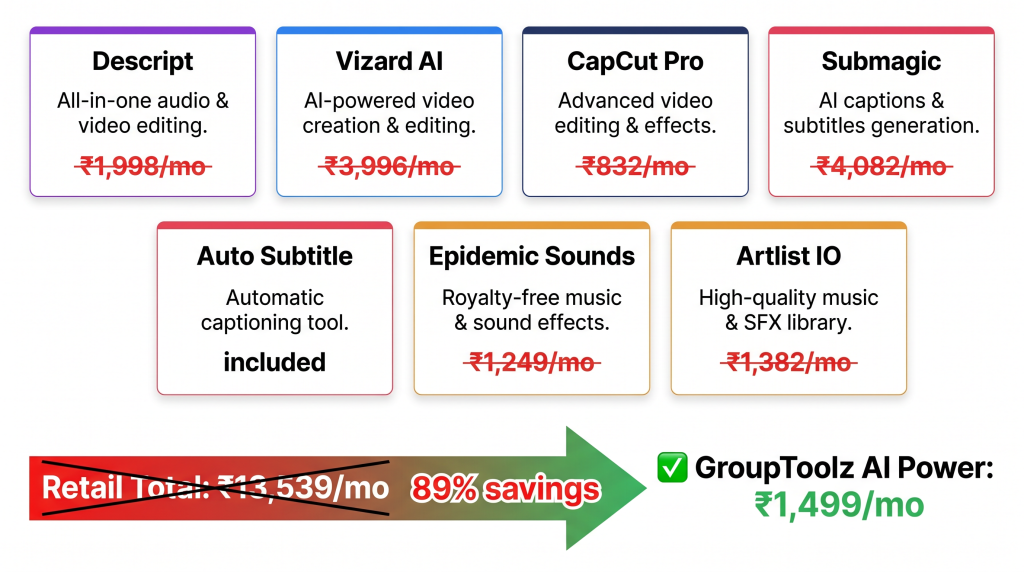
| Tool | Role in the workflow | Plan | Retail/month |
|---|---|---|---|
| Descript | Transcript editing, audio cleanup, voice cloning | AI Power ₹1,499 | ₹1,998 ($24 Creator) |
| Vizard AI | Long-to-short repurposing, automated clip detection | AI Power ₹1,499 | ₹3,996 ($48 Team) |
| CapCut Pro | Social media editing, effects, beat sync, templates | AI Power ₹1,499 | ₹832 ($9.99) |
| Auto Subtitle Gen | Accurate synced subtitles | AI Power ₹1,499 | Included |
| Submagic | Animated word-by-word captions | AI Power ₹1,499 | ₹4,082 ($49) |
| Epidemic Sounds | Royalty-free music, all-platform clearance | Ultimate ₹699 | ₹1,249 ($15) |
| Artlist IO | Premium music library + SFX | Ultimate ₹699 | ₹1,382 ($16.60) |
| Retail total (7 tools) | ₹13,539/mo | ||
| GroupToolz AI Power | All 7 + 143 more tools | ₹1,499/mo |
| The three-tool workflow Descript for long-form editing (podcasts, tutorials, interviews). Vizard AI for repurposing (one video becomes 10-15 clips). CapCut for the social polish (effects, transitions, trending formats). This covers every stage from raw footage to published social content. On GroupToolz AI Power at ₹1,499/month, all three come bundled with AI video generators (Kling, Veo 3), music licensing (Epidemic Sounds, Artlist), caption tools (Submagic, Auto Subtitle), and 140+ more. The retail cost of just these 7 video tools exceeds ₹13,539/month. This is the best ai video editor 2026 setup I have found for the price. |
All three editors. One subscription.
Descript + Vizard AI + CapCut + Submagic + Epidemic Sounds + Artlist + 144 more tools. The full video workflow. ₹1,499/month.
Frequently asked questions
Which is the best AI video editor overall?
There is no single best. It depends on what you are editing. Descript is best for podcast and interview editing (text-based). Vizard AI is best for repurposing long videos into short clips (automated). CapCut is best for social media creation (effects, templates, mobile). On GroupToolz, you get all three in the ai video editor comparison and use each one for what it does best.
Can CapCut replace Descript?
No. The capcut vs descript comparison comes down to workflow type. CapCut is a timeline editor where you scrub through footage and make cuts manually. Descript is a transcript editor where you edit text and the video follows. For dialogue content (podcasts, interviews, tutorials), Descript is 3-5x faster because you work with words instead of waveforms. CapCut is better for visual content that needs effects, transitions, and social formatting.
How many clips can Vizard AI extract from one video?
Typically 10-15 clips from a 30-minute video, depending on content density. A fast-paced interview with multiple topics might yield 20+. A single-topic tutorial might yield 5-8. In my vizard ai review testing, the AI prioritised clips with strong hooks, complete ideas, and natural start/end points. You review and approve each clip before export.
Is CapCut available in India?
CapCut was banned in India as part of Chinese app restrictions. Availability may vary by region. On GroupToolz, CapCut access is provided through the platform’s managed access system on the AI Power plan. Check current status for your area.
Which GroupToolz plan includes video editing tools?
Descript, Vizard AI, CapCut, Auto Subtitle Generator, and Submagic are all on the AI Power plan at ₹1,499/month. Epidemic Sounds and Artlist IO for music are on the Ultimate plan at ₹699/month. For the complete video editing workflow, AI Power covers everything you need.
What is Descript Overdub?
Overdub is Descript’s voice cloning feature. Train it on a sample of your voice, then generate new speech by typing text. It produces audio in your cloned voice. The main use: correcting mistakes in recorded audio without re-recording. Type the correct words, Overdub replaces the audio with your AI voice saying the correction. Available on Descript’s paid plans and included on GroupToolz AI Power.
Related GroupToolz video guides
Want more video editing guides and AI tool comparisons? Find more at GroupToolz
Comments