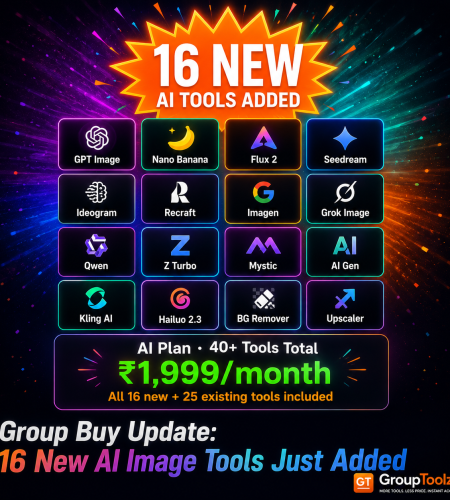
Big news for GroupToolz members. We just dropped 16 of the newest, most powerful AI image and video models into the AI Plan group buy. Flux 2, GPT Image, Nano Banana, Seedream, Ideogram, Recraft, Kling and more, the exact frontier models pros are using in 2026, now all under one ₹1,999 plan. Here’s every new tool, what it’s genuinely good at, and why having them together changes how you create.
By GroupToolz Team Updated: July 2026
| 16 New AI tools added | 40+ AI tools in the plan | ₹1,999 AI Plan, all included | 2026 Latest frontier models |
Here’s the thing about AI image generation in 2026. No single model wins everything. GPT Image tops the leaderboards but runs slow. Nano Banana nails editing and faces. Seedream owns 4K and product shots. Ideogram is the king of text in images. Recraft does vector and brand work nobody else touches. Flux 2 leads on raw photorealism. The pros don’t pick one, they use whichever model fits the job in front of them.
The catch used to be cost. To use all of these, you’d stack five, six, seven separate subscriptions, each billed in dollars, each its own login and credit system. That’s exactly what we just fixed. GroupToolz has added 16 of these frontier models to the AI Plan group buy, so members now get the whole lineup in one place for ₹1,999. Let me walk you through every new tool and what it actually does.
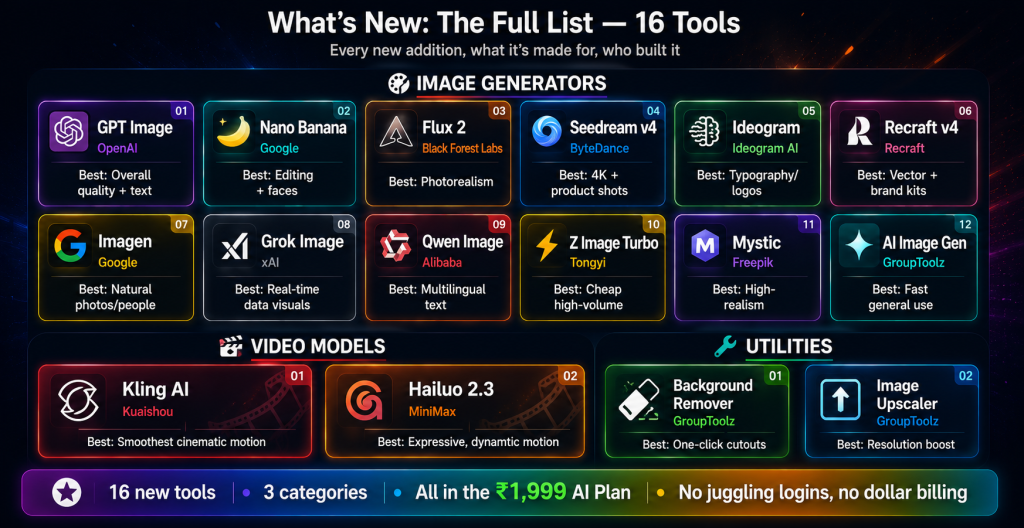
What’s New: The Full List
These 16 tools are live right now in the AI Plan. Here’s the quick view before I break each one down.
| Tool | Type | Best at |
|---|---|---|
| GPT Image | Image | Overall quality, text rendering, complex prompts |
| Nano Banana | Image | Editing, faces, character consistency |
| Flux 2 | Image | Photorealism, color precision |
| Seedream v4 | Image | 4K, product shots, text |
| Ideogram | Image | Typography, logos, text-heavy design |
| Recraft v4 | Image | Vector, brand kits, design |
| Imagen | Image | Natural photos, lifelike people |
| Grok Image | Image | Real-time data in visuals |
| Qwen Image | Image | Open-source value, multilingual text |
| Z Image Turbo | Image | Ultra-cheap volume, drafts, thumbnails |
| Mystic | Image | High-realism generation |
| AI Image Generator | Image | Fast general-purpose creation |
| Kling AI | Video | Smoothest AI video motion |
| Hailuo 2.3 | Video | Expressive AI video generation |
| Background Remover | Utility | Clean cut-outs in one click |
| Image Upscaler | Utility | Boost resolution and detail |
The New Image Generators, One by One
| GPT Image OpenAI OpenAI’s image model, and currently the one topping both the generation and editing leaderboards. It’s brilliant at complex prompts, world knowledge, and rendering text accurately inside images, three things most models still fumble. It’s not the fastest, because it reasons before it draws, but the quality is hard to beat. Best for: overall quality, text in images, tricky multi-element prompts. |
| Nano Banana Google (Gemini) Google’s editing powerhouse, built on Gemini. It changed what people expect from “change just this one thing” prompts, keeping a character’s face consistent across edits, swapping backgrounds cleanly, adjusting lighting without redrawing the whole image. It broke records on the community leaderboards for a reason. Best for: photo editing, character consistency, natural-language edits. |
| Flux 2 Black Forest Labs The photorealism leader. Flux 2 is a big jump over the original Flux, with sharper detail, better prompt following, and precise colour control that brand work depends on. It also handles multiple reference images well, so you can keep a look consistent across a whole set of generations. Best for: photorealistic images, colour-accurate brand work. |
| Seedream v4 ByteDance The dark horse that became a default for commercial work. Seedream renders text better than almost anything, outputs up to 4K natively, and nails product and packaging shots. It’s fast and cost-efficient too, which is why e-commerce and marketing folks love it. Best for: product shots, 4K output, posters and packaging with text. |
| Ideogram Ideogram AI The typography specialist. When the whole point of an image is text, wordmarks, lettering, signage, logos, Ideogram produces the cleanest results more often than anything else. If you’ve ever watched other generators turn text into gibberish, this is the fix. Best for: overall quality, text in images, tricky multi-element prompts. |
| Recraft v4 Recraft The designer’s model. Recraft does something rare, native vector output, so you get SVG-friendly art instead of raster you have to convert. It supports brand kits and colour palettes, which makes it the pick for anyone building consistent brand assets and web design work. Best for: vector art, logos, brand systems, design-led work. |
| Imagen Google’s Imagen family is known for natural, lifelike photos, especially people. Faces and skin look real rather than plastic, and lifestyle scenes come out believable. When you need a shot that looks like it came from a camera, not an AI, Imagen is a strong pick. Best for: natural-looking people, lifestyle and lifelike photos. |
| Qwen Image Alibaba Alibaba’s open-source model, built on a language-model architecture that gives it strong text rendering, including multilingual text, and precise editing. It’s the open-weight value pick, solid quality without the premium price, and good with prompts that involve labels or spatial detail. Best for: multilingual text, open-source flexibility, value. |
| Z Image Turbo Tongyi / Wan team The efficiency play. Z Image Turbo costs a fraction of the premium models per image, so you can generate at huge volume for very little. Quality is genuinely usable for thumbnails, drafts, mood boards and bulk work where cost per image matters more than perfection. Best for: high-volume generation, drafts, thumbnails. |
| Mystic Freepik A high-realism generator known for detailed, photographic-quality output. It’s a strong all-rounder for polished visuals when you want images that look refined straight out of the box. Best for: high-realism, polished general images. |
| AI Image Generator GroupToolz A fast, general-purpose image generator for quick everyday creation. When you just need a solid image without picking a specialist model, this is the simple starting point. Best for: quick, general-purpose image creation. |
The New Video Tools
| Kling AI Kuaishou Widely rated for the smoothest motion in AI video. Kling handles physics, camera moves and image-to-video beautifully, turning a still into believable motion. It’s one of the most popular video models going, and now it’s in the plan. We’ve got a full Kling AI group buy guide if you want the deep dive. Best for: smooth cinematic AI video, image-to-video. |
| Hailuo 2.3 MiniMax MiniMax’s video model, known for expressive, dynamic motion and strong prompt following. It’s a great complement to Kling, giving you a second video engine to try when you want a different feel for a clip. Best for: expressive AI video, motion variety. |
The New Utility Tools
| Background Remover GroupToolz One-click background removal for clean cut-outs. Drop in an image and get a transparent-background version ready for product listings, thumbnails or composites, without fiddling in a photo editor. Best for: product cut-outs, transparent backgrounds. |
| Image Upscaler GroupToolz Boost any image’s resolution and detail. Take a small or soft image and upscale it cleanly for print, large displays or crisp thumbnails. It pairs perfectly with the generators, make an image, then upscale it to final quality. Best for: upscaling, sharpening, print-ready output. |
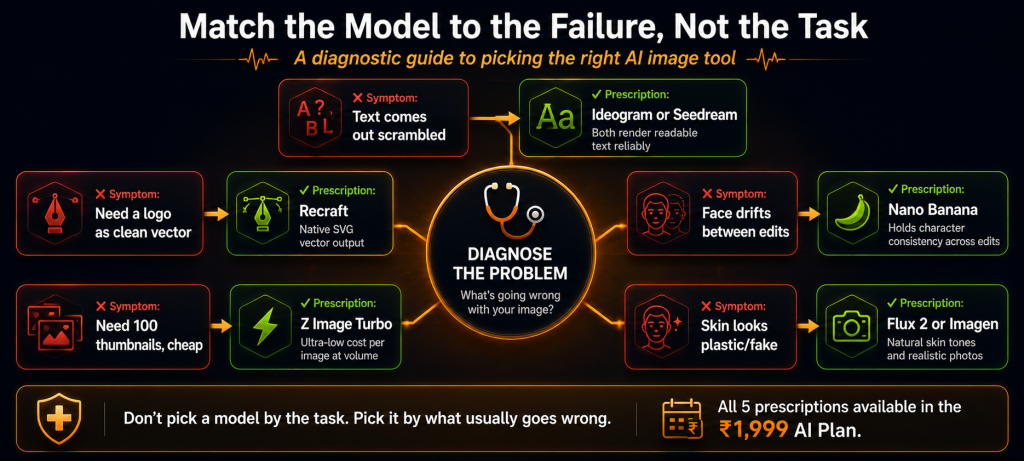
| Why having all of them together is the real win This is the part that matters. In 2026, the smart workflow isn’t loyalty to one model, it’s routing each job to the model that does it best. Text scrambled? Switch to Ideogram or Seedream. Face drifting between edits? Nano Banana. Skin looks plastic? Flux 2 or Imagen. Need a logo in vector? Recraft. Bulk thumbnails on a budget? Z Image Turbo. Owning all of them in one group buy means you never compromise on a job because you only pay for one model. You just pick the right tool and go. |
A Real Workflow Using the New Tools
Let me show you how these fit together on an actual job, because the magic is in combining them, not using any one alone. Say you’re making a product ad for a client, an image plus a short video clip.
You’d start in Seedream v4 or GPT Image to generate the hero product shot, since both handle products and text well and Seedream outputs 4K. If the client’s logo or a tagline needs to sit cleanly in the image, you’d switch to Ideogram, which renders text without turning it into gibberish. Need the product on a transparent background for a listing variant? Background Remover, one click. Want the final image razor-sharp for a billboard? Image Upscaler. Then, to bring it to life, you drop the still into Kling AI and animate it into a smooth video clip, or try Hailuo 2.3 for a different motion feel.
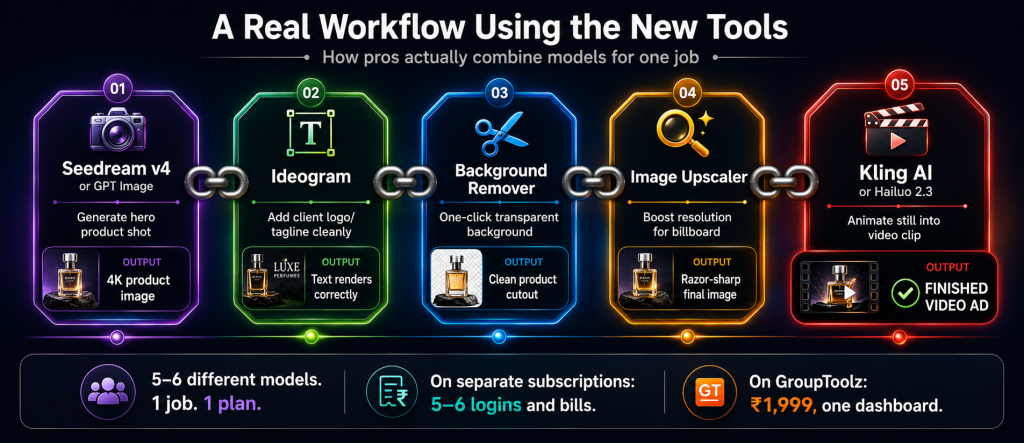
That’s five or six different models in a single job, each doing the one thing it’s best at. On separate subscriptions, that workflow means five or six logins and bills. In the GroupToolz group buy, it’s one plan, one dashboard, one rupee price. You move between tools without thinking about cost, which is exactly how professional AI work is meant to flow in 2026.
| Match the model to the failure, not the task Here’s a pro habit worth stealing. Don’t pick a model by the task, pick it by what usually goes wrong. If your text keeps coming out scrambled, reach for Ideogram or Seedream. If a face drifts between edits, Nano Banana holds it steady. If skin looks plastic and fake, Flux 2 or Imagen fix it. If you need a hundred rough thumbnails cheaply, Z Image Turbo. If you need a logo as clean vector, Recraft. Having all of them in one group buy means you can always swap to the model that solves your specific problem, instead of fighting one model to do everything. |
How These Compare to the Older Generation
If you’ve been using AI images for a while, you’ll notice how far these 2026 models have come. The older generation, the first waves of Stable Diffusion and early DALL-E, could make impressive pictures, but they struggled with the practical stuff, text came out garbled, faces morphed between generations, and getting a specific brand colour was a gamble.
This new batch fixes exactly those pain points. GPT Image and Seedream render readable text. Nano Banana keeps a face consistent across a dozen edits. Flux 2 hits precise hex colours for brand work. Recraft outputs actual vectors. These aren’t just prettier, they’re usable in real production in ways the older models weren’t. That’s why we prioritised adding them to the group buy, they’re the tools that turn AI from a novelty into a dependable part of your workflow.
Picking the Right Model for Common Jobs
To make it practical, here’s a quick guide to which of the new tools to reach for on the jobs people do most.
| The job | Reach for… |
|---|---|
| YouTube thumbnail | Ideogram (for the text) or Z Image Turbo (for cheap volume) |
| Product photo | Seedream v4 or Flux 2, then Background Remover |
| Logo or wordmark | Ideogram for text, Recraft for vector output |
| Realistic person | Imagen or Nano Banana |
| Editing an existing image | Nano Banana for consistent edits |
| Brand asset set | Recraft (brand kits) or Flux 2 (colour precision) |
| Bulk drafts / mood boards | Z Image Turbo for cost efficiency |
| Short video clip | Kling AI or Hailuo 2.3 |
| Upscaling for print | Image Upscaler |
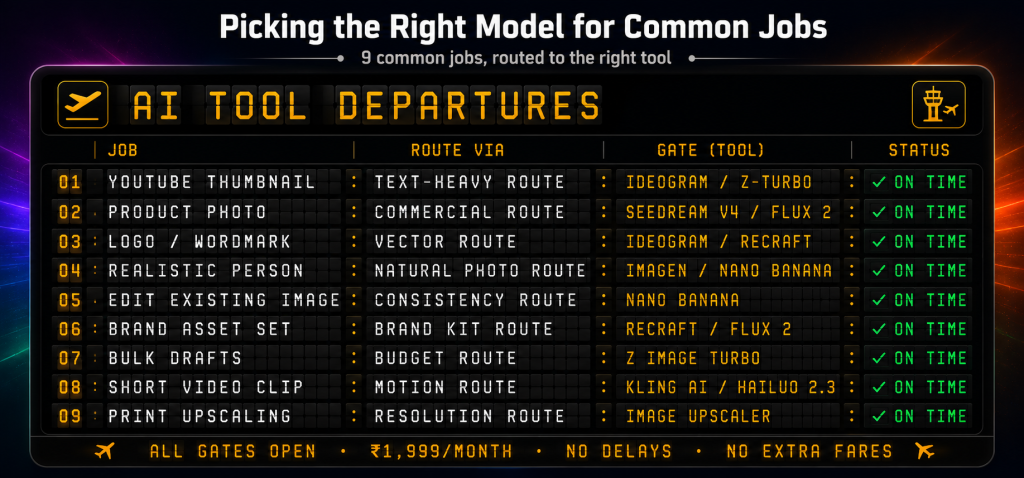
Keep this handy and you’ll get more out of the group buy from day one. The whole point of having 16 tools rather than one is that you’re never stuck, there’s always a model suited to the exact job in front of you, and it’s already paid for.
What This Would Cost You Separately
Here’s why bundling these into one group buy matters so much. Bought individually, these models charge per generation or per subscription, mostly in dollars, and it stacks up fast. A ChatGPT Plus plan for GPT Image, a Gemini plan for Nano Banana and Imagen, credits for Flux, Seedream, Ideogram, Recraft, a Kling plan for video, and on it goes. Run them all seriously and you’re easily past ₹15,000 to ₹20,000 a month across separate services.
The GroupToolz AI Plan folds all 16 new tools, plus the 25-plus AI tools already in the plan, into one ₹1,999 rupee price. That’s the whole frontier of 2026 image and video AI in a single group buy, no juggling logins, no dollar billing, no credit systems to track across seven platforms. You get the lot, and you pay in rupees.
| All 16 new tools + 25 more ₹1,999 40+ AI tools in one plan · every top 2026 image and video model · billed in INR · no auto-renewal · no juggling subscriptions |
Who These New Tools Are For
| You are a… | And the new tools give you… |
|---|---|
| Content creator | Every image style, plus AI video with Kling and Hailuo, in one place |
| E-commerce seller | Seedream for product shots, Background Remover for clean listings, Upscaler for print |
| Designer | Recraft for vector and brand kits, Ideogram for typography, Flux 2 for photorealism |
| Marketer | GPT Image and Seedream for text-heavy ad creative, all model choices covered |
| YouTuber | Ideogram and Z Image Turbo for thumbnails, Kling for intros and b-roll |
| Student / learner | Every frontier model to experiment with, at a rupee price |
How to Access the New Tools
If you’re already on the GroupToolz AI Plan, the 16 new tools are live in your dashboard right now, no extra charge, just log in and use them. If you’re not on the AI Plan yet, you grab it for ₹1,999 a month, pay in rupees through a UPI app, and you get instant access to all 40-plus AI tools, the new arrivals included.
From there it’s simple. Open the tool you want from the dashboard, write your prompt or upload your image, and generate. Because everything sits in one group buy, you can hop between models freely, draft a concept in Z Image Turbo, finalise it in Flux 2, fix the text with Ideogram, remove the background, upscale it, and animate it in Kling, all without leaving the plan or paying a second bill.
Questions People Actually Ask
What new tools were added to the group buy?
GroupToolz added 16 new AI tools to the AI Plan group buy: image generators GPT Image, Nano Banana, Flux 2, Seedream v4, Ideogram, Recraft v4, Imagen, Grok Image, Qwen Image, Z Image Turbo, Mystic and AI Image Generator; video tools Kling AI and Hailuo 2.3; and utilities Background Remover and Image Upscaler. All are live in the ₹1,999 plan now.
Do I pay extra for the new tools?
No. If you’re already on the GroupToolz AI Plan, all 16 new tools are included at no extra cost, just log in and use them. If you’re not on it yet, the whole AI Plan group buy, now 40+ tools including the new arrivals, is ₹1,999 a month, billed in rupees.
Which new AI image tool is the best?
There’s no single best, that’s the point of having them all. GPT Image leads on overall quality and text, Nano Banana on editing and faces, Flux 2 on photorealism, Seedream on 4K and product shots, Ideogram on typography, and Recraft on vector and brand work. The smart move is matching the model to each job, which is why having them in one group buy is so useful.
Can I generate AI video too?
Yes. The update added two video models, Kling AI, rated for the smoothest motion in AI video, and Hailuo 2.3 from MiniMax for expressive, dynamic clips. Both are in the AI Plan group buy alongside the image generators, so you can create stills and video from one plan.
How much would these cost bought separately?
Run all these models seriously through their own subscriptions and credits, mostly billed in dollars, and you’d easily spend ₹15,000 to ₹20,000 a month across many platforms. The GroupToolz AI Plan bundles all 16 new tools plus 25+ more into one ₹1,999 group buy, in rupees, with no juggling of separate logins or credit systems.
Can I pay in Indian Rupees?
Yes. The AI Plan group buy is ₹1,999, billed in INR via Razorpay, Stripe and UPI apps like PhonePe, GPay and Paytm. There’s no USD billing, no international card and no forex, unlike buying each AI tool directly, which charges in dollars. It also doesn’t auto-renew.
The Bottom Line
This update is a big one for anyone using GroupToolz for creative work. AI image and video generation moved fast in 2026, and the frontier is now spread across a dozen specialist models, each owned by a different company, each with its own bill. Keeping up used to mean paying for all of them separately, in dollars, across a pile of logins. That’s a lot of friction and a lot of money.
Now the whole frontier sits in one group buy. Sixteen new tools, the best image generators and video models of the year, plus the 25-plus AI tools already in the plan, all for ₹1,999 in rupees. Whether you’re making thumbnails, product shots, brand assets, logos or short videos, the right model is already there and already paid for. That’s the case in a sentence: instead of chasing subscriptions, you get the entire 2026 AI image toolkit in one place, and you just create.
Comments