
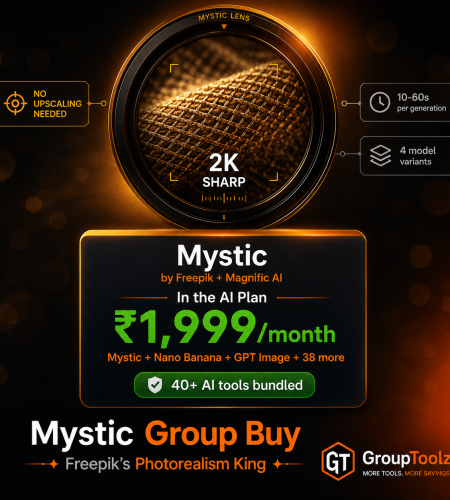
Mystic by Freepik is one of the most realistic AI image generators ever made, sharp enough that faces, skin and hands look like a real photo, no upscaling needed. Getting it direct means Freepik’s plans and dollar billing. A Mystic group buy gets it inside the GroupToolz AI Plan for ₹1,999, next to 40+ other AI tools. Here’s what Mystic does, exactly how to use it step by step, and the smart way to get it in India.
By GroupToolz Team Updated: July 2026
| 2K Full HD output | 4 Mystic models | 10-60s Per generation | ₹1,999 In the AI Plan |
Let me start with why Mystic is such a big deal. Built by Freepik together with Magnific AI, Mystic is a Flux-based image model that got labelled the most realistic AI image generator around, with reviewers saying it beat Midjourney on pure photorealism. The detail is the thing, skin texture, individual strands of hair, hands that actually look right, all rendered in sharp 2K without needing a separate upscaling step. It was curated by professional photographers, VFX artists and designers, and it shows.
The problem is access. Getting Mystic direct means a Freepik plan billed in dollars with a credit system, which is a hassle for creators in India. That’s exactly why a Mystic group buy makes sense, and why GroupToolz put it inside the AI Plan. In this guide I’ll walk you through what Mystic does, its four models, exactly how to use it step by step, and why getting it through a Mystic group buy is the smart move.
What Is Mystic?
Mystic is Freepik’s in-house AI image generation model, created with Magnific AI. Under the hood it’s a workflow built on Flux, one of the best foundational image models going, fine-tuned by a team of photographers and digital artists for maximum realism. You type a text prompt describing the image you want, or add a reference image, and Mystic generates a photorealistic result in full HD, usually in 10 to 60 seconds.
What sets it apart is realism. Where a lot of models still produce that plasticky, obviously-AI look, Mystic renders faces, skin, hands and text sharply enough to pass as a real photograph. It’s especially strong at portraits, product shots, and fantasy or sci-fi scenes that still look believable. That specific strength, photorealism without extra editing, is why a Mystic group buy is worth having in your toolkit, and it’s the reason Mystic built such a following so fast.
The Four Mystic Models
Mystic isn’t one model, it’s a small family, and through the AI Plan you get to pick between them depending on what you’re making. Here’s what each does.
| Model | Speed | Best for |
|---|---|---|
| Mystic 1.0 | ~18s, fastest | Quick, reliable photorealistic images, everyday use |
| Mystic 2.5 | ~22s | Higher-quality generation, the newer core model |
| Mystic 2.5 Flexible | ~68s | More creative freedom and variation, worth the wait |
| Mystic 2.5 Fluid | ~22s | Smooth, natural results with strong prompt adherence |
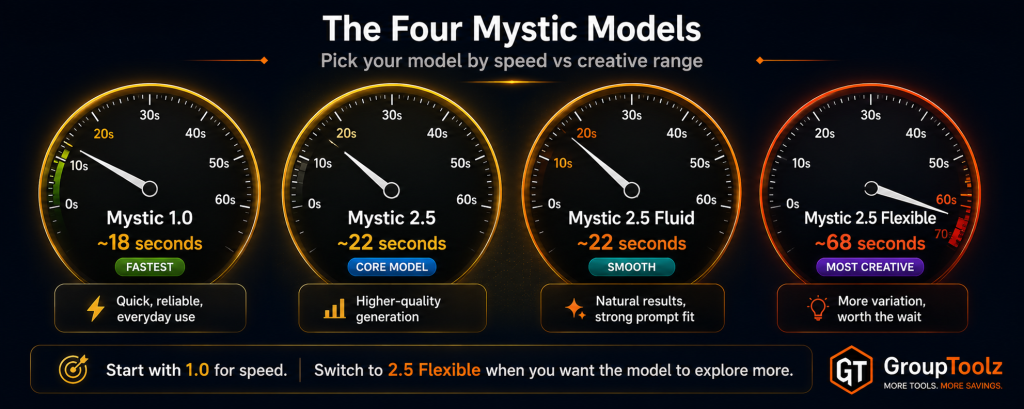
Most people start with Mystic 1.0 because it’s the fastest and gives clean, realistic results. When you want more quality or creative range, you switch to the 2.5 models, Flexible when you want the model to explore more, Fluid when you want smooth, faithful output. Having all four in a Mystic group buy means you match the model to the job instead of being stuck with one.
How to Use Mystic, Step by Step
Here’s the part that matters if you’re new to it. Using Mystic through the GroupToolz AI Plan is simple, and the interface walks you through it. Here’s the full flow.
1. Write your prompt
In the “Describe what you want to create” box, type a detailed prompt. Be specific about the subject, scene, lighting and mood. Instead of “a woman in a market,” try “an Indian street market at golden hour, a woman in a green kurta standing and smiling, flowers in the foreground, warm light.” The more detail, the better Mystic’s result.
2. Choose your model
From the model dropdown, pick Mystic 1.0, 2.5, 2.5 Flexible or 2.5 Fluid. Each shows an estimated time, so you can balance speed against the quality or creativity you want. Mystic 1.0 for fast everyday shots, the 2.5 models when you want more.
3. Set the aspect ratio
Pick the size and shape from the ratio dropdown. Mystic supports 1:1 for square, 16:9 and 9:16 for wide and vertical, plus 2:3, 3:4, 1:2, 2:1, 4:5, 3:2 and 4:3. Choose 9:16 for reels and stories, 16:9 for YouTube or banners, 1:1 for Instagram posts.
4. Add reference images (optional)
Open the settings and you can drop or click to add up to three reference images, each up to 5MB. These guide the style of your generation, so if you want a particular look, colour palette or composition, upload a reference and Mystic will lean towards it. Great for staying on-brand.
5. Generate
Hit the send button and Mystic renders your image, usually in 10 to 60 seconds depending on the model. Your result appears in the output view, ready to use.
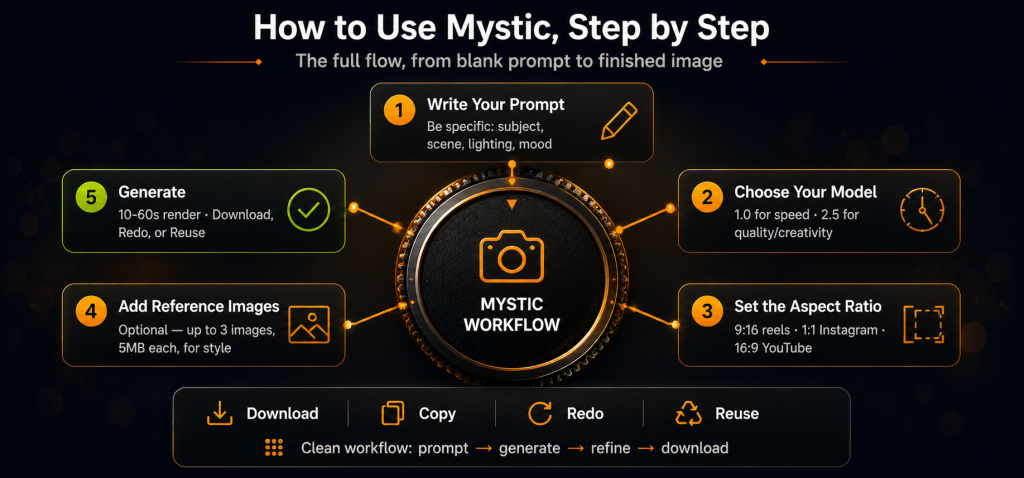
| What the output view gives you Once Mystic generates an image, the output view shows it with a full set of actions under each result. You get Download to save the image, Copy to grab it quickly, Redo to generate a fresh version of the same prompt, Reuse to load that prompt and settings back into the box for tweaking, and Delete to clear it. Each image is also tagged with the model and aspect ratio you used, so you can see exactly how it was made. It’s a clean, no-fuss workflow, prompt, generate, refine, download. |
What Is a Mystic Group Buy?
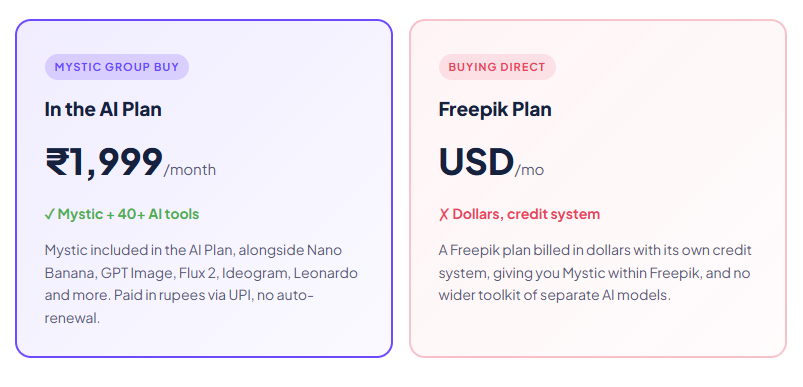
A Mystic group buy is where access to Mystic is shared through a provider, so you don’t pay Freepik’s full solo price in dollars. Instead of a standalone Freepik subscription billed in USD with its own credit system, a Mystic group buy through GroupToolz gets you the tool inside the AI Plan for ₹1,999 a month, paid in rupees, alongside 40-plus other AI tools.
That’s the key point: with GroupToolz, Mystic isn’t sold as a lonely single subscription. It comes as part of the AI Plan, so the same ₹1,999 that gets you Mystic also gets you Nano Banana, GPT Image, Flux 2, Ideogram, Leonardo, Gamma and a whole stack of image and video tools. A Mystic group buy this way isn’t just cheaper access to one model, it’s Mystic plus an entire AI toolkit in one rupee-priced plan.
| Mystic comes inside the AI Plan Here’s how the access works, plainly. Mystic is one of the tools included in the GroupToolz AI Plan at ₹1,999 a month. You don’t buy it as a separate subscription and you don’t deal with USD billing. You get into the AI Plan, open Mystic in your dashboard, and start generating photorealistic images with the full model choice, aspect ratios and reference-image features. That’s the whole appeal of a Mystic group buy through GroupToolz, one rupee plan, Mystic included, plus everything else. |
Group Buy vs Buying Mystic Direct
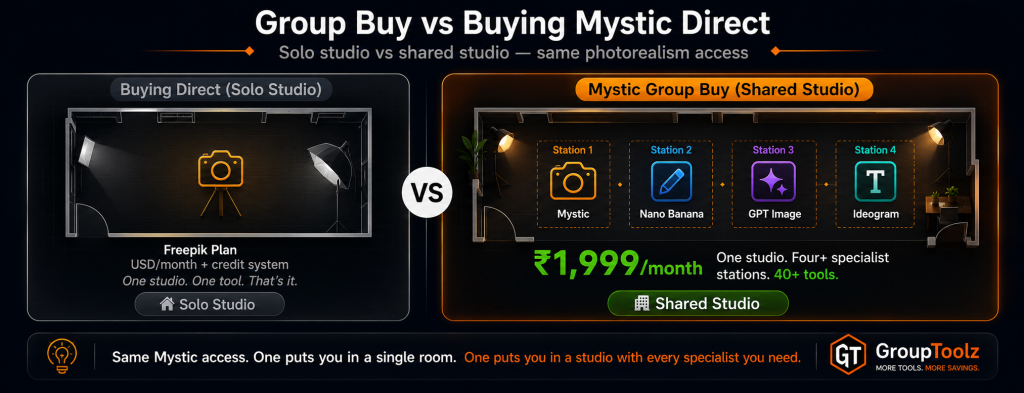
| What matters | Buying Direct | Mystic Group Buy |
|---|---|---|
| Price | Freepik plan, USD | In AI Plan, ₹1,999 |
| Billing | USD, card, credits | Rupees, UPI |
| Other AI tools | Freepik only | 40+ tools included |
| Other image models | Within Freepik | Nano Banana, GPT Image, Flux 2 too |
| Auto-renewal | Yes, bills your card | No auto-renewal |
| Support | Standard | WhatsApp, Indian hours |
| Bottom line | One platform, in dollars | Mystic + 40 tools, in rupees |
Why Getting Mystic in the AI Plan Makes Sense
You could get Mystic through Freepik directly, but here’s why getting it through the AI Plan group buy is the smarter move for most people. First, it’s in rupees. You pay ₹1,999 through a UPI app instead of putting a dollar charge on a card and eating the forex. For Indian creators, that alone removes a real hassle.
Second, and bigger, you get far more than just Mystic. The AI Plan bundles 40-plus AI tools, so the same payment that gets you Mystic also gets you the other top image models, Nano Banana for editing, GPT Image for overall quality, Flux 2 for photorealism, Ideogram for typography, plus writing tools, video tools and more. A modern creator uses several models for different jobs, and a Mystic group buy that comes bundled with the whole stack is simply better value than a single-platform subscription.
| Every top image model, one plan Worth highlighting: no single AI image model wins everything. Mystic is the photorealism specialist. Nano Banana is the editing champion. GPT Image tops overall quality. Ideogram owns typography. Flux 2 leads on colour. The AI Plan includes all of them, so you route each job to the best model. A Mystic group buy through the AI Plan gives you that whole lineup plus writing and video tools, which no standalone Mystic purchase can match. |
What You Can Make With Mystic
| Use case | Why Mystic fits |
|---|---|
| Realistic portraits | Skin, hair and eyes render like a professional photo shoot |
| Product photography | Magazine-quality product shots with sharp focus and colour |
| Fantasy & sci-fi art | Otherworldly scenes that still look detailed and believable |
| Marketing visuals | Clean, photorealistic images for ads and campaigns |
| Social content | Scroll-stopping images in the right ratio for each platform |
| Concept & mood boards | Fast, high-quality visuals to bring an idea to life |
| Mystic, in the AI Plan ₹1,999 Mystic + Nano Banana + GPT Image + Flux 2 + Ideogram + 35 more AI tools · one plan · billed in INR · no auto-renewal |
How Mystic Compares to Other Image Models
Mystic isn’t your only option, so here’s an honest look at where it sits, because it wins some jobs and others suit different tools.
| Tool | Best at | Where it trails |
|---|---|---|
| Mystic | Photorealism, portraits, no-upscale HD | Others edge it on editing existing photos |
| Nano Banana | Editing, character consistency, fusion | Less of a pure photorealism specialist |
| GPT Image | Overall quality, complex prompts, text | Slower to generate |
| Ideogram | Typography, logos, text-in-image | Narrower use case |
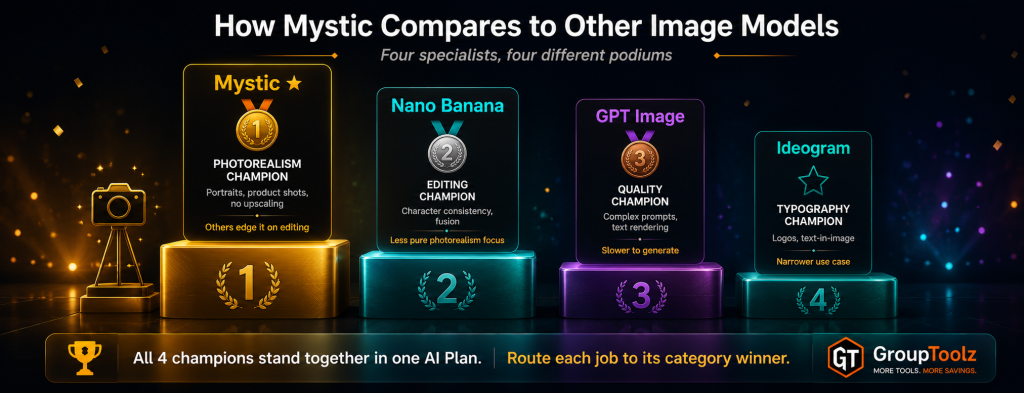
The honest read: for pure photorealism, portraits and lifelike scenes rendered in HD without extra steps, Mystic is often the best pick. Nano Banana wins for editing an existing photo and keeping characters consistent. GPT Image edges it on complex prompts. Ideogram owns text. The good news with a Mystic group buy through the AI Plan is that you don’t have to choose, all these models come in the plan, so you use Mystic for realism and switch to the others for their strengths.
Who a Mystic Group Buy Is For
| You are a… | And a Mystic group buy gives you… |
|---|---|
| Content creator | Photorealistic images in any ratio, plus the wider AI toolkit |
| E-commerce seller | Magazine-quality product shots without a photo studio |
| Marketer | Realistic ad and campaign visuals that don’t look AI-made |
| Designer | Mystic for realism plus Ideogram, Flux and Nano Banana for the rest |
| Social media manager | Fast HD visuals sized right for every platform |
| Student / hobbyist | A top photorealism model to create with at a rupee price |
Tips for Getting Great Results
Since a Mystic group buy gives you access to the tool, here’s how to get the most from it once you’re in.
Write detailed, descriptive prompts
Mystic rewards specifics. Describe the subject, the setting, the lighting, the camera style and the mood. Words like “golden hour,” “shallow depth of field,” “editorial photography” and “natural light” push it towards its best, most realistic output.
Pick the right model for the job
Use Mystic 1.0 for fast everyday images, and the 2.5 models when you want higher quality or more creative range. If a result isn’t quite right, switching model is often the quickest fix.
Use reference images to stay on-brand
If you have a specific look or colour palette in mind, upload up to three reference images in the settings. Mystic will lean towards their style, which is perfect for keeping a campaign consistent.
Match the ratio to the platform
Set 9:16 for reels and stories, 1:1 for Instagram posts, and 16:9 for YouTube thumbnails or website banners before you generate. It saves cropping later and gets you a cleaner composition.
Why Mystic’s Realism Actually Matters
It’s worth pausing on why photorealism is such a big deal, because it changes what you can do with AI images. For years, the giveaway that an image was AI-made was in the details, hands with too many fingers, skin that looked waxy, eyes that felt dead, text that turned to gibberish. Those flaws meant AI images were fine for concepts but not for real client work or polished marketing.
Mystic closed that gap. Its output is sharp and believable enough that a portrait can pass for a real photo, a product shot can go straight into a store listing, and a marketing visual doesn’t scream “made by a robot.” That reliability is the difference between a fun toy and a genuine production tool, and it’s why a Mystic group buy is worth having if your work needs images people will actually trust. You’re not generating rough drafts, you’re generating usable, professional visuals.
A Real Workflow With Mystic
Let me show you how Mystic fits an actual job, because that’s where the interface and models come together. Say you’re a small clothing brand and you need lifestyle images of a model in an Indian street market for a campaign, but you don’t have the budget for a photo shoot.
You’d open Mystic, pick a model, and write a detailed prompt, “an Indian street market at golden hour, a woman in a green kurta standing and smiling, flowers and stalls in the background, warm natural light, editorial photography.” You’d set the ratio to match where the image is going, maybe 4:5 for Instagram or 9:16 for a reel.
If you have a brand mood board, you’d drop a couple of reference images into the settings so the style stays on-brand. Then generate. In under a minute you’ve got a photorealistic lifestyle shot. If it’s not quite right, you Redo for a fresh take, or Reuse the prompt and tweak a detail. Once you’re happy, you Download it, and it’s ready for the campaign.
That whole shoot happened without a camera, a model or a studio, and a Mystic group buy through the AI Plan means you can do it as often as your campaigns need, plus jump to Nano Banana or Ideogram in the same plan for edits and text. That’s a complete visual workflow at a rupee price.
| Play to Mystic’s strengths, use the plan for the rest The smart way to work is to send each job to the model that’s best at it. Use Mystic for photorealistic people, products and scenes, that’s its home turf. For editing an existing photo or keeping a character consistent, switch to Nano Banana, also in the AI Plan. For crisp logo text, Ideogram. For complex hero images, GPT Image. A Mystic group buy through the AI Plan means you always have the right tool for the shot in front of you. |
The Bottom Line
Here’s where I land. Mystic is one of the most realistic AI image generators ever made, sharp, detailed, and believable enough for real production work, not just experiments. Its four models give you speed and range, the interface makes it easy to prompt, size and refine, and the reference-image feature keeps you on-brand. The tool itself is genuinely excellent.
The only friction was access, getting it direct means Freepik’s plans and dollar billing, built for a global audience.
That’s exactly what a Mystic group buy solves. Through GroupToolz, Mystic comes inside the AI Plan for ₹1,999 a month, in rupees, with no auto-renewal, and bundled with Nano Banana, GPT Image, Flux 2, Ideogram and 35-plus other AI tools. You get Freepik’s photorealism king, plus an entire creative toolkit, for one rupee price.
For any Indian creator, seller, marketer or designer who wants realistic AI images, a Mystic group buy through the AI Plan is the smart way to get it in 2026.
Questions People Actually Ask
What’s a Mystic group buy, in plain terms?
It’s shared access to Mystic through a provider, so you don’t buy a standalone Freepik plan in dollars. Through GroupToolz, a Mystic group buy gets you the tool inside the AI Plan for ₹1,999 a month, paid in rupees, alongside 40+ other AI tools. So you get Mystic plus an entire AI toolkit in one plan, rather than just one model billed in USD.
What is Mystic good at?
Mystic, from Freepik and Magnific, is one of the most realistic AI image generators around. It’s a Flux-based model that renders faces, skin, hands and text sharply in full HD without needing upscaling. It’s especially strong at portraits, product photography, and fantasy or sci-fi scenes that still look believable. A Mystic group buy gets all of that in the AI Plan.
How do I use Mystic?
Write a detailed prompt describing your image, choose a model (Mystic 1.0, 2.5, 2.5 Flexible or 2.5 Fluid), set the aspect ratio, optionally add up to three reference images for style, then hit generate. Your image renders in 10-60 seconds, and you can download, copy, redo or reuse it from the output view. A Mystic group buy through the AI Plan gives you this full workflow.
Is Mystic included in the GroupToolz AI Plan?
Yes. Mystic is one of the tools in the GroupToolz AI Plan at ₹1,999 a month. You don’t buy it as a separate subscription, it’s right there in the plan alongside Nano Banana, GPT Image, Flux 2, Ideogram, Leonardo and more. That’s the appeal of a Mystic group buy through GroupToolz, Mystic plus 40+ tools in one rupee plan.
Which Mystic model should I use?
Start with Mystic 1.0, it’s the fastest at around 18 seconds and gives clean, realistic results. For higher quality or more creative range, use Mystic 2.5, 2.5 Flexible (more variation) or 2.5 Fluid (smooth, faithful output). A Mystic group buy through the AI Plan gives you all four, so you can match the model to each job.
Can I pay in Indian Rupees?
Yes. The Mystic group buy through GroupToolz is part of the AI Plan at ₹1,999, billed in INR via Razorpay and UPI apps like PhonePe, GPay and Paytm. There’s no USD billing and no international card, unlike buying Mystic through Freepik directly, which charges in dollars. The AI Plan also doesn’t auto-renew.
Comments