

Semrush Guru retails at $249.95/month (~₹20,800). GroupToolz has Guru-level access on the Pro plan at ₹399/month, the Advanced plan at ₹499/month, and as a single tool at ₹199/month. Here’s what Guru actually adds over Pro, why 43% of Semrush’s paying customers chose to upgrade to it, and how to actually use each Guru-exclusive feature.
By GroupToolz Team Updated: June 6, 2026
Semrush Pro vs Guru: the complete differences
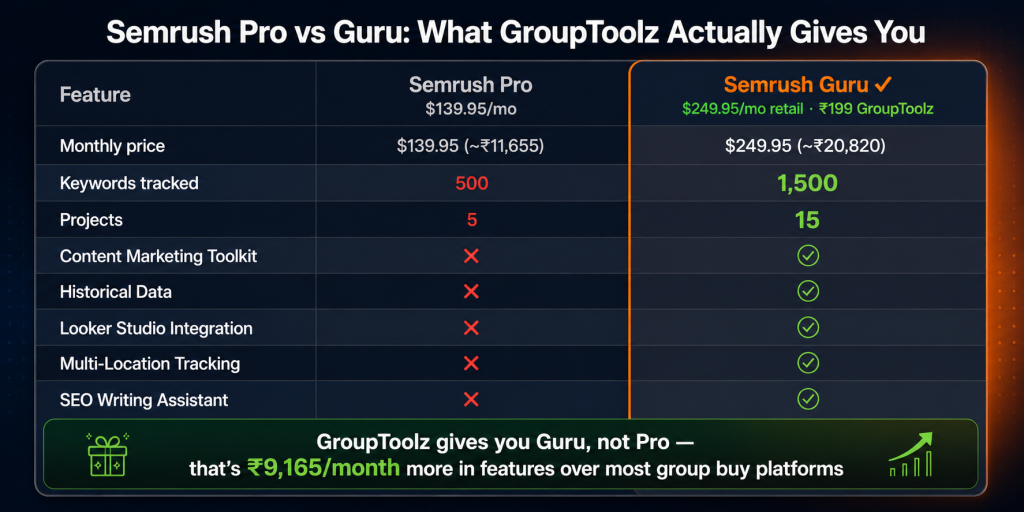
Semrush has three core plans in 2026: Pro at $139.95/month, Guru at $249.95/month, and Business at $499.95/month. On GroupToolz, the access is at Guru level, not Pro. Here’s what that actually means.
| Feature | Semrush Pro | Semrush Guru |
|---|---|---|
| Monthly price (retail) | $139.95 (~₹11,655) | $249.95 (~₹20,820) |
| Projects | 5 | 15 |
| Keywords tracked | 500 | 1,500 |
| Results per report | 10,000 | 30,000 |
| Pages audited monthly | 100,000 | 300,000 |
| Scheduled PDF reports | 5 | 20 |
| Content Marketing Toolkit | ❌ Not included | ✅ Included |
| Historical data | ❌ Not included | ✅ Full history |
| Looker Studio integration | ❌ Not included | ✅ Included |
| Multi-location tracking | ❌ Not included | ✅ Included |
| SEO Writing Assistant | ❌ Not included | ✅ Included |
| Topic Research Tool | ❌ Not included | ✅ Included |
| Plagiarism Checker | ❌ Not included | ✅ Included |
| Content Audit Tool | ❌ Not included | ✅ Included |
| GroupToolz price | N/A | Pro ₹399 / Advanced ₹499 / Single ₹199 |
| Why this matters for the semrush guru group buy decision GroupToolz explicitly states that Semrush access on their platform is at Guru tier. Most competing group buy platforms offer Semrush Pro only ($139.95/month retail). You’re getting Guru ($249.95/month retail), which means the semrush content marketing toolkit, semrush historical data, Looker Studio, and Multi-Location Tracking that Pro users simply don’t have. That’s ₹9,165/month in additional retail value over what most group buy platforms offer. |
The 4 Guru-exclusive features: what they actually do
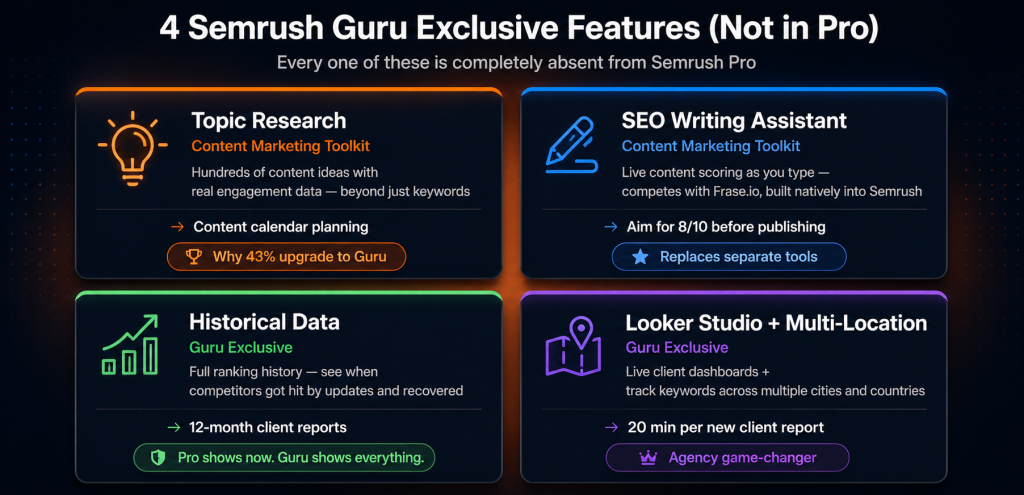
| Guru exclusive feature 1 Content Marketing Toolkit This is why 43% of Semrush’s 117,000+ paying customers are on Guru. The semrush content marketing toolkit gives you four tools that Pro users can’t access at any price. Let me explain each one because the names don’t always make it obvious what they’re for. Topic Research takes any topic and generates hundreds of subtopics, trending headlines, related questions, and content ideas with real engagement data from around the web. This is different from keyword research. Keywords show you search demand. Topic Research shows you content demand: which angles, formats, and subtopics are actually getting shared and engaging audiences for your subject. I use this for content calendar planning and the quality of ideas it surfaces is noticeably better than just doing keyword research alone. SEO Writing Assistant is a real-time content editor that scores your writing as you go based on the target keyword, recommended word count, semantic keyword coverage, readability, and originality. As you type, the sidebar shows missing keywords to add, overused terms to vary, and SEO recommendations to implement. It sets a target score based on what the current top-ranking pages achieve. You write until you hit or beat that score. This competes directly with Frase.io and NeuronWriter, and the fact that it’s built natively into Semrush means you don’t need to switch between tools. Plagiarism Checker scans your draft against web content before you publish. Useful for your own content and essential if you’re publishing AI-generated drafts. Works directly in the writing workflow. Content Audit Tool crawls your existing content and scores it against organic traffic, backlinks, social shares, word count, and time on page. It identifies thin content to update, high-performing pages to build on, and underperformers dragging your site’s authority down. For sites with 100+ articles, this is where you find the 20% of pages causing 80% of your SEO problems. |
| Guru exclusive feature 2 Historical Data Semrush Pro shows you now. Semrush historical data shows you the whole story. You get the complete ranking and traffic history for any domain going back years. This changes what you can actually learn from competitor research. With Pro, you can see a competitor ranks #3 for a keyword today. With semrush historical data, you can see they ranked #1 for that same keyword 18 months ago, dropped to #8 in August 2025 (almost certainly an algorithm update), and recovered to #3 by January 2026. That’s a completely different picture. This is a site that got hit and bounced back, which tells you something real about their authority. Very different from a new site that just climbed to #3 last month. Where I find Historical Data genuinely useful: algorithm update impact analysis (compare rankings before and after known update dates), competitor trajectory research (is this site growing or declining overall?), identifying seasonal ranking patterns, figuring out when a competitor started earning links and what triggered it, and spotting penalty recovery timelines. Client reporting is where it pays back fastest. When a client asks “are our rankings actually improving?”, you pull a 12-month position history and the answer is obvious. With Pro, you’re comparing two snapshots and hoping the client trusts the interpretation. |
| Guru exclusive feature 3 Looker Studio Integration Looker Studio is Google’s free data visualisation tool. The Semrush Guru Looker Studio connector lets you pull Semrush data directly into dashboards alongside Google Analytics, Google Search Console, and Google Ads data. One dashboard, all your client’s SEO performance data, auto-updating, no manual export needed. For agencies, this changes client reporting significantly. You build the dashboard template once. Duplicate it for each client. Looker Studio pulls fresh Semrush data on demand. The client gets a live link instead of a monthly PDF. They can check their performance any time, which genuinely reduces “how are my rankings doing?” messages. I’ve found that clients who have access to live dashboards ask better questions and have more useful conversations about strategy. The ones who only get monthly PDFs tend to obsess over week-to-week fluctuations. Setup takes about 2 hours for the first report template. After that, 20 minutes per additional client. That’s the kind of time math that justifies the upgrade on its own for anyone managing more than 3 clients. |
| Guru exclusive feature 4 Multi-Location Tracking Pro tracks keyword rankings in one location. Guru tracks them across multiple countries, cities, and regions simultaneously. For anyone working with local businesses or serving more than one geographic market, this is the limit that kills Pro faster than any other. An example for Indian marketers: a Delhi-based restaurant wants to know how it ranks for “best north Indian restaurant” in Delhi vs Mumbai vs Bengaluru. Different searchers, different results, different opportunities. You can’t see this properly on Pro. On Guru, it’s all in one project, one dashboard, one report. The Pro workaround is painful: create separate projects for each location (you only have 5). With Guru’s 15 projects and built-in multi-location tracking, this stops being a headache. E-commerce sellers targeting India, UAE, UK, and US can track the same product keywords in all four markets from a single Semrush project. It’s one of those features that seems niche until you need it, and then you wonder how you managed without it. |
The usage limit upgrade: why the numbers matter
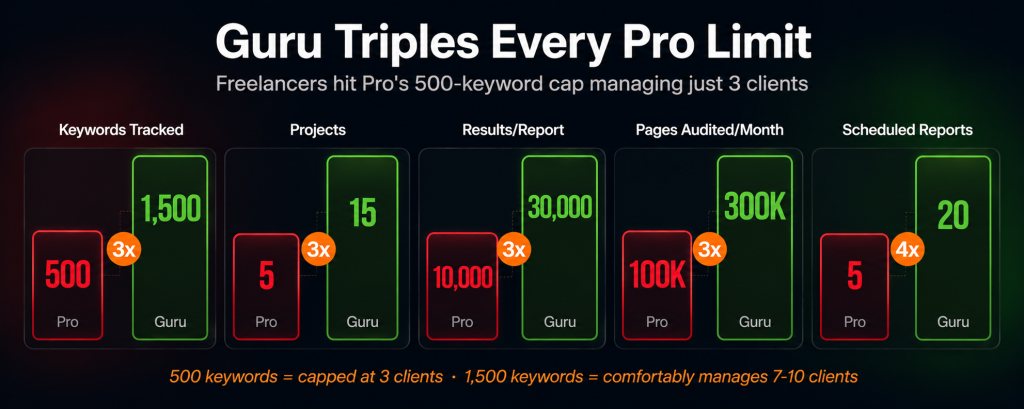
Beyond the exclusive features, Guru triples Pro’s usage limits. This hits faster than most people expect.
| Limit | Pro | Guru | Real-world impact |
|---|---|---|---|
| Keywords tracked | 500 | 1,500 | Manage 3 client keyword portfolios instead of 1 |
| Projects | 5 | 15 | 15 client websites vs 5 |
| Results per report | 10,000 | 30,000 | Export complete keyword lists, not truncated ones |
| Pages audited monthly | 100,000 | 300,000 | Audit large sites without hitting caps |
| Scheduled reports | 5 | 20 | Automated monthly reports for 20 clients vs 5 |
The 500-keyword limit on Pro is the one that catches people off guard. A freelancer managing three client websites typically tracks 150-200 keywords per client. That’s 450-600 total. Pro’s 500-keyword cap means you’re already at capacity managing three clients, with no room for growth. Guru’s 1,500-keyword limit comfortably handles 7-10 clients at that scale. If you’re doing this work professionally, that cap comparison alone makes the upgrade worth looking at seriously.
How to actually use each Guru feature
Content Marketing Toolkit workflow
Start in Topic Research: enter your target topic, filter by trending subtopics (rising search volume over the past 12 months), export the top 20 content ideas. Add to your content calendar. Then open the SEO Writing Assistant as your editor. Connect it to Google Docs via the Semrush browser extension and write with live scoring visible. Aim for 8/10 or better before publishing. Run Plagiarism Checker on the finished draft. Schedule the Content Audit monthly to catch pages losing ground before they fall too far. This is the workflow I’d actually recommend as a starting point.
Historical Data workflow
Semrush Organic Research > enter a competitor domain > click the Trend view to see their organic traffic history. Look for drops (algorithm hits) and spikes (successful content campaigns). Export the top 100 keywords they’ve gained in the past 6 months. That list tells you where their SEO team is currently focused. Compare current rankings against rankings from 12 months ago to see what they’ve strengthened and what they’ve lost. The semrush historical data view turns a competitor analysis from a snapshot into a story.
Looker Studio workflow
Connect via the Semrush Looker Studio connector (search “Semrush” in the Data Sources panel in Looker Studio). Build a report with: ranking position chart for your top 20 keywords, organic traffic trend from GA4, keyword movement table (gained/lost in the past 30 days), and site health score from Semrush Site Audit. Share the live link with each client. The first template takes about 2 hours. After that, 20 minutes per new client.
Multi-Location Tracking workflow
Semrush Position Tracking > create a campaign > select your domain > add your target keyword list > under Location, add multiple regions. Each location tracks independently and you see everything in one dashboard. Set up weekly email alerts for position changes over 5 in any location. That’s it. The setup is simpler than the Pro workaround of maintaining separate projects for each location.
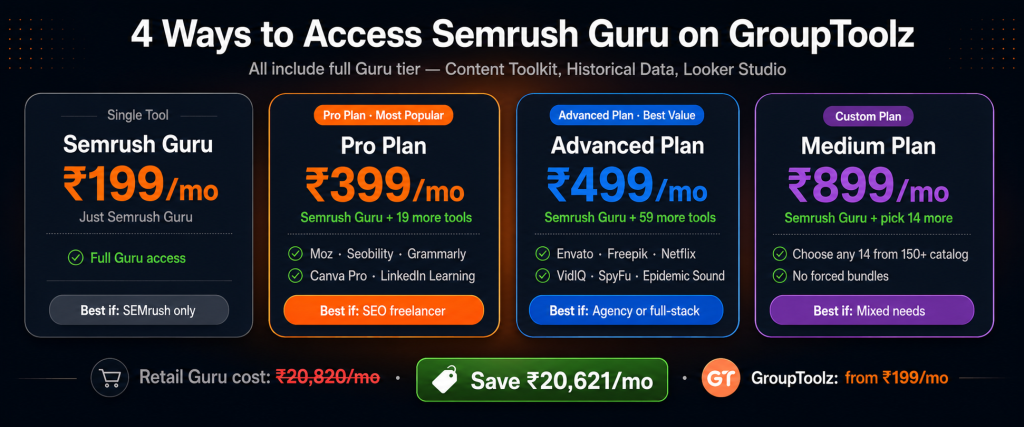
Semrush Guru on GroupToolz: access options
| How to access | GroupToolz plan | Price | Other tools included |
|---|---|---|---|
| Single tool | Semrush (Guru) only | ₹199/mo | Just Semrush Guru |
| Pro Plan | Pro (20+ tools) | ₹399/mo | Semrush Guru + Moz, Seobility, Grammarly, QuillBot, Canva, LinkedIn Learning, Scribd + more |
| Advanced Plan | Advanced (60+ tools) | ₹499/mo | Everything in Pro + Envato, Freepik, Epidemic Sound, Netflix, VidIQ, SpyFu, Serpstat + 40 more |
| Custom Medium | Medium (pick 15 tools) | ₹899/mo | Semrush Guru + any 14 other tools from the full catalog |
| The GroupToolz Guru value math Semrush Guru retails at $249.95/month (~₹20,820). GroupToolz Pro at ₹399/month includes the same Guru access plus 19 more tools. Annually: ₹2,49,840 at retail vs ₹4,788 on GroupToolz Pro. That’s roughly ₹2,45,000 per year saved on Semrush alone. Before you add the 19 other tools. For a freelance SEO or small agency, the math is pretty hard to argue with. |
Frequently asked questions
Does GroupToolz give Semrush Pro or Guru access?
Semrush Guru. GroupToolz explicitly upgraded their access to Guru tier ($249.95/month retail). That includes the Content Marketing Toolkit, semrush historical data, Looker Studio integration, and Multi-Location Tracking that Semrush Pro ($139.95/month) doesn’t have. Most other group buy platforms are only offering Pro access. That gap is what makes the semrush guru group buy on GroupToolz worth paying attention to.
What is the Semrush Content Marketing Toolkit?
Four Guru-exclusive tools: Topic Research (content ideas with real engagement data), SEO Writing Assistant (live scoring while you write), Plagiarism Checker (originality check before publishing), and Content Audit Tool (performance analysis of your existing content). Together they turn Semrush into a content production tool, not just an SEO research platform. The semrush content marketing toolkit is the main reason people upgrade from Pro.
What is Semrush Historical Data?
Semrush historical data gives you the complete ranking and traffic history for any domain, not just what it looks like today. You can see how competitors have tracked over years, spot when they got hit by algorithm updates, identify which content campaigns drove spikes, and show clients a 12-month position chart instead of just two snapshots. Pro users only see current data. That’s a real limitation once you’re doing serious SEO work.
How much does Semrush Guru cost on GroupToolz vs retail?
Retail: $249.95/month (~₹20,820). GroupToolz: ₹199/month as a single tool, ₹399/month on Pro plan (includes 20+ tools), ₹499/month on Advanced (60+ tools). Annual saving vs retail: roughly ₹2,45,000+ depending on which GroupToolz plan you’re on. The semrush guru features at ₹199 vs ₹20,820 is the clearest example of what group buy access actually means in rupee terms.
Why do 43% of Semrush users choose Guru?
The semrush content marketing toolkit is the main driver, specifically the SEO Writing Assistant. It replaces a separate content scoring tool (Frase.io, NeuronWriter) while being natively built into the Semrush workflow. Semrush historical data is the second reason, especially for agencies that need to demonstrate ranking progress to clients over time. Both features are completely absent from Pro, which makes the upgrade unavoidable for anyone doing content SEO seriously.
Can I use Semrush Guru for client reporting?
Yes. The Looker Studio integration is specifically designed for this. Pull Semrush ranking data directly into custom Google Data Studio dashboards alongside GA4 and Google Ads. Create one template, duplicate for each client, share live links. Guru also has 20 scheduled PDF reports (vs Pro’s 5). If you manage more than 5 clients, Pro’s report limit becomes a real problem before anything else does. The semrush guru features around reporting are where agencies feel the Pro vs Guru difference most acutely.
Comments