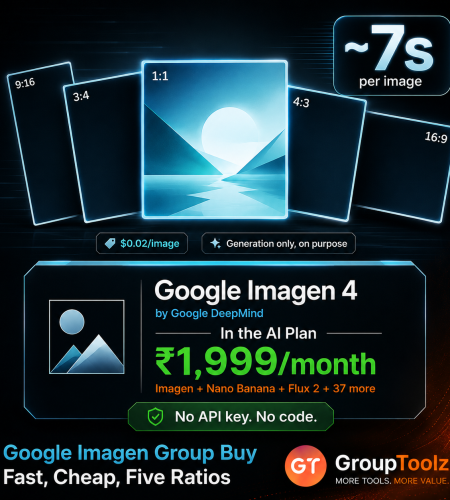
Google Imagen 4 is the cheapest production-quality image model any big lab sells, and one of the fastest. The catch is how you reach it. Google offers an API that needs a key and code, or consumer plans running $19.99 to $100 a month. A Google Imagen group buy skips both. You get Imagen inside the GroupToolz AI Plan for ₹1,999, next to 40+ tools that cover everything Imagen deliberately doesn’t do. Here’s how it works and how to use it.
By GroupToolz Team Updated: July 2026
| ~7s Per image | $0.02 Cheapest Google tier | 5 Aspect ratios | ₹1,999 In the AI Plan |
Let me start with what Imagen actually is, because Google’s naming confuses people. Google has two image families. Nano Banana lives inside Gemini and is built for editing and conversation. Imagen is the other one, made by Google DeepMind on a Latent Diffusion Transformer, and it does one job: turn text into a picture, fast and cheap. No chat, no back and forth, just generation.
That focus is why Imagen 4 Fast costs two cents an image and renders in seconds, making it the cheapest production-quality option any major lab offers. The awkward part is getting to it. Google sells it through an API that expects you to write code, or bundles it into consumer plans that start at about ₹1,700 a month and climb to ₹8,500. Neither suits a creator in India who just wants to make images. That’s the gap a Google Imagen group buy closes, and it’s why this one is worth understanding properly.
What Is Google Imagen?
Imagen is Google DeepMind’s dedicated text-to-image model, now in its fourth generation. You describe what you want and it produces an image. It’s strong on photorealism, follows prompts closely, and handles scenes, landscapes, products and people well. Every image it makes carries SynthID, Google’s invisible watermark that marks it as AI-generated.
Imagen 4 comes in three tiers. Fast is built for speed and volume, rendering in a couple of seconds. Standard is the balanced middle at full 2K resolution. Ultra sits at the top with the finest detail and the best prompt fidelity, particularly on skin and complex scenes. The GroupToolz interface runs Imagen 4 Fast, which is the version most people want for everyday work: quick answers, low cost, solid quality. A Google Imagen group buy gives you that without an API key.
The Three Imagen 4 Tiers
| Tier | Speed | Resolution | Built for |
|---|---|---|---|
| Imagen 4 Fast | ~2-7 seconds | Up to 1408×768 | Volume and speed, everyday work |
| Imagen 4 Standard | ~5-8 seconds | 2048×2048 | The balanced workhorse |
| Imagen 4 Ultra | ~10-15 seconds | Native 2K | Maximum detail and prompt fidelity |
Worth noting how those compare outside Google. Imagen 4 Standard matches DALL-E 3’s price while producing four times the pixel count, 2048×2048 against 1024×1024. That’s the sort of value that made Imagen the default recommendation for anyone generating images at volume, and it’s a big part of why a Google Imagen group buy is worth having in your kit.
What Imagen Is Best At
| Strength | What it means for you |
|---|---|
| Speed | Images in seconds, so you can try ten ideas in a coffee break |
| Photorealism | Landscapes, products and scenes that look photographed |
| Prompt adherence | Follows detailed descriptions closely rather than improvising |
| Volume work | Built for generating a lot of images without fuss |
| Clean output | Few artifacts, especially on the higher tiers |
| SynthID marking | Invisible watermarking, useful where disclosure matters |
| What Imagen deliberately does not do This is worth being straight about, because it shapes how you should use it. Imagen is generation only. It doesn’t edit existing images, it doesn’t hold a conversation across turns, and its text rendering inside pictures is basic next to Google’s own Gemini models. So it isn’t the tool for an infographic full of copy, or for changing the background of a photo you already have. Google built it narrow on purpose, and that focus is exactly why it’s fast and cheap. The sensible response isn’t to avoid it, it’s to pair it with tools that cover those gaps, which is precisely what a Google Imagen group buy through the AI Plan does. |
How to Use Google Imagen, Step by Step
The interface keeps things simple, which suits a model built for speed. Here’s the whole flow.
1. Write your prompt
In the “Describe what you want to create” box, type what you want and be specific. Imagen rewards detail, so name the subject, the setting, the light and the camera style. Something like “aerial view of a tropical island with crystal clear turquoise water, white sand beach, palm trees, drone photography” gives it everything it needs in one go.
2. Pick your aspect ratio
Open the ratio dropdown and choose the shape. Imagen gives you five: 1:1 for square social posts, 16:9 for thumbnails, banners and landscape scenes, 9:16 for reels and stories, plus 4:3 and 3:4. Set it before generating so the composition is built for that shape rather than cropped into it afterwards.
3. Open settings if you want a reference
Click the settings icon and you can drop in one reference image, up to 5MB, to steer the style of your generation. Imagen is a prompt-first model, so most of your control comes from how you write the description, but a reference helps when you’re chasing a particular look or palette.
4. Generate
Hit send and your image lands in about seven seconds. That speed is the point of Imagen 4 Fast, and it changes how you work, because you stop treating each attempt as precious and start actually experimenting.
| What the output view gives you Once an image appears you get a full row of actions beneath it. Download saves the file, Copy grabs it quickly, Redo runs the same prompt again for a different take, Reuse loads that prompt and its settings back into the box so you can change a word and go again, and Delete clears it. Each result is tagged with the model and ratio that made it, so you can see at a glance how a picture was produced. With Imagen rendering in seconds, the Redo and Reuse buttons are where a Google Imagen group buy really pays off, because iterating costs you nothing but a few seconds. |
What Google Charges Directly
Here’s the pricing that makes the case for a Google Imagen group buy, converted to rupees.
| Route | Price | In Rupees | The catch |
|---|---|---|---|
| Imagen 4 Fast, API | $0.02/image | ~₹1.70/image | Needs an API key and code |
| Imagen 4 Standard, API | $0.04/image | ~₹3.40/image | Same developer barrier |
| Imagen 4 Ultra, API | $0.06/image | ~₹5.10/image | Same developer barrier |
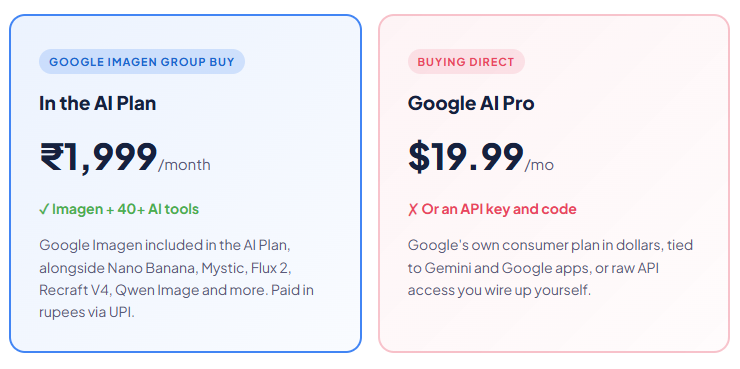
| Google AI Pro | $19.99/month | ~₹1,700/mo | Google ecosystem only |
| Google AI Ultra | From $100/month | ~₹8,500/mo | Priced for heavy or enterprise use |
| GroupToolz AI Plan | ₹1,999/month | ₹1,999/mo | Imagen plus 40+ other AI tools |
| The two doors, and why neither is comfortable Google gives you two ways in. Door one is the API. Cheap per image, yes, but it hands you a REST endpoint and expects you to get an API key from AI Studio and write code against it. For a designer or seller, that’s a wall before you’ve made a single picture. Door two is a consumer subscription. Google AI Pro at roughly ₹1,700 a month gets Imagen bundled into Gemini, and AI Ultra starts around ₹8,500. Both are billed in dollars, both tie you to Google’s own apps, and neither gives you anything outside that ecosystem. A Google Imagen group buy is door three: a working interface, no code, rupee pricing, and forty other tools sitting alongside it. |
What Is a Google Imagen Group Buy?
A Google Imagen group buy is where access to Imagen is shared through a provider, so you don’t set up an API key or take out a Google subscription in dollars. Through GroupToolz, a Google Imagen group buy gets you the model inside the AI Plan for ₹1,999 a month, paid in rupees, wrapped in a proper interface, alongside 40-plus other AI tools.
The difference matters more here than with most tools. Google sells Imagen either as developer infrastructure or as part of a bundle you may not want. A Google Imagen group buy turns it into something you can just open and use, with a prompt box, ratio options and a reference slot, and no per-image meter running while you think.
| Google Imagen comes inside the AI Plan Here’s how the access works, plainly. Google Imagen is one of the tools included in the GroupToolz AI Plan at ₹1,999 a month. You don’t buy a separate subscription, generate API keys or install anything. You get into the AI Plan, open Google Imagen in your dashboard, write a prompt and generate, with five aspect ratios and a reference image slot available. That’s the whole appeal of a Google Imagen group buy through GroupToolz, one rupee plan, Imagen included, plus everything else. |
Group Buy vs Getting Imagen Direct
| What matters | Google Direct | Google Imagen Group Buy |
|---|---|---|
| Price | Per image, or ₹1,700-8,500/mo | In AI Plan, ₹1,999 |
| Setup | API key and code, or a Google plan | Log in and generate |
| Billing | USD, card | Rupees, UPI |
| Editing tools | Imagen can’t edit | Nano Banana in the same plan |
| Other AI tools | Google ecosystem only | 40+ tools included |
| Support | Docs and forums | WhatsApp, Indian hours |
| Bottom line | Code or a Google bundle | Imagen + 40 tools, in rupees |
Why the GroupToolz AI Plan Is the Best Route
Let me put the case plainly. First, it’s in rupees. You pay ₹1,999 through a UPI app rather than a dollar card charge with forex on top, and there’s no per-image counter ticking while you experiment. Second, there’s nothing technical to set up, which matters here because the cheap route from Google is a developer API.
Third, and this is the part that really counts with Imagen specifically, the AI Plan covers exactly what Imagen can’t do. Imagen doesn’t edit images, so Nano Banana is there for that. Its in-image text is basic, so Qwen Image and Ideogram handle posters and typography. It’s not a portrait specialist, so Mystic covers that. Add Flux 2 for maximum photorealism, Recraft V4 for vectors, the Background Remover and Image Upscaler for finishing, and video models like Kling 2.5. A Google Imagen group buy that arrives with all of that is worth far more than API access to one narrow model.
| Every top model, one plan Worth saying clearly: no single AI image model wins everything, and Imagen is a good example of why. It’s the fastest and cheapest for straight generation, and that’s the job it’s built for. Nano Banana owns editing and character consistency. Flux 2 leads photorealism. Qwen Image and Ideogram handle text. Recraft V4 makes editable vectors. Mystic does portraits. The AI Plan includes all of them, so you send each job to whichever model handles it best. That’s why a Google Imagen group buy through the AI Plan beats buying into any single ecosystem. |
Imagen vs the Other Image Models
Here’s an honest comparison, because these models serve quite different purposes.
| Tool | Best at | Where it trails |
|---|---|---|
| Google Imagen | Speed, cost, straight text-to-image | No editing, basic in-image text |
| Nano Banana | Editing photos, character consistency | Slower for pure bulk generation |
| Flux 2 | Photorealism, multi-reference consistency | Sold as a developer API |
| Qwen Image | Readable text and complex layouts | Not built for speed |
| Mystic | Portraits and skin detail | Narrower use case |
The honest read: for fast, cheap, high-volume generation from a text prompt, Imagen is hard to beat and it’s why Google priced it where they did. For editing an existing photo, go to Nano Banana. For peak realism, Flux 2. For anything with readable text in it, Qwen Image or Ideogram. Because a Google Imagen group buy through the AI Plan includes all of them, picking one is never necessary.
What You Can Make With Imagen
| Use case | Why Imagen fits |
|---|---|
| Blog illustrations | Fast, on-topic images for every article you publish |
| Social graphics | Quick daily content in the right ratio for each platform |
| Product thumbnails | Built for volume, so a whole catalogue is quick work |
| Landscapes and scenes | Photoreal backgrounds, travel imagery and settings |
| Concept drafts | Seven-second turnaround means real experimentation |
| Content libraries | Filling out a bank of visuals without per-image guilt |
| Google Imagen, in the AI Plan ₹1,999 Imagen + Nano Banana + Flux 2 + Mystic + Qwen Image + 35 more AI tools · one plan · billed in INR · no auto-renewal |
A Real Workflow With Imagen
Let me make it concrete. Say you run a travel blog and you need a hero image plus five section illustrations for a piece about island destinations.
You’d start in Imagen because it’s quick, which is the whole draw of a Google Imagen group buy. Write a detailed prompt for your hero, set the ratio to 16:9, and generate. Seven seconds later you have something. Don’t like the angle? Hit Redo. Want a different mood? Reuse the prompt, change three words, go again. In five minutes you’ve got a hero you’re happy with, plus your five section images, each in whatever ratio suits where it sits.
Then use the rest of the plan for what Imagen won’t do. Need your logo overlaid cleanly on the hero? That’s Recraft V4 or Ideogram. Want to remove something distracting from one of the shots? Nano Banana. Need the hero bigger for a full-width header? The Image Upscaler. One afternoon, a fully illustrated article, no stock photo licence. That’s a Google Imagen group buy doing real work inside a wider toolkit.
| Speed changes how you should prompt Here’s a habit worth building with fast models. When each image takes a minute, people write one careful prompt and accept whatever comes back. When it takes seven seconds, that’s the wrong approach. Write a rough prompt, look at what you get, then use Reuse to refine one element at a time, the lighting, then the angle, then the mood. Four quick rounds gets you somewhere a single perfect prompt rarely does, and it costs less than a minute in total. Imagen is built for exactly this loop, and it’s the main reason a Google Imagen group buy feels different from using a slower model. |
Who a Google Imagen Group Buy Is For
| You are a… | And it gives you… |
|---|---|
| Blogger | Original illustrations for every post, no stock licences |
| Content creator | Fast daily visuals in every platform ratio |
| E-commerce seller | Volume image generation for listings and banners |
| Marketer | Quick concept drafts before committing to a final |
| Small business owner | Google-quality images with no code and no API key |
| Student / learner | A major lab’s model to experiment with at a rupee price |
Tips for Getting Great Results
A Google Imagen group buy gives you the tool, so here’s how to get the most out of it.
Write like a photographer
Imagen responds well to camera language. Words like drone photography, wide angle, golden hour, shallow depth of field and macro shift the output more than adjectives about beauty do.
Iterate instead of agonising
With seven-second generations, four quick attempts beat one long think. Change a single element each round so you can tell what actually made the difference.
Send text work elsewhere
If your image needs readable words in it, a poster or an infographic, use Qwen Image or Ideogram from the same plan. Imagen’s in-image text is basic and you’ll fight it.
Set the ratio first
Pick 16:9, 9:16, 1:1, 4:3 or 3:4 before you generate. Composition built for the right shape always beats a crop, and it takes one click.
The Bottom Line
Here’s where I land. Google Imagen is the model to reach for when you need images quickly and often. DeepMind built it narrow on purpose, generation only, and that focus makes it the cheapest production-quality option any major lab sells, at a speed that changes how you work.
The trouble was always the doorway. Google’s cheap route is an API that expects code, and its friendly route is a subscription starting around ₹1,700 a month that locks you into Google’s own apps. Neither works well for a creator in India. A Google Imagen group buy through GroupToolz fixes it: Imagen in a real interface inside the AI Plan at ₹1,999 a month, in rupees, with no keys and no per-image meter, bundled with 40-plus tools that handle editing, typography, vectors, portraits and video, the jobs Imagen was never built for. For any Indian blogger, seller, marketer or creator, that’s the smart way to use Imagen in 2026.
Questions People Actually Ask
What’s a Google Imagen group buy, in plain terms?
It’s shared access to Google Imagen through a provider, so you don’t set up an API key or take a Google subscription in dollars. Through GroupToolz, a Google Imagen group buy gets you the model inside the AI Plan for ₹1,999 a month, in rupees, wrapped in a real interface, alongside 40+ other AI tools. No code needed.
How much does Google Imagen cost directly?
Through Google’s API, Imagen 4 Fast is $0.02 an image, Standard $0.04 and Ultra $0.06, but you need an API key and code to use it. Through Google’s consumer plans, AI Pro is $19.99 a month (~₹1,700) and AI Ultra starts around $100 (~₹8,500). A Google Imagen group buy gets it inside the ₹1,999 AI Plan instead.
How do I use Google Imagen?
Write a detailed prompt describing your image, pick an aspect ratio from the five available (1:1, 16:9, 9:16, 4:3 or 3:4), optionally open settings to add one reference image, then generate. Your result lands in about seven seconds with Download, Copy, Redo, Reuse and Delete options, tagged with the model and ratio used.
What is Google Imagen best at?
Speed and cost for straight text-to-image work. Imagen 4 Fast renders in seconds and is the cheapest production-quality tier any major lab offers, which makes it ideal for blog illustrations, social graphics, thumbnails and any high-volume generation. It’s strong on photorealistic scenes and follows detailed prompts closely.
Can Google Imagen edit my photos?
No, and that’s by design. Imagen is generation only, with no editing, no multi-turn conversation and fairly basic text rendering inside images. That’s why it’s fast and cheap. For editing, the AI Plan includes Nano Banana, and for posters or anything with readable text, Qwen Image and Ideogram. A Google Imagen group buy through the plan covers those gaps.
Can I pay in Indian Rupees?
Yes. The Google Imagen group buy through GroupToolz is part of the AI Plan at ₹1,999, billed in INR via Razorpay and UPI apps like PhonePe, GPay and Paytm. There’s no USD billing, no international card and no per-image charges. The AI Plan also doesn’t auto-renew, so you choose when to pay again.
Comments