
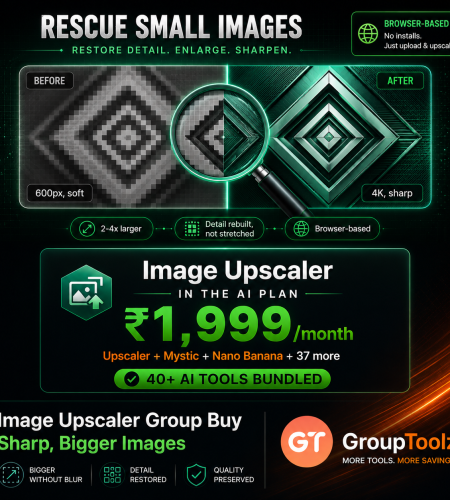
0Everyone hits this eventually. You’ve got the perfect photo, but it’s too small, too soft, too pixelated for the poster, the print or the listing. An AI upscaler fixes that, and the good ones charge a fortune for one job. Topaz runs ₹12,700 to ₹42,000 a year. Magnific is about ₹3,300 a month. An Image Upscaler group buy gets one inside the GroupToolz AI Plan for ₹1,999, next to 40+ other AI tools. Here’s how upscaling works, what it costs elsewhere, and how to use it.
By GroupToolz Team Updated: July 2026
| ₹42,000 Topaz Pro, per year | ₹3,300 Magnific, per month | 3 Formats supported | ₹1,999 In the AI Plan |
Let me start with the problem this solves, because almost everyone has run into it. You find the right photo but it’s 600 pixels wide and you need it for a banner. A client sends a logo that turns to mush the moment you enlarge it. An old family photo is precious but grainy. Or you generate a lovely AI image and realise it’s too small to print. Stretching it in any normal editor just makes a bigger blurry picture, because you can’t invent detail that isn’t there.
AI upscalers can. They use neural networks trained on millions of photos to rebuild detail as they enlarge, so the result looks sharp instead of smeared. It’s proper magic the first time you see it. The catch has always been cost, the good standalone upscalers charge serious money for a tool that does one thing. That gap is what an Image Upscaler group buy closes. That’s why an Image Upscaler group buy makes sense, and why GroupToolz put one inside the AI Plan. Let me show you how it works, what the alternatives cost, and how to use it.
What Does an AI Image Upscaler Do?
An AI image upscaler enlarges a picture while adding realistic detail, rather than just stretching the pixels you already have. Old-fashioned resizing takes each pixel and spreads it over a larger area, which is why enlarged photos go soft and blocky. There’s no extra information, so you just get a bigger version of the same small image.
AI works differently. The model has studied millions of images, so it understands what skin texture, fabric weave, brick, hair and foliage actually look like up close. When you feed it a small photo, it reconstructs that missing detail as it enlarges, effectively painting in pixels that make the bigger version look natural. The result is a photo that reads as sharp at a size the original could never handle. That’s the capability an Image Upscaler group buy puts in your hands, without paying standalone upscaler prices.
What the Image Upscaler Is Best At
| Job | What it does for you |
|---|---|
| Rescuing small photos | Turn a low-resolution image into something usable at a larger size |
| Print preparation | Get an image sharp enough for posters, flyers and packaging |
| Product listings | Meet the minimum image sizes marketplaces demand |
| Old photo restoration | Bring grainy scans and family pictures back to life |
| Finishing AI images | Push a generated image up to a size you can actually print |
| Fixing compressed files | Clean up images squashed by WhatsApp or a website |
| Why an upscaler quietly saves more work than you’d think Here’s the thing about upscaling: nobody wakes up wanting it, and then it rescues you constantly. The client photo that’s too small. The old logo file nobody can find the original of. The marketplace rejecting your listing image for being under their size rule. The print shop asking for 300 DPI when your file is 72. Each one used to mean a reshoot, a redesign or a compromise. With an upscaler, it’s a two-minute fix. That’s why bundling one into a plan makes more sense than paying a standalone subscription for something you need often but unpredictably, and it’s the practical case for an Image Upscaler group buy. |
What Do AI Upscalers Actually Cost?
This is where it gets uncomfortable. Standalone upscalers charge real money for a tool that does one job. Here’s the 2026 landscape, converted to rupees.
| Tool | Price | In Rupees | The catch |
|---|---|---|---|
| Topaz Gigapixel Personal | $149/year | ~₹12,700/yr | Desktop app, needs a capable GPU |
| Topaz Gigapixel Pro | $499/year | ~₹42,000/yr | The tier with full commercial terms |
| Magnific AI | $39/month | ~₹3,300/mo | Token-based, no free tier |
| Let’s Enhance | $9-34/month | ~₹770-2,900/mo | Free outputs carry a watermark |
| Per-image services | ~$0.50-1.00 | ~₹42-85 each | Costs stack up fast on volume |
| GroupToolz AI Plan | ₹1,999/month | ₹1,999/mo | Upscaler plus 40+ other AI tools |
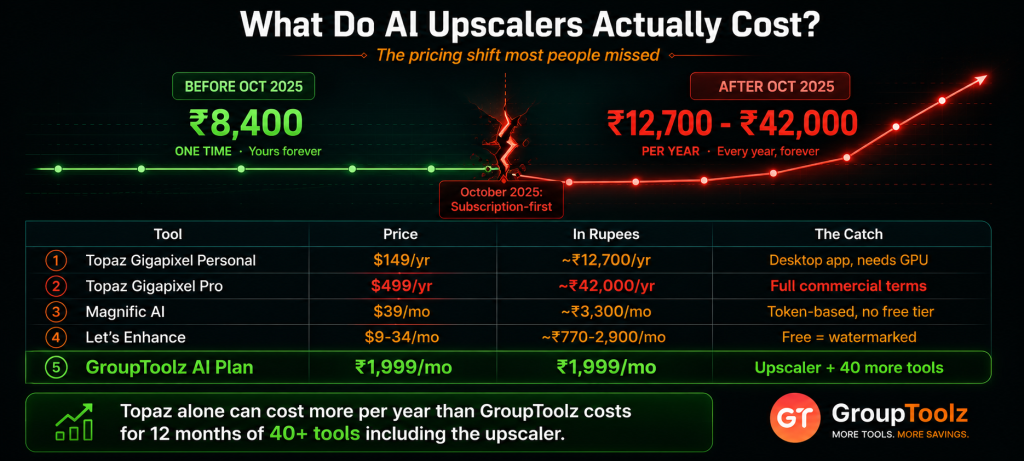
| The pricing shift most people missed Topaz Gigapixel used to be the sensible choice: about $99 once, yours forever. In October 2025 it went subscription-first, and now a tool that cost roughly ₹8,400 as a one-time purchase runs ₹12,700 to ₹42,000 every year. Two other things worth knowing. It’s desktop software that leans on your own graphics card, so a modest laptop will crawl through a batch. And the cheaper tiers restrict commercial use to smaller organisations, which matters if you’re doing client work. Magnific, the creative alternative, sits at about ₹3,300 a month with tokens metering what you can do. For one function, making images bigger, that’s a lot to carry. An Image Upscaler group buy sidesteps the whole thing. |
How to Use the Image Upscaler, Step by Step
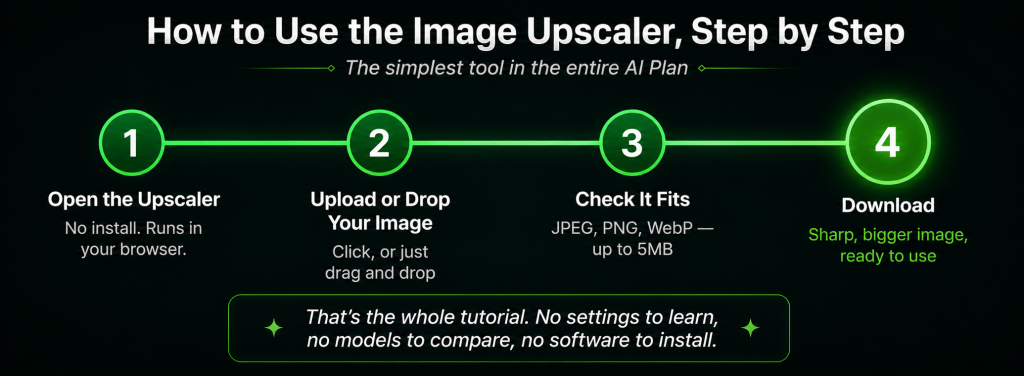
Here’s the good news after all that pricing talk: actually using it is about as simple as a tool gets. No settings to learn, no models to compare, no software to install. Here’s the whole flow.
1. Open the Image Upscaler
Log into your GroupToolz dashboard and open the Image Upscaler from your AI Plan tools. It runs in your browser, so there’s nothing to download and no graphics card requirement. Works the same on a laptop, a desktop or a phone.
2. Upload or drop your image
Click the Upload Image button, or just drag your file onto the upload area and drop it. Both work. If you’re already looking at the image in a folder, dragging it across is usually quicker than clicking through a file picker.
3.Check your file fits
The upscaler takes JPEG, PNG and WebP files up to 5MB. That covers almost everything you’d want to enlarge, since small, low-resolution images are exactly the ones that need upscaling and they’re rarely big files. If yours is over 5MB, it’s probably already high resolution and may not need this at all.
4. Let it process, then download
The AI goes to work rebuilding detail as it enlarges. Give it a moment, then download your upscaled image. Compare it against the original at full size and you’ll see where the model has reconstructed texture and edges that were mush before.
| Formats, sizes and a sensible workflow A few practical notes. JPEG is your everyday photo format and works fine. PNG is the one to use when your image has transparency, logos and graphics especially, since upscaling a PNG keeps that transparent background intact. WebP is common for images saved from websites, and it’s supported too. The 5MB ceiling is generous for the kind of file you’d be enlarging. One habit worth building: upscale as the last step, after any cropping or editing, so the AI works on your final composition rather than on something you’re about to change. That’s how to get the most from an Image Upscaler group buy. |
What Is an Image Upscaler Group Buy?
An Image Upscaler group buy is where access to an AI upscaling tool is shared through a provider, so you don’t buy a standalone upscaler subscription in dollars. Instead of paying Topaz yearly or Magnific monthly, an Image Upscaler group buy through GroupToolz gets you one inside the AI Plan for ₹1,999 a month, paid in rupees, alongside 40-plus other AI tools.
That’s the key point: with GroupToolz, the upscaler isn’t sold as a lonely single subscription. It comes as part of the AI Plan, so the same ₹1,999 that gets you upscaling also gets you Nano Banana, Mystic, GPT Image, Recraft V4, Qwen Image, Kling 2.5, Hailuo 2.3 and a whole stack of image and video tools. An Image Upscaler group buy this way isn’t just cheaper access to one utility, it’s the upscaler plus an entire AI toolkit in one rupee-priced plan.
| The Image Upscaler comes inside the AI Plan Here’s how the access works, plainly. The Image Upscaler is one of the tools included in the GroupToolz AI Plan at ₹1,999 a month. You don’t buy it as a separate subscription, you don’t install desktop software, and you don’t need a powerful graphics card. You get into the AI Plan, open the Image Upscaler in your dashboard, upload an image and get a sharper, larger version back. That’s the whole appeal of an Image Upscaler group buy through GroupToolz, one rupee plan, upscaling included, plus everything else. |
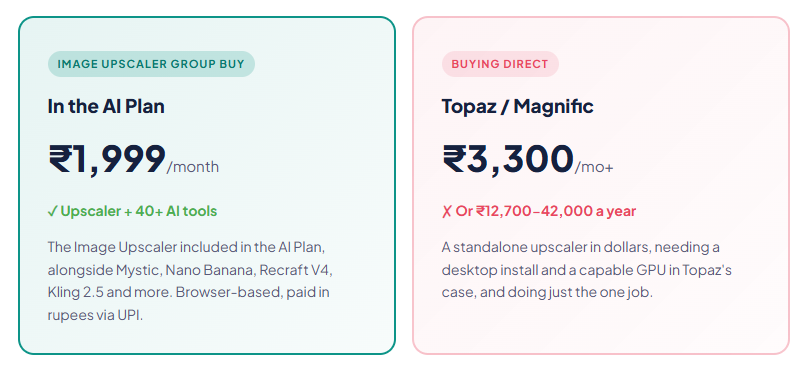
Group Buy vs Buying an Upscaler Direct
| What matters | Standalone Upscaler | Image Upscaler Group Buy |
|---|---|---|
| Price | ₹3,300/mo or ₹12,700-42,000/yr | In AI Plan, ₹1,999 |
| Billing | USD, card | Rupees, UPI |
| Setup | Desktop install, GPU needed | Browser, nothing to install |
| Other AI tools | Upscaling only | 40+ tools included |
| Image generators | Separate subscriptions | Mystic, Nano Banana, more |
| Support | Email or docs | WhatsApp, Indian hours |
| Bottom line | One utility, in dollars | Upscaler + 40 tools, in rupees |
Why Getting the Upscaler in the AI Plan Makes Sense
You could buy a standalone upscaler, but here’s why getting one through the AI Plan group buy is the smarter move for most people in India. First, it’s in rupees, ₹1,999 through a UPI app rather than a dollar charge and forex on your card. Second, there’s nothing to install and no hardware requirement, which matters when the leading desktop option leans on your graphics card.
Third, and this is the real argument, upscaling is rarely a job on its own. You upscale something you made or edited. So the same ₹1,999 that covers the upscaler also gives you Mystic and Nano Banana for creating and editing images, Recraft V4 for design and vectors, Qwen Image for text layouts, plus video tools like Kling 2.5. An Image Upscaler group buy bundled with the tools that feed it is simply more useful than a subscription that only ever does the final step.
| Generate, edit, then upscale, all in one plan This is where the bundle really earns its keep. Say you make an image in Mystic, tidy the background in Nano Banana, then need it big enough for a poster. On separate subscriptions that’s three tools, three bills, three logins, and you’re exporting and re-uploading between them. In the AI Plan it’s one plan and one workflow, generate, edit, upscale, done. The upscaler stops being a standalone purchase you have to justify and becomes the natural last step in work you’re already doing. That’s the quiet advantage of an Image Upscaler group buy that sits alongside the generators. |
How It Compares to the Big Upscalers
Let me be straight about where each option stands, because these tools really do differ.
| Tool | Best at | The trade-off |
|---|---|---|
| AI Plan upscaler | Fast browser upscaling, bundled with 40+ tools | Fewer expert controls than pro desktop apps |
| Topaz Gigapixel | Maximum quality for professional photography | ₹12,700-42,000/yr, desktop only, needs a GPU |
| Magnific AI | Creative upscaling that invents bold new detail | ~₹3,300/mo, tokens, can drift from the original |
| Upscayl (free) | No cost, runs on your own machine | Needs a decent GPU, slower, more manual |
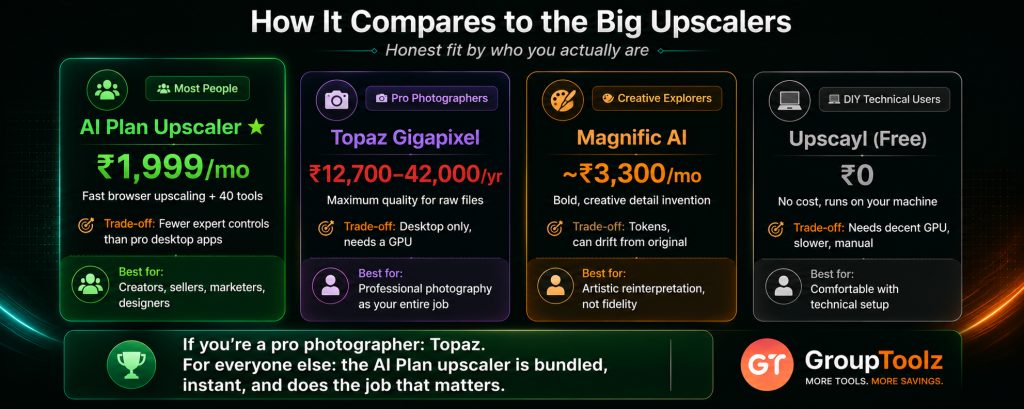
The honest read: if you’re a professional photographer whose entire job is squeezing every last pixel from raw files, Topaz is still the specialist and worth its price. For everyone else, creators, sellers, marketers, designers, a solid browser upscaler bundled into a wider toolkit does the job you actually need at a fraction of the cost. An Image Upscaler group buy through the AI Plan is aimed squarely at that second group, which is most of us.
What You Can Use It For
| Use case | Why upscaling helps |
|---|---|
| E-commerce listings | Meet marketplace resolution rules with the photos you already have |
| Posters and print | Push a small image up to something a printer will accept |
| Thumbnails and banners | Keep visuals crisp when you scale them up for larger placements |
| Old family photos | Rescue grainy scans and make them frame-worthy |
| Client assets | Work with the small logo or photo the client actually sent you |
| AI image finishing | Take a generated image up to a size you can print or publish big |
| Image Upscaler, in the AI Plan ₹1,999 Upscaler + Mystic + Nano Banana + Recraft V4 + Kling 2.5 + 35 more AI tools · one plan · billed in INR · no auto-renewal |
A Real Workflow With the Image Upscaler
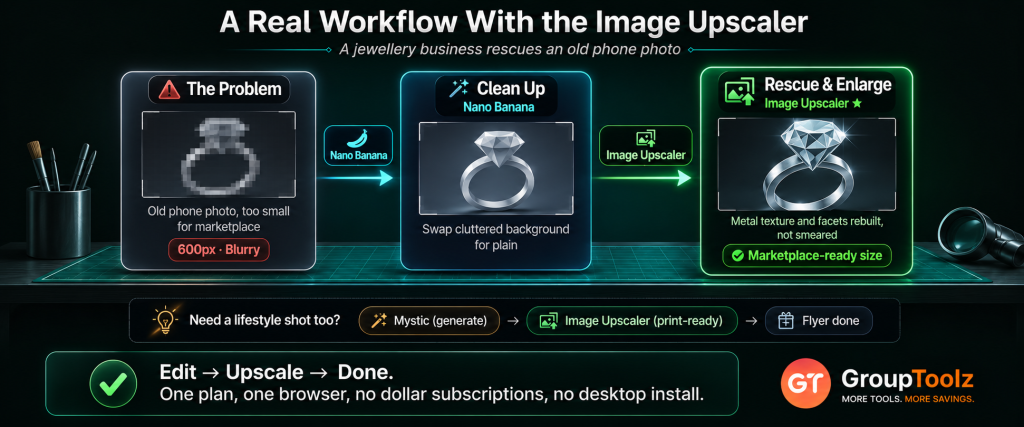
Let me make this concrete. Say you run a small jewellery business and you’re putting a piece on a marketplace that demands large, sharp product images, but the photo you took on your phone last year is the only one you have and it’s too small.
You’d start by opening Nano Banana in the AI Plan to clean up the shot, maybe swap the cluttered background for something plain. Then you’d take that cleaned image over to the Image Upscaler, drop it in, and get back a much larger, sharper version with the metal texture and stone facets rebuilt rather than smeared. Download it, and it now clears the marketplace’s size requirement comfortably, all through an Image Upscaler group buy rather than a separate subscription.
Want a lifestyle shot to go with it? Generate one in Mystic, then run that through the upscaler too so it’s print-ready for a flyer. The whole sequence, edit, generate, upscale, happened inside one plan, in one browser, without a single dollar subscription or a desktop install. That’s what an Image Upscaler group buy looks like in practice, a small utility that quietly finishes the job the other tools started.
| What upscaling can and can’t do Worth being honest here, because expectations matter. AI upscaling adds realistic detail convincingly at roughly two to four times the original size. Beyond that, the model is increasingly inventing rather than recovering, and results get less faithful. A tiny, heavily compressed thumbnail won’t become a flawless billboard, there simply isn’t enough information to work from. Start with the best source image you have, even if it’s still small, and you’ll get results that surprise you. Start with something already destroyed and no tool on earth will fully rescue it. Knowing that boundary makes you much better at using an upscaler well. |
Who an Image Upscaler Group Buy Is For
| You are a… | And it gives you… |
|---|---|
| E-commerce seller | Product photos that meet marketplace size rules without a reshoot |
| Designer | A rescue tool for every small asset a client sends over |
| Content creator | Crisp thumbnails and banners at any size you need |
| Small business owner | Print-ready flyers and posters from ordinary phone photos |
| Photographer | A quick browser option for enlarging without a desktop app |
| Anyone with old photos | Family pictures restored to something worth framing |
Tips for Getting Great Results
Since an Image Upscaler group buy gives you the tool, here’s how to get the most out of it once you’re in.
Start with the best source you have
Always feed it the original file rather than a version that’s been through WhatsApp or a screenshot. Every round of compression strips detail the AI then has to guess at, so the cleaner your input, the better your output.
Upscale last, not first
Do your cropping, colour correction and background work first, then upscale the finished image. Upscaling early means you’re enlarging parts you’ll later throw away, and re-editing afterwards can undo the sharpness you just gained.
Use PNG for anything with transparency
Logos, icons and graphics with see-through backgrounds should go in as PNG so the transparency survives. Send those as JPEG and you’ll get a white box behind your logo.
Check it at full size
Always view the result at 100% before using it. Upscaling looks great in a small preview no matter what, so zoom right in and check faces, text and fine detail where any oddities would show.
The Bottom Line
Here’s where I land. An AI upscaler is one of those tools you don’t think about until the moment you desperately need it, and then it saves the whole job. Small photos become usable, old scans become frame-worthy, generated images become printable, and marketplace size rules stop being a problem. An Image Upscaler group buy makes that rescue tool part of your everyday kit.
What never made sense was the price. Topaz went subscription-first and now runs ₹12,700 to ₹42,000 a year with a desktop install and a graphics card requirement. Magnific asks about ₹3,300 a month in tokens. That’s a lot for one function. An Image Upscaler group buy through GroupToolz fixes the maths: the tool comes inside the AI Plan for ₹1,999 a month, in rupees, in your browser, bundled with Mystic, Nano Banana, Recraft V4, Kling 2.5 and 35-plus other AI tools that actually feed into it. For any Indian seller, creator, designer or small business, an Image Upscaler group buy is the smart way to get upscaling in 2026.
Questions People Actually Ask
What’s an Image Upscaler group buy, in plain terms?
It’s shared access to an AI upscaling tool through a provider, so you don’t buy a standalone upscaler subscription in dollars. Through GroupToolz, an Image Upscaler group buy gets you one inside the AI Plan for ₹1,999 a month, paid in rupees, alongside 40+ other AI tools. So you get upscaling plus an entire AI toolkit in one plan, rather than paying Topaz or Magnific for one function.
How much do AI upscalers cost normally?
Topaz Gigapixel moved to subscriptions in late 2025 and now costs $149/year for Personal (~₹12,700) or $499/year for Pro (~₹42,000), plus it needs a desktop install and a capable GPU. Magnific AI starts at $39/month (~₹3,300) on tokens. Let’s Enhance runs $9-34/month and watermarks free output. An Image Upscaler group buy gets you upscaling inside the ₹1,999 AI Plan instead.
How do I use the Image Upscaler?
Open it from your AI Plan dashboard, then click Upload Image or drag and drop your file onto the upload area. It accepts JPEG, PNG and WebP files up to 5MB. The AI rebuilds detail as it enlarges, then you download the result. It runs in your browser, so there’s no software to install and no graphics card needed.
What file formats does it support?
JPEG, PNG and WebP, up to 5MB per file. Use JPEG for ordinary photos, PNG when your image has a transparent background like a logo or icon, and WebP for images saved from websites. Since the images that need upscaling are small ones, the 5MB ceiling covers just about everything you’d want to enlarge.
How much bigger can it make an image?
AI upscaling adds convincing detail at roughly two to four times the original size. Beyond that, the model invents more than it recovers and results get less faithful to the original. A very small, heavily compressed image won’t become a perfect billboard, there isn’t enough information to rebuild from. Start with the cleanest source file you have for the best results.
Can I pay in Indian Rupees?
Yes. The Image Upscaler group buy through GroupToolz is part of the AI Plan at ₹1,999, billed in INR via Razorpay and UPI apps like PhonePe, GPay and Paytm. There’s no USD billing and no international card, unlike Topaz or Magnific which charge in dollars. The AI Plan also doesn’t auto-renew, so you choose when to pay again.
Comments