
I stopped filming Reels six months ago. Everything is AI now. Hook written by ChatGPT, visuals from Kling Video, voiceover from GFX, captions from Submagic, music from Epidemic Sounds. 30 minutes per Reel. Here’s the whole workflow so you can make Instagram Reels with AI tools on GroupToolz too.
By GroupToolz Team Updated: May 10, 2026
The reason AI-made Reels are outperforming filmed ones
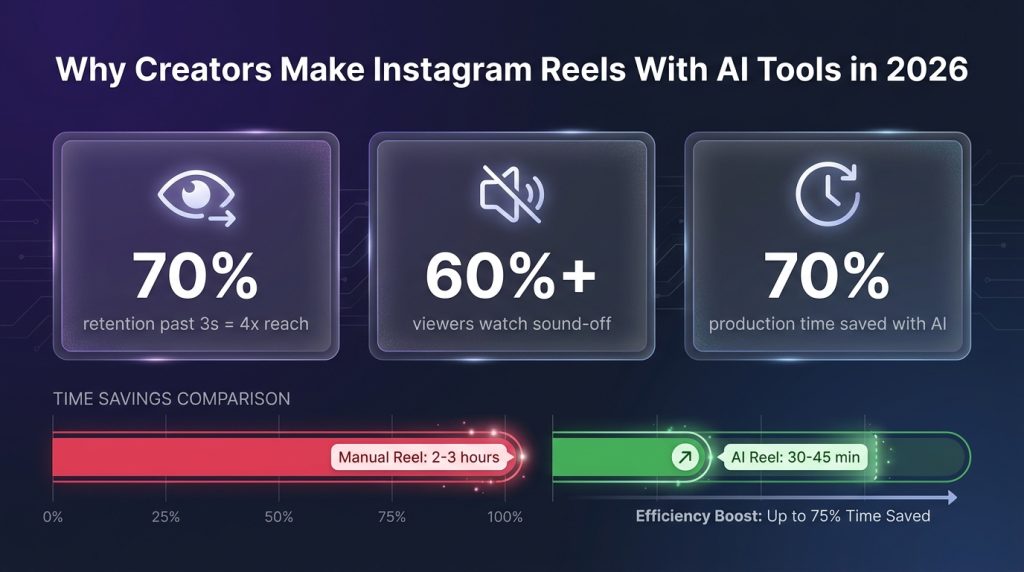
Instagram’s algorithm in 2026 does not care how you made your video. It does not know and does not check. What it measures is whether people keep watching past the 3-second mark, whether they save the Reel, and whether they share it. A Reel where 70% of viewers stick past second three reaches about 4x the audience of one where only 40% stick. That’s the whole game.
And AI tools are winning that game because they’re faster at producing the things the algorithm rewards. Strong hooks. Tight scripts. Visual variety. Perfect captions. When you make Instagram Reels with AI tools, you’re not replacing creativity. You’re just removing the bottlenecks that sit between your idea and a finished piece of content.
One stat I keep coming back to: more than 60% of people watch Reels with sound off. That means captions and text overlays are not a “nice to have.” They are the main event for most of your audience. When you make Instagram Reels with AI tools like Auto Subtitle Generator and Submagic, those captions are word-perfect and animated. When you do them manually, you’re spending 30 minutes on something an AI finishes in 90 seconds.
Every viral Reel has the same four parts
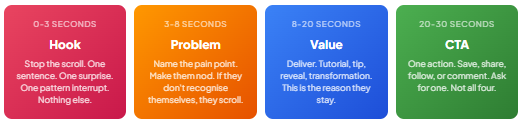
I’ve studied this enough to be annoying about it. The length varies. The niche varies. The four-part structure does not. Before you make Instagram Reels with AI tools or any other way, nail this formula.
The first 3 seconds decide everything
Instagram’s ranking model decides whether to keep pushing your Reel based on how many people stay past second three. That’s your audition. An analysis of 8,400+ Reels found that videos with more than one visual change in the first 5 seconds got about 2.1x higher completion rates than single-angle shots. When you make Instagram Reels with AI tools like Kling Video, you naturally produce these scene changes because each prompt generates a new angle. Filmed content tends to sit on one shot. AI content tends to move. The algorithm likes the movement.
8 steps to make Instagram Reels with AI tools on GroupToolz
| Step 1 of 8 Write 10 hooks and throw away 9 ChatGPT Plus The hook is the whole Reel in a sense. If it doesn’t stop the scroll, nobody sees your brilliant value section at second 8. When I make Instagram Reels with AI tools, I spend more time on hook selection than on any other step. The problem with most AI hook generators is that they produce 10 hooks in the same shape. After a few weeks, your audience recognises the pattern and scrolls past. The fix: feed ChatGPT examples from your own best-performing content and tell it to vary the structure, not match it. Prompt I use: “Write 10 scroll-stopping hooks for a Reel about [topic]. Target audience: [audience]. Under 8 words each. Mix questions, contradictions, numbers, and incomplete sentences. Do not use ‘POV:’, ‘Wait for it’, or ‘This will change your life’.” Hooks that work right now: a number that contradicts what people assume, a visual that doesn’t match the caption, a sentence that ends mid-thought, a claim so specific it demands checking. Generic motivational openers are being actively down-ranked by both platforms. The algorithm figured out that “5 things you need to know” is a template, and it’s tired of it. |
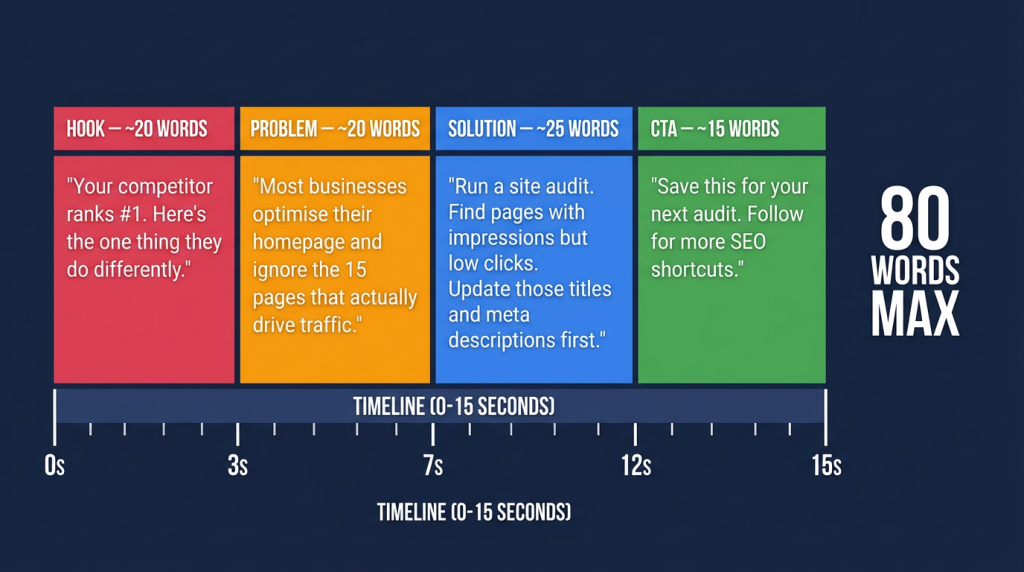
| Step 2 of 8 Script it tight (80 words for 15 seconds, max) Claude AI I use Claude over ChatGPT for scripts because Claude produces tighter short-form writing. The 200K context window means I can paste my last 10 scripts and say “write the next one in my voice but vary the structure.” It works better than starting cold every time. Prompt: “Write a 15-second Reel script about [topic]. Structure: Hook (0-3s), Problem (3-7s), Solution (7-12s), CTA (12-15s). Under 80 words total. Audience: [audience]. Conversational tone. Zero filler. Every sentence must add new information.” 80 words for 15 seconds. 150 words for 30 seconds. These numbers are shorter than people expect. Read the script aloud and time it. If it runs over, cut sentences, not words. AI scripts always run about 20% long because the models want to finish thoughts completely. Your job when you make Instagram Reels with AI tools is cutting that completeness. Incomplete thoughts with visual payoff outperform complete paragraphs every time in short-form. |
| Step 3 of 8 Generate the voiceover GFX Voiceover Speechelo GFX Voiceover is a GroupToolz exclusive and the reason I switched to AI narration. It handles Hindi, English, Tamil, Telugu, and other Indian languages with natural-sounding intonation. Most AI voice tools sound fine in English and robotic in Hindi. GFX doesn’t have that problem. Paste your script. Pick a voice. Export the audio. Under 2 minutes per Reel. One thing I’ve learned the hard way: voiceovers that sound too smooth actually perform worse than slightly imperfect ones. If your AI voice sounds like a radio host reading a teleprompter, people scroll. What works better is pacing variation. Slightly faster on the hook, a beat of silence before the key insight, slightly slower on the CTA. Speechelo on GroupToolz gives you a second voice option if you want tonal variety between Reels. When you make Instagram Reels with AI tools, having two voice options prevents your content from sounding the same every time. |
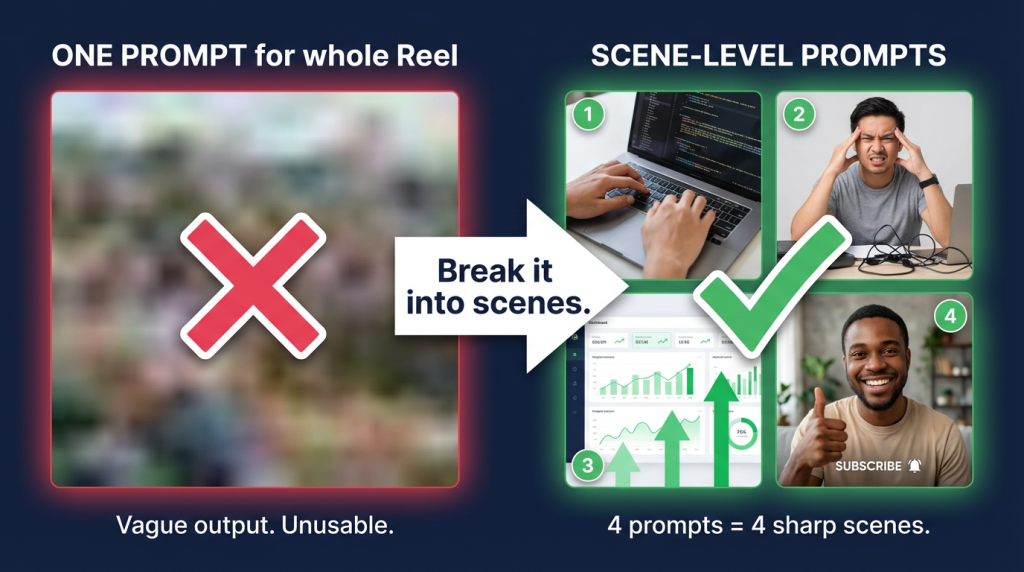
| Step 4 of 8 Generate the visuals (this is the fun part) Kling Video Hailou AI 2.3 This step is where the “no camera” part becomes real. Kling Video and Hailou AI 2.3 generate 9:16 vertical video from text prompts. No filming. No stock footage. No screen recording. Just describe what you want and the AI builds it. For polished Reels: Kling Video. Best quality, motion control, and text rendering. Generate 3-5 second clips per script section (hook visual, problem visual, solution visual, CTA visual), then stitch them together in Step 5. For daily posting: Hailou AI 2.3. Faster generation, slightly lower quality. When you need to make Instagram Reels with AI tools at volume (5+ per week), Hailou keeps the pace without sacrificing too much on visuals. Don’t describe the whole Reel in one prompt. I tried that. The output is always vague. Break it into scenes. “Close-up of hands typing on laptop, warm lighting, 9:16” for the hook. “Split screen: frustrated person left, same person smiling right, clean transition” for the problem/solution. Scene-level prompts produce usable video. Full-Reel prompts produce mush. |
| Step 5 of 8 Edit and assemble in CapCut CapCut CapCut is made by ByteDance. TikTok’s parent company. So its features are built to feed TikTok’s algorithm, and those features work equally well for Reels because the algorithms reward the same patterns. Import your video clips from Step 4 and voiceover from Step 3. Align them on the timeline. Then the important part: add a jump cut or scene change every 2-3 seconds. I know that sounds aggressive. It is. But the data is clear. Rapid visual changes outperform static shots on completion rate. If you make Instagram Reels with AI tools and you’re already generating multiple clips per Reel, you naturally have material for these cuts. Use CapCut’s trending effects and filters. They change monthly. Using current ones signals to the algorithm that your content is fresh. Use last month’s effects and the algorithm treats you like last month’s content. Export: 1080×1920, 9:16, 30fps, high bitrate. Both platforms compress on upload so start with the best quality you can. |
| Step 6 of 8 Captions are not optional (60% of your audience needs them) Auto Subtitle Generator Submagic More than 60% of mobile users watch with sound off. If your Reel has no captions, you just lost the majority of your audience in the first second. That’s not an opinion. That’s the data. Auto Subtitle Generator gives you clean, accurate subtitle tracks synced to your voiceover. Submagic takes it further with animated word-by-word highlighting and pop-in effects. The animated style consistently outperforms static subtitle bars because it adds another layer of visual movement. When people make Instagram Reels with AI tools and skip animated captions, they’re leaving performance on the table. Add a text overlay restating your hook in the first frame. This is your “second hook” for sound-off viewers. Visual hook plus text hook plus voiceover hook gives someone three reasons to stop scrolling in the first second. Use at least two of them. |
| Step 7 of 8 Music (and why you can not use trending pop songs) Epidemic Sounds If you use a copyrighted pop song, you cannot monetise that Reel on any platform. Instagram will let you use it for free reach, but the moment you try to earn from it, the copyright holder takes the revenue. This catches people off guard constantly. Epidemic Sounds on GroupToolz gives you royalty-free music cleared for Instagram, TikTok, and YouTube. No claims. No revenue splits. No surprises six months later when a label finds your video. For educational or informational Reels, pick ambient tracks that sit under the voiceover without competing. For trend-style Reels, use upbeat tracks and sync the beat drop to your visual transitions in CapCut. Volume: music at 15-20%, voiceover at 100%. If you can hear individual lyrics from the background track, it’s too loud and will fight your message. This is one of those details that separates people who make Instagram Reels with AI tools professionally from those who are still experimenting. |
| Step 8 of 8 Cover, publish, and the 60-minute rule Canva Pro Your Reel cover is the thumbnail on your profile grid. Use Canva Pro to make a 1080×1920 cover with 3-5 words in bold, high-contrast colours, and your brand font. This drives profile visits from Reel viewers and turns watchers into followers. About publishing timing: forget the “best time to post” charts. Post when you can be online for the next 60 minutes. The first hour after publishing is when Instagram decides whether your Reel is worth showing to more people. Replying to comments during that window is the highest-leverage thing you can do for reach. Schedule the Reel, then show up for the hour. That’s the whole publishing strategy. Cross-posting: Export the same Reel to TikTok and YouTube Shorts. Remove Instagram’s watermark before uploading to TikTok (watermark detection suppresses reach on both platforms). Adjust captions: TikTok rewards longer keyword-rich captions in 2026, Instagram rewards shorter ones with a clear CTA. Same video, different wrapper. Anytime you make Instagram Reels with AI tools, you’re also making TikToks and Shorts with zero extra work. |
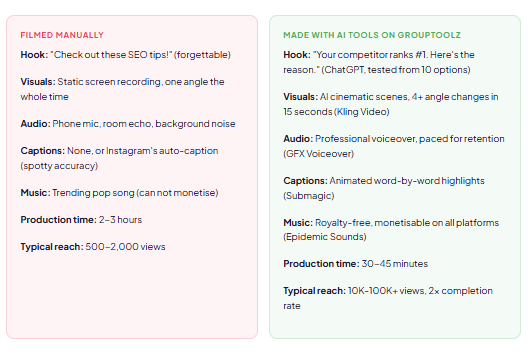
Basic Reel versus AI Reel: side by side
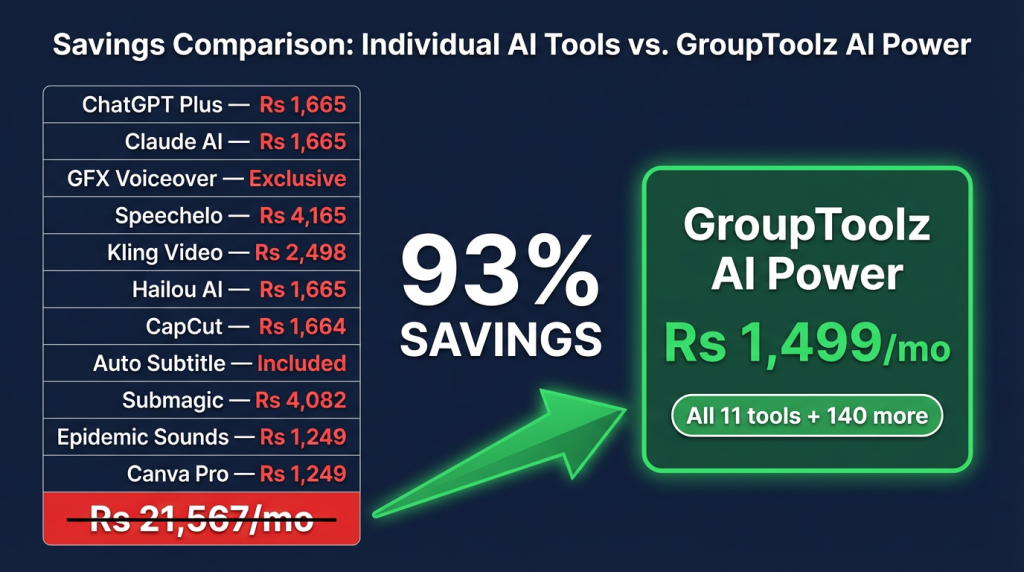
What the full stack costs (retail versus GroupToolz)
| Step | Tool | What it does | GroupToolz plan | Retail/month |
|---|---|---|---|---|
| 1. Hook | ChatGPT Plus | 10 hook variations per Reel | Pro Rs 449 | Rs 1,665 |
| 2. Script | Claude AI | Tight 15-30s scripts | Pro Rs 449 | Rs 1,665 |
| 3. Voice | GFX Voiceover | Multi-language narration | AI Power Rs 1,499 | Exclusive |
| 3b. Voice | Speechelo | Alternative voice profiles | AI Power Rs 1,499 | Rs 4,165 |
| 4. Visuals | Kling Video | Cinematic AI video, 9:16 | AI Power Rs 1,499 | Rs 2,498 |
| 4b. Visuals | Hailou AI 2.3 | Fast video for daily posting | AI Power Rs 1,499 | Rs 1,665 |
| 5. Edit | CapCut | AI auto-edit, transitions, beat sync | AI Power Rs 1,499 | Rs 1,664 |
| 6. Captions | Auto Subtitle Generator | Synced subtitle tracks | AI Power Rs 1,499 | Included |
| 6b. Captions | Submagic | Animated word-by-word captions | AI Power Rs 1,499 | Rs 4,082 |
| 7. Music | Epidemic Sounds | Royalty-free, all platforms | Ultimate Rs 699 | Rs 1,249 |
| 8. Cover | Canva Pro | Reel covers, text overlays | Starter Rs 199 | Rs 1,249 |
| All 11 tools at retail | Rs 21,567/mo | |||
| GroupToolz AI Power (everything + 140 more tools) | Rs 1,499/mo | |||
What to make first (by niche)
| Niche | Reel format | Hook example | Visual approach |
|---|---|---|---|
| Digital marketing | 3 quick tips (30s) | “Your SEO audit is missing this.” | Screen recording + AI text overlays |
| Finance | Before/after (15s) | “Rs 500/day = Rs 1.2 crore in 10 years.” | AI split screen from Kling |
| Health and fitness | Myth vs reality (20s) | “This ‘healthy’ breakfast has more sugar than a cola.” | Product comparison visuals from Hailou |
| Tech and AI | Tool walkthrough (30s) | “This AI tool replaced my entire editing workflow.” | Screen recording + animated captions |
| Travel | Countdown (15s) | “3 Goa spots that tourists miss.” | AI cinematic locations from Kling |
| Education | ELI5 (20s) | “What is blockchain? In 20 seconds.” | Simple animation + GFX voiceover |
How many per week?
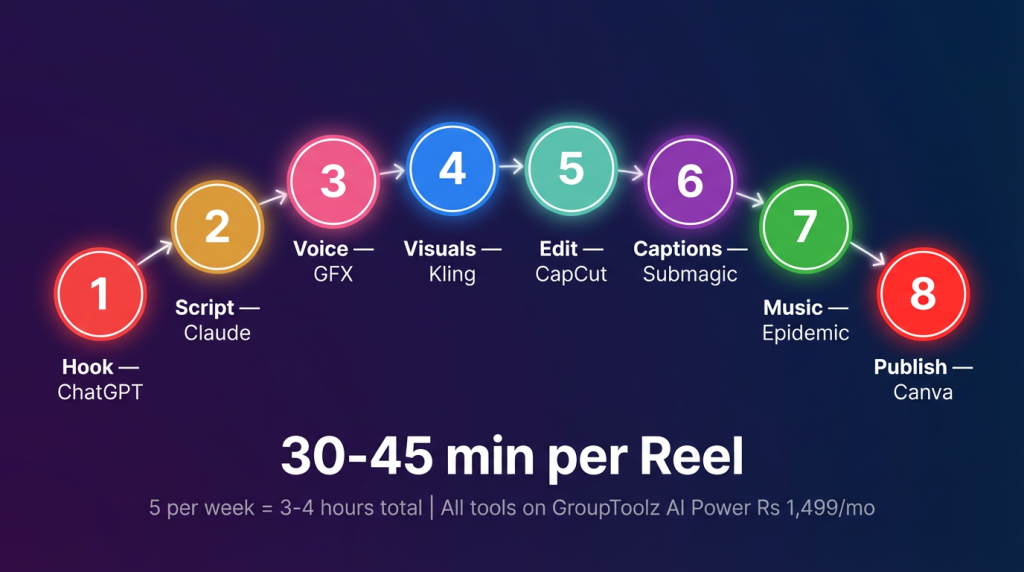
3-5 Reels per week works for most accounts. Posting daily only wins if quality stays high, and quality almost never holds at daily for solo creators. When you make Instagram Reels with AI tools on GroupToolz, 5 per week takes about 3-4 hours total. That’s sustainable without burning yourself out. The accounts that grow fastest post consistently at medium volume, not frantically at high volume.
Start making AI Reels. Rs 1,499/month.
Kling Video, GFX Voiceover, CapCut, Submagic, Epidemic Sounds, ChatGPT, Claude, and 140 more tools. No camera needed.
Questions people ask
Can AI-made Reels actually go viral?
Yes. The algorithm measures watch time, saves, and shares. It does not check whether a camera was involved. AI Reels with strong hooks and tight scripts routinely outperform filmed content with weak structure. What gets penalised is boring content, not AI content.
Will Instagram penalise me for using AI?
No. Meta’s policy is about synthetic likenesses of real people, not about AI-assisted editing or visual generation. The risk with AI Reels is creative, not policy. If every one of your Reels looks identical because you’re using the same prompts, your audience will get bored and stop watching. That kills your reach. Vary your prompts and formats when you make Instagram Reels with AI tools.
Which GroupToolz plan do I need?
AI Power at Rs 1,499/month. It has everything: ChatGPT Plus, Claude AI, GFX Voiceover, Speechelo, Kling Video, Hailou AI 2.3, CapCut, Submagic, Epidemic Sounds, and Canva Pro. The Ultimate plan at Rs 699 covers scripting and music but not the AI video generators or voiceover tools you need to make Instagram Reels with AI tools properly.
How long per Reel?
30-45 minutes. Hook writing (5 min), script (5 min), voiceover (2 min), visuals (10-15 min), CapCut editing (10 min), captions (3 min), music and cover (5 min). Compare that to 2-3 hours for filming, editing, and captioning manually.
Does this work for TikTok and YouTube Shorts too?
Same output format: 9:16, 1080×1920, 30fps. Cross-post to all three platforms. Remove any watermarks before uploading to a different platform (both Instagram and TikTok suppress content with competitor watermarks). Adjust caption length per platform. Same video, different text wrapper.
Do I need to show my face?
No. This entire workflow is built for faceless content. AI visuals replace footage. AI voiceover replaces your voice. Animated captions replace on-screen text cards. Some of the fastest-growing accounts in finance, tech, and education in 2026 are faceless. You can make Instagram Reels with AI tools and never appear on camera once.
More AI guides
Veo 3.1 vs Kling 3.0 vs Sora 2: Which AI Video Generator Should You Pick in 2026?
Nano Banana 2 vs Flux 2 vs Ideogram AI — Which GroupToolz Image Generator is Best?
How to Use ChatGPT + Ahrefs Together for SEO Content That Actually Ranks
Want more AI content creation guides? Browse all GroupToolz blog posts
Comments