How group buy works is the one question most sellers dodge. You pay ₹199, click a button, and Semrush opens. But who paid for that account? Why does it sometimes log you out? And why can’t you open the billing page? This guide takes you behind the dashboard, step by step, including the parts that don’t make providers look good. Us included.
By GroupToolz Team Checked: 4 November 2026
If you’ve ever wondered how group buy works before handing over your money, this page is for you. No sales pitch first. The plumbing first.
| $249.95 Semrush Guru, one user | ₹199 Shared Semrush, per month | 1 IP logged in at once (Semrush KB) | 2.6M Users hit by hacked extensions |
A customer once asked us on WhatsApp, quite seriously, whether we’d “hacked” Semrush. I laughed, then realised it was a fair question. From the outside, a ₹199 price for a tool that costs over ₹21,000 a month does look like magic. Or theft.
It’s neither. So how does group buy work, then? Arithmetic, a browser trick older than most of the tools involved, and a lot of boring maintenance. Once you understand how group buy works, you’ll know why it’s cheap, why it occasionally breaks, and which sellers are worth trusting. You’ll also know when to skip it completely, which I’ll get to.
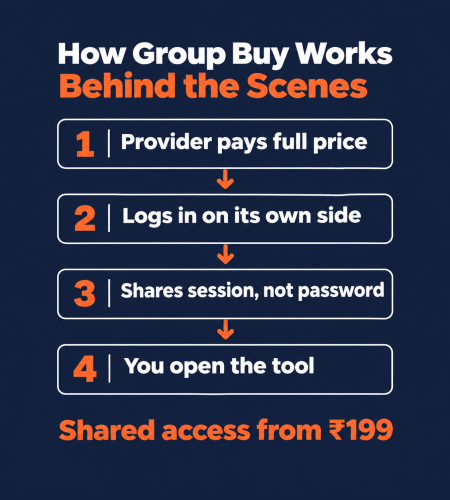
| The short answer A provider pays for real premium accounts, logs into them on its own systems, and shares the logged-in session with many users through a browser extension, a web dashboard or a cloud browser. Your monthly fee is a slice of the real subscription. Daily limits stop one person draining it, blocked pages stop anyone changing the password, and downtime happens when a tool company spots the sharing. That, in one paragraph, is how group buy works. |
How Group Buy Works in One Picture
Before the details, here’s the whole chain. Every provider, ours included, runs some version of this.
- The provider buys real subscriptions. Usually the top tier, and usually more than one account per tool.
- It logs in on its own side. The password never leaves the provider.
- It shares the session, not the password. Through an extension, a dashboard or a remote browser.
- It spreads users across accounts. So no single login carries too many people.
- It locks the dangerous pages. Billing, settings, logout, user management.
- It sets daily caps. Reports, exports, generations.
- It fixes things when they break. Which they do. Regularly.
Seven steps. Here’s what each one means for you.
Step 1: Someone Pays Full Price First
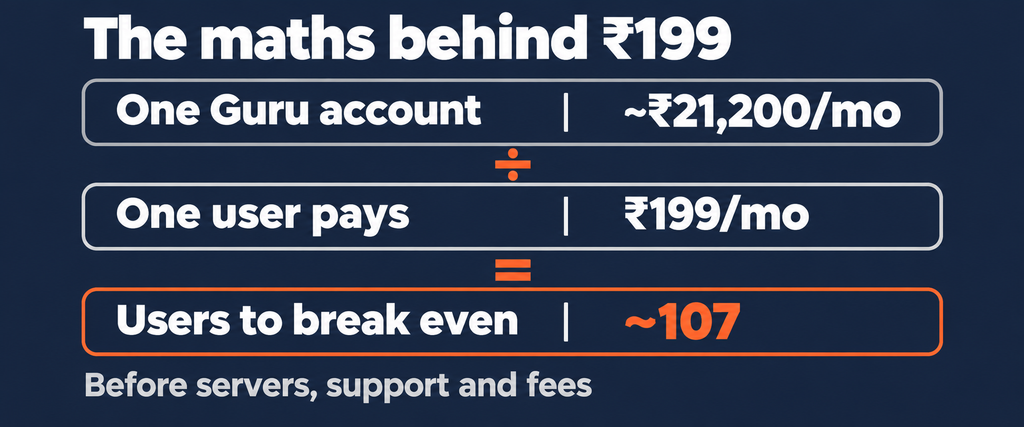
This surprises people, but it’s the foundation of how group buy works. There’s no secret cheap version of Semrush or Canva. The provider pays the same price you’d pay. Semrush Guru is $249.95 a month, roughly ₹21,200. Pro is $139.95. Those are the real invoices sitting behind a ₹199 plan.
So where does the saving come from? Volume. Here’s the rough maths, using Semrush Guru as the example.
| What | Number | What it tells you |
|---|---|---|
| One Guru account | ~₹21,200/mo | The cost the provider carries |
| Single-tool price | ₹199/mo | What one user pays |
| Users to break even | ~107 | Before servers, support or payment fees |
| Plus overheads | Servers, proxies, staff, gateway fees | Why bundles exist |
Illustrative maths at about ₹85 to the dollar. Real numbers vary by tool, plan and how many accounts a provider runs.
Look at that third row for a second. Over a hundred people need to pay ₹199 just to cover one account. That single number explains almost everything else about how group buy works: why there are daily limits, why some tools are slower at peak times, and why bundles like a ₹499 plan make more sense for a provider than lots of single tools. Spread the cost over many tools and many users, and it becomes a business.
It also tells you something useful as a buyer. If a seller offers fifty premium tools for ₹85, someone isn’t paying for something. Usually it’s you, later.
Step 2: The Session Is Shared, Not the Password
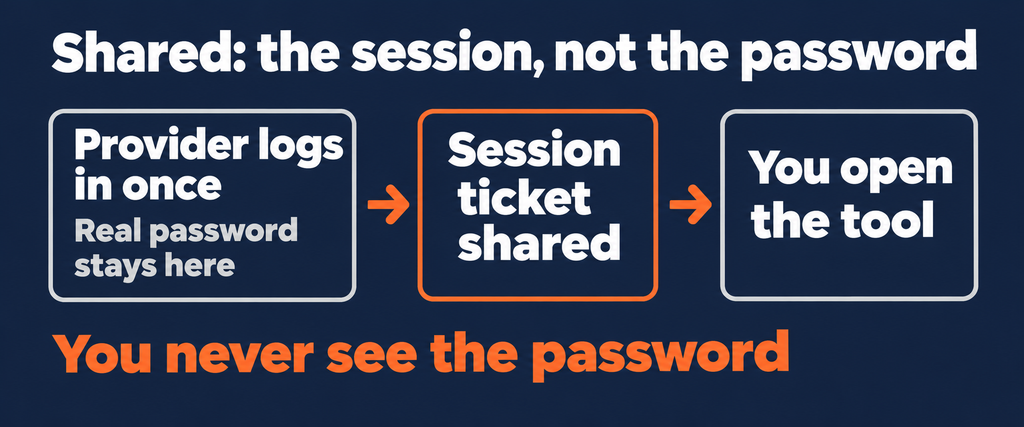
Here’s the bit that answers “did you hack it?”. When you log into any website, the site gives your browser a small piece of data called a session cookie. It’s basically a ticket that says “this person already logged in, let them through”. Every page you open after that shows the ticket instead of asking for your password again.
That’s the heart of how group buy works. The provider logs in once, with the real password, on its own machine. Then it shares the ticket, not the password. You get in. You never see the login details. And you can’t lock everyone else out by changing them, because you never had them.
| Why sessions expire and you see a login screen Session tickets don’t last forever. Tool companies expire them or kill them when something looks off, and you suddenly see a login page where your dashboard used to be. The provider has to log in again and push a fresh ticket. Good providers do this in minutes. Bad ones leave you staring at that screen until you message them. |
Step 3: Three Ways Access Reaches Your Browser
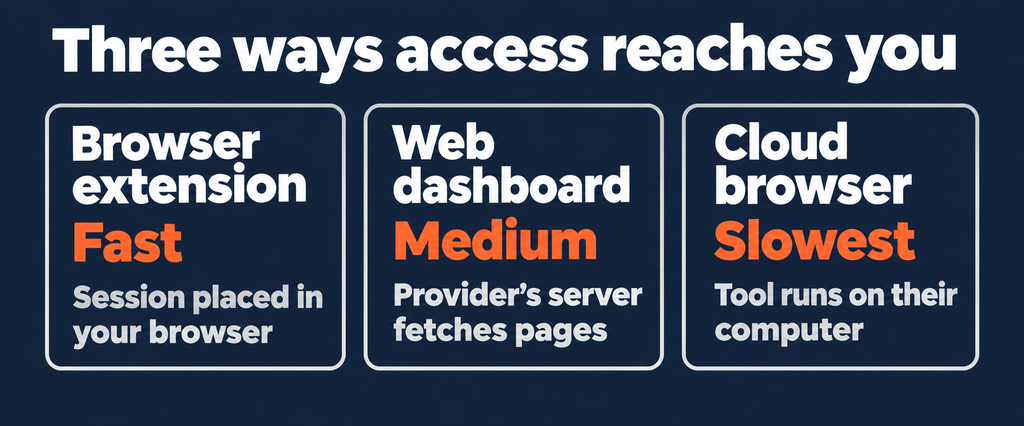
Every provider has to get that shared session from its side to yours. Group buy access arrives in one of three ways, and the one a seller picks tells you a lot about how group buy works at that company.
Browser extension
This is how group buy works at most Indian providers. You install the extension, log into their dashboard, click a tool, and the extension places the session in your browser. Then the real tool’s website opens in a normal tab. It’s fast and it feels exactly like using the tool yourself.
The catch is trust. An extension that can place cookies can usually read them too. Which brings me to a security point I’ll come back to.
Web dashboard or proxy
Here the tool opens through the provider’s own server. You never touch the real site directly; the provider’s server fetches pages and passes them to you. Nothing to install, and the provider controls exactly which pages load. It can feel a little slower, and some features, like big exports, sometimes misbehave.
Cloud browser or remote desktop
The tool runs in a browser on the provider’s computer somewhere else, and you see a live stream of it. Very little touches your own machine, which is great for safety. But it’s the clunkiest to use, especially on slow internet, and copying data out can be painful.
| Method | Speed | Feels like the real tool | Risk to your browser |
|---|---|---|---|
| Browser extension | Fast | Yes | Depends on the provider |
| Web dashboard / proxy | Medium | Mostly | Low |
| Cloud browser / RDP | Slowest | Laggy | Lowest |
Most people pick speed. Fine. Just read the security section below first, because that’s where how group buy works stops being theory and starts touching your own browser.
Step 4: Spreading People Across Accounts
Remember the Semrush support page. It says that on a regular subscription, “only one computer/IP address can be logged in at once”, and that too many active sessions can get an account flagged. Semrush’s terms go further: each account is meant for one individual, and if it detects repeated access from different locations, devices or IP addresses beyond the plan’s limits, it may suspend or terminate the account.
So the real engineering behind how group buy works is about not looking like a crowd. Providers route traffic through their own servers so that, from the tool’s side, activity looks like it’s coming from one place. They also run several accounts per tool and spread users between them, so no single account carries too much load.
This is why one day your Semrush tab might show different saved projects from the day before. You’ve been moved to another account in the pool. Nothing’s wrong; that’s just how group buy works when it’s working properly.
Step 5: Locked Pages and Blocked Buttons
Ever clicked “Settings” in a shared tool and got a blank page or an error? That’s deliberate, and it’s a big part of how group buy works safely for everyone on the account.
- Billing and subscription pages are blocked, so nobody can cancel or downgrade the plan.
- Profile and password pages are blocked, so nobody can take the account over.
- User management is blocked, so nobody can invite themselves as an admin.
- Logout is often blocked or redirected, because one person logging out can end the session for many.
- Some heavy features, like huge exports or API access, may be switched off.
Annoying? Sure. But one angry user on the billing page could kill the tool for a hundred people in ten seconds.
Step 6: Daily Limits, and Why They Exist
Every premium tool has its own limits. Semrush Guru, for example, gives a set number of results per report and keyword updates per month. On a shared account, those limits are shared too. One person running thousands of reports could burn the whole month’s allowance by lunchtime.
So providers put their own caps on top. A fixed number of reports, exports or AI generations per user per day. On our AI Plan, for example, most image and video tools come with a published daily number, like 20 generations a day on most image models. It isn’t there to annoy you. It’s how group buy works without collapsing under its heaviest user.
The honest test of a provider here is simple: are the limits written down before you pay? If a seller says “unlimited everything” on a shared account, either it isn’t true, or it won’t be true next week.
Step 7: Downtime, and What Good Providers Do About It
This is the part most group buy websites hide on page three of their FAQ. Tools go down. Not every day, but it happens to every provider, including us.
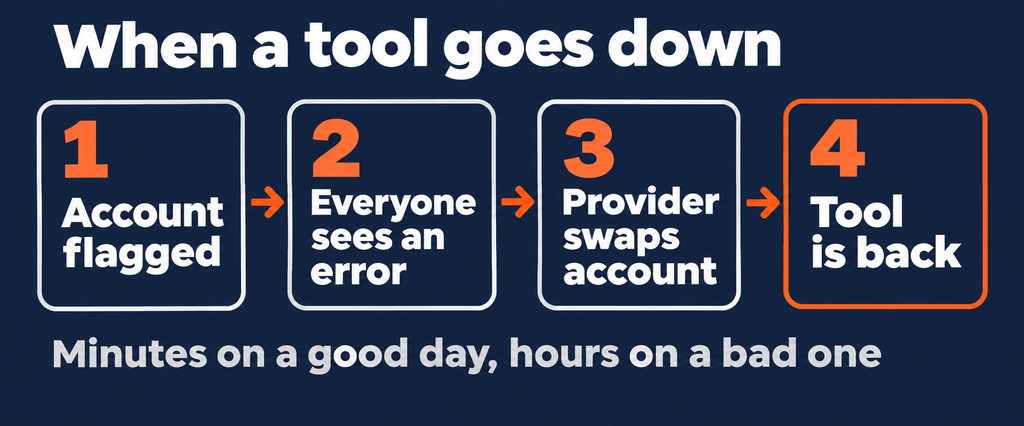
It usually goes like this. The tool company spots unusual activity and flags the account, asks for verification, or suspends it outright. Everyone on that account suddenly sees an error. The provider then swaps in a fresh account, re-logs, moves users across, and the tool comes back. On a good day that takes minutes. On a bad day, hours.
Understanding how group buy works makes downtime less scary, because you know it’s a temporary swap, not the end of the service. But it should also change how you work. Here’s what I’d do:
- Export as you go. Keyword lists, audits, designs. If the account flips mid-task, your work is safe.
- Don’t leave deadlines to the last night. A two-hour outage at 11 PM before a submission is a disaster you can avoid.
- Ask the downtime question before paying. Extra days? A credit? Nothing? Get it in writing.
- Keep a free fallback. Google Search Console, Canva Free and the free Semrush account cover a lot for a day.
| What “flagged” actually means for you When a tool company flags a shared account, the risk lands on the account holder, which is the provider, not you. Your own accounts aren’t touched, because you never logged in with them. What you lose is time: the minutes or hours until the provider brings a new account online. That’s the real cost to weigh, and it’s why agencies with client deadlines should pay for critical tools directly. |
The Security Side Nobody Talks About
I said I’d come back to extensions. Here’s the uncomfortable truth about how group buy works through a browser add-on: you’re trusting a stranger’s code inside your browser.
This isn’t paranoia. In late 2024, attackers hijacked at least 35 legitimate Chrome extensions, used by roughly 2.6 million people, and pushed updates that stole session cookies and login data. In June 2026, Malwarebytes reported malware that quietly installed a fake Chrome extension to grab cookies and take over logged-in accounts, sidestepping two-factor login. Session tickets are valuable. The same trick that lets a provider give you Semrush could, in the wrong hands, give someone your Gmail.
Don’t panic. Knowing how group buy works just means you build one habit.
- Use a separate browser profile for group buy tools. No Gmail, no banking, no client logins in that profile. Ever.
- Never install a downloaded .exe “tool loader”. Extensions or a web dashboard only.
- Check what the extension asks for. If it wants to read every site you visit, keep it in that separate profile.
- Never give a provider your own password. Remember, sharing only flows from their account to you.
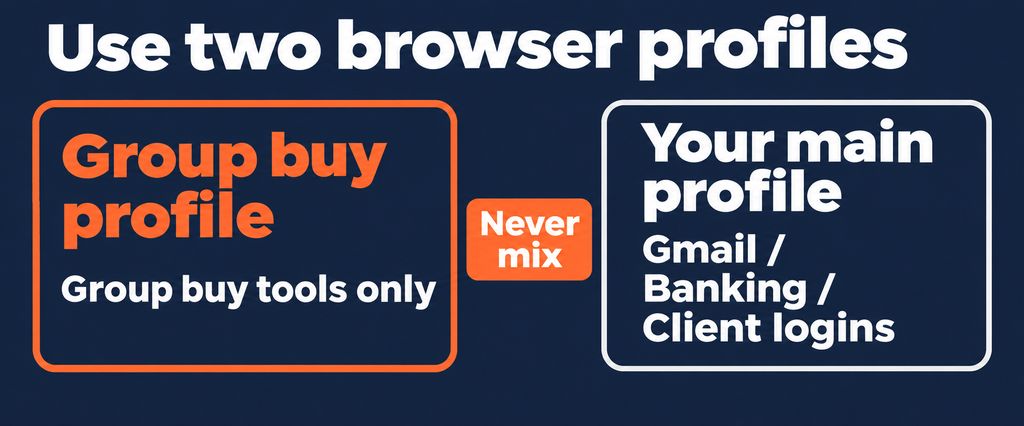
Do those four things and most of the risk disappears. Skip them, and a ₹199 tool could cost you a lot more than ₹199.
What You Can and Can’t Do on Shared Access
Now you know how group buy works, here’s what that means day to day.
| Task | On shared access | Why |
|---|---|---|
| Keyword and competitor research | Works well | Read-only research is what sharing does best |
| Downloading stock assets | Works well | Within daily download caps |
| AI image and video generation | Works | Daily generation limits apply |
| Site audits on your own site | Usually | Big crawls may be capped |
| Saving long-term projects | Risky | Accounts rotate, so projects can vanish |
| Rank tracking over months | Limited | Use Search Console for your own site |
| Confidential client work | Avoid | Other users may see your projects |
| Changing settings or adding users | Blocked | Protects the account for everyone |
Five Myths About How Group Buy Works
“It’s hacked or cracked software.” No. Real accounts, paid at full price. Cracked software is a different, far riskier thing, usually a download you should never run.
“It’s officially licensed.” Also no. Sharing goes against most tools’ terms, Semrush’s included. Any seller claiming to be an “official partner” is lying to you, and that alone is a reason to leave.
“My own account could get banned.” Your personal accounts aren’t involved. You never log into the tool with your own details. The account at risk belongs to the provider.
“Unlimited means unlimited.” On a shared account, nothing is truly unlimited. Even our no-cap Veo 3.1 plan works by trading speed for volume on a low-priority queue. Read what “unlimited” actually means before you pay.
“Cheapest is best.” Given how group buy works, a rock-bottom price means corners got cut on accounts, servers or support.
How to Check a Provider Once You Know How Group Buy Works
Knowing the machinery makes you a much sharper buyer. Ask any seller these five questions on WhatsApp before paying. Their answers show you how group buy works at their company, not just in theory.
- How does access reach me? Extension, dashboard or cloud browser. A clear answer is a good sign.
- What are the daily limits on the tool I need? A number, not “unlimited”.
- What happens when a tool goes down? How fast it’s usually fixed, and whether you get extra days.
- Can other users see my projects? The honest answer is yes, sometimes.
- Do I pay through a gateway with an invoice? Razorpay, Stripe or card, not a personal UPI ID.
For the full checklist, including what to do if a seller disappears with your money, see our guide to spotting a legit group buy website.
Who Shouldn’t Use a Group Buy at All
A guide about how group buy works that only sells group buys isn’t worth much, so here’s who should walk away.
Agencies with signed uptime promises to clients. Anyone handling confidential legal, medical or unreleased product work. Teams that need separate logins with their own history. And anyone who’s managed fine for a month on free tools. If you’ve never felt short of data, don’t pay anyone yet.
For students, bloggers, freelancers and creators, the trade usually makes sense. You give up privacy and perfect uptime. You get tools you’d never otherwise touch.
How GroupToolz Does It, Honestly
Since we’ve explained how group buy works in general, here’s how it works with us specifically, warts included.
- Access: through our dashboard and extension, with tools opening in your browser.
- Payment: Razorpay, Stripe and UPI apps like PhonePe, GPay and Paytm, with an invoice. Nothing auto-renews.
- Plans: single tools from ₹49, Lite at ₹199, Pro at ₹399, Advanced at ₹499, Designer’s Pack at ₹449, Writer’s Pack at ₹799, the AI Plan at ₹1,999, and Custom plans from ₹999 for any 15 tools up to ₹1,899 for any 50.
- Limits: published per tool, so you know your daily numbers before paying.
- Support: WhatsApp, 18/7.
Two honest weak spots. Our public reviews are still building, because we’re newer than some names in this market. And like every provider, we have downtime when a tool company flags an account. When that happens, we swap accounts and tell you what’s going on. Test us in the first 24 hours, exactly as you’d test anyone else.
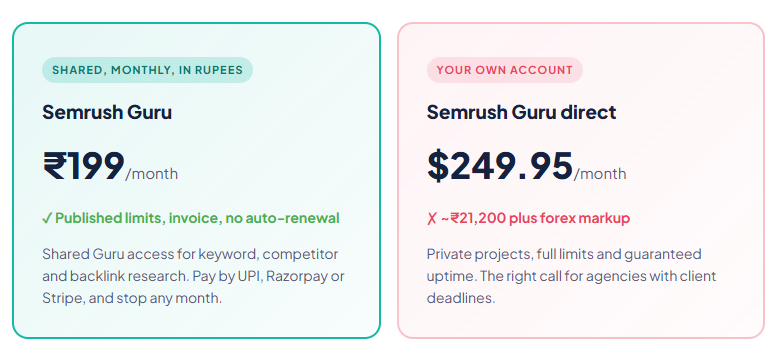
| Semrush Guru, one month ~₹21,200 → ₹199 Shared access · billed in INR via UPI · daily limits apply · no auto-renewal |
The Bottom Line
So that’s how group buy works. Someone pays full price for real accounts. They share the logged-in session, never the password, through an extension, dashboard or cloud browser. They spread people across accounts, block the pages that could wreck things, cap daily use, and patch the holes when a tool company notices.
None of that is magic, and none of it is risk-free. But once you understand how group buy works, you can judge any seller in five minutes, protect your browser with one simple habit, and decide whether the trade makes sense for your work. For most freelancers and creators in India, it does. For an agency with client contracts, it probably doesn’t. Both answers are fine.
Questions People Actually Ask
How group buy works, in simple words?
A provider buys real premium subscriptions, logs in on its own side and shares the logged-in session with many users through an extension, dashboard or cloud browser. Each user pays a small monthly fee. Daily limits, blocked settings pages and account rotation keep it running.
Do group buy providers share the password?
A good one doesn’t. The provider keeps the password and shares only the session, the small piece of data that keeps you logged in. That’s why you can’t change the password or open billing pages on shared tools.
Why do group buy tools go down sometimes?
Tool companies like Semrush watch for one account used from many devices or IP addresses, and their terms let them suspend it. When that happens, the provider swaps in a new account and moves users across. Good providers fix it in minutes to hours.
Can my own account get banned for using a group buy?
Your personal accounts aren’t involved, because you never log into the tool with your own details. The account at risk belongs to the provider. What you can lose is time during downtime, so export your work as you go.
Is a group buy browser extension safe?
It can be, but an extension that places cookies can usually read them too. Install it in a separate browser profile with no email, banking or client logins, never run a downloaded .exe loader, and only use providers that pass basic trust checks.
Why are there daily limits on a group buy?
Because many people share one account’s monthly allowance, which is how group buy works at every provider. Without per-user caps, one heavy user could use up reports or generations for everyone. Good providers publish these limits before you pay.
Is a group buy legal?
It isn’t an official licence. Sharing goes against most tools’ terms of service, which is why accounts can be suspended. For users, the practical risk is losing access for a while, not legal trouble, but it isn’t suitable for agencies with client contracts.
GroupToolz Team. We run a group buy platform in India, so we’re explaining our own industry here, including the uncomfortable parts. Semrush details come from its published terms of service and support pages, and security figures from public reports by Malwarebytes and others, checked on 4 November 2026.
Comments