
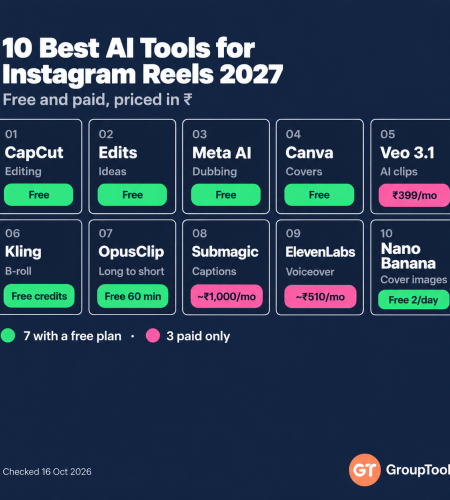
Instagram now dubs your reel into Hindi, Tamil or Marathi in your own voice, for free. Edits has an AI assistant that tells you what to post and when. And AI video tools can make the B-roll you never had time to shoot. Here are the ten AI tools that actually earn a place in a reels workflow for 2027, what each one costs in rupees, and which ones you can skip.
By GroupToolz Team Prices checked: 16 October 2026
| ₹0 Edits and Meta AI dubbing | 6 Indian languages for AI dubbing | ~₹819 CapCut Pro, monthly | ₹449 CapCut + Canva on GroupToolz |
Every week someone in our support chat asks the same question: “What are the best AI tools for reels?” And every week the honest answer is that it depends on where you’re stuck. Some people can’t think of ideas. Some can shoot but hate editing. Some have great content in Hindi and want it to reach Chennai and Kolkata too.
So this list of the best AI tools for Instagram reels 2027 isn’t sorted by hype. It’s sorted by the job each tool does in a real workflow: idea, footage, edit, captions, voice, cover, and reach. I’ve included free tools wherever they’re genuinely good, because two of the most useful tools on this list cost nothing at all.
| The short version If you only pick three of the best AI tools for Instagram reels 2027 has to offer, make them CapCut for editing, Instagram’s own Edits app for ideas and insights, and Meta AI translations to reach other languages. All three have free versions. Add Canva for covers and an AI video generator like Veo or Kling only when you need footage you can’t shoot. |
How I Chose the Best AI Tools for Instagram Reels 2027
Most AI tools for Instagram reels promise to do everything. A tool made this list only if it saves real time on a real reel. Here’s what I checked.
- Does it fix a real bottleneck? Ideas, editing, captions, voice, visuals or reach.
- Does it work for vertical video? A great tool that only exports 16:9 creates extra work.
- Is the output safe to post? No watermarks, clear commercial rights, no music that gets your reel muted.
- Does it handle Indian languages? Hindi captions, regional dubbing, Devanagari text.
- What does it cost in rupees? And is the free tier good enough to start?
Best AI Tools for Instagram Reels 2027 at a Glance
| # | Tool | Job in your workflow | Free tier | Paid from |
|---|---|---|---|---|
| 1 | CapCut | Editing, auto captions, templates | Yes | ~₹419/mo |
| 2 | Instagram Edits | Editing, ideas, insights | Yes | Free |
| 3 | Meta AI translations | Dubbing into other languages | Yes | Free |
| 4 | Canva | Covers, text, brand templates | Yes | ₹4,000/yr |
| 5 | Veo 3.1 | AI clips with sound | Jio offer | ₹399/mo |
| 6 | Kling | AI B-roll and motion | ~66 credits/day | $10, ~₹850 |
| 7 | OpusClip | Long video into reels | 60 min/mo | $15, ~₹1,275 |
| 8 | Submagic | Animated captions | Unclear | $12 to $19, ~₹1,000+ |
| 9 | ElevenLabs | AI voiceover | Non-commercial | $6, ~₹510 |
| 10 | Nano Banana | Cover images, start frames | 2 Pro images/day | ₹399/mo |
Dollar prices converted at about ₹85. Submagic’s annual price is $12 a month and monthly billing is $19.
1. CapCut: Best All-Round Reels Editor
CapCut is still the most popular of all Instagram reels AI tools in India, and for good reason. Auto captions in Hindi and English, beat sync, background removal without a green screen, thousands of trending templates, and a phone app that’s genuinely powerful. If you’re choosing the best AI tools for Instagram reels 2027 on a budget, this is the one to master before anything else.
The free version is a real editor, but premium templates carry a watermark and there’s no 4K. Standard is about ₹419 a month and Pro about ₹819. One honest note: CapCut is made by ByteDance, and if you’re on a work device with strict app policies, check before installing.
2. Instagram Edits: Best Free Tool From Instagram Itself
Meta’s Edits app started as a CapCut rival and has turned into something more useful. In June 2026 Meta added an AI assistant that reads your view counts, retention and trending audio, then suggests ideas and the best time to post. There’s also an Inspiration tab with topic search, audience insights by age and active hours, and a Project Versions feature for testing two edits of the same reel.
It belongs among the best AI tools for Instagram reels 2027 for one simple reason: it’s built by the people who run the feed. Its editing tools are simpler than CapCut’s and the desktop version isn’t out yet. But it’s free, it exports without a watermark, and the insights alone make it worth installing. Of all the AI tools for Instagram reels on this list, this is the one most creators are underusing.
3. Meta AI Translations: Best Way to Reach New Audiences
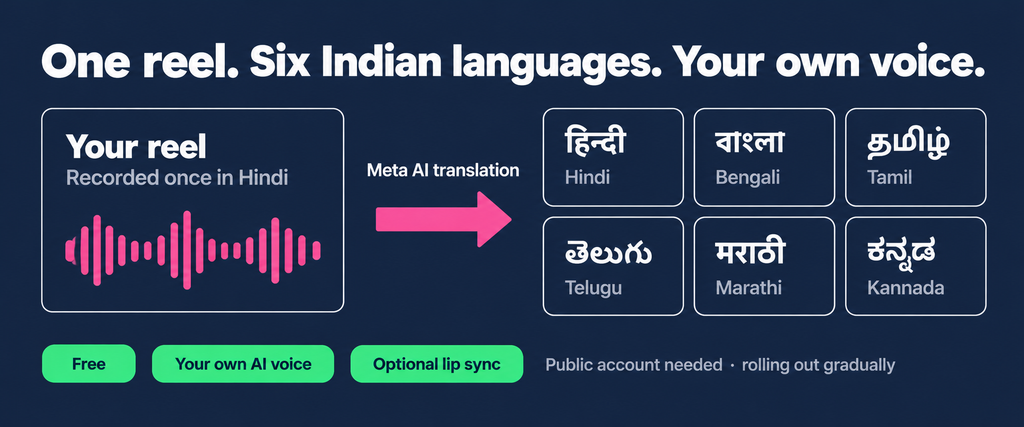
This is the feature I’d tell every Indian creator about. If I could keep only one of the best AI tools for Instagram reels 2027 has brought, for regional reach it might be this one. Instagram can now dub your reel into another language using an AI copy of your own voice, with optional lip sync. As of April 2026 it supports Hindi, Bengali, Tamil, Telugu, Marathi and Kannada, alongside English, Spanish and Portuguese.
It’s free, your original reel stays as it is, and on Instagram there’s no minimum follower count. You need a public account, and the toggle is rolling out gradually, so you might not see it yet. A finance creator posting in Hindi can now reach Tamil and Telugu viewers without recording anything twice. That’s a big deal.
| Get better translations Speak clearly, keep background music low under your voice, and avoid two people talking at once. The AI handles up to two voices per reel, but clean audio gives far more natural results. Always preview the translation before approving it. |
4. Canva: Best for Covers and Text Overlays
No list of the best AI tools for Instagram reels 2027 is complete without a design tool. Your reel cover decides whether anyone taps from your profile grid. Canva makes that easy with reel-sized templates, Magic Design, brand kits and background removal. It’s also the quickest way to make a text-heavy reel, like a “3 mistakes” list or a quote card, without opening a video editor at all.
Canva Pro in India is ₹4,000 a year. The free plan is generous, but brand kits, premium elements and the background remover need Pro.
5. Veo 3.1: Best AI Video Generator for Reels With Sound
Sometimes you need a shot you can’t film: a product on a Goa beach, rain on a Mumbai street at night, a talking character for a skit. Google’s Veo 3.1 is the best AI video generator for that, because it makes sound and dialogue in the same clip. It also supports vertical video, which matters for reels.
In India you get it through Google AI Plus at ₹399 a month (₹199 for new users), with roughly two Fast videos a day, or AI Pro at ₹1,950. Jio 5G users on eligible plans may get AI Pro free. Clips are 8 seconds by default, so think of Veo as a source of B-roll and hooks, not whole reels.
6. Kling: Best for AI B-Roll and Motion
Kling is the value pick for AI footage, and of the paid AI tools for Instagram reels it has the most generous free tier. It’s very good at movement, like dancing, running, pouring and spinning products, and the free tier gives around 66 credits a day. Kling 3.0’s paid plans start at $10 a month. A 5-second 720p clip costs 30 credits without sound and 45 with it.
The catch: failed generations still cost credits on the consumer app, and free users wait in long queues at busy times. Use Kling for short motion shots you’ll cut into a real edit, not for faces in close-up.
7. OpusClip: Best for Turning Long Videos Into Reels
If you already make podcasts, YouTube videos or webinars, OpusClip is the fastest way to get reels out of them, and the repurposing pick among the best AI tools for Instagram reels 2027. Upload a long video, and it finds the strongest moments, reframes them to 9:16, adds captions and scores each clip for how likely it is to hold attention.
The free plan gives 60 minutes of processing a month with a watermark on captions. Starter is $15 for 150 minutes and Pro $29 for 300. Its clip picks are good but not perfect, so always watch the first three seconds yourself before posting.
8. Submagic: Best for Animated Captions
Most reels are watched on mute, which makes captions the most important edit you’ll do. CapCut’s captions are fine. Submagic’s are the bold, word-by-word, emoji-sprinkled style you see on the biggest creator accounts, and it adds B-roll and zooms automatically.
Starter is $19 a month, or $12 a month billed yearly, for about 15 videos up to 2 minutes each. Check its Hindi caption accuracy on your own voice before paying, because accents and Hinglish trip up every caption tool to some degree.
9. ElevenLabs: Best for AI Voiceover
Faceless reels, explainers and product demos all need a voice. ElevenLabs is still the most natural-sounding text-to-speech tool, with Hindi and many other languages, and voice cloning on paid plans so you can keep a consistent narrator.
The free plan gives about 10 minutes of speech a month, but it’s for non-commercial use only and requires credit to ElevenLabs. Starter at $6 a month includes a commercial licence. If your reel promotes a business, don’t post free-tier audio.
10. Nano Banana: Best for Covers and Start Frames
Google’s Nano Banana models are the best image editors around right now. For reels, that means two things: polished cover images with your face kept exactly the same, and start frames for AI video. Feed a Nano Banana image into Kling or Veo as the first frame, and your AI clip looks far more consistent.
Free Gemini users get two Nano Banana Pro images a day. Google AI Plus at ₹399 gives you more, along with Veo, so the two pair well.
Honourable Mentions
A few more Instagram reels AI tools just missed the cut. Hailuo 2.3 is great for turning a still photo into a short moving clip. Midjourney makes the most striking cover art. Epidemic Sound is worth a look for licensed music if you run a business account, since Instagram gives business accounts a smaller music library. And ChatGPT or Gemini remain the fastest way to brainstorm 20 hooks in a minute.
A Reel Workflow Using These Tools
Here’s how the best AI tools for Instagram reels 2027 fit together for a typical 30-second reel. You won’t need every step every time, and that’s the point of picking the best AI tools for reels rather than all of them.
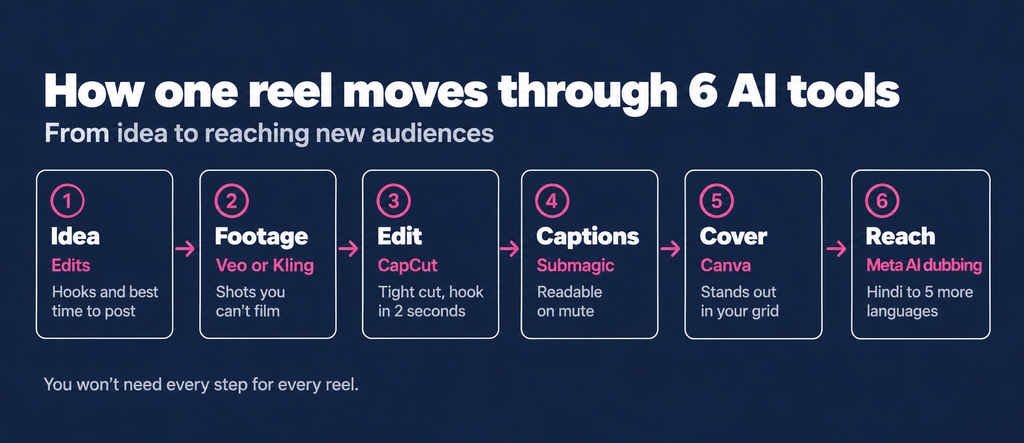
- Idea. Check Edits’ Inspiration tab and insights for what’s working, then ask ChatGPT for ten hooks on that topic.
- Footage. Shoot what you can on your phone. Fill the gaps with a Veo or Kling clip, using a Nano Banana image as the start frame.
- Edit. Cut it in CapCut or Edits. Keep the first two seconds tight and put the hook on screen.
- Captions and voice. Add CapCut or Submagic captions. Use ElevenLabs if you aren’t speaking yourself.
- Cover. Make a cover in Canva that reads clearly in the profile grid.
- Reach. Post, then turn on Meta AI translation for one or two more languages.
What the Best AI Tools for Instagram Reels 2027 Cost Together
The free starter stack shows how far free AI tools for Instagram reels go now. Here’s a realistic monthly stack if you bought everything direct, and the leaner versions most creators actually need.
| Stack | Tools | Monthly |
|---|---|---|
| Free starter | CapCut free, Edits, Meta AI translations, Canva free | ₹0 |
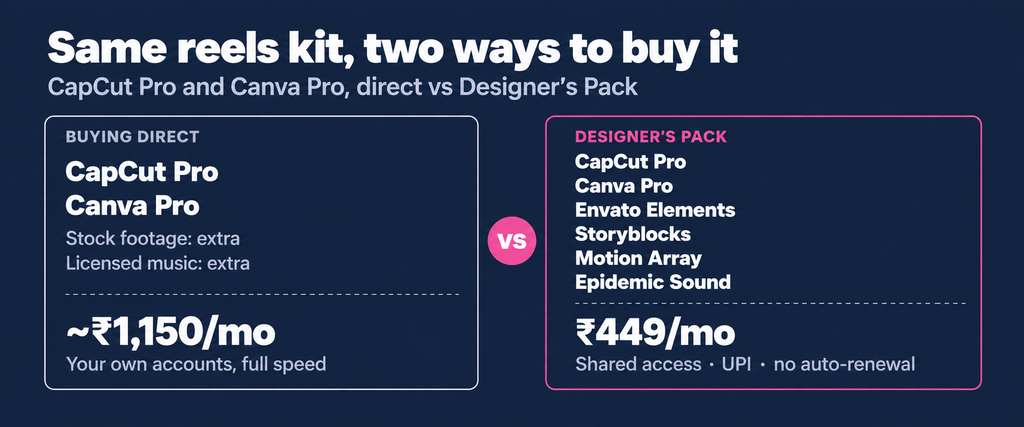
| Serious creator | CapCut Pro, Canva Pro | ~₹1,150 |
| AI-assisted creator | CapCut Pro, Canva Pro, Google AI Plus, ElevenLabs Starter | ~₹2,060 |
| Full kit, direct | All of the above plus Kling Standard, OpusClip Starter, Submagic Starter | ~₹5,800 |
| GroupToolz | Designer’s Pack (CapCut Pro, Canva Pro, stock, music) plus Veo 3.1 | ₹948 |
Direct prices use monthly billing where shown and about ₹333 a month for Canva Pro’s yearly plan. Submagic at its $19 monthly price.
Which Tools Fit Which Creator
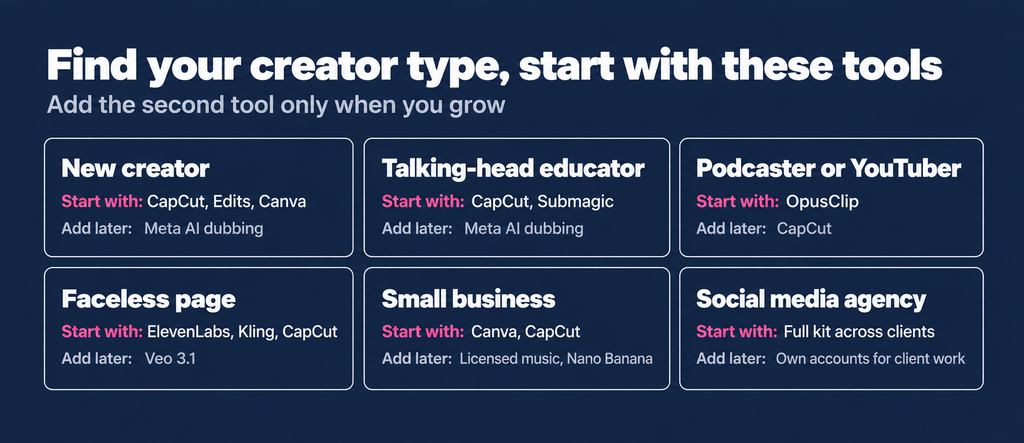
The best AI tools for Instagram reels 2027 for you depend on your format more than your budget. Here’s where I’d start.
| You are a… | Start with | Add when you grow |
|---|---|---|
| New creator | CapCut free, Edits, Canva free | Meta AI translations |
| Talking-head educator | CapCut, Submagic captions | Meta AI translations for regional reach |
| Podcaster or YouTuber | OpusClip | CapCut to polish the best clips |
| Faceless page | ElevenLabs, Kling, CapCut | Veo for hooks with sound |
| Small business | Canva, CapCut | Licensed music, Nano Banana product shots |
| Social media agency | A full kit across several clients | Your own accounts for client-critical work |
Where GroupToolz Fits, Honestly
We don’t offer every one of the best AI tools for Instagram reels 2027 on this list, and I’d rather be clear about that than let you find out after paying. Here’s what we have that’s relevant to reels.
- Designer’s Pack, ₹449 a month: CapCut Pro, Canva Pro, Envato Elements, Storyblocks, Motion Array, Epidemic Sound and more. This covers editing, covers, stock footage and licensed music.
- CapCut single tool, ₹249 a month: if editing is all you need.
- Veo 3.1 single tool, ₹499 a month: no daily cap, on Ultra Low Priority, so clips take longer to come back.
- AI Plan, ₹1,999 a month: Kling 2.5, Hailuo 2.3, Nano Banana and Midjourney, among others.
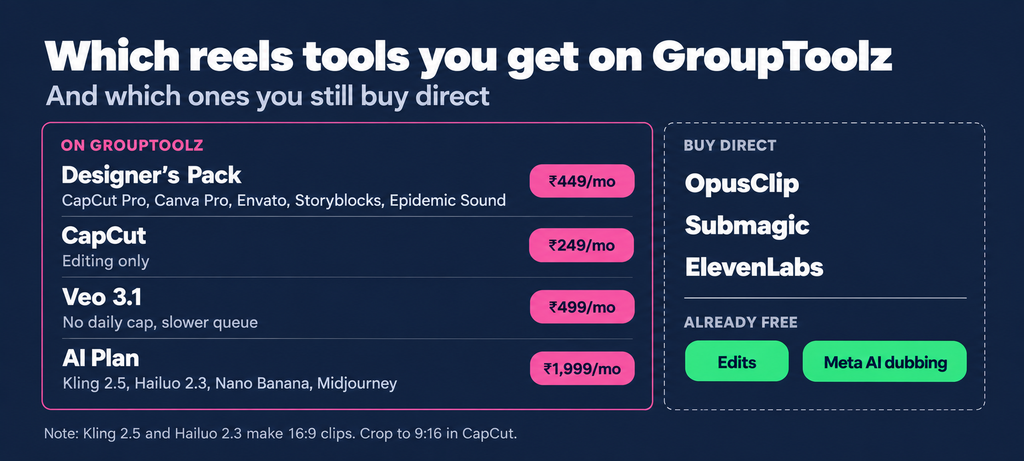
Two honest limits. First, our Kling 2.5 and Hailuo 2.3 output 16:9 clips, so for reels you’ll need to crop or reframe them in CapCut, which loses resolution. If you need native vertical AI video, Veo or Kling’s own app is better for that. Second, OpusClip, Submagic and ElevenLabs aren’t in the plans above, so you’d buy those direct. The free tools, Edits and Meta AI translations, need nothing from anyone.
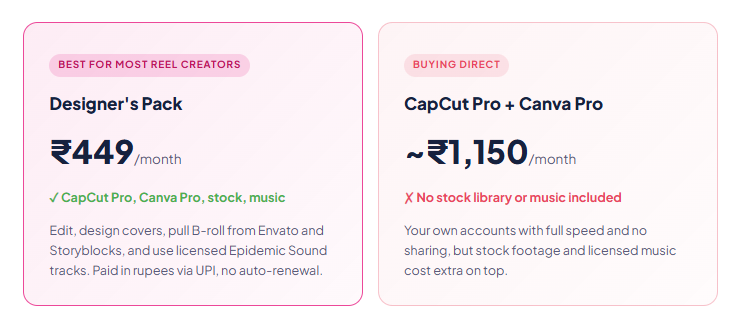
| CapCut Pro + Canva Pro, plus stock footage and licensed music ~₹1,150+ → ₹449 Shared group buy access · billed in INR via UPI · no annual lock-in · no auto-renewal |
Mistakes That Kill Reels Made With AI
Even the best AI tools for Instagram reels can’t rescue a reel from these.
Using the wrong music on a business account
Business accounts get a much smaller music library than personal ones. Use trending audio you’re not licensed for and your reel can be muted or blocked. Licensed libraries exist for exactly this reason.
Posting 16:9 AI clips without reframing
Black bars or a squashed frame tell viewers the clip was made for somewhere else. Generate vertically where you can, and reframe carefully where you can’t.
Letting AI faces carry the reel
Audiences still trust real people more than AI characters. Use AI for B-roll, backgrounds and hooks, and keep your own face or voice at the centre. Instagram also labels AI-generated content in many cases.
Skipping the first two seconds
No tool fixes a weak hook. Spend more time on your opening line than on transitions. Edits’ retention insights will show you exactly where people swipe away.
What Changes for Reels in 2027
This is an informed guess, not a forecast. AI dubbing will likely become standard and expand to more Indian languages, which makes regional reach the biggest growth lever for Indian creators next year. Instagram reels AI tools that dub, caption and reframe for you will matter more than flashy generators. Edits will probably get its desktop version and more AI editing. And AI video will keep getting cheaper and more vertical-friendly. I’ll update this guide to the best AI tools for Instagram reels 2027 as these land.
The Bottom Line
You don’t need ten tools. Most creators who post every day use three: an editor, a design tool and one AI tool for the gap they struggle with most. Start with the free AI tools for Instagram reels, CapCut, Edits, Canva and Meta AI translations, and only pay when a tool is clearly saving you hours.
The best AI tools for Instagram reels 2027 will bring are the ones that get you posting more often without making your content feel fake. Use AI for the boring parts. Keep the ideas, the voice and the face yours.
Questions People Actually Ask
What are the best AI tools for Instagram reels 2027?
CapCut for editing, Instagram’s Edits app for ideas and insights, Meta AI translations for dubbing into other languages, Canva for covers, Veo 3.1 and Kling for AI footage, OpusClip for turning long videos into reels, Submagic for captions, ElevenLabs for voiceover, and Nano Banana for cover images.
Are there free AI tools for Instagram reels?
Yes. Instagram’s Edits app and Meta AI translations are completely free. CapCut and Canva have strong free plans, Kling gives around 66 free credits a day, and OpusClip offers 60 free minutes a month with a caption watermark.
Can Instagram translate my reels into Hindi or Tamil?
Yes. Meta AI translations can dub your reel into Hindi, Bengali, Tamil, Telugu, Marathi and Kannada using an AI version of your voice, with optional lip sync. It’s free, needs a public account and has no follower minimum on Instagram, though it’s rolling out gradually.
Is CapCut or Edits better for reels?
CapCut has more editing power, templates and effects. Edits is simpler but free, made by Instagram, and includes an AI assistant and insights on what’s working. Many creators use Edits for planning and CapCut for the actual edit.
Which AI video generator is best for reels?
Veo 3.1 is best when you need sound or dialogue and supports vertical video. Kling is better value for motion-heavy B-roll. Use either for short shots inside a real edit rather than whole reels.
What does GroupToolz offer for reels?
The ₹449 Designer’s Pack includes CapCut Pro, Canva Pro, stock footage and Epidemic Sound music. CapCut alone is ₹249, Veo 3.1 is ₹499, and the ₹1,999 AI Plan adds Kling, Hailuo and Nano Banana. OpusClip, Submagic and ElevenLabs aren’t included.
Which AI tools for Instagram reels should a beginner start with?
Start with free ones: CapCut or Edits to edit, Canva for covers and Meta AI translations once you’re posting regularly. Only pay for a tool when you know exactly which part of your workflow it saves time on.
GroupToolz Team. We run a group-buy platform for SEO, design and AI tools in India and make reels for our own accounts with these tools. Feature details come from Meta’s announcements and each tool’s published pricing, checked in October 2026. Dollar prices are converted at about ₹85.
Comments