
We’ve updated the AI Plan, and this time we’re publishing every number. What each tool gives you per day, which tools run without a daily cap, what’s new in the lineup, and what ₹1,999 actually buys. Most group buy pages hide this and let you find out after paying. Here’s the full breakdown instead, so you can decide with the real figures in front of you.
By GroupToolz Team Updated: August 2026
| ₹1,999 Per month | 40+ AI tools | 20 Daily on most tools | 20% Off ₹2,499 |
Let me get the awkward bit out of the way first, because it’s the reason this post exists. Every AI tool on earth has usage caps. OpenAI meters your images inside ChatGPT, Kling runs on credits that expire monthly, Midjourney counts your fast hours. What almost nobody does is tell you the number before you pay.
So we’re doing that. The AI Plan group buy has been updated with more tools and new model versions, and this post lists exactly what you get per tool per day. Most give you 20 generations daily. Hailuo gives 15 because video costs more to run. And a large chunk of the lineup carries no daily cap at all. If you’re weighing up an AI Plan group buy, these are the numbers you actually needed before deciding.
What the AI Plan Costs Now
Pricing first, since that’s what everyone scrolls for on any AI Plan group buy page. The AI Plan is ₹1,999 a month, down from ₹2,499, which is 20% off. It covers 40-plus AI tools, and the plan card lists ten headline tools with another 41 inside.
| Plan | Was | Now | What it covers |
|---|---|---|---|
| Designer’s Pack | ₹799 | ₹449/mo | 20+ design tools, stock and assets |
| Writer’s Pack | ₹1,499 | ₹799/mo | 30+ writing and content AI tools |
| AI Plan | ₹2,499 | ₹1,999/mo | 40+ AI image and video models |
Worth knowing which one you need. The Designer’s Pack is stock and design assets. The Writer’s Pack is content and writing AI. The AI Plan is the generation suite, image and video models, and it’s the only one of the three that gives you Flux 2, GPT Image, Kling and the rest. An AI Plan group buy is for people making visuals, not for people editing documents.
The Full Daily Limits, Tool by Tool
Here’s the table that matters, and the reason this AI Plan group buy post exists at all. Every tool below shows its own counter in the dashboard, so you always know where you stand. These are per tool, per day, and they reset every day.
| Tool | Type | Per day |
|---|---|---|
| Kling 2.5 | Video | 20 |
| MiniMax Hailuo 2.3 | Video | 15 |
| Nano Banana | Image + editing | 20 |
| AI Images | Image | 20 |
| Flux 2 | Image | 20 |
| GPT Image | Image | 20 |
| Google Imagen | Image | 20 |
| Grok Image | Image | 20 |
| Ideogram | Image + text | 20 |
| Mystic | Image | 20 |
| Qwen Image | Image + text | 20 |
| Recraft V4 | Image + vectors | 20 |
| Seedream v4 | Image | 20 |
| Z-Image Turbo | Image | 20 |
| Background Remover | Utility | 20 |
| Image Upscaler | Utility | 20 |
| Everything after Z-Image Turbo | Rest of the suite | No daily cap |
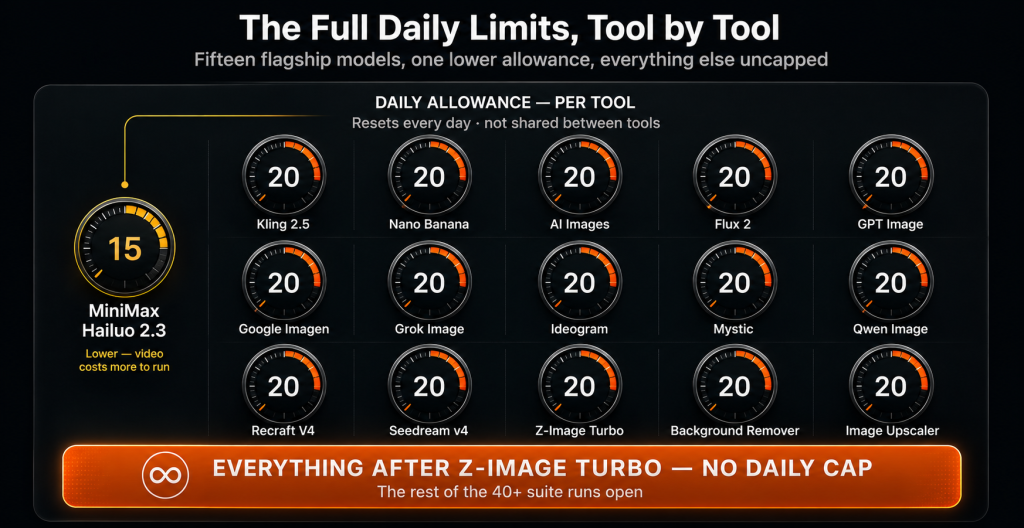
| Read that last row again, it’s the important one The tools listed above are the flagship models, and they carry a daily allowance. Everything else in the AI Plan, the entire remainder of the 40-plus lineup past Z-Image Turbo, runs without a daily cap. So the caps apply to the heaviest, most expensive models to run, and the rest of the suite is open. That’s a deliberate split. The models that cost the most compute get an allowance so the service stays fast for everyone, and the lighter tools stay open. Any honest AI Plan group buy has to work this way, the alternative is a service that grinds to a halt by lunchtime. |
Why 20 a Day Is More Than It Sounds
People see “20” and think it sounds tight. Do the arithmetic on an AI Plan group buy and it stops sounding tight.
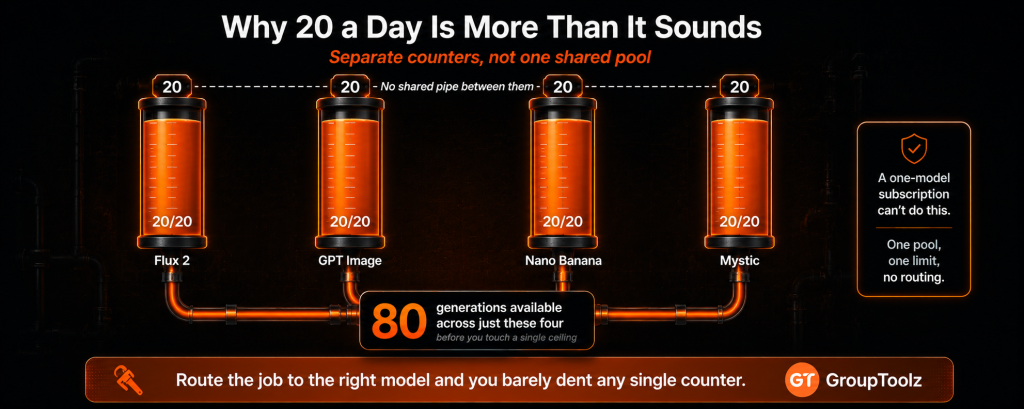
Twenty generations a day, per tool, is roughly 600 a month from that one tool. And these are separate counters, not one shared pool. Flux 2’s twenty doesn’t touch GPT Image’s twenty. So on a day when you’re working across four image models, that’s eighty generations available before you hit anything. Across the capped tools listed above, you’re looking at well over 300 generations in a single day if you actually used them all.
Now compare that to what you’d be doing otherwise. On a metered API you’d be watching a rupee counter tick with every attempt, which quietly changes how you work, you stop experimenting because each retry costs. With a daily allowance, retries within the day are free. That’s the practical benefit of an AI Plan group buy over per-image pricing, and it shows up in the quality of your output because you actually iterate.
| Being straight about who this doesn’t suit I’d rather tell you now than have you disappointed later. If you need to churn out hundreds of images from one specific model in a single sitting, say bulk-generating a 500-product catalogue in an afternoon on Flux 2 alone, a 20-a-day allowance on that model will slow you down. You’d need to spread the work across several days or across several models. That’s a real constraint and I’m not going to pretend otherwise. For everyone else, creators, sellers, marketers, agencies doing normal daily volumes, you’ll rarely touch the ceiling. Be honest about which one you are before buying into any AI Plan group buy. |
What’s New in This Update
The AI Plan group buy lineup has grown since we last wrote about it, and several tools now have newer model versions. Here’s what changed.
| Tool | What’s new |
|---|---|
| Nano Banana | Now three models: Nano Banana, Nano Banana 2 and Nano Banana Pro |
| Seedream | Seedream 4, 4 4K, 4.5 and Seedream 5 Lite all available |
| Mystic | Mystic 1.0, 2.5, 2.5 Flexible and 2.5 Fluid |
| Grok Image | Added to the lineup with ten aspect ratios |
| AI Images | New general tool with Auto and Cinematic modes |
| Hailuo 2.3 | Camera Motion controls added |
| Pricing | AI Plan reduced from ₹2,499 to ₹1,999 |
The Nano Banana and Seedream additions are the ones I’d flag. Getting three Nano Banana variants and four Seedream versions inside the same AI Plan group buy means you can compare model generations directly, which is useful, because a newer version isn’t always better for your particular style.
The Video Tools and Their Limits
Video is where limits matter most on any AI Plan group buy, because video generation costs far more compute than images. Two models, two different allowances.
Kling 2.5, twenty a day
Kling is the motion specialist of this AI Plan group buy. In the AI Plan it runs at 16:9, 5 seconds, 720p, and a start frame is required, so it works as image-to-video. You upload a still, describe the motion you want, and it animates. Render times run one to fifteen minutes. Twenty clips a day is a lot of video for most people, that’s a fortnight of daily reels in one sitting.
Hailuo 2.3, fifteen a day
Hailuo, the other video model in the AI Plan group buy, has two variants, standard and Fast, runs at 16:9, 6 seconds, 768p, and the start frame is optional here, so you can go straight from text to video. The addition worth knowing about is Camera Motion: pan left and right, push in, pull out, tilt up and down, zoom in and out, circling shots, walking shots, stage moves and scenic shots, or no motion at all. That’s proper cinematography control, and it’s the reason Hailuo is worth the slightly lower daily allowance.
| How to not waste your video allowance Video is the one place where careless prompting costs you. A wasted image generation is twenty seconds; a wasted video clip is up to fifteen minutes plus one of your daily fifteen or twenty. So plan the clip first. Generate your start frame in an image model, where you have plenty of allowance, and only take it to video once the frame looks right. Pick your camera motion deliberately in Hailuo rather than leaving it to chance. Write the motion into the prompt too, “slow push in, cinematic, 4K” style. Do that and your video allowance stretches far further than the number suggests. |
The Image Models You Get
The image side is where an AI Plan group buy gets deep. Each tool carries its own twenty a day, and each has model variants inside it.
| Tool | Models inside | Best at |
|---|---|---|
| Flux 2 | 10 models, Flux.1 through Flux.2 Pro | Photorealism, multi-reference consistency |
| GPT Image | GPT, GPT 1-HQ, GPT 1.5, GPT 1.5-High | Best all-rounder, world knowledge |
| Nano Banana | Nano Banana, 2, Pro | Editing photos, character consistency |
| Seedream v4 | Seedream 4, 4 4K, 4.5, 5 Lite | Product and commercial photography, 4K |
| Mystic | 1.0, 2.5, 2.5 Flexible, 2.5 Fluid | Portraits and skin detail |
| Recraft V4 | Recraft V4, V4 Pro | Editable vectors and logos |
| Google Imagen | Imagen 4 Fast | Speed, high-volume generation |
| Qwen Image | Qwen | Readable text in images |
| Ideogram | Ideogram | Headline typography |
| Grok Image | Grok | General generation, ten ratios |
| Z-Image Turbo | Z-Image Turbo | Fast generation, ten ratios |
| AI Images | Auto, Cinematic | Quick general use, cinematic looks |
| The separate counters are the whole trick Here’s the bit people miss when they compare an AI Plan group buy to a single subscription. Because each tool has its own daily allowance, the smart way to work is to route each job to the model that’s best at it, which also spreads your usage. Photoreal product shot? Flux 2. Complex prompt needing real-world understanding? GPT Image. Editing an existing photo? Nano Banana. Logo or vector? Recraft V4. Poster with text? Qwen Image or Ideogram. Portrait? Mystic. You get better results and you barely dent any single counter. A one-model subscription can’t do either of those things. |
What This Replaces
Let me put the AI Plan group buy price of ₹1,999 in context. Buying these tools directly means separate subscriptions and metered billing in dollars, and most of them aren’t even sold as consumer products.
Flux 2 comes as a developer API priced per megapixel, with third parties marking it up. GPT Image needs a ChatGPT subscription where images are metered, or an API and code. Google Imagen is the same story, an API or a Google plan starting around ₹1,700. Kling runs on monthly credit packs where unused credits expire and failed clips still charge you. Add a background remover at roughly ₹34 an image and an upscaler subscription on top.
Individually that’s several thousand rupees a month across half a dozen dollar-billed accounts, most needing an international card. An AI Plan group buy collapses all of it into one bill. The AI Plan group buy version is one payment of ₹1,999 in rupees through UPI, with everything in one dashboard and every limit shown on screen.
| AI Plan, updated ₹1,999 40+ AI tools · 20 a day on flagship models, 15 on Hailuo · no daily cap past Z-Image Turbo · billed in INR via UPI · no auto-renewal |
A Realistic Day on the AI Plan
Numbers in a table are abstract, so here’s what a working day on an AI Plan group buy actually looks like.
Say you’re launching a product. Morning: eight generations in Flux 2 finding the right hero shot, then four in Nano Banana cleaning up an existing photo. That’s 8 of 20 and 4 of 20, both counters barely touched. Midday: six passes in Recraft V4 for the logo lockup, five in Qwen Image for a poster with text on it. Still nowhere near any ceiling.
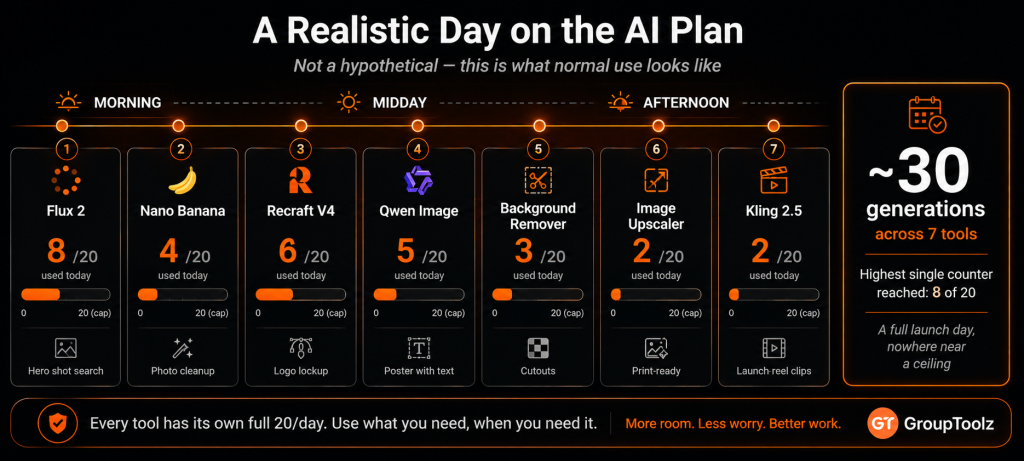
Afternoon: three runs through the Background Remover, two through the Image Upscaler for print. Then two Kling clips for the launch reel, using your best hero image as the start frame. Total for the day, roughly 30 generations across seven tools, and the highest single counter reached 8 out of 20. That’s a full launch day’s work and you’d have to try quite hard to run out. This is why an AI Plan group buy with per-tool allowances works better in practice than one shared pool.
How the Daily Reset Actually Works
A few practical questions come up constantly about the allowances, so let me answer them plainly.
The counters reset daily. You’ll see something like “0 / 20 today” next to each tool in the dashboard, and that figure goes back to zero the next day. Nothing rolls over, so an unused allowance today doesn’t become forty tomorrow. That’s worth knowing if you work in bursts, because spreading a big job across two days effectively doubles what you can pull from any single model.
They’re also per tool, not pooled. This is the detail that makes an AI Plan group buy feel bigger in practice than the number suggests, and it’s worth repeating because most people assume the opposite. Twenty on Flux 2 is twenty on Flux 2, and it has nothing to do with what you’ve used on Mystic or Recraft V4.
And you can always see where you stand. There’s no guessing, no hidden meter, no discovering mid-project that you’ve run dry. Every capped tool shows its counter on screen while you work. That transparency is the point of publishing these numbers at all, and it’s how an AI Plan group buy should work: you know the rules before you start, not after.
Who the AI Plan Is For
| You are a… | And it gives you… |
|---|---|
| Content creator | Thumbnails, reels and daily visuals from a dozen models |
| E-commerce seller | Product shots, cutouts, upscales and video, one plan |
| Designer | Vectors, photoreal work and typography without switching subs |
| Marketer | Ad creative and campaign assets that stay consistent |
| Video creator | Kling and Hailuo with camera motion, plus start frames |
| Agency | Every major model in one dashboard, billed in rupees |
Tips for Working Within the Limits
An AI Plan group buy gives you the allowances, so here’s how to make them go further.
Draft on the fast models
Use the quick models in your AI Plan group buy, like Z-Image Turbo, Google Imagen or Flux.1 Fast, to nail your prompt wording, then spend a heavier model’s allowance on the final render. Same result, fewer wasted generations on the expensive tools.
Spread across tools, not within one
If you need thirty images today, don’t pull them all from one counter. Split the job across the models best suited to each shot. Better output, and no counter gets near its ceiling.
Save your start frames
Kling needs a start frame and Hailuo works better with one. Generate and download good frames during image work so your video allowance goes entirely on video, not on making stills.
Reuse instead of retyping
The Reuse button reloads a prompt and its settings. Refining a good prompt beats writing a fresh one that misses and burns another generation.
The Bottom Line
Here’s where I land. Every AI service on the market has usage caps, including the ones charging you $20 or $200 a month. The difference is whether they tell you what those caps are before you hand over money, and an honest AI Plan group buy should. We’ve published ours: 20 a day on the flagship models, 15 on Hailuo because video is expensive to run, and no daily cap on everything past Z-Image Turbo.
Against that, an AI Plan group buy at ₹1,999 gets you Flux 2, GPT Image, Nano Banana, Seedream, Mystic, Recraft V4, Google Imagen, Qwen, Ideogram, Grok, Z-Image Turbo, the Background Remover, the Image Upscaler, and Kling and Hailuo for video, in one dashboard, in rupees, with no auto-renewal. Buying even three of those directly would cost more and mean juggling dollar-billed accounts. If your work involves making images or video, an AI Plan group buy is the sensible way to do it in 2026, and now you know exactly what you’re getting before you decide.
Questions People Actually Ask
What are the daily limits on the AI Plan?
Most flagship tools give you 20 generations per day each, including Flux 2, GPT Image, Nano Banana, Seedream v4, Mystic, Recraft V4, Google Imagen, Qwen Image, Ideogram, Grok, Z-Image Turbo, Kling 2.5, the Background Remover and the Image Upscaler. Hailuo 2.3 gives 15 a day. Everything in the lineup past Z-Image Turbo runs with no daily cap.
Are the limits shared across tools or separate?
Separate. Each tool has its own counter, shown in the dashboard, so using twenty on Flux 2 doesn’t touch your GPT Image allowance. Working across four image models gives you eighty generations before you hit anything. That’s why routing each job to the best model for it works so well on an AI Plan group buy.
How much does the AI Plan cost?
₹1,999 a month, reduced from ₹2,499, which is 20% off. That covers 40+ AI tools across image generation, editing, video, upscaling and background removal. It’s billed in INR through Razorpay and UPI apps like PhonePe, GPay and Paytm, and it doesn’t auto-renew.
What’s new in the updated AI Plan?
Nano Banana now has three models (Nano Banana, 2 and Pro), Seedream has four (4, 4 4K, 4.5 and 5 Lite), and Mystic has 1.0, 2.5, 2.5 Flexible and 2.5 Fluid. Grok Image and a general AI Images tool with Auto and Cinematic modes were added, Hailuo gained Camera Motion controls, and the price dropped to ₹1,999.
What are the video tool limits?
Kling 2.5 gives 20 clips a day at 16:9, 5 seconds, 720p, and needs a start frame, so it’s image-to-video. Hailuo 2.3 gives 15 a day at 16:9, 6 seconds, 768p, where the start frame is optional and Camera Motion controls let you set pans, zooms, push-ins, circling and walking shots. Renders take 1 to 15 minutes.
Can I pay in Indian Rupees?
Yes. The AI Plan group buy is billed in INR at ₹1,999 via Razorpay and UPI apps like PhonePe, GPay and Paytm, with no international card and no dollar billing. Nothing auto-renews, so you choose each month, and support runs on WhatsApp during Indian hours, roughly 10am to 11pm.
Comments