
Kling makes the smoothest AI video going, and Kling 2.5 is the version most creators rate as the sweet spot. The catch is what it costs. Kling’s own plans run from $6.99 to $180 a month, all metered by credits that vanish each month. A Kling 2.5 group buy gets it inside the GroupToolz AI Plan for ₹1,999, next to 40+ other AI tools. Here’s what Kling 2.5 does, what it really costs direct, how to use it, and the smart way to get it in India.
By GroupToolz Team Updated: July 2026
| $180 Kling Ultra, per month | 5s/10s Clip lengths | 7 Aspect ratios | ₹1,999 In the AI Plan |
Let me start with why people want Kling in the first place. Built by Kuaishou, Kling is the AI video model creators reach for when motion has to look right. Camera moves glide instead of jerking, objects move with real weight, and its image-to-video turns a still photo into a moving shot better than almost anything else. Over 60 million creators have used it. Version 2.5 in particular gets called the sweet spot, strong quality without the heavy cost of the newest modes.
The problem has always been the bill. Kling’s plans start cheap and climb to $180 a month, and every single one runs on credits that burn down as you generate and expire at month’s end. Failed clips still charge you. That’s the wall a Kling 2.5 group buy gets you over. GroupToolz puts Kling 2.5 inside the AI Plan for ₹1,999, in rupees, alongside 40-plus other AI tools. Let me show you the real pricing first, then the tool, then how to use it.
How Much Does Kling Actually Cost?
Here’s the real 2026 lineup, straight from Kling’s own membership page, converted to rupees so you can feel it properly.
| Plan | Price/mo | In Rupees | Credits |
|---|---|---|---|
| Free | $0 | ₹0 | 66 daily, watermarked, 360-540p, no commercial use |
| Standard | $6.99 | ~₹600 | 660 credits a month |
| Pro | $25.99 | ~₹2,200 | 3,000 credits a month |
| Premier | $64.99 | ~₹5,500 | 8,000 credits a month |
| Ultra | $180 | ~₹15,300 | 26,000 credits, top priority |
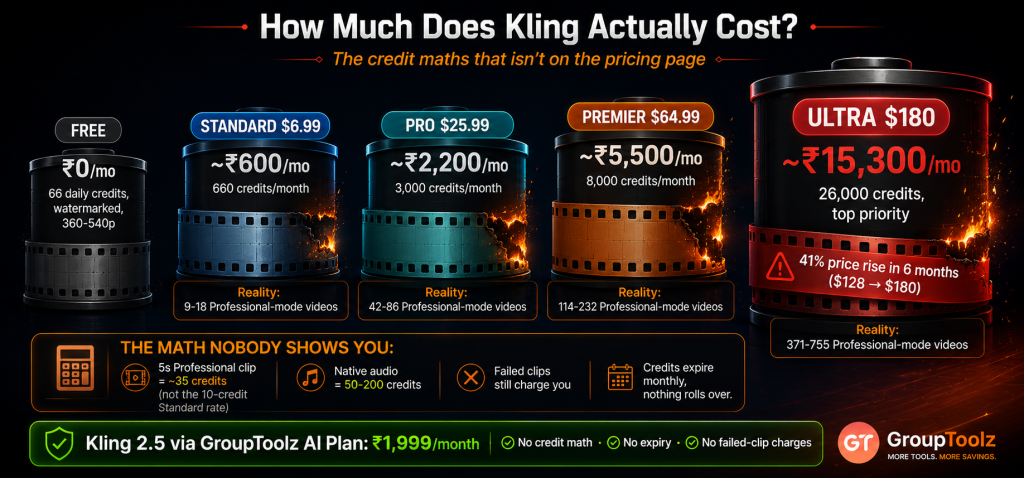
Two things jump out. First, the top tier is brutal, ₹15,300 a month for one video tool. And it got there fast: Ultra launched at $128 in August 2025 and hit $180 by January 2026, a 41% rise in six months, with no annual billing option to lock in a rate. Second, and more important, none of those numbers tell you what you’ll actually spend, because everything runs on credits.
| The credit maths nobody shows you upfront This is where Kling pricing gets slippery. A 5-second 720p clip costs about 10 credits in Standard mode, but around 35 credits in Professional mode, the mode you’d actually want. Turn on native audio and a clip can run 50 to 200 credits. So the Standard plan’s 660 credits, which sounds generous, realistically works out to somewhere between 9 and 18 decent Professional-mode videos a month. Then there’s the part that really stings: failed generations still charge you, and AI video needs three to five attempts for one keeper. Credits also expire monthly, nothing rolls over. That’s the friction a Kling 2.5 group buy removes. |
What Is Kling 2.5?
Kling 2.5 is a version of Kuaishou’s Kling video model, and it’s the one a lot of creators settle on. It takes a starting image plus a text prompt describing the scene, motion and style, and turns them into a short video clip. Through the GroupToolz interface you get Kling 2.5 with a start frame, prompt box, aspect ratio choice, duration options and camera motion control.
What makes Kling stand out is motion quality. Where other models produce clips that look floaty or where the camera drifts oddly, Kling keeps movement smooth and believable, and its image-to-video is a real strength. Feed it a product photo and it’ll animate the scene with a natural camera push. That reliability with motion is why a Kling 2.5 group buy is worth having if you make video ads, reels or any content where movement needs to look professional rather than obviously AI-made.
What Kling 2.5 Is Best At
| Strength | What it means for you |
|---|---|
| Smooth motion | Movement looks natural and weighted, not floaty or glitchy |
| Image-to-video | Turn a still photo or design into a moving shot, its best trick |
| Camera control | Pan, zoom and tilt effects you can direct through the prompt |
| Cinematic look | Ask for cinematic lighting and slow motion and it delivers |
| Product shots | Rotating, gliding product visuals that look shot on camera |
| Consistent quality | 2.5 is the reliable middle ground, strong output without extremes |
| Why motion quality is the whole game Here’s what separates usable AI video from the stuff that gets scrolled past. Viewers can’t always say why a clip looks fake, but they feel it, and it’s nearly always the motion. Objects that drift without weight, a camera that swims rather than moves, limbs that morph mid-shot. Kling built its reputation on fixing exactly that. Motion carries momentum, cameras move like real cameras, and a still image animates into something that looks filmed. For anyone putting AI video in front of customers, that’s the difference between a clip you can publish and one you quietly delete. A Kling 2.5 group buy puts that motion quality in your hands. |
How to Use Kling 2.5, Step by Step
Here’s the part that matters if you’re new to it. Using Kling 2.5 through the GroupToolz AI Plan is straightforward once you know the flow. Here’s every step.
1. Upload your start frame
Kling 2.5 needs a start frame, so this one’s required, not optional. Upload the image you want the video to begin from, a product photo, a character shot, a design, anything. This image sets the look, composition and style of your whole clip, so pick a good one. It’s why Kling’s image-to-video strength matters so much here.
2. Describe your video
In the prompt box, write out the scene, the motion and the style. You’ve got up to 2,000 characters, so use them. Say what moves and how, “slow camera push in, gentle breeze in her hair, warm evening light.” Adding words like cinematic, 4K and slow motion pushes the output towards a more professional look.
3. Pick your aspect ratio
Choose the shape from the ratio dropdown. Kling 2.5 gives you 16:9 for YouTube and wide shots, 9:16 for reels and stories, 1:1 for square social posts, plus 2:3, 3:2, 4:3 and 3:4. Set this before generating so your composition is right from the start rather than cropped later.
4. Choose your duration
Pick 5 seconds or 10 seconds from the duration dropdown. Five seconds suits a single beat, a product reveal, a quick reaction, a transition. Ten seconds gives you room for a fuller moment or a longer camera move. Output runs at 720p.
5. Generate and wait
Hit Generate and Kling gets to work. Video takes longer than images, typically 1 to 15 minutes to render depending on length and load, so this is the point where you go make tea. Your finished clip appears when it’s done, ready to download.
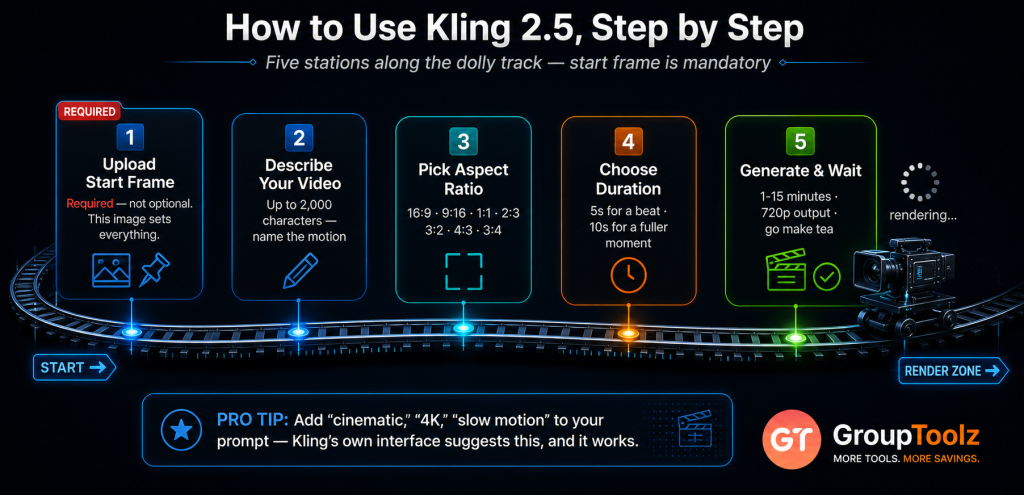
| Camera motion, and the pro tip worth remembering Two things that lift your results straight away. First, camera motion: you can direct pans, zooms and tilts through your prompt, so name the move you want rather than leaving it to chance. Second, the pro tip built right into the interface, add words like “cinematic,” “4K” and “slow motion” to your prompt for a more professional finish. Those small additions change the feel of a clip more than people expect. Since a Kling 2.5 group buy gives you the tool inside the AI Plan, you can try a few prompt variations and keep the best one. |
What Is a Kling 2.5 Group Buy?
A Kling 2.5 group buy is where access to Kling 2.5 is shared through a provider, so you don’t pay Kuaishou’s full solo price in dollars. Instead of a standalone Kling subscription billed in USD with its own credit pool, a Kling 2.5 group buy through GroupToolz gets you the tool inside the AI Plan for ₹1,999 a month, paid in rupees, alongside 40-plus other AI tools.
That’s the key point: with GroupToolz, Kling 2.5 isn’t sold as a lonely single subscription. It comes as part of the AI Plan, so the same ₹1,999 that gets you Kling 2.5 also gets you Hailuo 2.3, Nano Banana, GPT Image, Mystic, Recraft V4, Qwen Image and a whole stack of image and video tools. A Kling 2.5 group buy this way isn’t just cheaper access to one model, it’s Kling plus an entire AI toolkit in one rupee-priced plan.
| Kling 2.5 comes inside the AI Plan Here’s how the access works, plainly. Kling 2.5 is one of the tools included in the GroupToolz AI Plan at ₹1,999 a month. You don’t buy it as a separate subscription and you don’t deal with USD billing. You get into the AI Plan, open Kling 2.5 in your dashboard, upload a start frame and start making video, with all the aspect ratios, duration options and camera control. That’s the whole appeal of a Kling 2.5 group buy through GroupToolz, one rupee plan, Kling included, plus everything else. |
Group Buy vs Buying Kling Direct
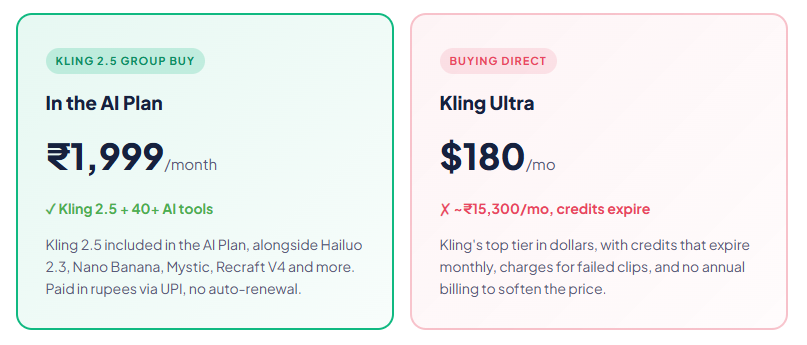
| What matters | Buying Kling Direct | Kling 2.5 Group Buy |
|---|---|---|
| Price | $6.99-$180/mo | In AI Plan, ₹1,999 |
| Billing | USD, card, credits | Rupees, UPI |
| Credit expiry | Monthly, nothing rolls over | Not your problem |
| Other AI tools | Kling only | 40+ tools included |
| Hailuo 2.3 too | Separate subscription | Also in the AI Plan |
| Support | Standard | WhatsApp, Indian hours |
| Bottom line | One tool, in dollars | Kling 2.5 + 40 tools, in rupees |
Why Getting Kling 2.5 in the AI Plan Makes Sense
You could buy Kling directly, but here’s why getting it through the AI Plan group buy is the smarter move for most people in India. First, it’s in rupees. You pay ₹1,999 through a UPI app instead of putting a dollar charge on a card and eating the forex. That alone removes a real hassle.
Second, and bigger, you get far more than just Kling. The AI Plan bundles 40-plus AI tools, so the same payment that gets you Kling 2.5 also gets you Hailuo 2.3, the other top video model, plus every major image tool, Nano Banana for editing, Mystic for photorealism, Recraft V4 for vectors, Qwen Image for text, and writing tools on top. Most video work needs images too, thumbnails, start frames, graphics. A Kling 2.5 group buy that comes bundled with the whole stack is simply better value than a single-tool subscription.
| Two top video models, one plan Worth highlighting: the AI Plan includes both Kling 2.5 and Hailuo 2.3, the two AI video models most creators rank at the top. They’re good at different things. Kling gives you the smoothest motion, camera work and image-to-video. Hailuo 2.3 is the physics specialist, strongest on emotional close-ups, faces and stylised or anime work. Having both means you send each shot to whichever handles it best, rather than forcing one model to do everything. A Kling 2.5 group buy through the AI Plan gives you that pairing plus 40+ other tools. |
Kling 2.5 vs Other AI Video Models
Kling isn’t your only option, so here’s an honest comparison, because it wins some jobs and others suit different tools.
| Tool | Best at | Where it trails |
|---|---|---|
| Kling 2.5 | Smooth motion, camera work, image-to-video | Faces less expressive than Hailuo |
| Hailuo 2.3 | Physics, emotion, faces, anime, speed | Camera motion not as smooth |
| Veo 3 | Realism, native audio | Costly at the higher tiers |
| Runway | Built-in editing tools | Motion a step behind Kling |
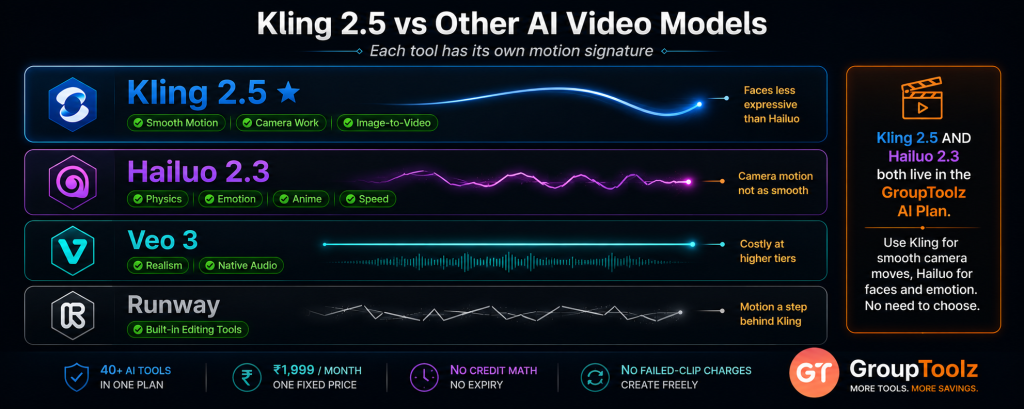
The honest read: for smooth motion, believable camera moves and animating a still image, Kling 2.5 is often the best pick. Hailuo 2.3 wins on facial emotion, physics-heavy scenes and anime styles, and it renders faster. Veo 3 leads on native audio. The good news with a Kling 2.5 group buy through the AI Plan is that you don’t have to choose between Kling and Hailuo, both come in the plan, so you use each for what it does best.
What You Can Make With Kling 2.5
| Use case | Why Kling 2.5 fits |
|---|---|
| Product ads | Smooth rotations and camera pushes that look professionally shot |
| Social reels | 9:16 clips with motion that stops the scroll |
| Animated photos | Bring a still image or design to life with natural movement |
| Brand b-roll | Short cinematic shots to cut between in a longer edit |
| YouTube intros | 16:9 cinematic openers built from a single design |
| E-commerce visuals | Turn catalogue photos into moving listings and ads |
| Kling 2.5, in the AI Plan ₹1,999 Kling 2.5 + Hailuo 2.3 + Nano Banana + Mystic + Recraft V4 + 35 more AI tools · one plan · billed in INR · no auto-renewal |
A Real Workflow With Kling 2.5
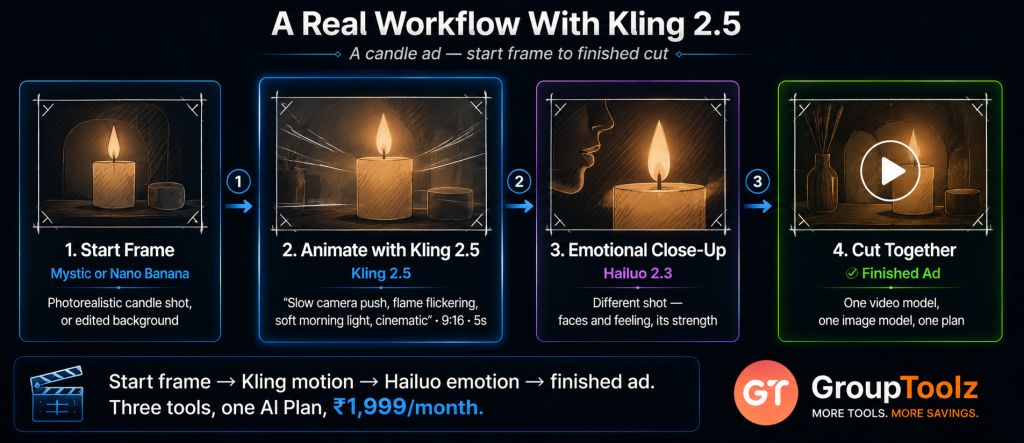
Let me show you how this fits an actual job, because the start-frame requirement shapes how you work. Say you sell handmade candles and you want a short video ad for Instagram.
You’d begin with the image, because Kling 2.5 starts from one. Either use a product photo you already have, or make one in the AI Plan, Mystic for a photorealistic lifestyle shot, or Nano Banana to drop your candle onto a nicer background. That becomes your start frame. Upload it, then write your prompt describing the motion you want, “slow camera push towards the candle, flame flickering gently, soft morning light through a window, cinematic.” Set the ratio to 9:16 for Reels, pick 5 seconds, and generate.
Ten minutes later you’ve got a clip that looks filmed rather than generated. If you want a second shot, a close-up with a bit more emotion, you’d switch to Hailuo 2.3 in the same plan, because faces and feeling are its strength. Cut the two together and you’ve got an ad. That whole sequence used a video model, an image model and a second video model, all from one plan. A Kling 2.5 group buy makes that possible without three separate dollar subscriptions.
| Your start frame does half the work Worth internalising, because it’s the single biggest lever on Kling output quality. Since Kling 2.5 builds from a start frame, the quality, composition and lighting of that image largely determine how good your video looks. A rushed, badly lit photo gives you a rushed, badly lit video with movement added. Spend the extra few minutes getting the frame right, or generate a proper one with Mystic, Nano Banana or Recraft V4 inside the same AI Plan, and Kling has something worth animating. That’s another quiet advantage of a Kling 2.5 group buy that bundles image tools alongside it. |
Who a Kling 2.5 Group Buy Is For
| You are a… | And a Kling 2.5 group buy gives you… |
|---|---|
| E-commerce seller | Product photos animated into ads without a film crew |
| Social media creator | Smooth 9:16 reels with motion that looks professional |
| Video marketer | Cinematic brand clips and b-roll on a rupee budget |
| Freelancer / agency | Kling plus Hailuo and 40+ tools to cover any client brief |
| YouTuber | Intros, transitions and b-roll built from your own designs |
| Student / learner | A top AI video model to practise with at a rupee price |
Tips for Getting Great Results
Since a Kling 2.5 group buy gives you access to the tool, here’s how to get the most from it once you’re in.
Start with a strong frame
Your start frame sets everything. Use a sharp, well-lit, well-composed image, and Kling has good material to animate. Generate one in the AI Plan’s image tools if you don’t have the right shot.
Name the motion you want
Don’t leave movement to chance. Write it in, “slow zoom out,” “camera pans left,” “gentle drift upward.” Kling responds well to clear direction, and vague prompts give vague motion.
Use the cinematic keywords
Adding “cinematic,” “4K” and “slow motion” to your prompt really does shift the look towards something more polished. It’s the tip Kling’s own interface suggests, and it works.
Match duration to the shot
Pick 5 seconds for a single beat and 10 seconds when the motion needs room to breathe. Asking for too much action in a short clip is how you get rushed, messy movement.
The Bottom Line
Here’s where I land. Kling 2.5 is one of the best AI video models you can use, and the reason is simple: motion. Cameras move properly, objects carry weight, and a still image animates into something that looks filmed rather than generated. For product ads, reels and brand video, that’s exactly what you need.
The friction was never the tool, it was the pricing. Kling’s plans run from $6.99 up to $180 a month, metered by credits that expire monthly and get charged even when a clip fails, with a top tier that jumped 41% in six months. That’s a hard sell for a creator in India. A Kling 2.5 group buy through GroupToolz solves it: the tool comes inside the AI Plan for ₹1,999 a month, in rupees, with no auto-renewal, bundled with Hailuo 2.3 and 40-plus other AI tools. You get the motion king plus a full creative toolkit for one rupee price. For any Indian seller, creator or marketer making AI video, that’s the smart way to do it in 2026.
Questions People Actually Ask
What’s a Kling 2.5 group buy, in plain terms?
It’s shared access to Kling 2.5 through a provider, so you don’t buy a standalone Kling subscription in dollars. Through GroupToolz, a Kling 2.5 group buy gets you the tool inside the AI Plan for ₹1,999 a month, paid in rupees, alongside 40+ other AI tools including Hailuo 2.3. So you get Kling plus an entire AI toolkit in one plan, rather than one model billed in USD.
How much does Kling cost directly?
Kling has five tiers in 2026: Free (66 daily credits, watermarked, 360-540p), Standard at $6.99/month, Pro at $25.99, Premier at $64.99, and Ultra at $180 (about ₹15,300). Ultra rose from $128 to $180 in six months. Every tier runs on credits that expire monthly, and failed clips still charge you. A Kling 2.5 group buy gets it inside the ₹1,999 AI Plan instead.
How do I use Kling 2.5?
Upload a start frame, it’s required, then write a prompt describing the scene, motion and style (up to 2,000 characters). Pick your aspect ratio from 16:9, 9:16, 1:1, 2:3, 3:2, 4:3 or 3:4, choose 5 or 10 seconds, and generate. Clips take roughly 1-15 minutes to render at 720p. A Kling 2.5 group buy through the AI Plan gives you this full workflow.
What is Kling 2.5 best at?
Motion, above everything. Kling produces the smoothest, most believable movement and camera work in AI video, and its image-to-video is a standout, turning a still photo into a shot that looks filmed. It’s ideal for product ads, reels, brand b-roll and animating designs. A Kling 2.5 group buy gets that quality inside the AI Plan.
Kling 2.5 or Hailuo 2.3, which should I use?
Both, ideally, and both are in the AI Plan. Kling 2.5 is stronger on smooth motion, camera moves and image-to-video, so use it for product shots and cinematic movement. Hailuo 2.3 wins on facial emotion, physics and anime styles, and renders faster. Since a Kling 2.5 group buy through the AI Plan includes both, you send each shot to whichever suits it.
Can I pay in Indian Rupees?
Yes. The Kling 2.5 group buy through GroupToolz is part of the AI Plan at ₹1,999, billed in INR via Razorpay and UPI apps like PhonePe, GPay and Paytm. There’s no USD billing and no international card, unlike buying Kling directly from Kuaishou in dollars. The AI Plan also doesn’t auto-renew, so you choose when to pay again.
Comments