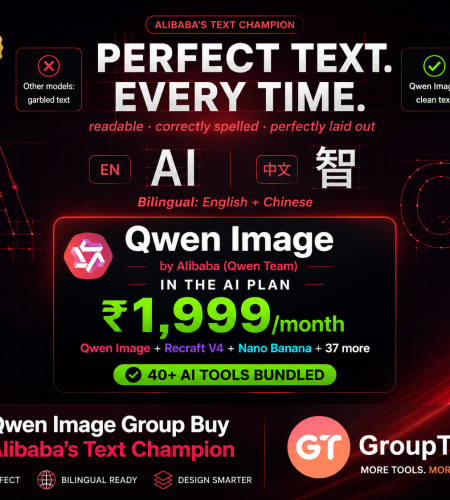
Qwen Image from Alibaba does the one thing most AI models still fumble: it puts real, readable text into images. Posters, infographics, signage, it renders them cleanly where others produce gibberish, and it edits images too. Getting it direct means Alibaba Cloud and dollar API costs. A Qwen Image group buy gets it inside the GroupToolz AI Plan for ₹1,999, next to 40+ other AI tools. Here’s what Qwen Image does, exactly how to use it, and the smart way to get it in India.
By GroupToolz Team Updated: July 2026
| #1 AI Arena, text & edit | 2K Native resolution | EN+CN Bilingual text | ₹1,999 In the AI Plan |
Let me start with what makes Qwen Image stand out, because it solves a problem that’s frustrated everyone using AI images. Ask most models to put text in a picture, a poster headline, a sign, a label, and you get warped, misspelled nonsense. Qwen Image, built by Alibaba’s Qwen team, is the model that finally cracked this. It renders complex, readable text in both English and Chinese, and it sits at number one on AI Arena, the blind human evaluation leaderboard, for both image generation and editing.
The latest version, Qwen Image 2.0, launched in February 2026, made it even better, a leaner, faster design at 7 billion parameters, native 2K resolution, and one unified model that both generates and edits images. It handles prompts up to 1,000 tokens, so you can describe detailed layouts, full posters, infographics, even comics, and it lays out the text properly. Getting it direct means Alibaba Cloud’s API in dollars. That’s why a Qwen Image group buy makes sense, and why GroupToolz put it inside the AI Plan. Let me break down the tool, how to use it, and the smart way to get it.
What Is Qwen Image?
Qwen Image is an AI image generation and editing model from Alibaba’s Qwen team, part of the same family as its well-known Qwen language models and a sibling to Z-Image. You type a prompt describing what you want, and it generates an image, or you give it an image plus an instruction and it edits it. The standout is text: it can render intricate, multi-line text layouts with high accuracy, which is why people use it for anything where words on the image actually matter.
Qwen Image 2.0 unified two things that used to be separate models: generation and editing. So one tool both creates images from scratch and edits existing ones, style transfer, background swaps, adding or removing objects, even rewriting text inside an image while keeping the font and style. It outputs at native 2K, follows detailed instructions closely, and handles both English and Chinese text at a commercial-grade standard. That combination of text mastery plus editing is why a Qwen Image group buy is worth having, especially if your work involves posters, infographics or any design with text.
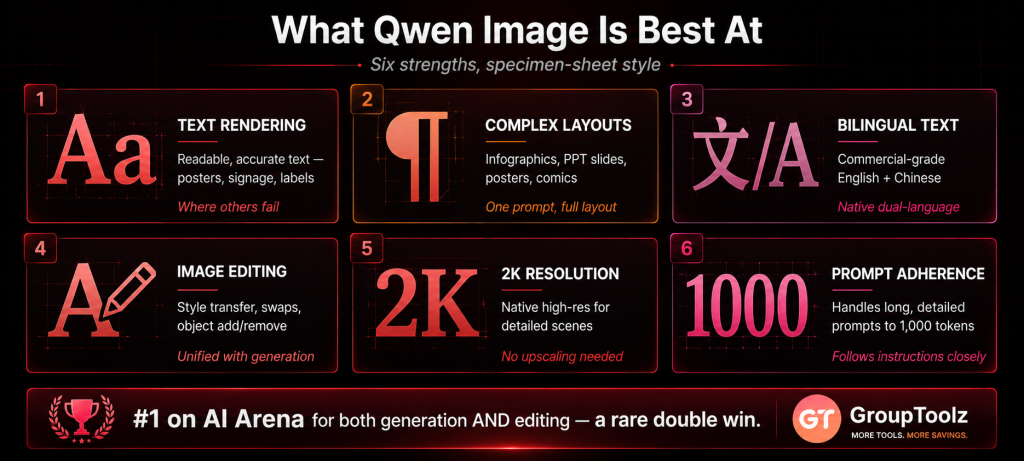
What Qwen Image Is Best At
Every AI image model has a sweet spot. Here’s where Qwen Image really leads.
| Strength | What it means for you |
|---|---|
| Text rendering | Readable, accurate text in images, posters, signage, labels, where others fail |
| Complex layouts | Full infographics, PPT slides, movie posters and comics from one prompt |
| Bilingual text | Commercial-grade English and Chinese rendering |
| Image editing | Style transfer, background swaps, object add or remove, text rewriting |
| 2K resolution | Native high-resolution output for detailed, realistic scenes |
| Prompt adherence | Handles long, detailed prompts up to 1,000 tokens accurately |
| Why text rendering is the killer feature Here’s the thing nobody tells you about AI images until you try to make a poster. Text is the hardest part. Most models turn your headline into garbled letters, so you end up adding text by hand in another tool. Qwen Image fixed that. It puts clean, readable, correctly-spelled text right into the image, laid out properly, in English or Chinese, on posters, infographics, signs, packaging. For marketers, designers and anyone making visuals with words, that saves a whole editing step and opens up work other models simply can’t do. A Qwen Image group buy puts that specific strength in your hands. |
How to Use Qwen Image, Step by Step
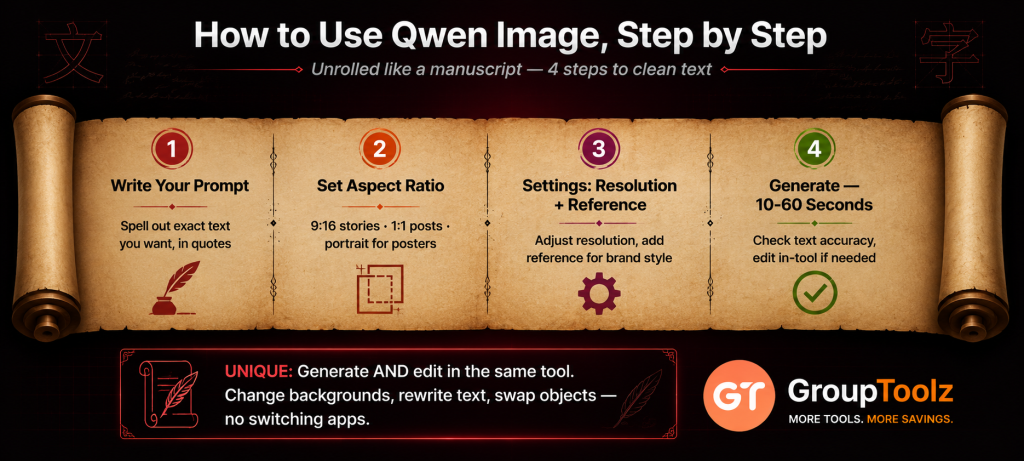
Here’s the part that matters if you’re new to it. Using Qwen Image through the GroupToolz AI Plan is simple, and the interface walks you through it. Here’s the full flow.
1. Write your prompt
In the “Describe what you want to create” box, type a detailed prompt. Be specific, and if you want text in the image, spell out the exact words. For a poster, try “event poster, bold title reading Summer Fest 2026, subtitle reading Live Music & Food, warm sunset colours, clean modern layout.” The more layout detail you give, the better Qwen Image’s result.
2. Set the aspect ratio
Pick the size and shape from the ratio dropdown. Qwen Image supports a wide range, 1:1 for square, 16:9 and 9:16 for wide and vertical, plus 4:3, 3:4, 3:2, 2:3, 1:2, 2:1 and 4:5. Choose 16:9 for banners and thumbnails, 9:16 for reels and stories, 1:1 for social posts, and a portrait ratio for posters.
3. Open settings for resolution and reference
Click the settings icon to adjust resolution and add a reference image. A reference guides the style of your generation, so if you want to match a particular look, colour palette or brand style, add one and Qwen Image will lean towards it. Useful for staying on-brand across a set of visuals.
4. Generate
Hit the send button and Qwen Image renders your image, usually in 10 to 60 seconds. Check the text came out right, and if you want to change anything, adjust your prompt and generate again, or use its editing to tweak the existing image.
| Generate and edit in one tool Worth knowing: Qwen Image doesn’t just make images, it edits them too, all in the same model. Once you’ve generated something, you can ask it to change the background, add or remove an object, shift the style, or even rewrite the text inside the image while keeping the same font. That means you can go from a first draft to a finished, polished visual without switching tools. Because a Qwen Image group buy gives you the full model, both the generation and editing sides are yours to use. |
What Is a Qwen Image Group Buy?
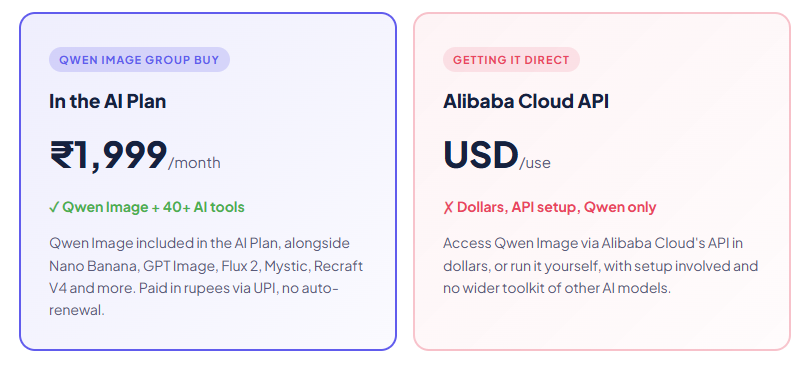
A Qwen Image group buy is where access to Qwen Image is shared through a provider, so you don’t pay Alibaba’s full API price in dollars or set it up yourself. A Qwen Image group buy through GroupToolz gets you the tool inside the AI Plan for ₹1,999 a month, paid in rupees, alongside 40-plus other AI tools.
That’s the key point: with GroupToolz, Qwen Image isn’t sold as a lonely single subscription. It comes as part of the AI Plan, so the same ₹1,999 that gets you Qwen Image also gets you Nano Banana, GPT Image, Flux 2, Mystic, Recraft V4, Ideogram, Leonardo and a whole stack of image and video tools. A Qwen Image group buy this way isn’t just cheaper access to one model, it’s Qwen Image plus an entire AI toolkit in one rupee-priced plan.
| Generate and edit in one tool Worth knowing: Qwen Image doesn’t just make images, it edits them too, all in the same model. Once you’ve generated something, you can ask it to change the background, add or remove an object, shift the style, or even rewrite the text inside the image while keeping the same font. That means you can go from a first draft to a finished, polished visual without switching tools. Because a Qwen Image group buy gives you the full model, both the generation and editing sides are yours to use. |
Group Buy vs Getting Qwen Image Direct
| What matters | Getting It Direct | Qwen Image Group Buy |
|---|---|---|
| Price | API or own setup, USD | In AI Plan, ₹1,999 |
| Billing | USD, per-use | Rupees, UPI |
| Setup | API keys or hardware | Just log in, no setup |
| Other AI tools | Qwen Image only | 40+ tools included |
| Other image models | Separate | Nano Banana, Mystic, Recraft too |
| Support | DIY / docs | WhatsApp, Indian hours |
| Bottom line | One model, DIY, in dollars | Qwen Image + 40 tools, in rupees |
Qwen Image vs Other Image Models
Qwen Image isn’t your only option, so here’s an honest comparison, because it wins some jobs and others suit different tools.
| Tool | Best at | Where it trails |
|---|---|---|
| Qwen Image | Text rendering, posters, editing, 2K | Others edge it on pure artistic flair |
| Recraft V4 | Editable vectors, design taste | No unified editing like Qwen |
| Nano Banana | Photo editing, character consistency | Text rendering not its focus |
| Mystic | Peak photorealism, portraits | Weaker on text-in-image |
The honest read: for text in images, complex poster and infographic layouts, bilingual text and unified generation-plus-editing, Qwen Image is often the best pick. Recraft V4 wins for editable vectors and pure design work. Nano Banana leads on photo editing and character consistency. Mystic edges it on pure photorealism. The good news with a Qwen Image group buy through the AI Plan is that you don’t have to choose, all these models come in the plan, so you use Qwen Image for text and layouts and switch to the others for their strengths.
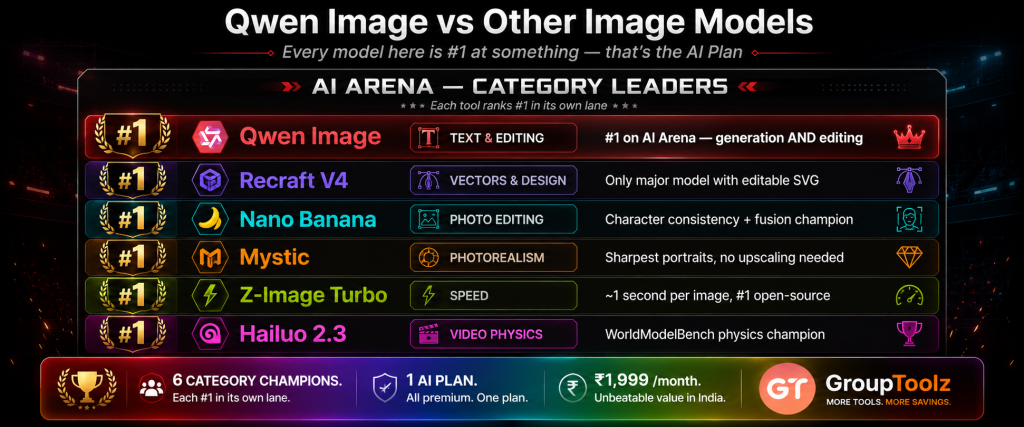
| Every top image model, one plan Worth highlighting: no single AI image model wins everything. Qwen Image is the text and editing champion. Recraft V4 is the vector and design king. Nano Banana leads photo editing. Mystic tops photorealism. GPT Image is a strong all-rounder. The AI Plan includes all of them, so you route each job to the best model. A Qwen Image group buy through the AI Plan gives you that whole lineup, which a standalone Qwen purchase can’t match. |
What You Can Make With Qwen Image
| Use case | Why Qwen Image fits |
|---|---|
| Posters & flyers | Clean, readable headline and body text laid out properly |
| Infographics | Complex multi-text layouts from a single detailed prompt |
| Social graphics | On-brand images with accurate text for daily posts |
| Product labels & packaging | Text that renders correctly on the design, no fixing needed |
| Image editing | Swap backgrounds, add objects or rewrite text in existing images |
| Bilingual content | English and Chinese text at commercial-grade quality |
| Qwen Image, in the AI Plan ₹1,999 Qwen Image + Nano Banana + GPT Image + Mystic + Recraft V4 + 35 more AI tools · one plan · billed in INR · no auto-renewal |
Why Getting Qwen Image in the AI Plan Makes Sense
You could access Qwen Image directly, but here’s why getting it through the AI Plan group buy is the smarter move for most people. First, there’s no setup. Getting it direct means Alibaba Cloud’s API and dollar billing, or running it yourself, which is fine for developers but a barrier for everyone else. Through the AI Plan, you just log in and use it, no keys, no technical fuss.
Second, and bigger, you get far more than just Qwen Image. The AI Plan bundles 40-plus AI tools, so the same payment that gets you Qwen Image also gets you the other top image models, Nano Banana for editing, GPT Image for overall quality, Mystic for photorealism, Recraft V4 for vectors, plus writing and video tools. A modern creator uses several models for different jobs, and a Qwen Image group buy that comes bundled with the whole stack is simply better value, all in rupees.
A Real Workflow With Qwen Image
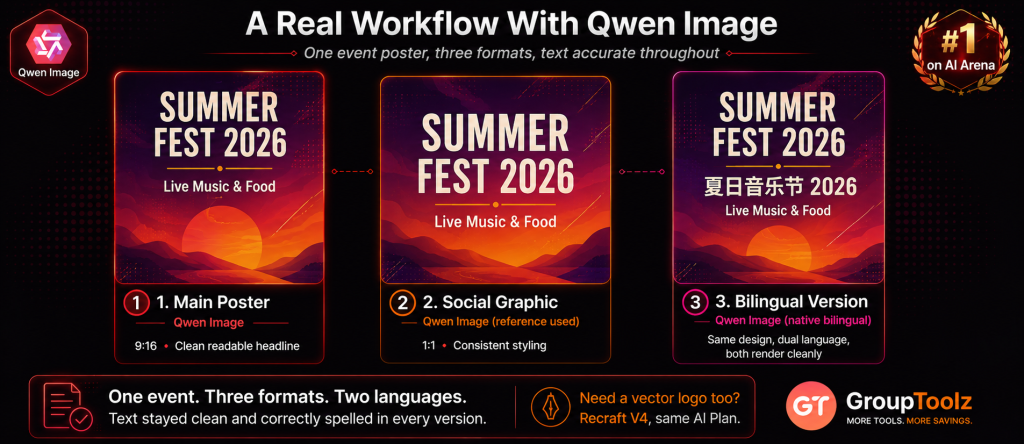
Let me show you how Qwen Image fits an actual job, because its strengths shine in text work. Say you’re running a small event and you need a poster, a matching social graphic, and a bilingual version, all with clean, readable text.
You’d start in Qwen Image with the main poster, writing a detailed prompt that spells out your title, subtitle and details, plus the style and colours. Because Qwen Image renders text properly, the headline comes out clean and correctly spelled, no fixing in another app. Then for the social version, you’d change the ratio to 1:1 or 9:16 and reuse the same style, maybe using a reference image to keep it consistent. If you need a Chinese-language version for a different audience, Qwen Image handles that text natively too. And if a detail needs changing, you use its built-in editing to swap the background or tweak an element rather than starting over.
In one session you’ve made a poster, a social graphic and a bilingual version, all with clean text, all consistent. That’s work most AI models can’t do without a separate design tool. And because a Qwen Image group buy gives you the tool inside the AI Plan, you can jump to Recraft V4 for a vector logo or Nano Banana to edit a product photo, all in the same plan. That’s a complete design and image workflow at a rupee price.
| Play to Qwen Image’s strengths, use the plan for the rest The smart way to work is to route each job to the model that’s best at it. Send anything with text, posters, infographics, labels, signage, to Qwen Image, that’s its home turf, along with quick edits. For editable vector logos and icons, switch to Recraft V4, also in the AI Plan. For photo editing and character consistency, Nano Banana. For pure photorealism, Mystic. A Qwen Image group buy through the AI Plan means the right tool is always there for the job in front of you. |
Who a Qwen Image Group Buy Is For
| You are a… | And a Qwen Image group buy gives you… |
|---|---|
| Marketer | Posters and social graphics with clean, readable text |
| Designer | Text-heavy layouts and infographics, plus editing, in one model |
| Small business owner | Flyers, labels and packaging with correct text, no design skills needed |
| Content creator | Thumbnails and social posts with sharp, legible text |
| Bilingual brand | English and Chinese text handled natively at high quality |
| Student / learner | A leading text-and-image AI model to create with at a rupee price |
Tips for Getting Great Results
Since a Qwen Image group buy gives you access to the tool, here’s how to get the most from it once you’re in.
Spell out your text exactly
Qwen Image’s big strength is text, so write the exact words you want, in quotes if it helps. Say where they go too, “bold title at the top,” “small caption at the bottom,” and it’ll lay them out properly.
Use long, detailed prompts
It handles prompts up to 1,000 tokens, so don’t hold back. Describe the layout, the text, the style, the colours and the mood in detail, and Qwen Image follows it closely.
Lean on the editing side
Don’t start over when a detail’s off. Use Qwen Image’s editing to change a background, add or remove an object, or rewrite text in the image. It saves regenerating from scratch.
Add a reference for consistency
Building a set of matching visuals? Add a reference image in settings so the next generation follows the same style and colours. It keeps a campaign looking consistent.
The Bottom Line
Here’s where I land. Qwen Image is one of the most useful AI image tools of 2026 because it does the thing almost every other model still struggles with: real, readable text in images. Add its unified generation and editing, native 2K, bilingual support and top spot on AI Arena, and it’s a proper production tool for anyone making visuals with words. The friction was always access, getting it direct means Alibaba Cloud’s API and dollar billing.
That’s exactly what a Qwen Image group buy solves. Through GroupToolz, Qwen Image comes inside the AI Plan for ₹1,999 a month, in rupees, with no auto-renewal, and bundled with Nano Banana, GPT Image, Mystic, Recraft V4 and 35-plus other AI tools. You get Alibaba’s text champion plus an entire creative toolkit for one rupee price. For any Indian marketer, designer, business or creator who wants clean text in their AI images, a Qwen Image group buy through the AI Plan is the smart way to get it in 2026.
Questions People Actually Ask
What’s a Qwen Image group buy, in plain terms?
It’s shared access to Qwen Image through a provider, so you don’t pay Alibaba’s API price in dollars or set it up yourself. Through GroupToolz, a Qwen Image group buy gets you the tool inside the AI Plan for ₹1,999 a month, paid in rupees, alongside 40+ other AI tools. So you get Qwen Image plus an entire AI toolkit in one plan.
What is Qwen Image good at?
Qwen Image, from Alibaba’s Qwen team, is the text-rendering champion of AI images. It puts clean, readable text into images, posters, infographics, signage, in English and Chinese, where other models fail. It also edits images, style transfer, background swaps, object changes, and outputs at native 2K. It ranks #1 on AI Arena. A Qwen Image group buy gets all of that in the AI Plan.
How do I use Qwen Image?
Write a detailed prompt, spelling out any text you want, set the aspect ratio, open settings to adjust resolution or add a reference image, then generate. Your image renders in 10-60 seconds, and you can edit it in the same tool. A Qwen Image group buy through the AI Plan gives you this full workflow.
Can Qwen Image really render text properly?
Yes, that’s its headline strength. Where most AI models produce garbled, misspelled text, Qwen Image renders clean, readable, correctly-laid-out text in both English and Chinese, on posters, infographics and signage. Qwen Image 2.0 handles prompts up to 1,000 tokens for detailed layouts. That’s why a Qwen Image group buy is so useful for text-heavy visuals.
Is Qwen Image included in the GroupToolz AI Plan?
Yes. Qwen Image is one of the tools in the GroupToolz AI Plan at ₹1,999 a month. You don’t buy it separately, it’s in the plan alongside Nano Banana, GPT Image, Mystic, Recraft V4, Ideogram and more. That’s the appeal of a Qwen Image group buy through GroupToolz, Qwen Image plus 40+ tools in one rupee plan.
Can I pay in Indian Rupees?
Yes. The Qwen Image group buy through GroupToolz is part of the AI Plan at ₹1,999, billed in INR via Razorpay and UPI apps like PhonePe, GPay and Paytm. There’s no USD billing, no international card, and no API to set up. The AI Plan also doesn’t auto-renew.
Comments