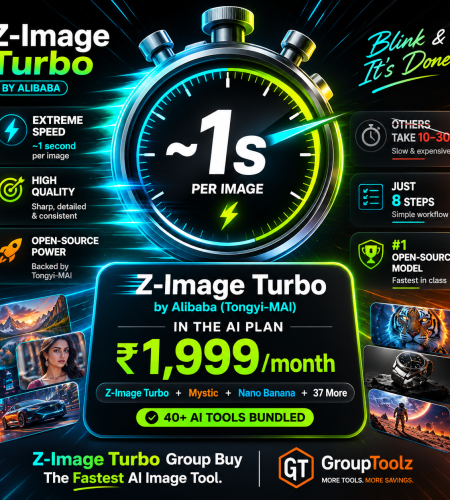
Z-Image Turbo by Alibaba is the speed champion of AI image generation, photorealistic pictures in about a second, and it ranked the number one open-source image model of the year. Getting it direct means setup or dollar-based platforms. A Z-Image Turbo group buy gets it inside the GroupToolz AI Plan for ₹1,999, next to 40+ other AI tools. Here’s what it does, exactly how to use it, and the smart way to get it in India.
By GroupToolz Team Updated: July 2026
| ~1s Per image, ultra-fast | #1 Open-source image model | 6B Parameters, efficient | ₹1,999 In the AI Plan |
Let me start with the one thing everyone notices about Z-Image Turbo. It’s fast. Really fast. Built by Alibaba’s Tongyi-MAI team, this model generates photorealistic images in about a second, where most AI generators make you wait ten, twenty, thirty. It does that with a clever, efficient design that needs just eight steps to produce a full image, versus the dozens other models require. And it’s not fast at the expense of quality, it ranked the number one open-source image model of the year, beating bigger, heavier rivals.
The catch with getting it direct is the friction, either technical setup if you run it yourself, or a dollar-based platform if you don’t. That’s exactly why a Z-Image Turbo group buy makes sense, and why GroupToolz put it inside the AI Plan. In this guide I’ll cover what Z-Image Turbo does, exactly how to use it in the GroupToolz interface, and why a Z-Image Turbo group buy is the smart way to get it.
What Is Z-Image Turbo?
Z-Image Turbo is a text-to-image model from Alibaba’s Tongyi-MAI research team, released in late 2025. You type a prompt describing the image you want, and it generates a photorealistic result almost instantly. It’s part of the wider Z-Image family, but Turbo is the fast, distilled version built specifically for speed, delivering high quality with very little computing cost.
What makes it special is the balance. It’s a small model at 6 billion parameters, far leaner than rivals that use 20 to 80 billion, yet it produces state-of-the-art results. It handles photorealism well, renders text clearly in both English and other languages, and follows instructions closely. Because it’s so efficient, generation is near-instant, which changes how you work, you can try ten variations in the time another model takes for one. That speed is the whole appeal of a Z-Image Turbo group buy.
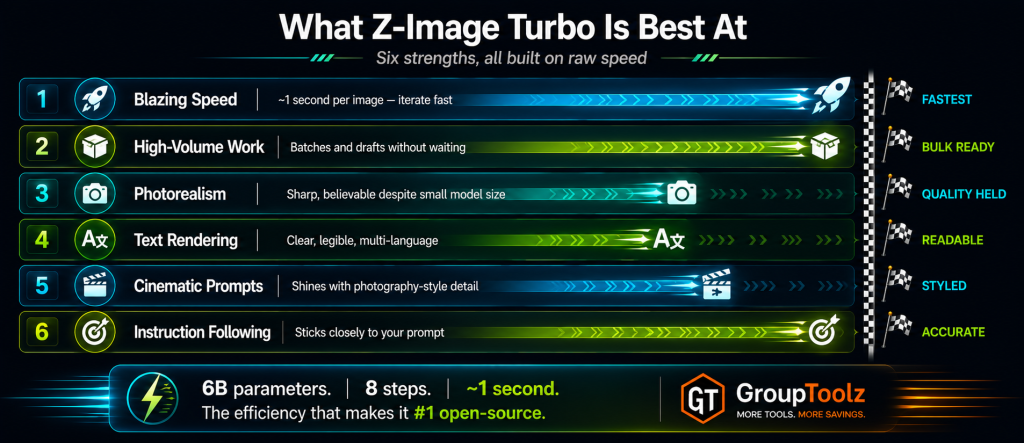
What Z-Image Turbo Is Best At
Every AI image model has a sweet spot. Here’s where Z-Image Turbo genuinely shines.
| Strength | What it means for you |
|---|---|
| Blazing speed | Photorealistic images in about a second, so you iterate fast |
| High-volume work | Generate many images quickly, perfect for batches and drafts |
| Photorealism | Sharp, believable results despite the small, efficient model |
| Text rendering | Clear, legible text in images, in more than one language |
| Cinematic prompts | Shines with detailed, photography-style prompts and lighting |
| Instruction following | Sticks closely to what you describe, so fewer wasted tries |
| Why the speed genuinely changes how you work Speed isn’t just a nice-to-have, it changes your whole workflow. When each image takes twenty or thirty seconds, you plan carefully and generate sparingly, because waiting adds up. When each image takes about a second, you stop planning and start exploring, try ten prompt variations, generate a whole batch of thumbnails, iterate on a concept in real time. That fast feedback loop makes you more creative and more productive, because there’s no waiting between ideas. For anyone making images at volume, drafts, thumbnails, mood boards, that near-instant speed is exactly why a Z-Image Turbo group buy is so useful. |
How to Use Z-Image Turbo, Step by Step
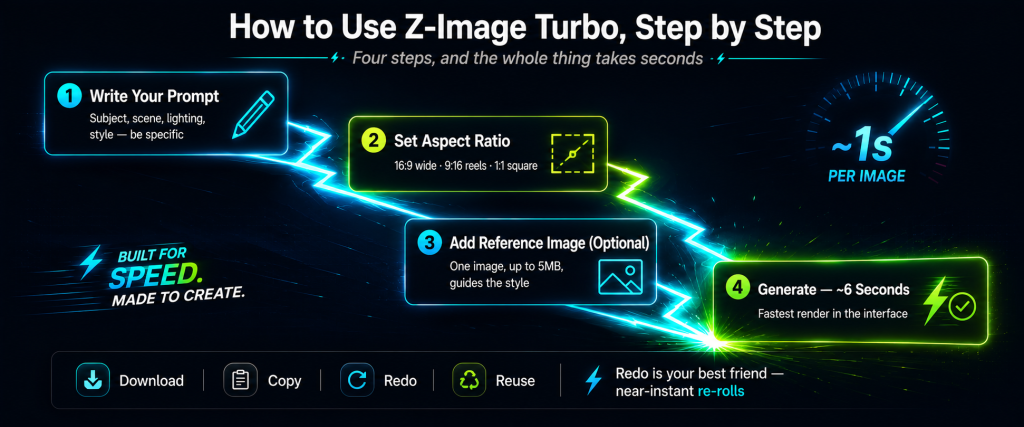
Here’s the part that matters if you’re new to it. Using Z-Image Turbo through the GroupToolz AI Plan is simple, and the interface guides you. Here’s the full flow.
1. Write your prompt
In the “Describe what you want to create” box, type a detailed prompt. Z-Image Turbo loves specifics, so describe the subject, scene, lighting and style. For example, “create a lion sleeping in a forest at night, a lone figure watching from far, moonlight, realistic, cinematic.” The more detail you give, the closer the result.
2. Set the aspect ratio
Pick your image shape from the ratio dropdown. Choose 16:9 for wide shots like YouTube thumbnails and banners, 9:16 for reels and stories, or 1:1 for square social posts. Setting the right ratio before you generate saves cropping later.
3. Add a reference image (optional)
Open the settings and you can drop or click to add one reference image, up to 5MB. This guides the style of your generation, so if you want a specific look or composition, upload a reference and Z-Image Turbo will lean towards it.
4. Generate
Hit the send button and Z-Image Turbo renders your image, often in around six seconds in the interface, among the fastest you’ll find. Your result appears in the output view, ready to use.
| What the output view gives you Once Z-Image Turbo generates an image, the output view shows it with a full set of actions under each result. You get Download to save the image, Copy to grab it quickly, Redo to generate a fresh version of the same prompt, Reuse to load that prompt and settings back into the box for tweaking, and Delete to clear it. Each image is also tagged with the model and aspect ratio you used. Because generation is so fast, the Redo button is your best friend, tap it a few times and pick the best result in seconds. |
What Is a Z-Image Turbo Group Buy?
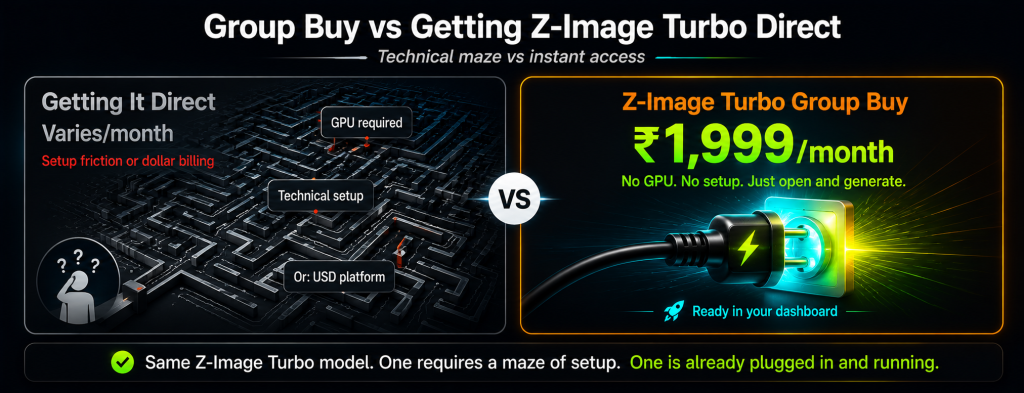
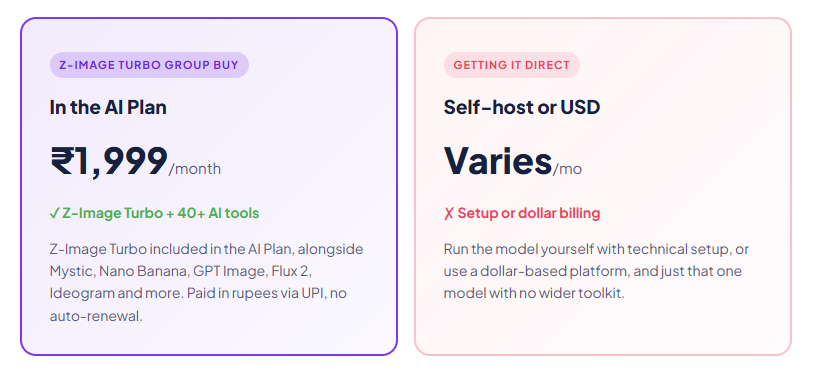
A Z-Image Turbo group buy is where access to Z-Image Turbo is shared through a provider, so you don’t handle the setup or pay a dollar-based platform yourself. Instead of running the model or subscribing to a USD service, a Z-Image Turbo group buy through GroupToolz gets you the tool inside the AI Plan for ₹1,999 a month, paid in rupees, alongside 40-plus other AI tools.
That’s the key point: with GroupToolz, Z-Image Turbo isn’t sold as a lonely single subscription. It comes as part of the AI Plan, so the same ₹1,999 that gets you Z-Image Turbo also gets you Mystic, Nano Banana, GPT Image, Flux 2, Ideogram, Leonardo and a whole stack of image and video tools. A Z-Image Turbo group buy this way isn’t just cheap access to one model, it’s Z-Image Turbo plus an entire AI toolkit in one rupee-priced plan.
| Z-Image Turbo comes inside the AI Plan Here’s how the access works, plainly. Z-Image Turbo is one of the tools included in the GroupToolz AI Plan at ₹1,999 a month. You don’t buy it as a separate subscription, and you don’t set anything up. You get into the AI Plan, open Z-Image Turbo in your dashboard, and start generating images fast, with the aspect ratios and reference-image feature ready to go. That’s the whole appeal of a Z-Image Turbo group buy through GroupToolz, one rupee plan, Z-Image Turbo included, plus everything else. |
Group Buy vs Getting Z-Image Turbo Direct
| What matters | Getting It Direct | Z-Image Turbo Group Buy |
|---|---|---|
| Access | Setup or USD platform | Ready in the AI Plan |
| Price | Varies, often USD | ₹1,999, in the plan |
| Billing | USD or self-hosted | Rupees, UPI |
| Other AI tools | Z-Image only | 40+ tools included |
| Other image models | Separate | Mystic, Nano Banana, Flux 2 too |
| Support | Self-serve | WhatsApp, Indian hours |
| Bottom line | One model, some effort | Z-Image Turbo + 40 tools, in rupees |
Why Getting Z-Image Turbo in the AI Plan Makes Sense
You could get Z-Image Turbo on your own, but here’s why getting it through the AI Plan group buy is the smarter move for most people. First, there’s no setup. You don’t need a powerful GPU or technical know-how, it’s just there in your dashboard, ready to use. And it’s in rupees, so you pay ₹1,999 through a UPI app instead of a dollar charge on a card.
Second, and bigger, you get far more than just Z-Image Turbo. The AI Plan bundles 40-plus AI tools, so the same payment that gets you Z-Image Turbo also gets you the other top image models, Mystic for photorealism, Nano Banana for editing, GPT Image for overall quality, Ideogram for typography, plus writing tools, video tools and more. A modern creator uses several models for different jobs, and a Z-Image Turbo group buy that comes bundled with the whole stack is simply better value than a single-model setup.
| Every top image model, one plan Worth highlighting: no single AI image model wins everything. Z-Image Turbo is the speed and volume champion. Mystic is the photorealism specialist. Nano Banana is the editing king. GPT Image tops overall quality. Ideogram owns typography. The AI Plan includes all of them, so you route each job to the best model. A Z-Image Turbo group buy through the AI Plan gives you that whole lineup plus writing and video tools, which no standalone Z-Image Turbo access can match. |
What You Can Make With Z-Image Turbo
| Use case | Why Z-Image Turbo fits |
|---|---|
| YouTube thumbnails | Generate lots of options fast, pick the best in seconds |
| Social content at volume | Batch out daily images without waiting between generations |
| Concept & mood boards | Explore many visual ideas rapidly to land a direction |
| Draft visuals | Rough out compositions quickly before a final render |
| Cinematic scenes | Detailed, photography-style prompts come out sharp |
| Fast iteration | Try ten variations in the time others take for one |
| Z-Image Turbo, in the AI Plan ₹1,999 Z-Image Turbo + Mystic + Nano Banana + GPT Image + 35 more AI tools · one plan · billed in INR · no auto-renewal |
How Z-Image Turbo Compares to Other Models
Z-Image Turbo isn’t your only option, so here’s an honest look at where it sits, because it wins some jobs and others suit different tools.
| Tool | Best at | Where it trails |
|---|---|---|
| Z-Image Turbo | Speed, volume, drafts, fast iteration | Top-end polish vs premium models |
| Mystic | Pure photorealism, portraits | Slower than Z-Image Turbo |
| GPT Image | Overall quality, complex prompts | Much slower to generate |
| Nano Banana | Editing, character consistency | Different job to generation |
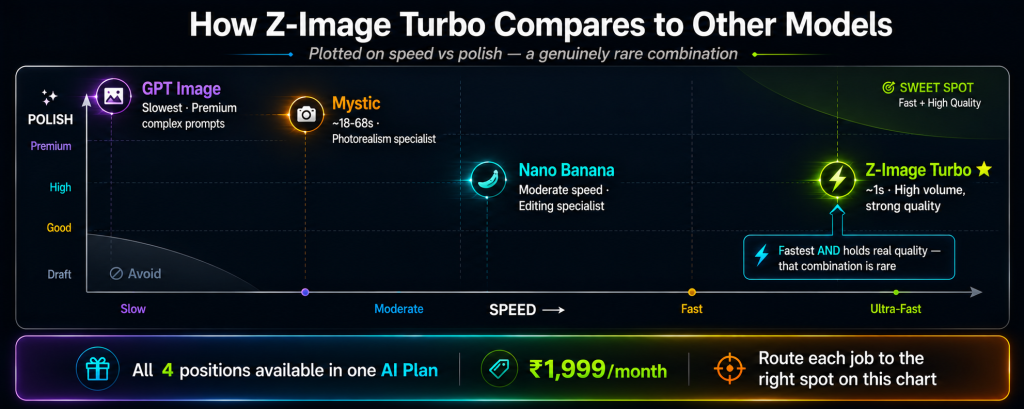
The honest read: for speed, volume and rapid iteration, Z-Image Turbo is often the best pick, and it holds its own on quality too. When you want the absolute top polish for a hero image, Mystic or GPT Image might edge it, though they’re slower. The good news with a Z-Image Turbo group buy through the AI Plan is that you don’t have to choose, all these models come in the plan, so you use Z-Image Turbo for fast, high-volume work and switch to the others when a job needs their strengths.
A Real Workflow With Z-Image Turbo
Let me show you how Z-Image Turbo fits an actual job, because its speed really shows here. Say you’re a YouTuber who needs to test thumbnail ideas for a video, and you want to try lots of concepts before picking one.
You’d open Z-Image Turbo, set the ratio to 16:9 for a thumbnail, and write your first prompt. Because it generates in about a second, you can fire off ten different concepts in barely more than a minute, different compositions, backgrounds, moods. You Redo the ones that are close but not perfect, tweak prompts on the fly with Reuse, and quickly narrow down to the strongest option. Once you’ve got a winner, you Download it. Then, if you want to add crisp title text, you jump to Ideogram in the same AI Plan, or polish the hero version in Mystic.
That whole thumbnail-testing process, which would be slow and frustrating on a heavier model, takes minutes with Z-Image Turbo. And a Z-Image Turbo group buy through the AI Plan means you can do it as often as you like, plus reach for the other tools in the plan when you need them. That’s a fast, complete workflow at a rupee price.
| Play to Z-Image Turbo’s speed, use the plan for the rest The smart way to work is to send each job to the model that suits it. Use Z-Image Turbo for speed, volume and rapid iteration, drafts, thumbnails, exploring concepts, that’s its home turf. For a polished photorealistic hero shot, switch to Mystic, also in the AI Plan. For editing a photo, Nano Banana. For crisp logo text, Ideogram. A Z-Image Turbo group buy through the AI Plan means you always have the right tool for the job. |
Who a Z-Image Turbo Group Buy Is For
| You are a… | And a Z-Image Turbo group buy gives you… |
|---|---|
| YouTuber | Fast thumbnail testing, try many concepts in minutes |
| Content creator | High-volume social images without waiting between generations |
| Marketer | Rapid ad-creative drafts to test directions quickly |
| Designer | Fast concept exploration, plus the polished models for finals |
| E-commerce seller | Quick product-image variations at volume |
| Student / hobbyist | A top, fast image model to create with at a rupee price |
Tips for Getting Great Results
Since a Z-Image Turbo group buy gives you access to the tool, here’s how to get the most from it once you’re in.
Lean into the speed
Don’t overthink your first prompt. Because generation is so fast, just fire off a version, see what comes back, and refine from there. Rapid trial and error gets you to a great result faster than careful planning would.
Write detailed, cinematic prompts
Z-Image Turbo shines with photography-style prompts. Mention the time of day, lighting, camera style and mood, “golden hour,” “soft grain,” “editorial photography,” to push it towards its best output.
Use Redo generously
Since each generation is near-instant, tap Redo a few times on a promising prompt and pick the best of the batch. It costs you almost no time and often lands a better result.
Set the ratio first
Choose 16:9, 9:16 or 1:1 to match where the image is going before you generate. It saves cropping and gives a cleaner composition straight away.
The Bottom Line
Here’s where I land. Z-Image Turbo is one of the most useful AI image tools of 2026 for a simple reason: it’s fast without giving up quality. When each image takes seconds, you work differently, you experiment more, produce in volume, and stop rationing your tries. Its compact, efficient design is a genuine breakthrough, and for thumbnails, product shots, drafts and any high-volume work, it’s hard to beat.
The friction was always access, running it yourself needs a capable GPU, and paying per image elsewhere means dollars and setup. That’s exactly what a Z-Image Turbo group buy solves. Through GroupToolz, Z-Image Turbo comes inside the AI Plan for ₹1,999 a month, in rupees, with no auto-renewal and no hardware, bundled with Nano Banana, GPT Image, Flux 2, Mystic and 35-plus other AI tools. You get Alibaba’s speed king plus an entire creative toolkit for one rupee price. For any Indian creator, seller or marketer who wants fast, quality AI images, a Z-Image Turbo group buy through the AI Plan is the smart way to get it in 2026.
Questions People Actually Ask
What’s a Z-Image Turbo group buy, in plain terms?
It’s shared access to Z-Image Turbo through a provider, so you don’t handle setup or a dollar-based platform yourself. Through GroupToolz, a Z-Image Turbo group buy gets you the tool inside the AI Plan for ₹1,999 a month, paid in rupees, alongside 40+ other AI tools. So you get Z-Image Turbo plus an entire AI toolkit in one plan.
What is Z-Image Turbo good at?
Z-Image Turbo, from Alibaba’s Tongyi-MAI team, is the speed champion of AI image generation. It creates photorealistic images in about a second, ranked the number one open-source image model of the year, and is great for high-volume work, drafts, thumbnails and fast iteration. It also renders text well and follows prompts closely. A Z-Image Turbo group buy gets all of that in the AI Plan.
How do I use Z-Image Turbo?
Write a detailed prompt describing your image, set the aspect ratio (16:9, 9:16 or 1:1), optionally add one reference image for style, then hit generate. Your image renders in around six seconds, and you can download, copy, redo or reuse it from the output view. A Z-Image Turbo group buy through the AI Plan gives you this full workflow.
Is Z-Image Turbo included in the GroupToolz AI Plan?
Yes. Z-Image Turbo is one of the tools in the GroupToolz AI Plan at ₹1,999 a month. You don’t buy it as a separate subscription, it’s right there in the plan alongside Mystic, Nano Banana, GPT Image, Flux 2, Ideogram and more. That’s the appeal of a Z-Image Turbo group buy through GroupToolz, Z-Image Turbo plus 40+ tools in one rupee plan.
Why is Z-Image Turbo so fast?
It uses an efficient design that generates a full image in just eight steps, where most models need dozens. It’s also a lean 6-billion-parameter model, far smaller than rivals, yet ranked the top open-source model. That efficiency means near-instant generation, which is why it’s ideal for high-volume and fast-iteration work, and a big reason a Z-Image Turbo group buy is so useful.
Can I pay in Indian Rupees?
Yes. The Z-Image Turbo group buy through GroupToolz is part of the AI Plan at ₹1,999, billed in INR via Razorpay and UPI apps like PhonePe, GPay and Paytm. There’s no USD billing and no international card, and no technical setup. The AI Plan also doesn’t auto-renew.
Comments