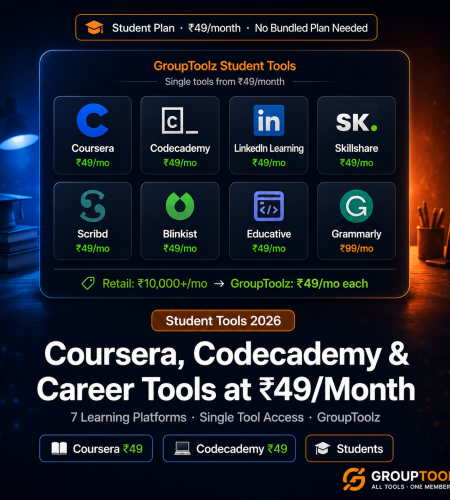
Coursera costs ₹3,000-₹50,000 per course. LinkedIn Learning is ₹1,664/month. Codecademy Pro is ₹1,581/month. These grouptoolz student plan tools give you access to all three — plus Skillshare, Scribd, Blinkist, and Educative — at ₹49/month each. Same platform, shared access, a fraction of the price.
By GroupToolz Team Updated: June 14, 2026
The tool problem every student faces
Every career you’re trying to build in 2026 requires tools you can’t normally afford as a student. A design student needs Canva Pro. An aspiring data scientist needs a Coursera Python specialisation. A student entering digital marketing needs Semrush to practice real keyword research. An engineering student wants Codecademy Pro to learn coding with actual projects.
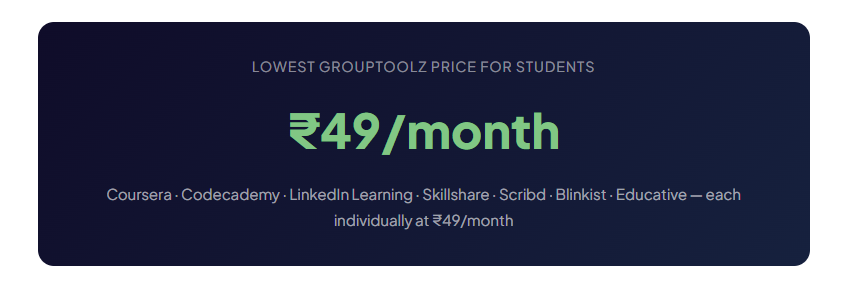
Most students choose between skills and savings. GroupToolz student plan tools remove that trade-off. The platform’s single-tool pricing starts at ₹49/month. At ₹49/month for a coursera group buy, you can complete a 3-month specialisation for ₹147 total instead of ₹9,000-₹15,000. That’s not a rounding error. That’s a different decision entirely.
The ₹49/month learning platforms
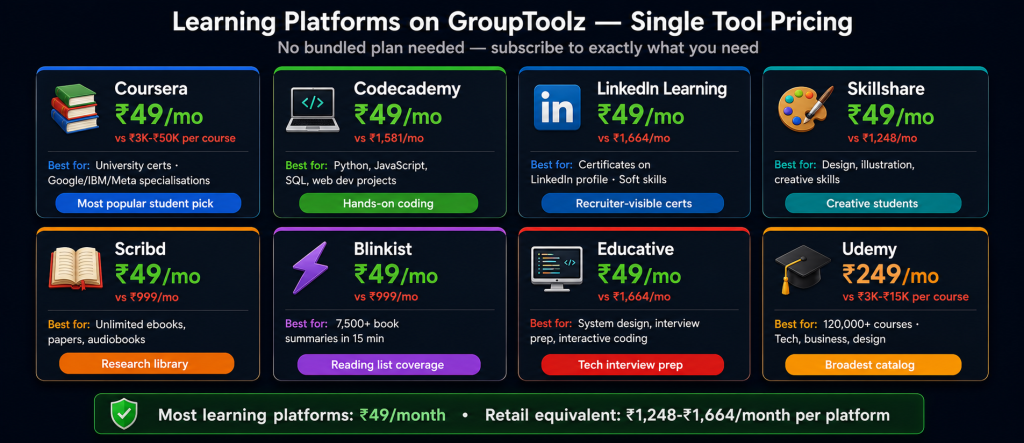
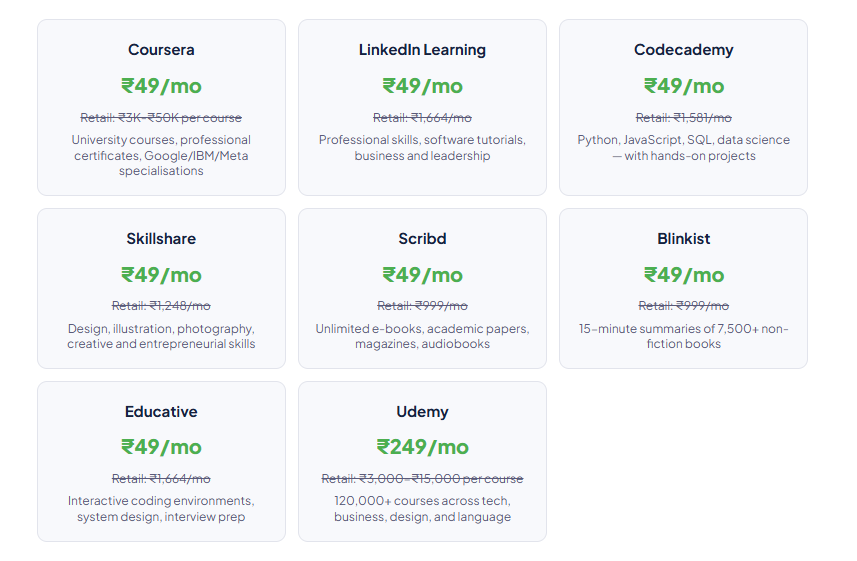
These seven learning platforms are available as single tools at ₹49/month each — the lowest tier in the GroupToolz catalog.
The ₹99/month tools most students actually need
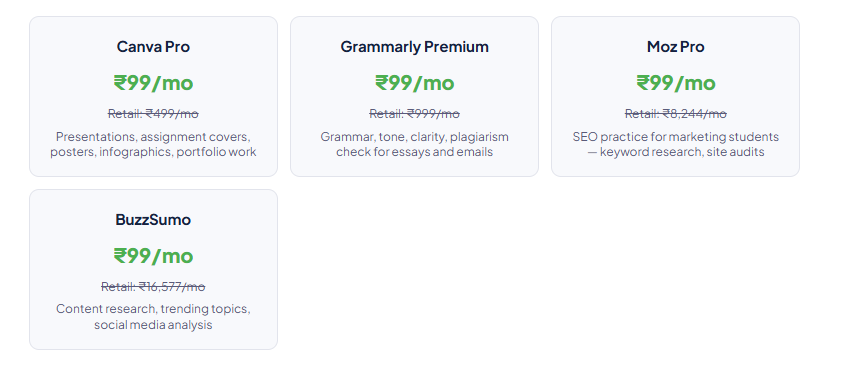
Beyond learning platforms, students need tools for assignments, presentations, and building real skills. These are the ₹99/month tools that come up most.
The ₹149/month add-ons worth considering
Student use case bundles: what to actually subscribe to
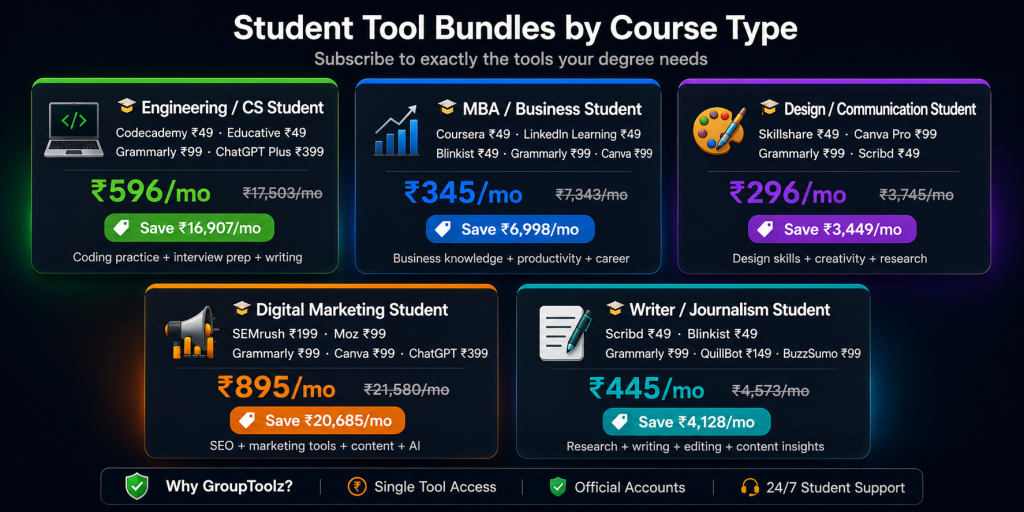
| 🎓 Engineering / Computer Science student Codecademy ₹49 Educative ₹49 Grammarly ₹99 ChatGPT Plus ₹399 The codecademy cheap approach here is straightforward: Codecademy Pro for structured coding courses with hands-on projects (Python, JavaScript, SQL, web development). Educative for system design, data structures, and coding interview prep with interactive in-browser environments. No local setup needed, which matters on college hostel internet. Grammarly for technical reports, internship applications, and professional emails. ChatGPT Plus for debugging code, understanding error messages, and getting complex concepts explained at the right level. Not for doing your assignments for you — for understanding what you’re stuck on at midnight when no professor is available. Total monthly cost: ₹596. Retail equivalent: ₹17,503/month. Saving: ₹16,907/month. |
| 📊 MBA / Business Management student Coursera ₹49 LinkedIn Learning ₹49 Blinkist ₹49 Grammarly ₹99 Canva Pro ₹99 Coursera for Google, HBS, Wharton, and ISB certificates that employers actually recognise. LinkedIn learning cheap access here is one of the best arguments for this whole student group buy approach: the platform’s certificates show up on your LinkedIn profile and recruiters do check. Blinkist for getting through a reading list that would otherwise take years — 15-minute summaries aren’t perfect, but they’re better than skipping the books entirely. Grammarly for MBA essays and case submissions. Canva for client presentations and business plan decks that don’t look like default PowerPoint. Total monthly cost: ₹345. Retail equivalent: ₹7,343/month. Saving: ₹6,998/month. |
| 🎨 Design / Communication student Skillshare ₹49 Canva Pro ₹99 Grammarly ₹99 Scribd ₹49 Skillshare for design courses from professional designers: typography, illustration, UI/UX, brand identity, photography. The quality varies but the good instructors are really good. Canva Pro for building an actual design portfolio during your studies. The Pro features (background remover, brand kit, premium templates) let you create work that looks like it came from a professional studio, not a student assignment. Grammarly for portfolio website copy, client proposals, and professional emails. Scribd for design reference books, typography guides, and creative non-fiction without buying individual books at ₹200-₹2,000 each. Between Scribd and Skillshare, you have a real library and real instruction for ₹98/month combined. Total monthly cost: ₹296. Retail equivalent: ₹3,745/month. Saving: ₹3,449/month. |
| 📱 Digital Marketing student Semrush ₹199 Moz Pro ₹99 Grammarly ₹99 Canva Pro ₹99 ChatGPT Plus ₹399 This is the use case where the student seo tools on GroupToolz are most clearly worth it. Semrush Guru is the industry standard at most agencies. When you walk into an interview and say you’ve been using it for keyword research, competitor analysis, and site audits, that’s a different conversation than saying you studied SEO theory. Moz Pro for additional practice. Between the two, you’re working with the same tools the professionals use. Grammarly for blog posts, social media copy, and content assignments. Canva Pro for social media graphics and marketing collateral. ChatGPT Plus for content ideation and understanding marketing strategies. This stack costs ₹895/month. At most agencies, the equivalent tools run ₹21,580/month at retail. Total monthly cost: ₹895. Retail equivalent: ₹21,580/month. Saving: ₹20,685/month. |
| ✍️ Writer / Journalism student Scribd ₹49 Blinkist ₹49 Grammarly ₹99 QuillBot ₹149 BuzzSumo ₹99 Scribd for unlimited access to books, audiobooks, and academic publications. The research library you can’t afford to buy individually. Blinkist for surveying broad reading lists quickly — not as a replacement for reading properly, but for figuring out which books are worth the full read. Grammarly Premium is the closest thing to a personal editor that students can afford. QuillBot for paraphrasing and restructuring sentences when rewriting sources for citations. BuzzSumo for researching what performs well in your beat before pitching to publications. Total monthly cost: ₹445. Retail equivalent: ₹4,573/month. Saving: ₹4,128/month. |
Singles vs bundled plans: when to switch
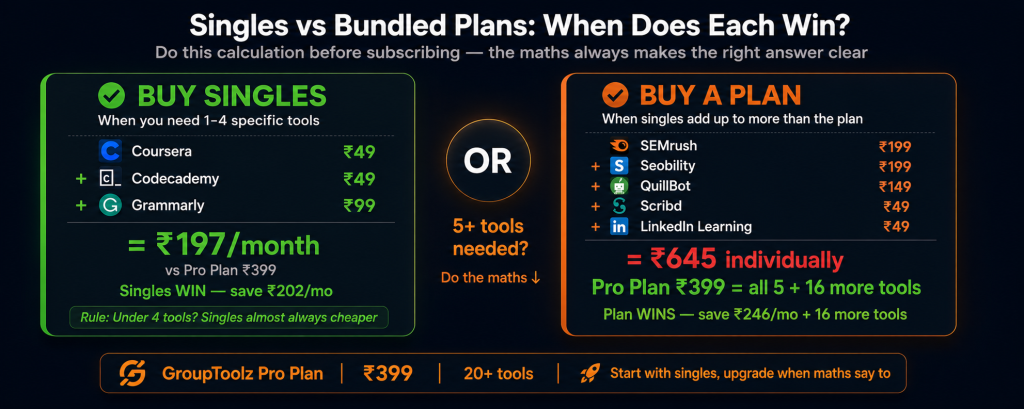
Single tools at ₹49-₹249 make sense for students who need 1-4 specific tools. Once you need 5+, the bundled plans become more cost-effective.
| Plan | Price | Key student tools included | Best for |
|---|---|---|---|
| Lite Plan | ₹199/mo | Canva Pro, Glorify, Moz Pro, Wordtune, SEOSiteCheckup | Design students, basic marketing practice |
| Pro Plan | ₹399/mo | All Lite + Semrush Guru, Seobility, Grammarly, QuillBot, LinkedIn Learning, Scribd, AnswerThePublic, + more | Marketing, communication, business students |
| Advanced Plan | ₹499/mo | All Pro + Envato, Storyblocks, Freepik, Epidemic Sound, SpyFu, VidIQ, Netflix, Skillshare, Woorank + more | Full-stack digital marketing, media students |
| Designer’s Pack | ₹349/mo | Envato, Storyblocks, Motion Array, Freepik, Epidemic Sound, Canva Pro, CapCut Pro, Creative Fabrica, Kittl + more | Graphic design, UI/UX, film production students |
| Writer’s Pack | ₹799/mo | Jasper AI, Frase.io, NeuronWriter, HIX AI, Grammarly, QuillBot, GPTZero, Writesonic + 20 more | Content writing, journalism, copywriting students |
| The singles vs plan decision If you need 1-3 learning platforms (Coursera + Codecademy + LinkedIn Learning at ₹49 each), buy them as singles: ₹147/month. Add Grammarly (₹99) and Canva (₹99) individually: ₹345/month total — still cheaper than the Pro plan at ₹399. Once you also need Semrush, Seobility, QuillBot, Scribd, and LinkedIn Learning, the Pro plan at ₹399 beats buying them individually (₹199+₹199+₹149+₹49+₹49 = ₹645 just for those five). The Pro plan gives you all five plus 15 more tools for ₹246 less. The maths isn’t complicated, it’s just worth actually doing before you subscribe. |
What these tools actually do for your job prospects
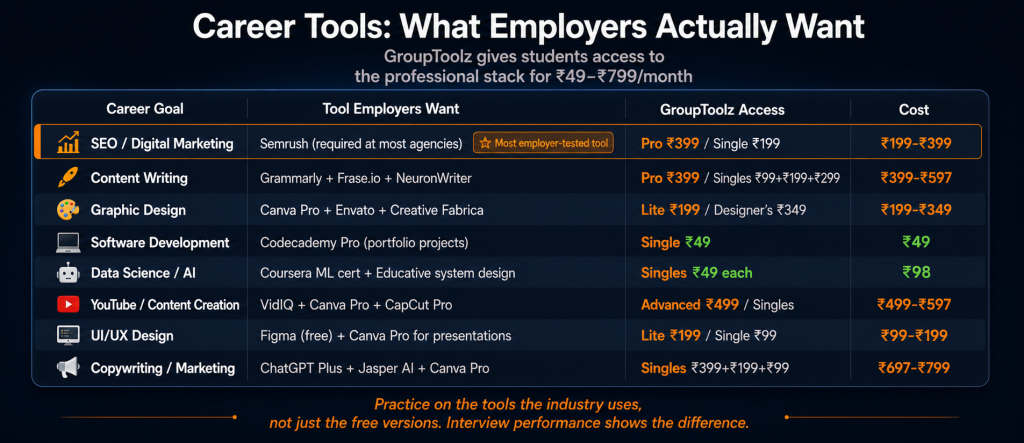
| Career goal | Tool employers want | GroupToolz access | Cost |
|---|---|---|---|
| SEO / Digital Marketing | Semrush proficiency (required at most agencies) | Pro ₹399 / Single ₹199 | ₹199-₹399 |
| Content Writing | Grammarly Premium, Frase.io, NeuronWriter | Pro ₹399 / Singles ₹99+₹199+₹299 | ₹399-₹597 |
| Graphic Design | Canva Pro, Envato Elements, Creative Fabrica | Lite ₹199 / Designer’s ₹349 | ₹199-₹349 |
| Software Development | GitHub (free), Codecademy Pro experience | Single ₹49 | ₹49 |
| Data Science / AI | Coursera ML certificate, Educative system design | Singles ₹49 each | ₹98 |
| YouTube / Content Creation | VidIQ, Canva Pro, CapCut Pro | Advanced ₹499 / Singles | ₹499-₹597 |
| UI/UX Design | Figma (free), Canva Pro for presentations | Lite ₹199 / Single ₹99 | ₹99-₹199 |
| Copywriting / Marketing | ChatGPT Plus, Jasper AI, Canva Pro | Singles ₹399+₹199+₹99 / Writer’s ₹799 | ₹697-₹799 |
Using GroupToolz tools for assignments: what each one actually does
Presentations and reports: Canva Pro (₹99)
Canva Pro’s 420,000+ premium templates include university presentation templates, business report layouts, infographic designs, and academic poster formats. The Brand Kit feature lets you apply consistent colours and fonts across all your academic work. Your assignments look like they came from a professional design team rather than a default PowerPoint theme. Background Remover takes out backgrounds for design projects without Photoshop. I’ve seen final-year project presentations made in Canva that genuinely looked better than paid agency work.
Writing quality: Grammarly Premium (₹99)
Grammarly Premium does more than fix grammar. It catches passive voice, unclear sentence structure, wordiness, and tone mismatches between your intended academic register and what you actually wrote. The plagiarism checker scans your draft against web sources before you submit. For students writing in English as a second language, the suggestion explanations teach correct patterns over time — it’s a writing tutor in your browser. One caveat: don’t let it over-formalise your writing to the point where your own voice disappears. Adjust the suggestions, don’t just accept everything.
Research and summarising: Scribd + Blinkist (₹49 + ₹49)
Scribd is unlimited access to e-books, academic papers, and magazines — the research library you’d otherwise spend ₹200-₹2,000 per book building. Blinkist gives 15-minute summaries of 7,500+ non-fiction books, which is genuinely useful for reading lists you’ll never get through in full. Together at ₹98/month, they replace the college library bookshelf without the queue, the fines, or the books being checked out by someone else already.
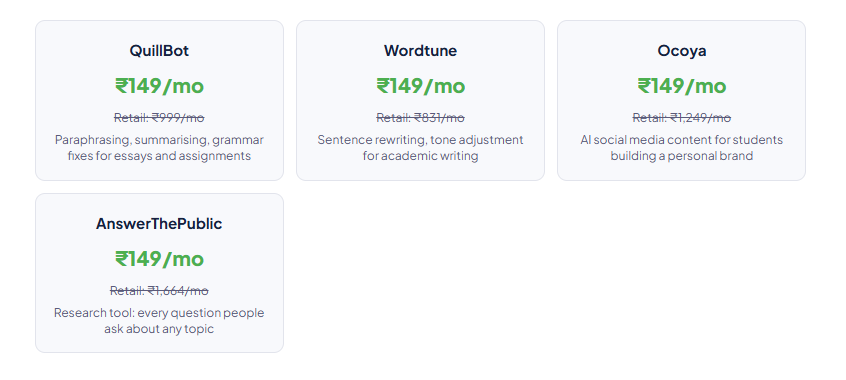
Academic writing assistance: QuillBot (₹149)
QuillBot’s paraphrasing tool helps you restate research sources in your own words for citations. The summarisation tool condenses long papers into key points for lit reviews. Important: use QuillBot to improve your writing and understand sources. Not to skip the thinking. Academic integrity policies apply regardless of which tool you used — and the best version of any assignment is still the one where you understood the material.
Understanding difficult material: ChatGPT Plus (₹399)
ChatGPT Plus is the study companion available at 2 AM during exam week. Struggling with the Black-Scholes model and have basic calculus but no finance background? Ask it to explain it at exactly that level. Stuck on a programming error? Paste the error message and ask what’s wrong and why. Preparing for an exam? Ask for practice questions on specific topics with explanations for the answers. The ₹399/month is worth it if you use it actively. It’s not worth it if you’re just going to use it to generate assignments you then submit unchanged.
Total student toolkit cost summary
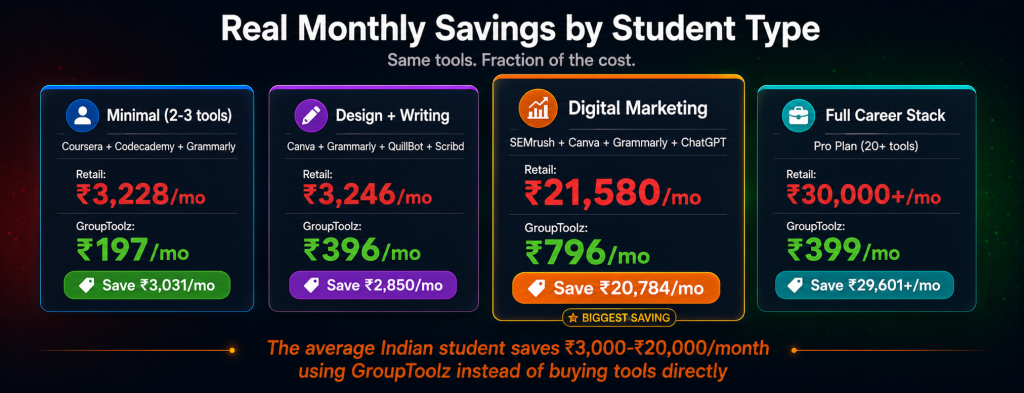
| Student type | Tools needed | GroupToolz cost | Retail equivalent | Monthly saving |
|---|---|---|---|---|
| Minimal (2-3 tools) | Coursera + Codecademy + Grammarly | ₹197/mo | ₹3,228/mo | ₹3,031 |
| Standard (design + writing) | Canva + Grammarly + QuillBot + Scribd | ₹396/mo | ₹3,246/mo | ₹2,850 |
| Digital Marketing | Semrush + Canva + Grammarly + ChatGPT | ₹796/mo | ₹21,580/mo | ₹20,784 |
| Full career stack | Pro Plan (20+ tools) | ₹399/mo | ₹30,000+/mo | ₹29,601+ |
| The honest student math Indian university students typically have ₹5,000-₹15,000 per month for all expenses. Retail tool subscriptions would eat 20-80% of that for just the professional tools needed to stay competitive. GroupToolz student plan tools cut that to ₹49-₹799/month. The savings aren’t abstract. If you’re applying for a digital marketing internship and you’ve actually used Semrush for keyword research, you’re in a different conversation than someone who studied it in slides. That’s what the ₹199/month for a Semrush single buys: actual practice on the actual tool. That’s the practical case for the student group buy approach here. |
Frequently asked questions
Can I really access Coursera for ₹49/month on GroupToolz?
Yes. This coursera group buy access is the platform’s lowest-priced single tool. You get shared access to Coursera — same courses, same learning experience. You can complete specialisations, professional certificates from Google, IBM, Meta, and university partners at ₹49/month instead of paying ₹3,000-₹50,000 per course at retail. Three months on Coursera costs ₹147 on GroupToolz vs ₹9,000-₹15,000 directly.
Which GroupToolz plan is best for students?
Start with single tools and only upgrade when the maths work out. The grouptoolz student plan tools at ₹49 each cover most learning needs. Coursera + Codecademy + Grammarly = ₹197/month. If you also need Semrush, the linkedin learning cheap access at ₹49, Scribd, and QuillBot, the Pro plan at ₹399 includes all four plus 16 more tools — cheaper than buying them individually (₹199+₹49+₹49+₹149 = ₹446 just for those four). Do the maths for your specific list before subscribing.
Is GroupToolz allowed for students?
Yes. There are no restrictions on who can subscribe. Students, freelancers, agencies, and businesses all use GroupToolz. The tools themselves are the same platforms you’d access with any subscription. Standard terms of service for each platform apply — the student group buy aspect is about pricing access, not bypassing any platform rules.
Can I use Grammarly from GroupToolz for assignments?
Yes. Grammarly Premium via GroupToolz works exactly like a direct Grammarly Premium subscription: same grammar checking, same plagiarism detection, same writing suggestions, same browser extension. Use it for improving your writing, checking grammar, and verifying originality before submission. Check your institution’s policies on AI writing tools if you’re unsure what level of assistance is permitted.
Does GroupToolz Coursera access give me certificates?
Yes, but the certificate comes from Coursera. GroupToolz gives you platform access. You enrol in a course within Coursera, complete the assessments, and earn the certificate from Coursera and the affiliated institution directly. The certificate on your CV says Coursera/Google/IBM — not GroupToolz. That’s how it should work.
Which tools help most for getting hired after graduation?
Semrush is required at virtually every digital marketing agency — it’s the tool, not a tool. The linkedin learning cheap access for certificates matters because recruiters do check LinkedIn profiles and certificates show up there. Canva Pro skills are expected in design and marketing roles. Codecademy Pro’s project-based learning gives you portfolio pieces you can actually show. The student seo tools on GroupToolz, especially Semrush, are where students most consistently tell us they got value in interviews. Practice on the tools the industry uses, not just the free versions.
Comments