
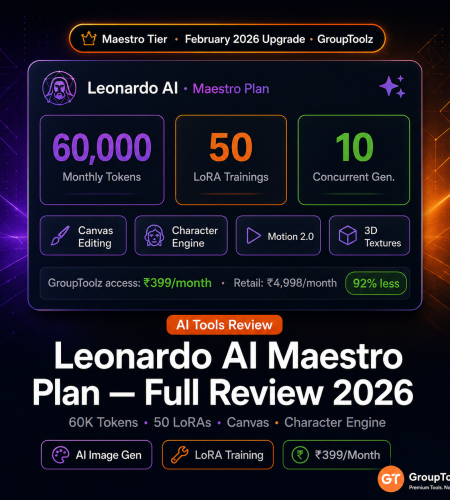
This leonardo ai maestro plan review covers every feature upgrade, the token system, and three real production workflows — everything you need to know about Maestro-tier access on GroupToolz. Leonardo AI Maestro retails at $60/month (~₹4,998). GroupToolz upgraded to Maestro tier in February 2026. This leonardo ai maestro plan review covers what Maestro actually unlocks over Artisan, how the token system works in practice, which features matter for real production work, and how to access it on GroupToolz from ₹399/month.
By GroupToolz Team Updated: June 11, 2026
| 60K Monthly tokens | ~3,750 Images per month | 50 LoRA trainings/month | 10 Concurrent generations |
What Maestro unlocks over Artisan
Leonardo AI has four paid tiers in 2026: Apprentice ($12), Artisan ($30), Maestro ($60), and Teams (custom). This leonardo ai group buy access from GroupToolz is at Maestro level — the second-highest tier. Here’s what that means in concrete terms.
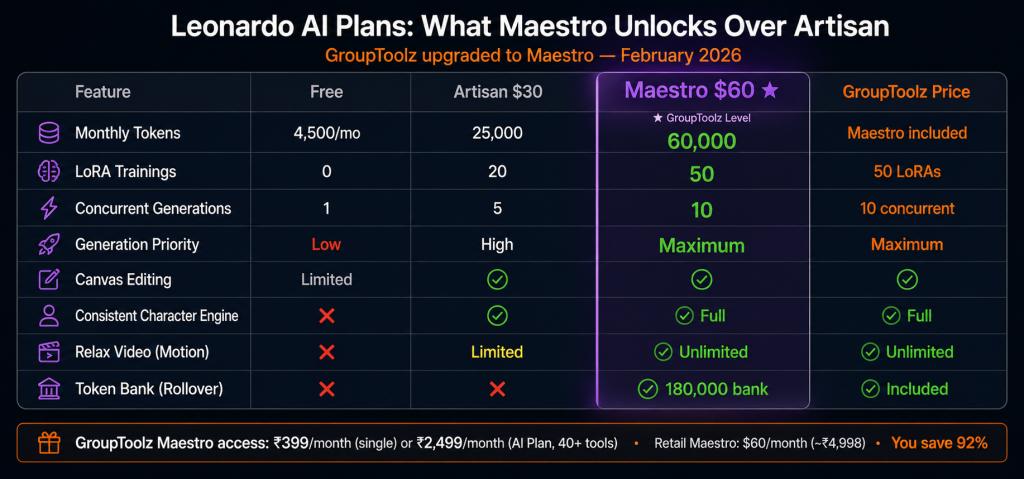
| Feature | Free | Apprentice ($12) | Artisan ($30) | Maestro ($60) |
|---|---|---|---|---|
| Monthly tokens | 150/day (~4,500/mo) | 8,500 | 25,000 | 60,000 |
| Approx. images/month | ~900-1,125 (daily reset) | ~1,700-2,125 | ~5,000-6,250 | ~3,300-15,000 |
| Relax Mode | ❌ | ❌ | ✅ (basic models only) | ✅ Unlimited (basic models) |
| LoRA trainings/month | 0 | 1 | 20 | 50 |
| Concurrent generations | 1 | 2 | 5 | 10 |
| Generation priority | Low | Standard | High | Maximum |
| Private generations | ❌ | ✅ | ✅ | ✅ |
| Canvas editing | Limited | ✅ | ✅ | ✅ |
| 3D texture generation | ❌ | Limited | ✅ | ✅ |
| Unlimited relax video (Motion) | ❌ | ❌ | Limited | ✅ Unlimited |
| Commercial rights | Limited | ✅ | ✅ | ✅ Full |
| Token bank (rollover) | ❌ | ❌ | ❌ | ✅ 180,000 bank |
| What the GroupToolz Maestro upgrade actually means GroupToolz upgraded from Artisan to Maestro in February 2026. Practically: 60,000 tokens vs 25,000 (2.4x more monthly capacity), 50 LoRA trainings vs 20 (2.5x more custom model slots), 10 concurrent generations vs 5 (doubles throughput for volume work), maximum generation priority vs high, and unlimited relaxed video. At retail, going from Artisan to Maestro costs an extra $30/month (~₹2,499). On GroupToolz, you get Maestro at no extra cost. |
How the token system works in practice
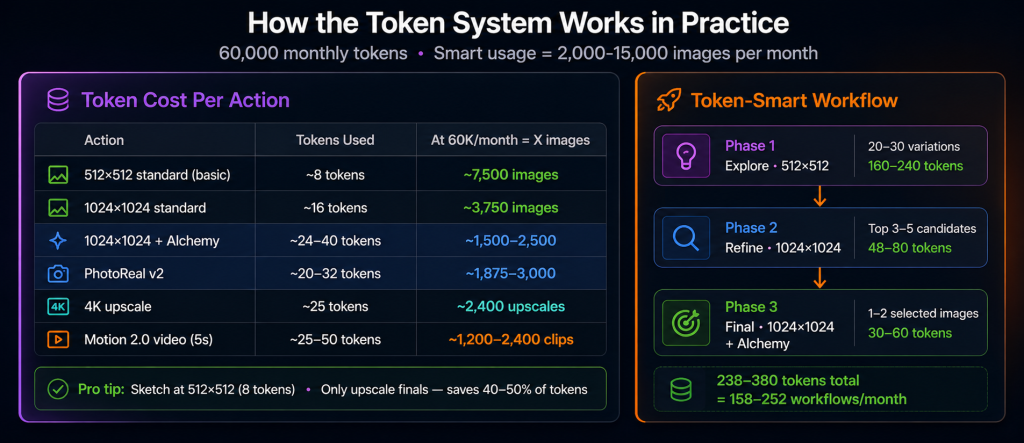
Everything in Leonardo AI costs tokens. The 60,000 monthly Maestro allocation sounds like a lot until you start generating at high settings and realize how fast it goes. Here’s the actual cost breakdown, so you can plan around it.
| Action | Token cost | At 60K tokens/month |
|---|---|---|
| Standard 512×512 image (basic model) | ~8 tokens | 7,500 images |
| Standard 1024×1024 image | ~16 tokens | 3,750 images |
| Image with Alchemy (quality boost) | ~24-40 tokens | 1,500-2,500 images |
| Image with PhotoReal v2 | ~20-32 tokens | 1,875-3,000 images |
| 4K upscale (Ultimate Upscaler) | ~25 tokens | 2,400 upscales |
| Motion 2.0 video (5 seconds) | ~25-50 tokens | 1,200-2,400 clips |
| LoRA training (custom model) | 200-600 tokens + slot | 100-300 trainings at lower limit |
In practice, the range is 3,300-15,000 images per month depending on settings. The smart approach: ideate at 512×512 (8 tokens = 7,500 images for sketching) and only upscale to 1024×1024 or 4K for final selections. This cuts token consumption by 40-50% during the exploration phase. Don’t run Alchemy or PhotoReal on everything. Save those settings for images you’re actually committing to. This is the kind of thing that’s obvious in retrospect but takes a few token-depleted months to figure out.
| The 3-phase workflow that stretches tokens furthest Phase 1 (Explore at 512×512, ~8 tokens each): Generate 20-30 variations. Cost: 160-240 tokens. Phase 2 (Refine at 1024×1024, ~16 tokens): Upscale the 3-5 best candidates. Cost: 48-80 tokens. Phase 3 (Final at 1024×1024 + Alchemy, ~30 tokens): Render the 1-2 selected images. Cost: 30-60 tokens. Total: 238-380 tokens for a complete ideation-to-final workflow. At 60,000 monthly tokens, that’s roughly 158-252 complete production workflows per month. |
The 5 Maestro features that actually matter
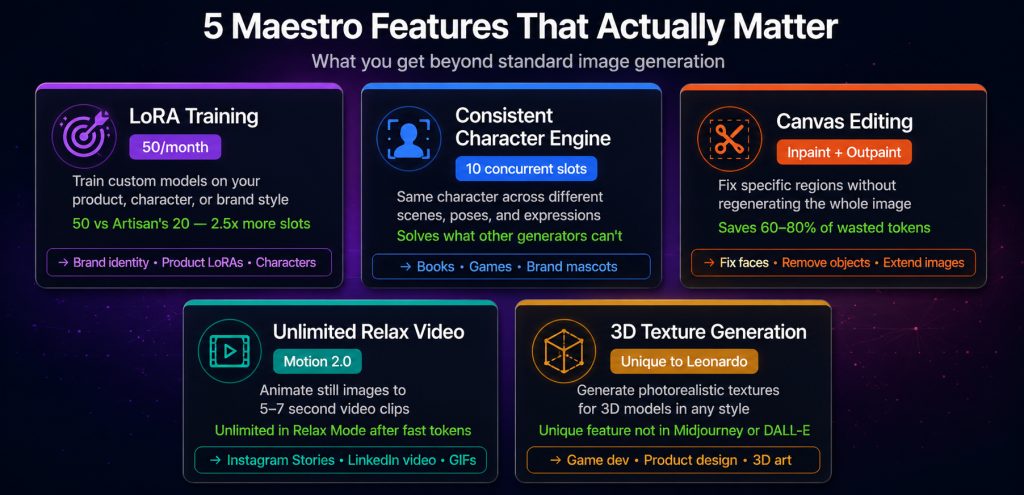
| Feature 1 LoRA training: 50 custom models per month LoRA (Low-Rank Adaptation) training is how you build custom AI models tuned to a specific visual style, character, or product. Upload reference images, set the training parameters, and Leonardo trains a model that generates new images consistently in that style. The Maestro plan’s 50 LoRA trainings per month is 2.5x Artisan’s 20. For anyone managing multiple client brands or character projects, this matters in ways the raw number doesn’t fully convey. Each LoRA is a specific visual language: a product’s appearance, a character’s face and clothing, a brand’s visual identity. At 50 per month, you can run a proper character-franchise workflow or maintain a large library of trained client styles without constantly bumping into the cap. The Artisan limit of 20 feels tight surprisingly fast once you’re doing real production work. That’s one thing this ai image generator review makes clear. Who uses this: E-commerce sellers with product-specific LoRAs for consistent imagery. Brand designers training client identity styles. Game developers maintaining character consistency across assets. Content creators building signature visual series. |
| Feature 2 Consistent Character Engine This is probably the feature that most clearly separates Leonardo from Midjourney and DALL-E for production work. The Consistent Character Engine locks a specific character’s appearance — face, body type, clothing, distinctive features — across multiple generations in different poses, expressions, backgrounds, and contexts. Without it, generating the same character across different scenes means constant small variations you didn’t ask for. A character’s face shifts slightly. The hair changes. The eye colour drifts. The Character Engine stops that. For children’s book illustrators, game developers, comic creators, and brand mascot designers, this solves a real problem that most image generators just don’t address. Maestro’s 10 concurrent slots and maximum priority mean the character consistency engine runs at full speed. No queuing, no waiting, 10 variations running simultaneously. This is where the concurrent generation bump from Artisan (5) to Maestro (10) is most noticeable in daily use. |
| Feature 3 Unlimited relax video (Motion 2.0) Motion 2.0 converts still images into short animated clips (5-7 seconds). Maestro includes unlimited relaxed video generation for Leonardo’s own video models. Once your fast tokens are used, you can keep generating video clips in relaxed mode (slower queue) at no additional token cost. I want to be honest about this one: the outputs are short and not cinematic. For serious video production, use Kling 3.0 or Veo 3.1. But for quick animated social content — Instagram Stories, LinkedIn video posts, product GIFs — Motion 2.0 covers the basics without needing a separate ai image generator subscription. If you’re already on the AI Plan, it’s a useful add-on rather than a primary video tool. |
| Feature 4 3D texture generation Unique to Leonardo among the mainstream AI image generators. Upload a 3D model and the platform generates photorealistic textures and materials for it in any style — photorealistic, stylised, sci-fi, fantasy, or any trained LoRA style. For game developers, product designers, and 3D artists, this cuts texture work significantly. A building exterior that would take a 3D artist several hours to texture manually takes minutes to generate multiple variations of, which means you can explore visual direction before committing to anything. The output quality is good enough for concept approval and often usable as a base for final work with light touch-up. |
| Feature 5 Canvas editing: inpainting and outpainting The Canvas tool is Leonardo’s image editing workspace. Inpainting: select a region and regenerate just that part while keeping everything else. Fix a face, swap a background element, remove something distracting, change clothing. Outpainting: extend an image beyond its original borders. Take a portrait and add surroundings. Extend a square image to widescreen format with plausible content in the image’s style. For AI image editing workflows, Canvas replaces a lot of basic Photoshop work. Generated the perfect product image except for one distracting element in the background? Inpaint it. Don’t regenerate the whole thing. I find this one of the most practically useful leonardo ai features 2026 for reducing wasted tokens — instead of regenerating 20 times hoping to get it right, you fix the one thing that’s wrong. |
Maestro vs Artisan: is the upgrade worth it at retail?
This is relevant even though GroupToolz provides Maestro access. Understanding the tier comparison tells you the real value in this ai image generator review context.
| Use case | Artisan enough? | Need Maestro? |
|---|---|---|
| Blogging: 50-100 images per month | ✅ Yes | No |
| Social media: 200-500 images per month | ✅ Yes | No |
| E-commerce: 500-1,000 product images per month | ⚠️ Borderline | ✅ Yes |
| Agency: multiple client projects running simultaneously | ❌ Tokens run out | ✅ Yes |
| Character-heavy projects (5+ distinct characters) | ⚠️ 20 LoRA limit tight | ✅ Yes (50 LoRAs) |
| Game development asset production | ❌ Volume needs Maestro | ✅ Yes |
| High-speed iteration (10 concurrent) | ❌ 5 concurrent limit | ✅ Yes |
The honest picture from this maestro vs artisan comparison: if you’re doing casual blogging or moderate social media posting, Artisan’s 25,000 tokens probably covers you. The moment you’re doing agency work, e-commerce at volume, or character-heavy projects, you’d hit the Artisan cap and stop mid-month. That’s the core argument for the leonardo ai group buy Maestro tier.
3 real workflows using Leonardo AI Maestro
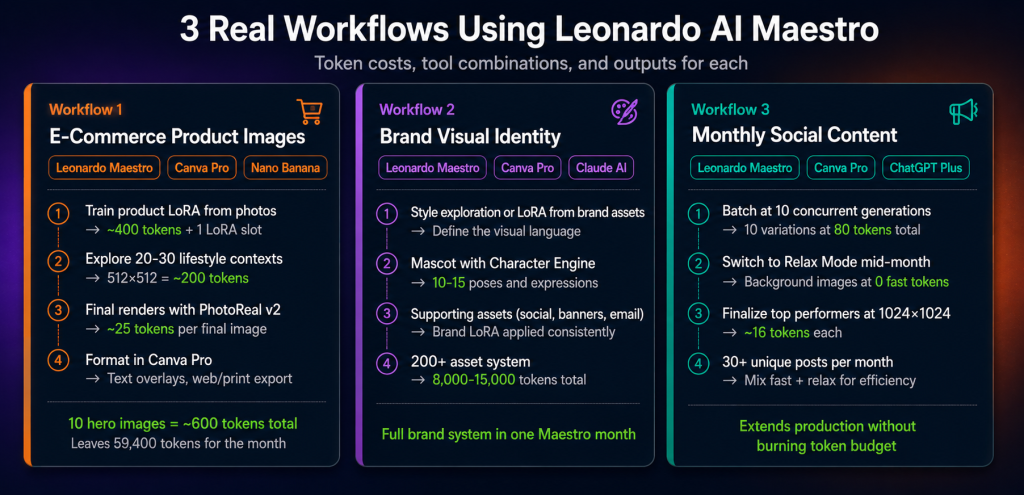
| Workflow 1: e-commerce product image system Leonardo AI Maestro Canva Pro Nano Banana Pro Goal: Generate 50+ on-brand product image variations per week for an online store. Step 1 — Train the product LoRA: Photograph your product on a plain white background from 10-15 angles. Upload as a LoRA training dataset. Train a custom model around your specific product (uses ~400 tokens + 1 LoRA slot). Now you have a model that generates your product in any scene. Step 2 — Explore lifestyle contexts: Use your product LoRA to generate the same product in 20-30 different settings (kitchen counter, outdoor, gift wrapping). At 512×512 for exploration (8 tokens each), this costs about 160-240 tokens. Select the best 5 contexts. Step 3 — Final renders: Generate the selected contexts at 1024×1024 with PhotoReal v2 (~25 tokens each). Upscale hero images to 4K (~25 tokens). About 50 tokens per final image. 10 final hero images: 500 tokens total. Step 4 — Finish in Canva Pro: Add text overlays, price badges, promotional frames. Export optimised for web, cropped for social, 4K for print. The AI generation covers the hard part; Canva handles the formatting. |
| Workflow 2: brand identity visual system Leonardo AI Maestro Canva Pro Claude AI Goal: Build a cohesive visual identity for a client — mascot, social imagery, and marketing assets all in a consistent style. Step 1 — Style definition: If the client has existing brand imagery, train a LoRA on it. If not, run 20-30 style explorations using Phoenix or Lucid Origin models with detailed prompts until you find the brand aesthetic. This part is genuinely fun to do in Leonardo because the model variety is wide. Step 2 — Mascot with Consistent Character Engine: Design the brand mascot across 3-4 initial concepts. Pick the strongest one. Lock it in the Consistent Character Engine and generate it in 10-15 different contexts, poses, and expressions for the brand’s various use cases. Step 3 — Supporting assets: Use the brand style LoRA to generate social media backgrounds, hero images, email headers, and banner elements. At 60,000 Maestro tokens, a full brand system with 200+ generated assets typically costs 8,000-15,000 tokens — leaving plenty of budget for monthly content work after the initial system build. |
| Workflow 3: monthly social media content production Leonardo AI Maestro Canva Pro ChatGPT Plus Goal: Generate 30+ unique social media images per month without burning through tokens. Use Relax Mode when fast tokens run low: Mid-month, when you’ve spent most of your fast tokens, switch to Relax Mode for background images, texture explorations, and supplementary visuals. Basic models at no token cost, just slower. It extends production capacity significantly without touching your remaining fast token budget. This is one of the Maestro features that looks minor on the feature list but makes a real difference in practice. Batch at 10 concurrent: Generate 10 variations simultaneously instead of one at a time. At 8 tokens each for exploration generations, you evaluate 10 options at 80 tokens total in the same time Artisan’s 5-concurrent limit evaluates 5. Not glamorous, but it meaningfully speeds up iteration-heavy workflows. |
Leonardo AI Maestro on GroupToolz: access options
| Access method | Plan | Price | What else is included |
|---|---|---|---|
| AI Plan | AI Plan — 40+ tools | ₹2,499/mo | ChatGPT Plus, Perplexity AI, Grok, Flux Image, Sora, Nano Banana Pro, Submagic, Gamma AI, and 32 more AI tools |
| Single Tool | Leonardo AI only | ₹399/mo | Leonardo AI Maestro only |
| Advanced Plan | Advanced — 60+ tools | ₹499/mo | Semrush Guru, Envato Elements, Canva Pro, VidIQ, Epidemic Sound, Netflix, and 54 more (check live plan page for current Leonardo AI inclusion) |
| The honest value assessment Leonardo AI Maestro retails at $60/month (~₹4,998). This leonardo ai group buy access on GroupToolz is ₹399/month as a single tool — 92% less than retail. On the AI Plan at ₹2,499/month, you get Maestro alongside ChatGPT Plus, Perplexity, Grok, Flux, Nano Banana Pro, Sora, and 33 more. The combined retail cost of five of those AI tools alone exceeds ₹15,000/month. The 50 LoRA trainings and 60,000 monthly tokens cover serious commercial volume — more than enough for agency-scale work. That’s the core maestro vs artisan distinction in practice. Artisan and Apprentice can’t sustain that. That’s what the GroupToolz upgrade to Maestro actually changes for the leonardo ai features 2026 lineup on the platform. |
Frequently asked questions
Which AI video generator is best in June 2026?
Maestro has 60,000 monthly tokens (vs Artisan’s 25,000), 50 LoRA trainings (vs 20), 10 concurrent generations (vs 5), maximum generation priority (vs high), unlimited relaxed video generation (vs limited), and a 180,000 token bank with rollover. Retail: $60/month vs $30. The maestro vs artisan comparison matters most if you’re doing agency-scale work or character-heavy projects where the Artisan limits actually bite. GroupToolz provides Maestro-level access.
How many images can I generate with 60,000 monthly tokens?
Depends heavily on settings. 512×512 basic: ~7,500 images. 1024×1024 standard: ~3,750. With Alchemy quality boost: ~2,000. A realistic mixed workflow (ideation at low quality, final renders at high quality) typically yields 2,000-5,000 production-quality images per month. The leonardo ai features 2026 token efficiency tip: sketch at 512×512, only upscale finals.
What is LoRA training in Leonardo AI?
LoRA training creates a custom AI model tuned to a specific visual style, character design, or product appearance. Upload reference images, train a LoRA, and Leonardo generates new images consistently in that style. Maestro allows 50 per month, which is enough to maintain a large library of client brand styles, product models, and character designs simultaneously. Artisan’s 20 feels tight once you’re doing professional work.
What is Relax Mode?
Basic model generation at no fast token cost, but in a slower queue (minutes rather than seconds). Available on Artisan and Maestro. Maestro includes unlimited relaxed video generation on top of that. When your fast tokens run low mid-month, Relax Mode extends production for non-urgent work without touching your remaining budget. One of those features that looks minor until you’re actually using the platform regularly.
Can I use Leonardo AI images commercially on GroupToolz?
Yes. Paid plan subscribers (including this leonardo ai group buy Maestro access) have commercial usage rights per Leonardo AI’s Terms of Service. Free plan images have more restricted commercial rights. Always review the current ToS before publishing or selling AI-generated content, since rights can vary for certain licensed model styles.
How does Leonardo AI compare to Midjourney?
This comes up right after the maestro vs artisan question in most tool comparisons. Midjourney produces more artistically striking images and is still the benchmark for AI illustration quality. Leonardo gives you more technical control: custom LoRA training, the Character Engine, Canvas editing, 3D texture generation, and better LoRA ecosystem. For this leonardo ai maestro plan review conclusion: use Midjourney if aesthetic quality for illustration is the only thing that matters. Use Leonardo if you need consistent characters, custom trained styles, canvas editing, or high-volume production work. They’re different tools for different situations.
Comments