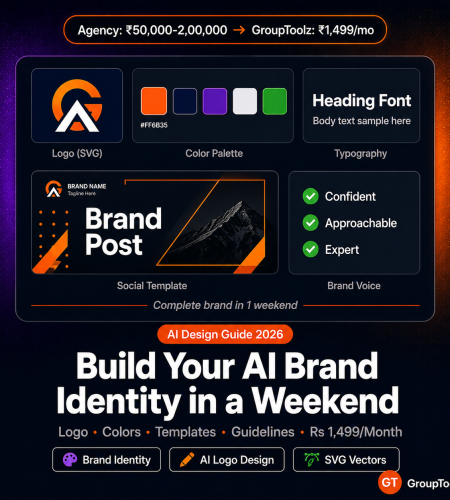
A branding agency charges Rs 50,000 to Rs 2,00,000 for a brand identity package. GroupToolz AI Power gives you the brand identity AI tools to build the same thing yourself for Rs 1,499/month. Name, logo, colours, fonts, templates, social assets, guidelines. Here’s how, step by step.
By GroupToolz Team Updated: May 20, 2026
What “brand identity” actually means (it’s not just a logo)
A brand identity is a system. It’s the set of visual and verbal elements that make your business recognisable across every touchpoint. Logo, yes. But also colours, fonts, voice, templates, and the rules for using them consistently. Here’s what a professional package typically includes.
| Element | What it is | Where it shows up |
|---|---|---|
| Brand name | The name your business operates under | Everywhere: website, socials, packaging, invoices |
| Logo (primary + variations) | Visual mark in full colour, black/white, icon-only, horizontal/stacked | Website, social profiles, business cards, packaging, emails |
| Colour palette | Primary, secondary, and neutral colours with hex codes | Website, social media, packaging, print |
| Typography | Heading font + body font pairing | Website, presentations, social graphics, documents |
| Brand voice and tone | How your brand talks: formal, casual, witty, authoritative | Website copy, socials, emails, support |
| Social media templates | Post templates for Instagram, LinkedIn, Twitter/X, YouTube | Daily social content |
| Business card | Physical or digital card with contact details | Meetings, networking, events |
| Email signature | Branded footer for professional emails | Every email you send |
| Brand guidelines PDF | Document with all elements and usage rules | Team, freelancers, partners, vendors |
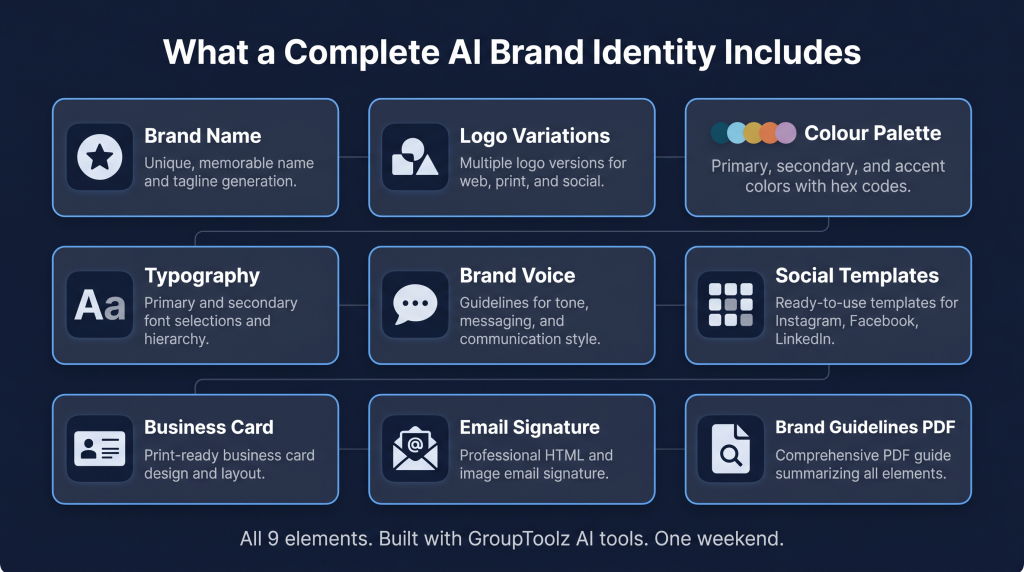
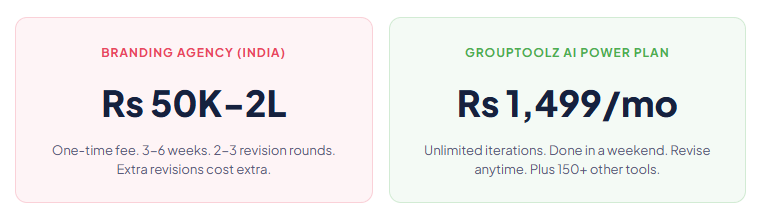
An Indian branding agency charges Rs 50,000-2,00,000 for this. A freelance designer charges Rs 15,000-50,000. The process takes 3-6 weeks of revisions. With AI brand building tools on GroupToolz, you can put together the entire package in a weekend and iterate as many times as you want without paying extra.
The 8-step AI brand building pipeline
| Step 1 of 8 Brainstorm the brand name ChatGPT Plus Claude AI Start with ChatGPT Plus for volume. Generate 50-100 name ideas in a single session. The prompt matters more than the tool. Prompt template: “Generate 30 brand name ideas for a [describe your business]. The name should be: under 3 syllables, easy to spell in both English and Hindi, available as a .com domain (suggest names unlikely to be taken), and evoke [desired feeling: trust, innovation, warmth, speed]. Avoid names starting with ‘AI’, ‘Smart’, or ‘Pro’. Generate names in these categories: invented words, compound words, descriptive names, metaphorical names.” Take the top 10 and feed them into Claude AI for deeper analysis. Ask Claude to evaluate each name on memorability, pronunciation across Indian languages, potential trademark conflicts (basic screening), domain availability, and emotional associations. Claude’s reasoning tends to produce a more thoughtful shortlist than ChatGPT’s volume-first approach. Once you’ve got 3 finalists: check domain availability on Namecheap or GoDaddy, search the MCA (Ministry of Corporate Affairs) database for existing company names, search Instagram and Twitter/X for handle availability, and do a basic Google search to make sure no major brand already uses the name. |
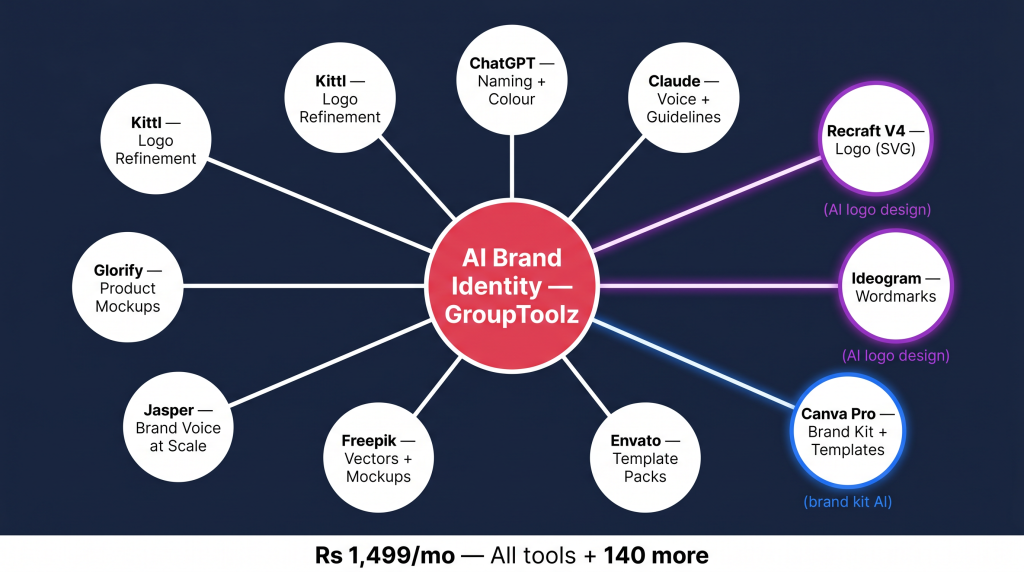
| Step 2 of 8 Design the logo Recraft V4 Ideogram AI Kittl This is where AI logo design changed in 2026. Recraft V4 produces native SVG vector logos. Clean, scalable, professional marks that come out of the model ready to drop into Illustrator or Figma without any vectorisation step. No other major AI image generator does this. Recraft V4 for logomarks: Generate abstract marks, geometric symbols, and icon-based logos. Feed it your exact hex codes so the logo uses your colour palette from Step 3. Generate 20-30 variations, narrow to 3-5 candidates. The SVG output means every variation is immediately usable at any size. Ideogram AI for wordmarks: If your AI brand identity centres on a text-based logo (like Google, Coca-Cola, or Netflix), Ideogram handles typography better than any other generator. Generate wordmark variations with different fonts, weights, and decorative touches. It renders readable text consistently, which is where other AI models still struggle. Kittl for refinement: Kittl is a design tool on GroupToolz specialising in logo and brand work. Use it to refine your AI-generated concepts: adjust spacing, add taglines, create variations (horizontal, stacked, icon-only), export in every format you need (SVG, PNG, PDF). Kittl bridges the gap between AI logo design output and production-ready files. What you need from this step: A primary logo (full colour), a single-colour version (dark backgrounds), an icon-only version (favicons, app icons, profile photos), and a horizontal lockup (email signatures, website headers). |
| Step 3 of 8 Define the colour palette ChatGPT Plus Canva Pro Your brand kit AI colour palette needs five colours: primary (dominant, used most), secondary (complementary, for accents), neutral dark (text and backgrounds), neutral light (backgrounds and spacing), and accent/CTA (buttons, links, calls to action). In ChatGPT Plus, describe your brand’s personality and audience. Ask for 3 palette options with hex codes and reasoning. “My brand is a fintech startup targeting Indian millennials. Suggest 3 colour palettes (5 colours each) with hex codes. Explain why each works for this audience.” In Canva Pro, use the colour palette generator to visualise each option. Test across different contexts: business card mockup, social media post, website header. Colours that look strong as hex codes sometimes clash in practice. Always test before you commit. Two rules worth following: Your primary colour needs enough contrast against white and dark backgrounds for accessibility (WCAG AA). Your CTA colour should visually pop against everything else in the palette. And stick to 3 colours maximum in any single design. The other 2 are for balance across different materials. |
| Step 4 of 8 Choose typography Claude AI Canva Pro You need two fonts: one for headings, one for body text. The pairing has to be readable at small sizes on mobile, available as a Google Font (for web), and visually distinct enough that headings feel different from paragraphs without clashing. In Claude AI, describe your brand personality and ask for specific pairings. Claude’s recommendations tend to be more considered than generic font pairing tools because it factors in the brand context you describe. In Canva Pro, test each pairing on a mockup social post with your brand colours. Check: heading font readable at 24px+, body font readable at 14px on mobile, clear visual hierarchy without looking disconnected. Safe pairings for Indian brands: Plus Jakarta Sans + Inter for modern tech. Playfair Display + Source Sans Pro for premium and luxury. Poppins + Nunito for friendly and approachable. All free Google Fonts, all with solid Hindi/Devanagari support. |
| Step 5 of 8 Define brand voice and copy Claude AI Jasper AI Brand voice is how your brand talks. Not a font. Not a colour. The personality that comes through in every sentence you write. A luxury watch brand speaks differently from a street food delivery app, even when both are saying “order now.” In Claude AI, generate a brand voice document. Prompt: “Create a brand voice guide for [brand name]. Industry: [X]. Audience: [X]. The voice should be [3 adjectives]. Include: a one-paragraph voice description, 5 ‘we say this / not this’ examples, tone guidelines for different contexts (social vs email vs website vs support), and 3 sample social posts demonstrating the voice.” In Jasper AI, encode the voice using the Brand Voice feature. Feed it your Claude-generated guide, 10 sample posts, and your homepage copy. Then use Jasper for all future content. Every output will match your voice without you re-prompting each time. This is what makes AI brand building scalable. Also write your core copy in this step: tagline (under 8 words), elevator pitch (30 seconds, 60 words), homepage headline and subheadline, and “about us” paragraph (150 words). Generate 10 versions of each with ChatGPT, refine the best ones with Claude. |
| Step 6 of 8 Create social media templates Canva Pro Envato Elements Freepik These are the brand identity AI tools assets you’ll use most often. A set of 10-15 templates handles 90% of daily posting and keeps everything visually consistent without designing from scratch every time. In Canva Pro, set up a Brand Kit with your logo, hex codes, and fonts from Steps 2-4. The brand kit AI feature applies your brand to any template automatically. Change a colour in the kit, every template updates. Create templates for: Instagram post (1080×1080), Instagram story (1080×1920), carousel cover + inner slides, LinkedIn post (1200×628), Twitter/X post (1600×900), YouTube thumbnail (1280×720), Facebook cover (820×312). From Envato Elements, download professional template packs and customise with your Brand Kit. These were designed by professional designers. You’re swapping the visual identity layer while keeping the layout and composition that makes them look polished. From Freepik, grab vector elements, illustrations, and mockups to add variety. Use their platform-specific template bundles as starting points and customise in Canva. |
| Step 7 of 8 Design business card and email signature Canva Pro Glorify Business card: Minimal layout. Logo on front, name and contact details on back. Include: name, title, phone, email, website, and one social handle (the most relevant one). Don’t cram every platform on there. White space isn’t wasted space. It’s a deliberate choice that makes you look professional. Email signature: 600px wide, under 100KB file size so it loads everywhere. Logo, name, title, phone, email, website. Export as PNG from Canva Pro. A decent email signature turns every email into a brand touchpoint. You send hundreds of emails a month. That adds up. In Glorify, create branded product mockups if you sell anything physical or digital. Your product in context with your brand colours, logo, lifestyle setting. Works for website hero sections, Amazon listings, social ads, pitch decks. |
| Step 8 of 8 Compile the brand guidelines document Claude AI Canva Pro The guidelines document is what keeps your AI brand identity consistent over time. Without it, your brand slowly drifts as different people interpret things differently. A teammate picks the wrong shade of blue. A freelancer uses the wrong font. It happens gradually, and then your brand looks like five different companies. In Claude AI, generate the text: “Write a brand guidelines document for [brand name]. Include: logo usage (minimum size, clear space, do/don’t examples), colour palette (hex + RGB + CMYK values), typography (heading and body fonts with size hierarchy), brand voice (tone, vocabulary, examples), social media guidelines, and photo/image style.” In Canva Pro, design it using a presentation template. Add visual examples for every rule: correct and incorrect logo placement, colour swatches, font pairing examples at different sizes. Export as PDF. This becomes the single source of truth for anyone who touches your brand. Target: 12-20 pages. Cover page, brand story (3-5 sentences), logo variations with rules, colour palette with codes, typography with hierarchy, voice with examples, social templates overview, contact info for brand questions. |
Agency vs AI: what the numbers actually look like
| Brand element | Agency (India) | Freelancer | AI brand building on GroupToolz |
|---|---|---|---|
| Brand naming + research | Rs 10,000-25,000 | Rs 5,000-10,000 | Rs 0 (ChatGPT + Claude) |
| AI logo design (4 variations) | Rs 15,000-50,000 | Rs 5,000-20,000 | Rs 0 (Recraft V4 + Ideogram + Kittl) |
| Colour palette + typography | Rs 5,000-15,000 | Rs 2,000-5,000 | Rs 0 (ChatGPT + Canva Pro) |
| Social media templates (10-15) | Rs 10,000-30,000 | Rs 5,000-15,000 | Rs 0 (Canva Pro + Envato) |
| Business card + email signature | Rs 3,000-8,000 | Rs 1,000-3,000 | Rs 0 (Canva Pro + Glorify) |
| Brand voice + copy | Rs 10,000-25,000 | Rs 5,000-15,000 | Rs 0 (Claude AI + Jasper AI) |
| Brand guidelines PDF | Rs 5,000-15,000 | Rs 3,000-8,000 | Rs 0 (Claude AI + Canva Pro) |
| Total | Rs 58,000-1,68,000 | Rs 26,000-76,000 | Rs 1,499/mo (all tools) |
Agencies deliver polished, professionally crafted work. For funded startups, luxury brands, and national campaigns, that investment makes sense. But for freelancers, small businesses, local shops, and early-stage startups, spending Rs 50,000-2,00,000 on branding before you’ve found product-market fit is money spent in the wrong order.
The AI brand building approach lets you build something professional now, test it with real customers, and invest in agency-level refinement later when you know what works. Your first AI brand identity should cost Rs 1,499/month, not Rs 1,50,000.
When you should hire an agency instead
If you’ve raised funding and need investor-grade collateral. If you’re launching a consumer product on retail shelves. If your industry has specific regulatory requirements for branding (pharmaceuticals, financial services). Or if your brand will be on national television or in print media. For everything else, the brand identity AI tools on GroupToolz produce 80% of agency quality at a fraction of the cost, and you can iterate without paying per revision.
The AI brand building toolkit on GroupToolz
| Tool | Role in brand building | Plan | Retail price |
|---|---|---|---|
| ChatGPT Plus | Name brainstorming, colour psychology, copy drafting | Pro Rs 449 | Rs 1,665/mo |
| Claude AI | Brand voice, guidelines, name analysis, nuanced copy | Pro Rs 449 | Rs 1,665/mo |
| Recraft V4 | AI logo design (native SVG vectors) | AI Power Rs 1,499 | Rs 1,665/mo |
| Ideogram AI | Wordmarks and text-heavy logos | AI Power Rs 1,499 | Rs 1,332/mo |
| Canva Pro | Brand kit AI, templates, cards, guidelines layout | Starter Rs 199 | Rs 1,249/mo |
| Envato Elements | Professional template packs, stock photos | Starter Rs 199 | Rs 1,374/mo |
| Freepik | Vectors, illustrations, mockups | Starter Rs 199 | Rs 749/mo |
| Jasper AI | Brand Voice feature, consistent copy at scale | Pro Rs 449 | Rs 4,082/mo |
| Glorify | Product mockups, branded e-commerce visuals | Pro Rs 449 | Rs 2,415/mo |
| Kittl | Logo refinement, production-ready brand files | Pro Rs 449 | Rs 1,249/mo |
| Retail total (10 tools) | Rs 17,445/mo | ||
| GroupToolz AI Power | All 10 + 140 more | Rs 1,499/mo |
Mistakes that ruin AI brand identity projects
Generating 100 logos and never picking one. AI makes generation too easy. We’ve seen founders spend weeks producing thousands of logo variations and never committing. Set a rule: generate 30 in one session, shortlist 5, test 3 with your audience (Instagram Story poll, WhatsApp group), commit to the winner within 48 hours. Done beats perfect.
Forgetting to test at small sizes. Your AI logo design looks great at 500px on a laptop. Does it work as a 32px favicon? As a tiny Instagram profile photo? As a single-colour watermark on a video? Test every size before you commit. Recraft V4’s SVG output makes scaling easy, but the design itself still needs to be recognisable when small.
Too many colours. AI will give you a 7-colour palette if you ask for one. Don’t use it. Stick to 2 brand colours + 1 accent + 2 neutrals. Great brands are recognisable by one or two colours. Coca-Cola is red. Spotify is green. Zomato is red. Flipkart is blue and yellow. Simplicity creates recognition.
Skipping the guidelines document. Building the AI brand identity is the fun part. Documenting it is the boring part. Most people skip the boring part. Without guidelines, your brand slowly degrades as you and your team make inconsistent choices under deadline pressure. The 2 hours spent on a guidelines PDF saves hundreds of hours of brand clean-up later.
Never showing it to real people. AI doesn’t have taste. You have taste, but your taste is biased toward what you personally like rather than what your customers respond to. Before you finalise anything, show it to 10-20 people in your target audience. A quick Instagram Story poll (“A or B?”) costs nothing and prevents expensive brand pivots down the road.
All the brand identity AI tools, one plan
Recraft V4 + Ideogram + Canva Pro + Claude AI + ChatGPT + Jasper + Envato + Kittl + 142 more tools. Rs 1,499/month.
Frequently asked questions
Can AI actually design a professional logo?
In 2026, yes. Recraft V4 produces native SVG vector logos with brand colour control that you can use directly in professional design software. Ideogram AI handles text-heavy logos and wordmarks with accurate typography. The AI logo design output is comparable to mid-tier freelance work. For high-stakes brands, these serve as strong starting points that a designer can refine further.
How long does AI brand building take?
A complete AI brand identity (name, logo, colours, fonts, voice, templates, business card, email signature, guidelines) can be done in one weekend. Budget 8-12 hours of focused work. The bottleneck is decision-making, not production. AI generates options in minutes. Choosing between them takes hours.
Which GroupToolz plan do I need?
For basic branding with Canva Pro templates and Envato assets, the Starter plan at Rs 199/month works. For AI logo design with Recraft V4 and Ideogram, you need the AI Power plan at Rs 1,499/month. The Pro plan at Rs 449/month adds ChatGPT, Claude, Jasper, Glorify, and Kittl for brand voice, copy, and design refinement.
Should I hire an agency or use brand identity AI tools?
Use AI if you’re a freelancer, small business, personal brand, local shop, or early-stage startup without major funding. The AI brand building pipeline produces professional results at a fraction of agency cost. Hire an agency if you’ve raised money, you’re launching on retail shelves, your branding has regulatory requirements, or you’ll be on national media.
Can I trademark an AI-generated logo?
Trademark law varies by country and is still catching up to AI-generated content. In India, trademark registration focuses on whether the mark is distinctive and used in commerce, not on how it was made. Practical approach: use AI for concepts, make at least minor manual adjustments to the final version, and talk to a trademark attorney before filing. This isn’t legal advice, but it’s what most brands are doing in 2026.
What’s the best AI tool for logo design in 2026?
Recraft V4 for icon-based and abstract logos (native SVG vectors, brand colour control). Ideogram AI for wordmarks and text-heavy logos (best typography rendering). Kittl for refining AI output into production-ready files. All three are brand identity AI tools available on GroupToolz. Recraft V4 and Ideogram on the AI Power plan at Rs 1,499/month, Kittl on Pro at Rs 449/month.
More AI design guides from GroupToolz
More AI design and brand building guides on the GroupToolz blog
Comments