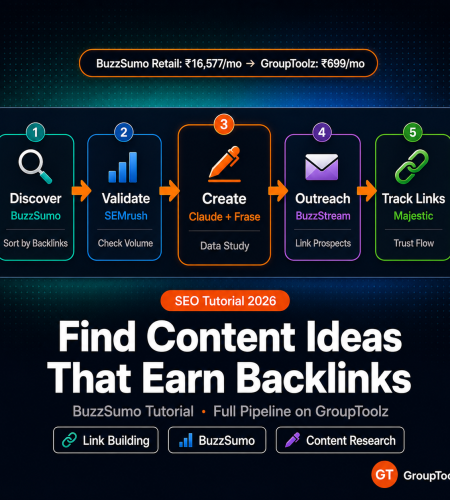
Most content gets zero backlinks. Zero. BuzzSumo content research shows you what already earned both links and shares, so you reverse-engineer the formula instead of guessing. Here’s the full pipeline from discovering linkable ideas to earning backlinks for your own site, using GroupToolz tools.
By GroupToolz Team Updated: May 18, 2026
What BuzzSumo does that other tools can’t
BuzzSumo indexes billions of articles and web pages and tracks how they perform across Facebook, X, Reddit, Pinterest, and backlink sources. Search a topic and it shows you the most shared, most linked, and most engaged-with content for that topic. With exact numbers.
SEMrush tells you which keywords have search volume. Frase.io tells you what the top-ranking pages cover. Neither tells you what content people voluntarily share with their audiences or link to from their own sites. That’s the gap BuzzSumo content research fills. It answers a specific question: “For this topic, what content already proved it can earn engagement and links?”
That matters because ranking content and linkable content are different things. A how-to guide might rank fine for its target keyword but generate zero BuzzSumo backlinks because nobody references how-to guides. A data study might not target any specific keyword at all but earn hundreds of links because journalists and bloggers cite original data. BuzzSumo helps you figure out which content types in your niche earn links, so you stop wasting time on formats that only rank.
One more thing: BuzzSumo Content Creator starts at $199/month (roughly Rs 16,577) at retail. On BuzzSumo GroupToolz, it’s included in the Ultimate plan at Rs 699/month with 100+ other tools. You pay less for the entire plan than BuzzSumo alone costs retail.
The 5 content types that earn the most backlinks
After looking at millions of articles through BuzzSumo’s Content Analyzer, a pattern shows up consistently. These five formats earn far more content ideas backlinks than standard blog posts.
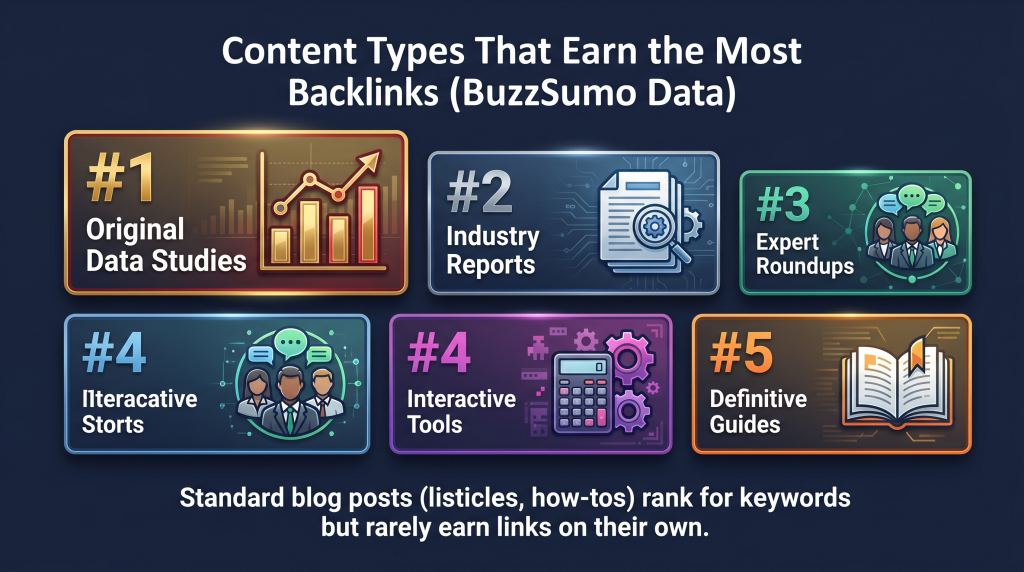
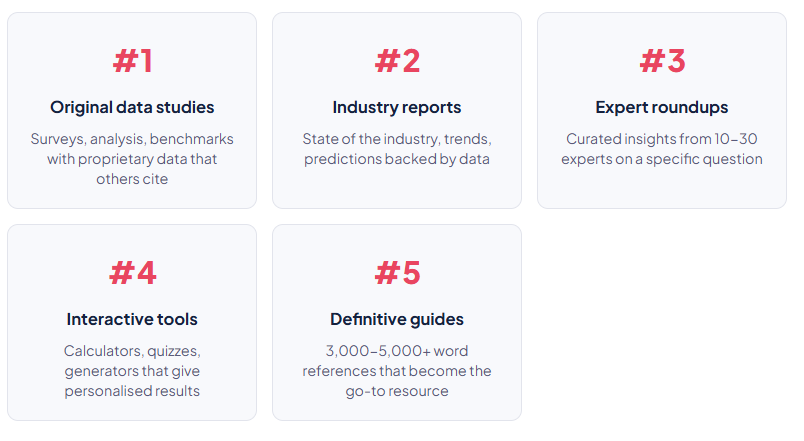
Regular blog posts (listicles, how-tos, opinion pieces) rank for keywords but rarely earn backlinks on their own. The five types above earn links because they contain something other creators need to reference: data, expertise, or utility you can’t get anywhere else. BuzzSumo content research proves this for your specific niche by showing which formats earned the most links in your industry.
The 5-step BuzzSumo-to-backlinks pipeline
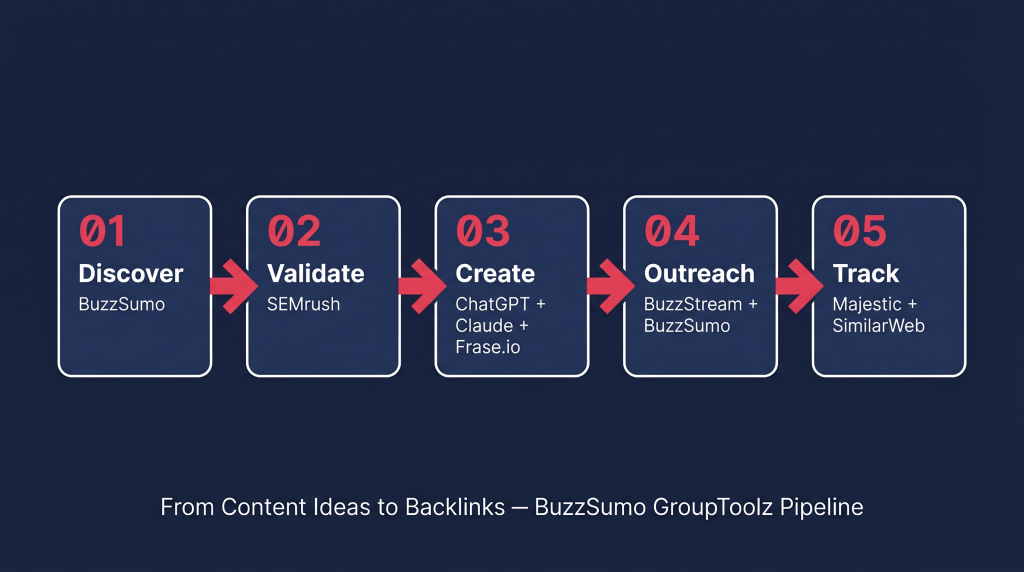
| Step 1 of 5 Discover what already earns links BuzzSumo Open BuzzSumo’s Content Analyzer. Type in your niche as a broad keyword: “content marketing,” “ecommerce,” “SaaS,” “digital marketing India.” Don’t use long-tail keywords here. You want broad topic discovery, not specific page targeting. Sort by backlinks, not shares. This is the move most BuzzSumo tutorial guides skip. Sorting by shares shows what’s popular on social media. Sorting by BuzzSumo backlinks shows what other website owners consider worth linking to. Those are different audiences with different behaviour. You want the backlink sort. Filter by content type to isolate data studies, reports, and guides. Use the Evergreen Score filter to find content that keeps earning links over time rather than one-hit viral spikes. High evergreen score means the piece generates content ideas backlinks for months or years after publication. That’s what you want to copy. Look at the top 20 results. For each high-backlink piece, write down: the content type (data study, report, guide, tool), what makes it citable, when it was published, and the domain authority of the publisher. Can you compete with that publisher? Can you make something better? This analysis gives you a blueprint for what earns links in your space. This is BuzzSumo content research at its most practical. |
| Step 2 of 5 Check if search volume exists too SEMrush Content that earns backlinks doesn’t always have search volume. A data study about “email marketing benchmarks 2026” might earn 300 backlinks from bloggers but only get 500 monthly searches. Still valuable. Backlinks improve your whole domain’s authority, not just that one page. But ideally, you want both: BuzzSumo backlinks from the original data and organic traffic from search volume. Open SEMrush Keyword Magic Tool and check whether the topic you found via BuzzSumo content research also has decent search numbers. If “email marketing benchmarks 2026” shows both high backlinks in BuzzSumo and 2,000+ monthly searches in SEMrush, that’s a priority topic. Also check keyword difficulty in SEMrush. Data studies and original research can rank for hard keywords because they naturally earn the links needed to compete. A KD-80 keyword that would take months of link building with a normal blog post might rank within weeks if your data study picks up 50+ natural links. |
| Step 3 of 5 Create something worth citing ChatGPT Plus Claude AI Frase.io This is where most people blow it. They find a high-backlink topic and write a normal blog post about it. That won’t work. You need something citable. Something another publisher needs to reference. For data studies: do original research. Survey your audience, analyse public datasets, or pull data from multiple sources into one report. Use ChatGPT Plus to spot data patterns and Claude AI to write the narrative around your findings. The data has to be yours. Restating someone else’s numbers doesn’t earn links. For industry reports: mix your original data with trend analysis, expert quotes, and actionable recommendations. Use Frase.io to see what the top-ranking reports in your niche already cover, then make sure yours covers everything they do plus 2-3 insights they missed. For definitive guides: write the most complete resource on the topic. Use Frase.io’s topic coverage map to hit every subtopic existing guides cover plus the gaps they skip. Use Claude AI for the actual writing (it handles structured, long-form content better than most tools). Target 3,000-5,000 words with clear headings, data tables, and something actionable in every section. Visuals matter more than you’d think. Content with custom charts and infographics earns more backlinks than text-only content because publishers embed your graphics (with attribution links) in their own articles. Use Canva Pro on BuzzSumo GroupToolz to create charts and visuals worth embedding. |
| Step 4 of 5 Reach out to people who already link to similar stuff BuzzStream BuzzSumo Publishing and hoping doesn’t work. You need to put your content in front of the people most likely to link. Go back to the high-backlink content you found in Step 1 of this BuzzSumo tutorial. Click on the backlink profile of those top articles. BuzzSumo shows every domain that linked to them. These BuzzSumo backlinks data points are your outreach list. They’ve already proven they link to content on your topic. They’re pre-qualified. Import that list into BuzzStream. BuzzStream finds contact information, manages your outreach emails, and tracks who responded. Write personalised messages for each prospect that reference their existing content and explain why your new piece is a better or more current source worth linking to. There’s also the unlinked mention play. Set up BuzzSumo Monitoring alerts for your brand name. When someone mentions you without linking, reach out and ask for a link. These are the easiest links you’ll ever earn because the publisher already knows you. They just forgot the hyperlink. |
| Step 5 of 5 Track your link growth Majestic SimilarWeb In Majestic, track your backlink profile over time. Majestic’s Trust Flow and Citation Flow metrics tell you whether you’re earning links from high-authority sites (high Trust Flow) or low-quality directories (high Citation Flow, low Trust Flow). You want Trust Flow above 20 and a balanced ratio between the two. Set up Majestic tracking for each piece of linkable content. Check weekly for the first month after you publish and do outreach, then monthly after that. A well-executed data study or guide should pick up 10-50 backlinks in the first 90 days, with more coming over time as people find it through search. SimilarWeb tracks the referral traffic from your links. Not every backlink sends visitors, but links from high-traffic sites do. Track which referring domains send the most people and prioritise those relationships for future work. |
BuzzSumo features most people skip
The Content Analyzer gets all the attention in every BuzzSumo tutorial, but some of the most useful features are the ones people never open.
Question Analyzer
This one searches Reddit, Quora, Amazon reviews, and forums for the exact questions your audience asks. These questions are content gold because they represent gaps Google hasn’t filled yet. If hundreds of people ask a specific question on Reddit and no thorough answer exists, that’s your opening. Run a BuzzSumo content research query around that question and see if existing answers also earn links.
Trending feeds
Trending catches content gaining engagement velocity right now. Published in the last 24 hours, accumulating shares faster than normal. If you do any newsjacking or timely content, this is where you find topics before they peak. Set up a custom feed for your niche and check it daily.
Content analysis reports
Beyond individual articles, BuzzSumo generates aggregate reports showing engagement trends over time for any topic. You can see whether your topic is growing, flat, or fading. Useful for deciding whether to invest in a big resource or pivot to something on the rise. BuzzSumo’s own team used this feature to merge conflicting content reports on their site, which resulted in 962 additional keywords and 167 extra backlinks after consolidation.
YouTube Analyzer
BuzzSumo’s YouTube Analyzer evaluates both organic and paid YouTube content with data on views, video length, likes, comments, and social engagement. If you create written and video content, this helps you spot which YouTube topics in your niche get the most traction, and you can apply those insights to your written BuzzSumo content research too.
The full toolkit on BuzzSumo GroupToolz
| Tool | Role in the pipeline | Plan | Retail price |
|---|---|---|---|
| BuzzSumo | Content discovery, backlink analysis, trend monitoring, unlinked mentions | Ultimate Rs 699 | Rs 16,577/mo |
| SEMrush | Keyword validation, search volume, difficulty analysis | Pro Rs 449 | Rs 11,650/mo |
| Frase.io | Topic coverage mapping, competitive content gaps | Pro Rs 449 | Rs 3,748/mo |
| ChatGPT Plus | Data analysis, draft generation, outreach email writing | Pro Rs 449 | Rs 1,665/mo |
| Claude AI | Long-form writing, structured reports | Pro Rs 449 | Rs 1,665/mo |
| BuzzStream | Outreach management, contact finding, email sequences | Ultimate Rs 699 | Rs 2,080/mo |
| Majestic | Backlink tracking, Trust Flow, link quality | Ultimate Rs 699 | Rs 4,165/mo |
| SimilarWeb | Referral traffic tracking, competitor analysis | Pro Rs 449 | Rs 1,665/mo |
| Canva Pro | Data charts, infographics, embeddable visuals | Starter Rs 199 | Rs 1,249/mo |
| Retail total (9 tools) | Rs 44,464/mo | ||
| GroupToolz Ultimate (all included) | Rs 699/mo |
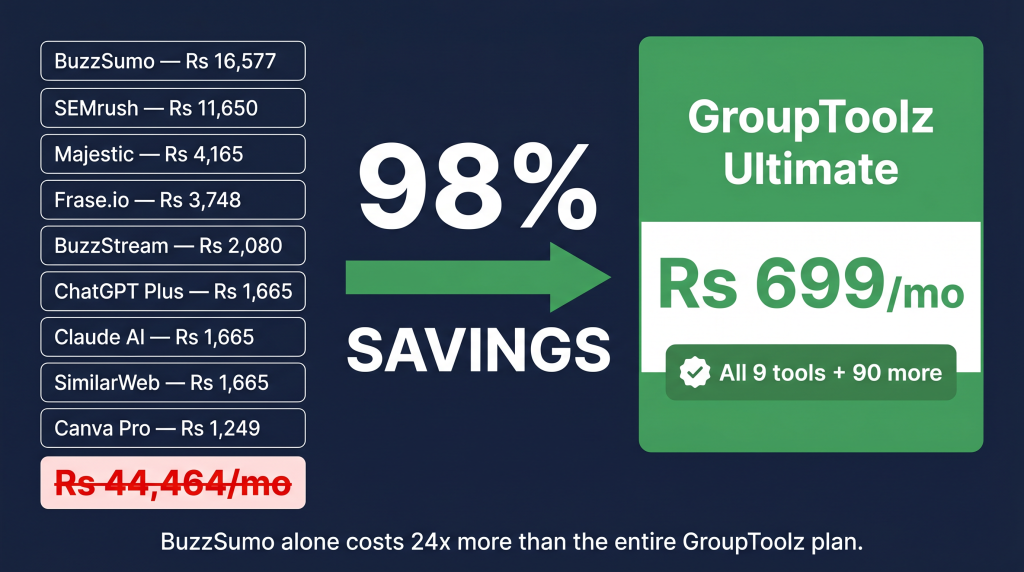
| The pricing reality BuzzSumo alone costs Rs 16,577/month at retail. BuzzSumo GroupToolz is on the Ultimate plan at Rs 699/month, which also includes SEMrush, Majestic, BuzzStream, Frase.io, ChatGPT Plus, Claude AI, SimilarWeb, Canva Pro, and 90+ more tools. The entire 5-step pipeline runs on one subscription that costs less than 5% of BuzzSumo’s retail price. |
The complete content-to-backlinks pipeline
BuzzSumo + SEMrush + Majestic + BuzzStream + Frase.io + ChatGPT + Claude + 90 more tools. Rs 699/month.
Frequently asked questions
What is BuzzSumo used for?
BuzzSumo is a content intelligence tool that shows you the most shared, most linked, and most engaged-with content for any topic. You use it for BuzzSumo content research to find content ideas backlinks opportunities, analyse how competitor content performs, spot trending topics, and monitor brand mentions across the web.
How much does BuzzSumo cost on GroupToolz?
BuzzSumo GroupToolz access is on the Ultimate plan at Rs 699/month, bundled with 100+ other tools. The same BuzzSumo plan costs $199/month (roughly Rs 16,577) at retail. On GroupToolz, you’re paying 96% less and getting the full SEO and content toolkit alongside it.
How do I find content ideas that earn backlinks with BuzzSumo?
Open BuzzSumo Content Analyzer, enter your niche topic, and sort by backlinks instead of social shares. This shows content that other website owners link to, not just content that gets shared on social. Look at the top 20 results, note the format and angle, then create your own improved version. That’s BuzzSumo content research in its most useful form.
What content types earn the most backlinks?
Original data studies, industry reports, expert roundups, interactive tools (calculators, generators), and definitive guides consistently earn the most content ideas backlinks. Standard blog posts like listicles and how-tos rank for keywords but rarely attract links on their own.
Can I use BuzzSumo for link building outreach?
Yes. BuzzSumo identifies the domains that linked to competing content (your outreach list) and monitors unlinked brand mentions (easy link opportunities). Pair BuzzSumo with BuzzStream for managing the actual outreach. Both are on the BuzzSumo GroupToolz Ultimate plan at Rs 699/month.
Which GroupToolz plan includes BuzzSumo?
The Ultimate plan at Rs 699/month. It also includes SEMrush, Majestic, BuzzStream, Serpstat, VidIQ, Epidemic Sounds, Helium 10, Shutterstock, plus everything in the Starter and Pro plans. For the BuzzSumo backlinks pipeline in this BuzzSumo tutorial, the Ultimate plan covers every tool you need.
More SEO guides from GroupToolz
How to write product descriptions that actually rank using GroupToolz AI (2026)
Local SEO for Google Maps: How to Actually Get Into the Local 3-Pack (2026)
Google AI Overview Optimization: How to Get Your Content Cited Using GroupToolz (2026)
More content research and link building guides on the GroupToolz blog
Comments