

Complete SEO Workflow for Beginners 2026 — The Ultimate Group Buy Tools Roadmap
The SEO workflow for beginners in 2026 does not have to be complicated or expensive. Indian bloggers, freelancers, and small business owners who are just starting out can run a complete professional SEO operation using group buy tools on GroupToolz for as little as ₹199–₹699/month — the same tools used by agencies charging ₹50,000/month to their clients.
This guide is a step-by-step SEO workflow for beginners covering every stage from setting up your site to ranking on Google. Each step maps to a specific tool available on GroupToolz so you know exactly what to use, when to use it, and what to do with the results. No vague advice. No expensive tool requirements. Just a practical roadmap that works in 2026.
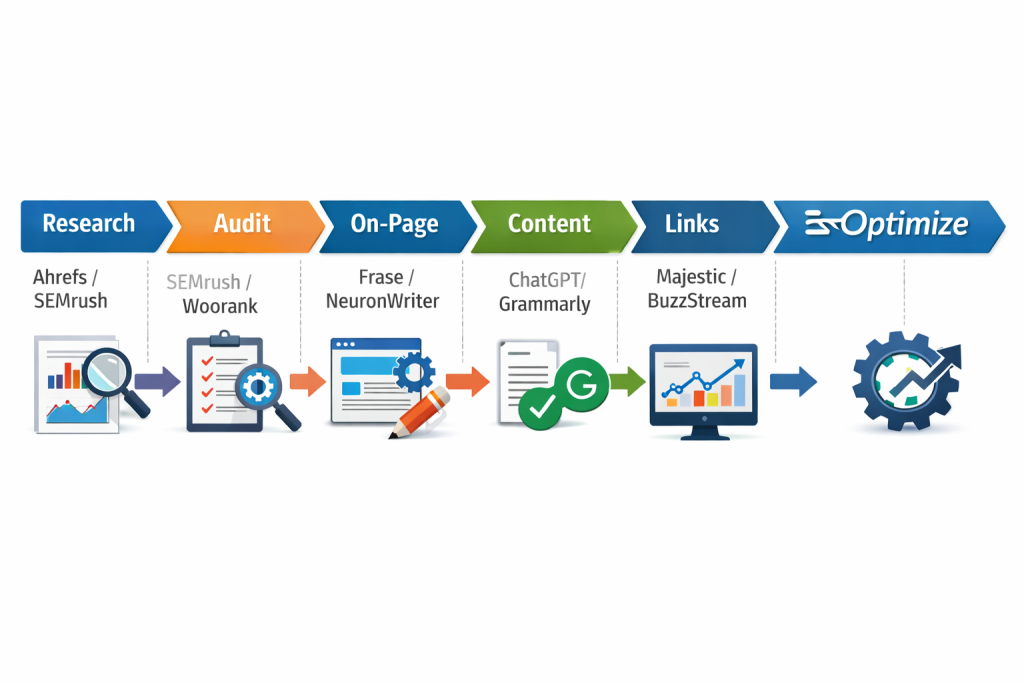
SEO Workflow for Beginners — The 7 Stage Roadmap
| Stage | What You Do | Tools Used | GroupToolz Plan |
|---|---|---|---|
| 1. Site Setup and Technical SEO | Fix technical issues before creating content | Screaming Frog, Seobility, Screpy | Ultimate ₹699 |
| 2. Keyword Research | Find keywords worth targeting | KWFinder, SEMrush, Ahrefs, Ubersuggest | Pro ₹449 / Ultimate ₹699 |
| 3. Competitor Analysis | Understand who you’re competing against | Ahrefs, SEMrush, SpyFu, Similarweb | Ultimate ₹699 |
| 4. Content Creation | Write content that ranks and converts | ChatGPT Plus, Jasper AI, Grammarly, Frase.io | Pro ₹449 |
| 5. On-Page SEO | Optimise pages for target keywords | Neuron Writer, Frase.io, SEMrush | Pro ₹449 / Ultimate ₹699 |
| 6. Link Building | Build authority with backlinks | Ahrefs, Majestic, BuzzSumo, Buzzstream | Ultimate ₹699 |
| 7. Tracking and Reporting | Monitor rankings and traffic growth | Ahrefs, SEMrush, SE Ranking, Serpstat | Ultimate ₹699 |
What Tools Do You Need for the SEO Workflow for Beginners?
Before getting into the workflow, here’s what GroupToolz gives you access to at each plan level. The SEO workflow for beginners can be completed effectively on the Pro plan at ₹449/month for the first 3–6 months. The Ultimate plan at ₹699/month unlocks Ahrefs and the full SEO research stack once you’re ready to go deeper.
| GroupToolz Plan | Price | Key SEO Tools for Beginners |
|---|---|---|
| Starter | ₹199/mo | Canva Pro, Grammarly Premium, QuillBot, Scribd |
| Pro | ₹449/mo | SEMrush, ChatGPT Plus, Jasper AI, SpyFu, KWFinder, Writesonic AI, Frase.io, Neuron Writer |
| Ultimate | ₹699/mo | Ahrefs, Moz Pro, Majestic, Serpstat, Seobility, BuzzSumo, Buzzstream, Similarweb + all Pro tools |
The SEO workflow for beginners covered in this guide uses tools from both the Pro and Ultimate plans. You can follow Steps 1–5 on the Pro plan and upgrade to Ultimate when you’re ready for link building and deeper competitor analysis.
Stage 1 — Technical SEO Setup
The SEO workflow for beginners starts with technical SEO because content and links cannot overcome a broken foundation. Google cannot rank pages it cannot crawl and index properly. Before writing a single word of content, fix the technical issues on your site first.
What to Do in Stage 1
- Submit your site to Google Search Console and verify ownership
- Submit your XML sitemap to Google Search Console
- Check your site is mobile-friendly using Google’s mobile test
- Verify your site loads in under 3 seconds using Google PageSpeed Insights
- Run a full technical audit using Seobility or Screpy
- Fix broken links, missing meta tags, duplicate content, and crawl depth issues
- Ensure HTTPS is active on your domain
Tools to Use in Stage 1
Seobility (included on GroupToolz Ultimate) crawls your entire site and produces a prioritised list of technical SEO issues. The free version covers basic checks but the GroupToolz access gives you the full crawl with issue severity ratings. Fix High severity issues first, then Medium, then Low.
Screpy (included on GroupToolz Ultimate) monitors your site’s technical health on an ongoing basis. Set it up after your initial audit and it alerts you when new technical issues appear rather than requiring you to run manual audits repeatedly.
SEMrush Site Audit (included on GroupToolz Pro) is the most detailed technical audit tool in this SEO workflow for beginners stack. It categorises issues into Errors, Warnings, and Notices with specific fix instructions for each one. For beginners, the built-in explanation of why each issue matters makes it easier to prioritise fixes without prior technical knowledge.
Stage 1 Checklist
- ☑ Google Search Console set up and verified
- ☑ XML sitemap submitted
- ☑ Mobile-friendly confirmed
- ☑ Page speed above 70 on mobile
- ☑ HTTPS active
- ☑ Seobility or SEMrush Site Audit run and High severity issues fixed
- ☑ No broken internal links
- ☑ All pages have unique meta titles and descriptions
Stage 2 — Keyword Research
Keyword research is the most important stage in the SEO workflow for beginners. Every piece of content you create should target a specific keyword with real search demand. Creating content without keyword research is the single biggest mistake beginners make — you can spend weeks writing posts nobody ever searches for.
Step 1 — Find Seed Keywords
Seed keywords are broad terms that describe your niche. Write down 10–15 seed keywords before opening any tool. Think about what your target reader types into Google when they need what you offer. For a blog about digital marketing, seed keywords include “social media marketing”, “content writing tips”, “email marketing strategy”, and so on.
Step 2 — Expand With KWFinder
KWFinder (Mangools), included on GroupToolz Pro at ₹449/month, is the best keyword research tool for the SEO workflow for beginners specifically because the interface is designed for people who are new to SEO. The Keyword Difficulty score is displayed as a simple number from 0–100 with a colour indicator. Green means low competition. Red means avoid for now.
Enter each seed keyword into KWFinder and review the related keyword suggestions. Filter for keywords with monthly search volume above 100 and Keyword Difficulty below 40 if your site is new. These are the keywords a new site can realistically rank for within 3–6 months of publishing good content.
Step 3 — Validate With SEMrush
After building your initial keyword list in KWFinder, cross-check the top opportunities in SEMrush’s Keyword Magic Tool. SEMrush shows search intent alongside volume data, which KWFinder doesn’t. Knowing whether a keyword has informational, commercial, or transactional intent tells you what type of content to create — blog post, product page, or comparison article.
Step 4 — Upgrade to Ahrefs for Deeper Research
Once you’re past the beginner stage and your site has 10–15 published posts, Ahrefs Keywords Explorer (included on GroupToolz Ultimate at ₹699/month) gives you the most accurate Keyword Difficulty scores and the best long-tail keyword discovery in the market. The Parent Topic feature groups keyword variations by the single page that could rank for all of them, which prevents you from creating multiple competing posts targeting the same keyword cluster.
Stage 2 Checklist
- ☑ 10–15 seed keywords identified for your niche
- ☑ KWFinder used to expand each seed keyword
- ☑ 30–50 target keywords shortlisted with volume above 100 and KD below 40
- ☑ Search intent identified for each target keyword
- ☑ Keywords organised into a spreadsheet by topic cluster
- ☑ Google Trends checked for seasonal or declining keywords
Stage 3 — Competitor Analysis
Competitor analysis is the stage in the SEO workflow for beginners that most people skip and then wonder why their content isn’t ranking. Before writing a post, you need to understand exactly who is ranking for your target keyword and why. This tells you what it takes to outrank them and whether that’s achievable for a new site.
Find Your SEO Competitors
Your SEO competitors are not necessarily your business competitors. They’re the sites that rank for the keywords you want to rank for. Search your top 10 target keywords on Google and note which domains appear consistently across multiple search results. These are your real SEO competitors for this niche.
Analyse Competitor Traffic With SEMrush
Enter your top competitors into SEMrush’s Domain Overview. This shows estimated monthly organic traffic, total keywords they rank for, top-performing pages, and their main traffic-driving keywords. For the SEO workflow for beginners, focus on their top 10 pages — these are the content types and topics proving most valuable in your niche.
Analyse Competitor Backlinks With Ahrefs
Enter competitor domains into Ahrefs Site Explorer to see their full backlink profile. Look at their Domain Rating, referring domains count, and the types of sites linking to them. For the SEO workflow for beginners, this tells you how strong a competitor’s authority is and roughly how many backlinks you’ll need to compete with them for specific keywords.
Find Content Gaps With SEMrush Keyword Gap
SEMrush’s Keyword Gap tool lets you enter your domain and up to 4 competitor domains simultaneously. It shows keywords your competitors rank for but your site doesn’t — these are your content gaps. For beginners, filtering this list for keywords with volume above 200 and KD below 40 produces a prioritised list of content opportunities your competitors are capturing and you’re not.
Check Competitor Traffic Sources With Similarweb
Similarweb (included on GroupToolz Ultimate) shows you where a competitor’s total traffic comes from: organic search, direct, referral, social, email, or paid. For the SEO workflow for beginners, this tells you whether a competitor’s traffic is primarily SEO-driven or whether they rely on paid ads or social media. Knowing this shapes your own channel strategy.
Stage 3 Checklist
- ☑ Top 5 SEO competitors identified for your niche
- ☑ Competitor Domain Rating and backlink count noted in Ahrefs
- ☑ Top 10 competitor pages analysed in SEMrush
- ☑ Keyword Gap analysis run in SEMrush
- ☑ 20+ content gap opportunities identified
- ☑ Traffic source breakdown checked in Similarweb
Stage 4 — Content Creation
Content creation in the SEO workflow for beginners is where most people spend the most time and get the least return because they write content without a framework. Good SEO content in 2026 needs to match search intent, cover the topic comprehensively, and be better than what’s currently ranking. Here’s how to do that systematically.
Step 1 — Build a Content Brief With Frase.io
Frase.io (included on GroupToolz Pro at ₹449/month) is the best content brief tool for the SEO workflow for beginners. Enter your target keyword and Frase analyses the top 20 ranking pages, extracting the topics, headings, questions, and statistics they cover. The output is a structured content brief showing exactly what your post needs to include to be competitive.
For beginners, using Frase.io’s brief before writing means you understand the full scope of a topic before you start, which prevents the common problem of writing a 1,000-word post on a topic where every ranking competitor has 2,500+ words.
Step 2 — Draft With ChatGPT Plus
ChatGPT Plus (included on GroupToolz Pro) is the fastest way to produce a solid first draft in the SEO workflow for beginners. Use your Frase.io brief as the structure input for ChatGPT Plus and prompt it to write each section. The key is to use ChatGPT Plus as a starting point, not a finished product — the output needs editing, personalisation, and fact-checking before it’s ready to publish.
A practical prompt structure for the SEO workflow for beginners: “Write a 2,500 word blog post targeting the keyword [your keyword]. Use these headings: [headings from Frase brief]. Include these topics: [topics from Frase brief]. Write for Indian readers. Avoid em dashes. Keep sentences short and direct.”
Step 3 — Scale Content With Jasper AI
Once you’ve published 10–15 posts manually and understand the workflow, Jasper AI (included on GroupToolz Pro) helps you scale content production. Jasper’s Blog Post template and SEO mode are built for producing optimised long-form content faster than starting from scratch in ChatGPT Plus. The Brand Voice feature lets you train Jasper on your existing posts so new content matches your established writing style.
Step 4 — Edit With Grammarly Premium and QuillBot
Every piece of content in the SEO workflow for beginners needs editing before publishing. Grammarly Premium (included on GroupToolz Starter at ₹199/month) catches grammar errors, tone inconsistencies, clarity issues, and sentence structure problems that reduce readability and trust.
QuillBot (included on GroupToolz Starter) is useful for paraphrasing sections that feel too similar to competitor content, rewriting awkward sentences, and summarising long sections into tighter paragraphs. Both tools integrate directly with Google Docs and most writing platforms.
Step 5 — Add Visuals With Canva Pro
Every post in the SEO workflow for beginners should have at least one custom image. Posts with relevant visuals get more time on page, more social shares, and higher click-through rates from search results. Canva Pro (included on GroupToolz Starter) has blog post featured image templates, infographic templates, and comparison chart templates that turn raw content into visually shareable assets in minutes.
Stage 4 Checklist
- ☑ Frase.io brief created for each post before writing
- ☑ First draft produced in ChatGPT Plus or Jasper AI
- ☑ Draft edited in Grammarly Premium for errors and clarity
- ☑ Awkward sections refined in QuillBot
- ☑ Featured image created in Canva Pro
- ☑ Minimum word count matches or exceeds top-ranking competitors
- ☑ All factual claims verified before publishing
Stage 5 — On-Page SEO Optimisation
On-page SEO is the stage in the SEO workflow for beginners that directly tells Google what your page is about. No matter how good your content is, if on-page SEO signals are weak, Google will rank more optimised competitors above you. This stage takes 15–20 minutes per post but has an outsized impact on ranking speed.
Optimise With Neuron Writer
Neuron Writer (included on GroupToolz Pro at ₹449/month) is an NLP content optimisation tool. Enter your target keyword and Neuron Writer shows which semantic terms, entities, and phrases the top-ranking pages use that your content should also include. It gives your content a content score from 0–100 that improves as you add recommended terms.
For the SEO workflow for beginners, aim for a Neuron Writer score above 60 before publishing. Pages scoring above 60 consistently outrank lower-scoring pages for the same keyword over time.
On-Page SEO Elements to Optimise
- Title Tag: Include your primary keyword within the first 60 characters. Make it compelling with a number, power word, or year.
- Meta Description: 150–160 characters including the focus keyword. Describe the benefit of clicking, not just the topic.
- URL Slug: Short, keyword-focused, no stop words. Example: /keyword-research-for-beginners/ not /how-to-do-keyword-research-for-beginners-in-2026/
- H1: One per page, contains the primary keyword naturally.
- H2 and H3 Subheadings: Include keyword variations and related terms. These are what Google scans to understand page structure.
- First 100 Words: Primary keyword should appear in the first paragraph. Google gives more weight to keywords appearing early in content.
- Image Alt Text: All images should have descriptive alt text including the target keyword where natural.
- Internal Links: Link to 3–5 related posts on your site from every new post. This spreads link equity and helps Google understand your site structure.
- External Links: Link to 2–3 authoritative sources. This signals to Google that your content is well-researched.
Check On-Page Score With Woorank
Woorank (included on GroupToolz Ultimate) runs a comprehensive on-page analysis of any URL and gives it an overall website review score. For the SEO workflow for beginners, run Woorank on each published page to catch on-page issues you may have missed during the optimisation process.
Stage 5 Checklist
- ☑ Title tag contains focus keyword within 60 characters
- ☑ Meta description is 150–160 characters with focus keyword
- ☑ URL slug is short and keyword-focused
- ☑ H1 contains primary keyword
- ☑ Focus keyword appears in first 100 words
- ☑ Neuron Writer score above 60
- ☑ 3–5 internal links added
- ☑ 2–3 external links to authoritative sources added
- ☑ All images have keyword-relevant alt text
- ☑ Woorank check completed on published URL
Stage 6 — Link Building
Link building is the stage in the SEO workflow for beginners that most people find most intimidating. The reality is that for a new site, you don’t need hundreds of backlinks to rank for low-competition keywords. You need a handful of relevant, quality links from real websites in your niche.
Find Link Building Opportunities With Ahrefs
Ahrefs Content Explorer (included on GroupToolz Ultimate at ₹699/month) is the best link prospecting tool in the SEO workflow for beginners stack. Search your topic, filter for pages with high organic traffic but low referring domains — these are pages that rank well but don’t have many backlinks, suggesting the topic doesn’t require heavy link building to compete.
The Link Intersect tool in Ahrefs shows websites that link to multiple competitors but not to you. These sites are clearly willing to link to content in your niche and are the best outreach targets because they have a demonstrated pattern of linking in your space.
Research Link Quality With Majestic
Majestic (included on GroupToolz Ultimate) gives you Trust Flow and Citation Flow scores for any domain. Before pursuing a backlink from a site, check its Trust Flow in Majestic. A Trust Flow above 15 indicates a real, quality site. Trust Flow below 10 on a site claiming to offer backlinks is a warning sign — these are typically low-quality directories or link farms that can actually harm your SEO.
Find Content Worth Linking to With BuzzSumo
BuzzSumo (included on GroupToolz Ultimate) shows which content in your niche gets the most backlinks and social shares. For the SEO workflow for beginners, this tells you what types of content attract links naturally in your niche. If detailed comparison posts get the most links, that’s what you should be creating. If original research and data-driven posts dominate, that’s the link magnet format for your niche.
Manage Outreach With Buzzstream
Buzzstream (included on GroupToolz Ultimate) is a link building outreach CRM. Once you have a list of link prospects from Ahrefs Link Intersect, Buzzstream helps you find contact information, track outreach emails, follow up systematically, and manage relationship history with each prospect. For beginners doing outreach manually, Buzzstream reduces the admin overhead significantly.
Beginner Link Building Strategies That Actually Work
- Guest posting. Write articles for other blogs in your niche in exchange for a backlink. Use BuzzSumo to find high-traffic blogs in your niche accepting guest posts, then pitch a topic that fits their audience.
- Broken link building. Use Ahrefs to find broken links on competitor sites in your niche. Find a broken link, create content that replaces it, and contact the webmaster to suggest your page as a replacement.
- Resource page link building. Search Google for “best resources [your niche]” or “useful links [your niche]”. These pages link to helpful content and are relatively easy to get listed on with a well-optimised post.
- HARO responses. Help A Reporter Out sends daily email requests from journalists looking for expert sources. Respond to relevant requests with genuine expertise and get backlinks from news sites and blogs.
Stage 6 Checklist
- ☑ Ahrefs Link Intersect run to identify outreach targets
- ☑ Prospect Trust Flow checked in Majestic (target TF above 15)
- ☑ BuzzSumo used to identify top link magnet content formats in your niche
- ☑ Buzzstream set up for outreach tracking
- ☑ Guest post opportunities identified in your niche
- ☑ 10 outreach emails sent per week minimum
Stage 7 — Tracking and Reporting
The final stage in the SEO workflow for beginners is tracking what’s working and what isn’t. SEO without measurement is guesswork. You need to know which pages are ranking, which keywords are gaining positions, where traffic is coming from, and which content improvements are moving the needle.
Track Rankings With SE Ranking or Serpstat
SE Ranking (included on GroupToolz Ultimate) tracks your keyword ranking positions over time with daily or weekly update cadence. Add all your target keywords to SE Ranking after publishing each post and monitor position changes over the following weeks. A keyword moving from position 45 to 18 to 8 over 6 weeks is the normal trajectory for a well-optimised post on a new site with consistent link building.
Serpstat (included on GroupToolz Ultimate) adds a competitor ranking layer. You can see your rankings and competitor rankings for the same keywords side by side, which tells you whether you’re closing the gap or falling further behind on specific terms.
Monitor Traffic in Google Search Console
Google Search Console is the most accurate source of organic traffic data for your site because it comes directly from Google. Check it weekly in the SEO workflow for beginners routine. The Performance report shows impressions, clicks, average position, and click-through rate for every keyword and page on your site.
Pages with high impressions but low click-through rates are the quickest wins in the SEO workflow for beginners. You’re already ranking but not getting the click. Rewriting the title tag and meta description to be more compelling can double CTR on these pages without any additional content work.
Analyse Backlink Growth With Ahrefs
Check your Ahrefs Site Overview monthly to track Domain Rating growth and new referring domains. Consistent growth in referring domains, even just 2–5 new domains per month, signals a healthy link building trajectory for a new site. A sudden drop in referring domains indicates lost links that need to be replaced or investigated.
Identify Content to Update With SEMrush
SEMrush’s Position Tracking tool shows ranking movements for your target keywords over time. Posts that ranked in positions 10–20 but have been declining over the past 60 days are candidates for content refreshes. Updating these posts with new information, improved on-page SEO, and additional content often recovers or improves their rankings faster than publishing new content.
Stage 7 Checklist
- ☑ All target keywords added to SE Ranking or Serpstat for position tracking
- ☑ Google Search Console checked weekly for impression and CTR data
- ☑ High impression / low CTR pages identified and title/meta updated
- ☑ Ahrefs Domain Rating and referring domains checked monthly
- ☑ Declining posts identified and scheduled for content refresh
- ☑ Monthly SEO report produced covering rankings, traffic, and backlinks
SEO Workflow for Beginners — Monthly Routine
Once the initial setup is complete, the SEO workflow for beginners becomes a repeatable monthly routine. Here’s what to do each week:
| Week | Tasks | Tools Used |
|---|---|---|
| Week 1 | Keyword research for next month’s content, content briefs in Frase.io | KWFinder, SEMrush, Frase.io |
| Week 2 | Write and publish 2–3 new posts, on-page optimisation | ChatGPT Plus, Jasper AI, Grammarly, Neuron Writer |
| Week 3 | Link building outreach, 10+ emails sent via Buzzstream | Ahrefs, Majestic, BuzzSumo, Buzzstream |
| Week 4 | Tracking review, update declining posts, technical audit check | SE Ranking, Serpstat, SEMrush, Seobility |
SEO Workflow for Beginners — Common Mistakes to Avoid
Targeting Keywords That Are Too Competitive
The most common mistake in the SEO workflow for beginners is targeting high-volume, high-competition keywords before building domain authority. A new site targeting “best SEO tools” (KD 85) will not rank for years. The same site targeting “best SEO tools for small blogs India” (KD 22) can rank in 3–4 months. Start with low-competition long-tail keywords and build from there.
Publishing Without On-Page Optimisation
Many beginners write excellent content and publish it without completing the on-page checklist. Missing the Neuron Writer optimisation step alone costs significant ranking potential. On-page SEO takes 15–20 minutes per post. Skipping it to publish faster is a false economy — you’ll spend far more time later wondering why your content isn’t ranking.
Ignoring Technical SEO
A slow-loading site, crawl errors in Google Search Console, or missing XML sitemap can cancel out months of content work. Run a Seobility or SEMrush Site Audit monthly and keep your error count at zero. Technical SEO issues compound over time — fixing them early is significantly easier than diagnosing a traffic drop caused by six months of ignored crawl errors.
Not Building Links
Content alone ranks well for very low competition keywords. For anything with real search volume, backlinks are necessary. Many beginners in the SEO workflow skip link building because it feels uncomfortable or complex. Starting with 5 outreach emails per week via Buzzstream is enough to build momentum. Quality over volume — 5 real links from relevant sites are worth more than 50 links from irrelevant directories.
Not Tracking Progress
SEO results take 3–6 months to appear for a new site. Many beginners give up because they don’t track ranking progression and assume nothing is working. SE Ranking or Serpstat shows you exactly how each keyword is moving even when you’re not yet on page 1. Seeing a keyword move from position 60 to 35 to 18 over 8 weeks is the motivation that keeps the SEO workflow for beginners sustainable long-term.
SEO Workflow for Beginners — Tools Cost on GroupToolz vs Retail
| Tool | Retail Price/Month | INR Equivalent |
|---|---|---|
| Ahrefs Standard | $249 | ~₹20,750 |
| SEMrush Pro | $139.95 | ~₹11,650 |
| KWFinder (Mangools) | $29 | ~₹2,415 |
| ChatGPT Plus | $20 | ~₹1,665 |
| Jasper AI | $49 | ~₹4,082 |
| Grammarly Premium | $12 | ~₹999 |
| Frase.io | $115 | ~₹9,577 |
| Neuron Writer | $19 | ~₹1,582 |
| Majestic | $49.99 | ~₹4,165 |
| BuzzSumo | $199 | ~₹16,577 |
| Buzzstream | $24 | ~₹1,998 |
| SE Ranking | $65 | ~₹5,414 |
| Serpstat | $69 | ~₹5,747 |
| Total Retail | $1,039.94/mo | ~₹86,621/mo |
| GroupToolz Ultimate | ₹699/mo | |
| Monthly Saving | ~₹85,922/mo |
The complete SEO workflow for beginners tool stack costs over ₹86,000/month at retail. GroupToolz Ultimate at ₹699/month gives you every tool in this guide. For beginners who are just starting out, this difference is not marginal — it’s the difference between having a professional SEO stack and having none at all.
Final Verdict — SEO Workflow for Beginners 2026
The SEO workflow for beginners in 2026 is a 7-stage process covering technical setup, keyword research, competitor analysis, content creation, on-page optimisation, link building, and tracking. Each stage has specific tools, specific outputs, and specific checklists that tell you when you’ve done it properly.
The biggest barrier for most Indian beginners is not understanding SEO — it’s the cost of the tools. At retail, a professional SEO tool stack costs ₹50,000–₹86,000/month. On GroupToolz Pro at ₹449/month, you can complete Stages 2, 4, and 5 fully. On GroupToolz Ultimate at ₹699/month, all 7 stages are covered with the best tools available for each one.
The SEO workflow for beginners works when you follow it consistently. The tools make each stage faster and more accurate. GroupToolz makes the tools accessible at a price that doesn’t require an agency budget to afford.
Frequently Asked Questions — SEO Workflow for Beginners
What is the best SEO workflow for beginners in 2026?
The best SEO workflow for beginners in 2026 covers 7 stages: technical SEO setup, keyword research, competitor analysis, content creation, on-page optimisation, link building, and tracking. Each stage has specific tools — Seobility for technical SEO, KWFinder for keyword research, Frase.io for content briefs, Neuron Writer for on-page optimisation, Ahrefs for link building, and SE Ranking for tracking. All are available on GroupToolz from ₹449/month.
How long does SEO take for a beginner?
For a new site following a consistent SEO workflow for beginners, expect 3–6 months before seeing meaningful organic traffic. Low-competition keywords can rank in 6–12 weeks with good content and basic on-page optimisation. Higher-competition keywords take 6–12 months. Tracking rankings weekly with SE Ranking or Serpstat shows progress even before rankings translate to visible traffic.
What is the best keyword research tool for SEO beginners?
KWFinder (Mangools) is the best keyword research tool for the SEO workflow for beginners because the interface is specifically designed for people new to SEO. The Keyword Difficulty score is presented simply, the related keyword suggestions are relevant, and the search volume data is accurate for Indian markets. KWFinder is included on GroupToolz Pro at ₹449/month.
Do beginners need Ahrefs for SEO?
Not immediately. The SEO workflow for beginners can be completed effectively on the GroupToolz Pro plan with KWFinder, SEMrush, ChatGPT Plus, Jasper AI, Frase.io, and Neuron Writer for the first 3–6 months. Ahrefs becomes necessary when you start building links, need deeper competitor keyword analysis, or need to run technical site audits at scale. Ahrefs is included on GroupToolz Ultimate at ₹699/month.
How much do SEO tools cost for beginners in India?
At retail, the full SEO workflow for beginners tool stack costs ₹50,000–₹86,000/month. On GroupToolz, you can run the complete SEO workflow for beginners on the Pro plan at ₹449/month for content and keyword research tools, or the Ultimate plan at ₹699/month for the full stack including Ahrefs, Majestic, BuzzSumo, Buzzstream, and tracking tools.
What is the most important stage in the SEO workflow for beginners?
Keyword research is the most important stage. Every other stage — content creation, on-page optimisation, link building, tracking — depends on having the right keywords to target. Getting keyword research right means you’re creating content people actually search for at a competition level you can realistically rank for. Getting it wrong means months of work producing content that never ranks regardless of how well-written it is.
Looking for more SEO guides and group buy tools tutorials? Find more such blogs at GroupToolz →
Comments