
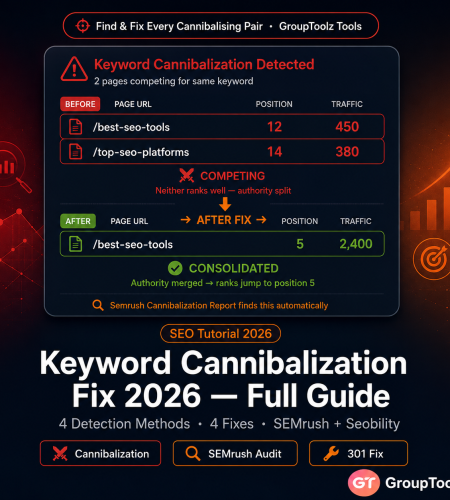
Keyword cannibalization is when two or more pages on your site compete for the same search query. Google can’t figure out which one you want to rank, so it hedges — and ranks neither well. This keyword cannibalization fix 2026 guide shows you how to find every cannibalising pair and resolve it permanently, using the tools already in your GroupToolz subscription.
By GroupToolz Team Updated: June 15, 2026
What keyword cannibalization actually means
Cannibalization happens when multiple pages on your domain target the same keyword or close variants. Google splits its ranking signals between them instead of concentrating them on one strong page. Neither ranks as well as a single consolidated page would. That’s the whole problem.
Here’s how it plays out in practice. Say Google evaluates your site for “best group buy tools India” and finds three relevant pages: your homepage, a comparison article, and a pricing page that all mention the phrase. Instead of picking the strongest one, Google rotates between them — sometimes showing the homepage, sometimes the comparison article, depending on when it last crawled each. None consistently makes the top 5. All three would rank better if the signals were on one page.
Cannibalization builds up in two specific situations. First: AI content at scale. If you’re producing one article per week using AI tools, after a year you’ll likely have overlapping content across dozens of topics — especially long-tail variations that are semantically close. Second: old content left unaudited. A post from 2022 about “best SEO tools” might now compete with a 2024 post about “top SEO platforms” even if the targets felt intentionally different when written. I’ve audited sites that didn’t realise they had 40+ cannibalising pairs until they looked.
| Why it’s getting worse in 2026 Google’s March 2026 Core Update put more weight on topical authority — the coherent, non-overlapping structure of a site’s content. A site where multiple pages compete for the same term sends a confusing topical signal. And AI content tools have dramatically increased publishing velocity, meaning more sites have more overlapping pages than ever before. Running a quarterly audit isn’t optional anymore for sites publishing more than two articles per week. |
The 4 symptoms to watch for
| Symptom | What you see in data | What it means |
|---|---|---|
| Ranking fluctuation | A keyword’s position bounces between pages 1 and 2 week to week without any content changes | Google can’t commit to which of your pages should rank — keeps switching between cannibalising pages |
| Two pages, one keyword | GSC shows two different URLs generating impressions for the same query | Both pages are in the index for this keyword; authority is split |
| Dropping CTR despite ranking | Impressions are high but CTR keeps falling | Google shows inconsistent URLs — searchers see different landing pages on different searches |
| Unexplained traffic drops | A page that ranked reliably drops suddenly with no algorithm update or content change | A newer page targeting the same keyword has started competing, splitting the authority your original page previously held alone |
Step 1: detect cannibalization
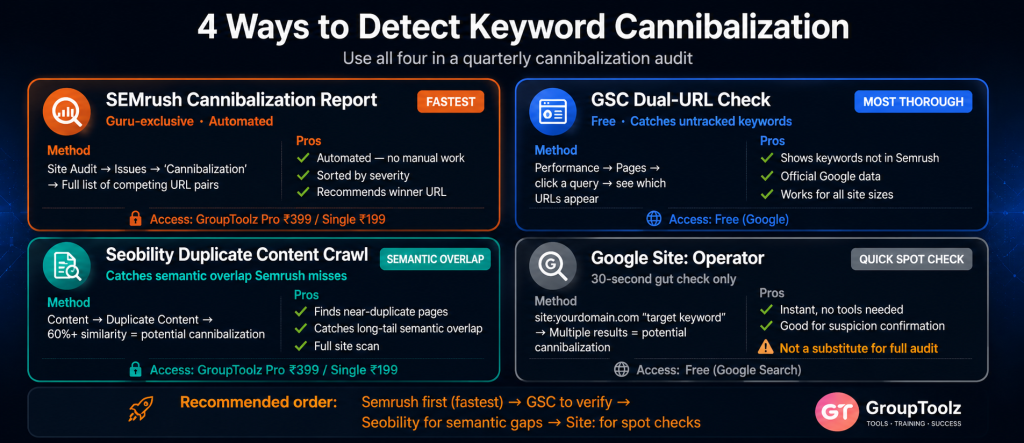
| Detection method 1 — fastest Semrush Cannibalization Report Semrush Guru This is where I’d start for any site with more than 50 pages. The Semrush Cannibalization Report is Guru-exclusive. It automatically identifies every keyword where two or more of your pages compete, sorted by severity. No manual spreadsheet work. Just a list of the problems. How to access: Semrush → Site Audit → your project → Issues tab → search “Cannibalization.” Or Site Audit → Crawled Pages → filter by “Cannibalized pages.” Semrush cross-references your crawled pages against your tracked keywords and flags every competing pair. What the report gives you: The cannibalised keyword, the two or more competing URLs, their respective ranking positions, traffic estimates, and which page Semrush recommends as the canonical winner. Export it. That’s your keyword cannibalization seo fix list. Semrush Guru is on GroupToolz Pro at ₹399/month, Advanced at ₹499/month, or as a single tool at ₹199/month. |
| Detection method 2 — most thorough Google Search Console dual-URL check Google Search Console GSC catches cannibalization that Semrush misses — specifically for keywords you don’t track. The method: GSC → Performance → Search Results → click the “Pages” tab → click on a specific query you’re concerned about. GSC shows which of your pages generated impressions for that query. If you see two of your own pages appearing for the same query, cannibalization is confirmed. More systematic approach: Export the full query report (up to 1,000 rows via GSC, unlimited via the Google Sheets add-on). Build a pivot table or VLOOKUP to find queries where the same domain appears on multiple rows with different page URLs. Each match is a cannibalization instance. For large sites (500+ pages), this manual approach takes a while. Use Semrush for scale; use GSC to verify specific pairs or investigate queries not in your tracked keyword list. The two tools together cover more than either alone. |
| Detection method 3 — catches semantic overlap Seobility duplicate content crawl Seobility This one catches a different kind of problem. Seobility’s crawl detects pages with very similar or overlapping content that may cannibalise on semantic keywords even when the exact target keywords differ. These pages won’t appear in the Semrush Cannibalization Report because they technically target different terms — but Google still sees them as competing. How to access: Seobility → your project → Content → Duplicate Content. Pages with 60%+ content similarity are likely competing on long-tail and semantic queries. Cross-reference Seobility’s pairs with the Semrush report. Pages appearing in both are your highest-priority fixes. Seobility is on GroupToolz Pro at ₹399/month or single at ₹199/month. |
| Detection method 4 — quick spot check only Site operator search Google (free) For a quick gut-check on one specific keyword: search site:yourdomain.com "target keyword" in Google. If you get two or more of your own pages in the results, those pages are cannibalising. This method is imprecise — Google personalises results and doesn’t show everything indexed — but it’s a useful 30-second diagnostic before you run a full audit. Don’t use this as your only detection method. Use it to confirm a suspicion before investing time in the fix. |
Step 2: prioritise which pairs to fix first
A larger site might have 30, 50, or 100+ cannibalising pairs once you’ve run the full cannibalization audit. You can’t fix everything at once. Fix in order of business impact, not alphabetical order or how annoying they look.
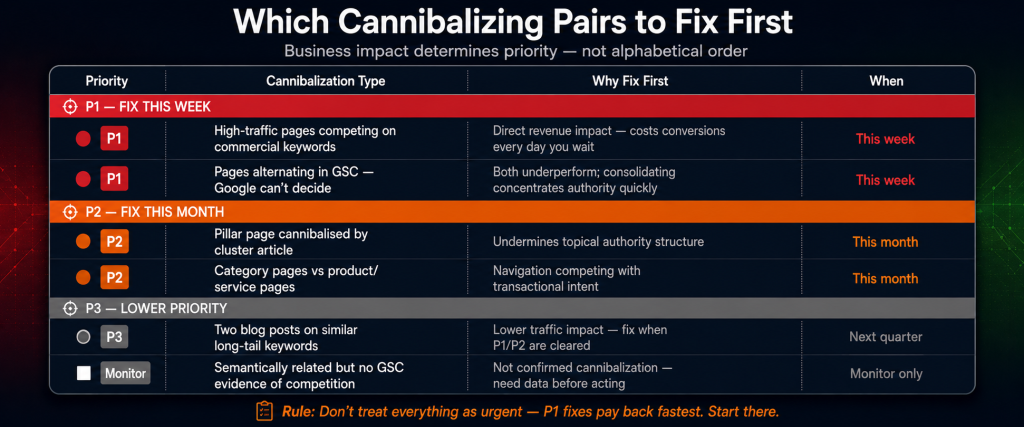
| Priority | Cannibalization type | Why fix first |
|---|---|---|
| P1 — Fix this week | High-traffic pages cannibalising commercial keywords (your money pages) | Direct revenue impact. A commercial page losing rankings to a blog post costs conversions every day you wait. |
| P1 — Fix this week | Pages alternating in GSC — Google can’t decide | Both underperform. Consolidating concentrates authority quickly. Usually the fastest ranking win available. |
| P2 — Fix this month | Pillar page cannibalised by a cluster article | Undermines your topical authority structure. Cluster articles should feed the pillar’s authority, not compete with it. |
| P2 — Fix this month | Category pages cannibalising product or service pages | Navigation cannibalising transactional intent is common on e-commerce sites and usually an easy canonical tag fix. |
| P3 — Fix next quarter | Two informational blog posts targeting similar long-tail terms | Lower traffic impact. Still worth consolidating to strengthen topical cluster coherence. |
| P3 — Monitor only | Semantically related but clearly differentiated content with no GSC evidence of actual competition | Not confirmed cannibalization. May just be topically adjacent. Don’t act without data. |
Step 3: apply the right fix
There are four ways to fix duplicate keyword targeting. Which one applies depends on the page relationship, traffic distribution, and content overlap. This is the part where people get confused, so I’ll be specific about when each one applies.
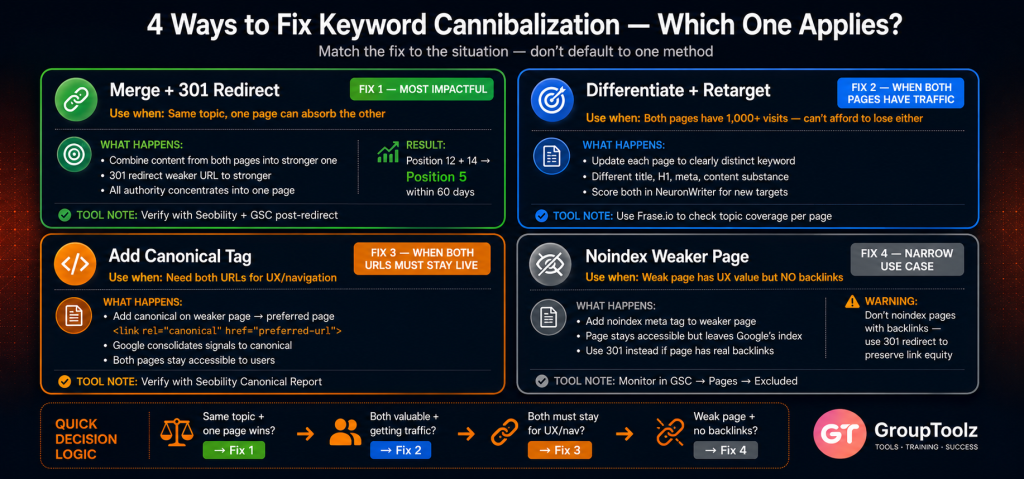
| Fix 1: merge and redirect (301) Use when: Both pages cover the same topic and one can absorb the other’s content What to do: Combine the content of both pages into the stronger one — the page with more traffic, more backlinks, or higher commercial importance. Take the best sections from the weaker page and add them to the stronger one. Implement a 301 redirect from the weaker URL to the stronger URL. Result: All ranking signals (backlinks, traffic history, internal links) concentrate into one stronger page. A 301 passes roughly 90-99% of the linking page’s authority to the destination. This is the most impactful fix for most cannibalization situations. I’d rather do a merge than a canonical tag in most cases — the signal consolidation is cleaner. After redirecting: Update all internal links that pointed to the old URL to point directly to the new one. Internal links through redirects still work but cost a small amount of crawl efficiency. Use Seobility to find all internal links pointing to the old URL before you redirect. After the redirect, run Semrush Site Audit to verify no internal links still point to the old URL. Request re-indexing of the target page in GSC. |
| Fix 2: differentiate and retarget Use when: Both pages serve different intents but the keyword targeting overlaps What to do: Update each page to clearly target a distinct keyword and intent. If Page A targeted “best SEO tools” and Page B targeted “top SEO platforms” — same intent, different phrasing — retarget Page B to something genuinely distinct: “free SEO tools” or “SEO tools for small businesses.” Update the title tag, H1, meta description, and opening paragraph to reflect the new target. Use Frase.io for the content work: Open both pages in Frase.io with their new target keywords. Frase shows the topic coverage each keyword requires from the current top results. Ensure each page covers topics appropriate for its new target — not just a title tag change, but actual content substance. Score each page in NeuronWriter for its new target keyword. Aim for 75+ before republishing. When to use this over merging: If both pages get 1,000+ visits per month, merging risks losing the traffic from whichever page you redirect. Differentiation is safer when both pages have established audiences. If one page gets 50 visits and one gets 5,000, merge into the stronger one. |
| Fix 3: canonical tag Use when: You need both URLs live for UX or navigation, but only want one to rank What to do: Add a canonical tag to the page you don’t want to rank, pointing to the one you do: <link rel="canonical" href="https://yourdomain.com/preferred-page" />. Google treats the canonical URL as the master version and consolidates signals toward it.When it’s right: Category page and product page competing — you need both for navigation, but the product page should rank for the specific keyword. Put canonical on the category page pointing to the product page. Pagination pages competing with the main article. Multiple URL variations (trailing slash, HTTP vs HTTPS, www vs non-www) — these should already have canonicals but it’s worth checking in Seobility’s canonical report. Seobility flags canonical errors fast: canonicals pointing to non-indexed pages, canonical chains, conflicting tags. Fix these immediately — a broken canonical is often worse than no canonical at all. |
| Fix 4: noindex the weaker page Use when: The weaker page has UX value but shouldn’t appear in search results What to do: Add <meta name="robots" content="noindex"> to the page you want excluded from Google’s index. The page stays accessible to users but Google removes it from search results within 1-4 weeks.When to use it: Thin tag pages or archive pages competing with main content. Filtered versions of pages (sort-by-price product listings competing with the main category page). Printer-friendly page versions. One hard limit: don’t use noindex on pages with real backlinks. Those backlinks lose value when the page gets noindexed. Use a 301 redirect instead to preserve that link equity. The noindex fix is most appropriate for pages with no meaningful backlink profile. |
Step 4: verify the fixes actually worked
| Fix applied | Verify with | Timeline | What to check |
|---|---|---|---|
| Merge + 301 redirect | Seobility crawl + GSC Coverage | 7-14 days after redirect | Old URL returns 301, GSC shows old URL as Excluded, internal links updated to new URL |
| Differentiate + retarget | GSC Performance + NeuronWriter score | 4-8 weeks after content update | Each page now generates impressions for its distinct keyword, not the same query |
| Canonical tag added | Seobility canonical report | 7-14 days | Non-preferred page shows “excluded by canonical” in GSC Coverage report |
| Noindex added | GSC → Indexing → Pages | 7-28 days | Noindexed page appears in “Excluded” with “noindex” reason in GSC |
After any fix implementation, monitor the target keyword in Semrush for 60-90 days. Ranking improvements are typically visible within 30-60 days as Google recrawls and re-evaluates the consolidated page. The improvement varies depending on how competitive the keyword is and how strong your individual pages were before consolidation. Don’t expect overnight results. The crawl schedule matters.
The quarterly cannibalization audit checklist
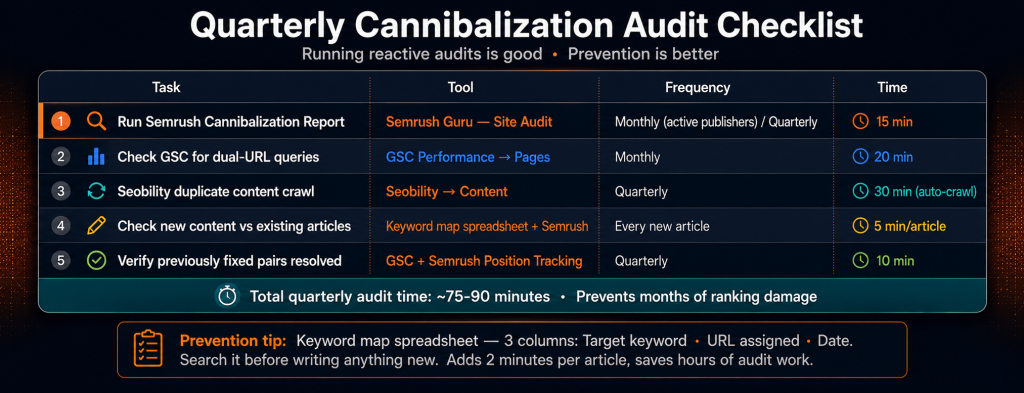
| Task | Tool | Frequency | Time required |
|---|---|---|---|
| Run Semrush Cannibalization Report | Semrush Guru — Site Audit | Monthly for active publishers, quarterly for steady sites | 15 minutes |
| Check GSC for dual-URL queries | GSC Performance → Pages | Monthly | 20 minutes |
| Seobility duplicate content crawl | Seobility → Content | Quarterly | 30 minutes (crawl runs automatically) |
| Check new content against existing articles | Before publishing each post | Every new article | 5 minutes per article |
| Verify previously fixed pairs are still resolved | GSC + Semrush | Quarterly | 10 minutes |
Preventing cannibalization before it happens
Detection and fixing is reactive. The better system stops cannibalization before new articles create it. Here’s what that looks like in practice.
Maintain a keyword map: A simple spreadsheet with three columns: target keyword, URL assigned to it, date published. Before writing anything new, search the spreadsheet for the target keyword. If it’s already assigned to a URL, either update that existing article or choose a meaningfully different target for the new piece. This takes 2 minutes before every article and saves hours of audit work later.
Use Semrush before publishing: Before finalising any article title or H1, run the target keyword through Semrush Keyword Overview and filter by your domain. Semrush shows which of your pages already rank for this keyword. If an existing page ranks in the top 50 for your target keyword, consider updating that existing page rather than creating a new one. This is the Semrush prevention step that most people skip — and it’s the reason sites accumulate 40+ cannibalising pairs without noticing.
AI content and cannibalization: AI tools produce topically similar content fast. If you’re using ChatGPT Plus or Claude to generate at scale, include your keyword map in every content brief prompt. “Here are the keywords already covered on our site: [list]. Don’t overlap with these. The target keyword for this article is [new keyword].” This adds a cannibalization check directly into the AI workflow. It’s not perfect, but it catches the obvious overlaps before they become a duplicate keyword targeting problem.
The GroupToolz cannibalization audit toolkit
| Tool | Role in cannibalization audit | GroupToolz access |
|---|---|---|
| Semrush Guru | Automated Cannibalization Report (Guru-exclusive), keyword ranking data, page comparison | Pro ₹399 / Advanced ₹499 / Single ₹199 |
| Seobility | Duplicate content detection, canonical tag verification, internal link audit post-fix | Pro ₹399 / Single ₹199 |
| Frase.io | Content differentiation — ensures retargeted pages cover genuinely distinct topic territory | Single ₹199 |
| NeuronWriter | Score retargeted content for new keyword relevance before republishing | Single ₹299 |
| Google Search Console | Identify dual-URL queries, monitor excluded pages post-fix, verify canonical implementation | Free |
| The actual return on fixing cannibalization Cannibalization fixes are among the faster ranking wins available for established sites. Two pages each stuck at position 12-15 for the same keyword, when merged into one, often land at position 4-8 within 60-90 days. That position jump means meaningfully more clicks — position 5 gets roughly 6-7% CTR where position 12-15 gets under 2%. The work for one pair: 30-60 minutes to identify and analyse, 1-2 hours to merge and redirect. GroupToolz Pro at ₹399/month includes Semrush Guru and Seobility — the detection and verification toolkit for this workflow, at less than the monthly retail cost of Semrush alone. |
Frequently asked questions
What is keyword cannibalization in SEO?
Keyword cannibalization in SEO is when two or more pages on your site target the same keyword or very similar ones, and Google splits ranking signals between them instead of concentrating them on one strong page. Neither page ranks as well as a single consolidated page would. Both underperform because Google can’t decide which one to show. It’s a self-imposed ranking problem.
How do I find keyword cannibalization with Semrush?
Semrush → Site Audit → your project → Issues tab → search “Cannibalization.” Or Site Audit → Crawled Pages → filter by “Cannibalized pages.” The semrush cannibalization report is a Guru-exclusive feature that identifies every keyword where two or more of your pages compete, with recommendations on which to designate as the winner. Available on GroupToolz Pro (₹399), Advanced (₹499), or single tool (₹199).
What is the best fix for keyword cannibalization?
Depends on the situation. Merge and 301 redirect when both pages cover the same topic — this is usually the most impactful keyword cannibalization fix 2026 option and what I’d use first. Differentiate and retarget when both pages have significant traffic and serve genuinely different audiences despite overlap. Canonical tag when you need both URLs live but want one to rank. Noindex when the weaker page has UX value but no real backlinks. Merging is the strongest signal consolidation in most cases.
How long does it take for cannibalization fixes to improve rankings?
Google processes 301 redirects and canonical tags within 1-4 weeks in most cases. Ranking improvements for the target keyword are usually visible within 30-60 days. The timeline depends on how often Google crawls your site — frequently updated sites get recrawled faster. Don’t expect week-one results. The cannibalization audit and fix work is worth doing for longer-term ranking stability rather than quick wins.
Does Google penalise sites for keyword cannibalization?
No manual penalty, but the ranking impact is effectively a self-imposed problem. Duplicate keyword targeting splits authority and causes both pages to rank lower than one consolidated page would. After Google’s March 2026 Core Update, topical authority — coherent, non-overlapping site structure — became more important, making cannibalization more damaging to overall site authority than it was in previous years.
How do I prevent keyword cannibalization with AI content at scale?
Keyword map spreadsheet — one row per article, target keyword and URL. Search it before writing anything new. Run the target keyword through Semrush before finalising any title to check whether an existing page already ranks for it. Include your covered keywords list in every AI content brief prompt. Run the Semrush report monthly to catch slippage before it compounds. These four steps together are a complete cannibalization audit prevention system that adds maybe 10 minutes to each article’s workflow.
Comments